Step-by-Step Guide to Web Speed Measurement for Marketers
 Martin Michálek26. 4. 202211 minut čtení
Measuring web speed is a rather tricky business that tends to change quite a bit—take, for instance, the recent introduction of Google's Page Experience rating.
People not fully immersed in the "web performance" field—like marketers, managers, or designers—often find themselves caught off guard by using inappropriate tools at the wrong stages of measurement.
On April 7th, I had the chance to discuss this at the SEO Restart conference. This text will share the core idea—illustrating the simplest way to gather speed data and the recommended method for passing it on to developers.
I'll be showcasing screenshots from our speed tester version 3.0, which we've recently enhanced with user accounts and the ability to monitor multiple client websites on a dashboard, even with your colleagues.
For demonstration purposes, I've chosen the domain Mall.cz, which, although not one of our clients, is interesting due to its size and variety of page types. You can check out the public speed test for Mall at pagespeed.one/app/r/73f8e7b84404.
The Web Speed Work Cycle
Let's start broadly with the general process of working on web speed.
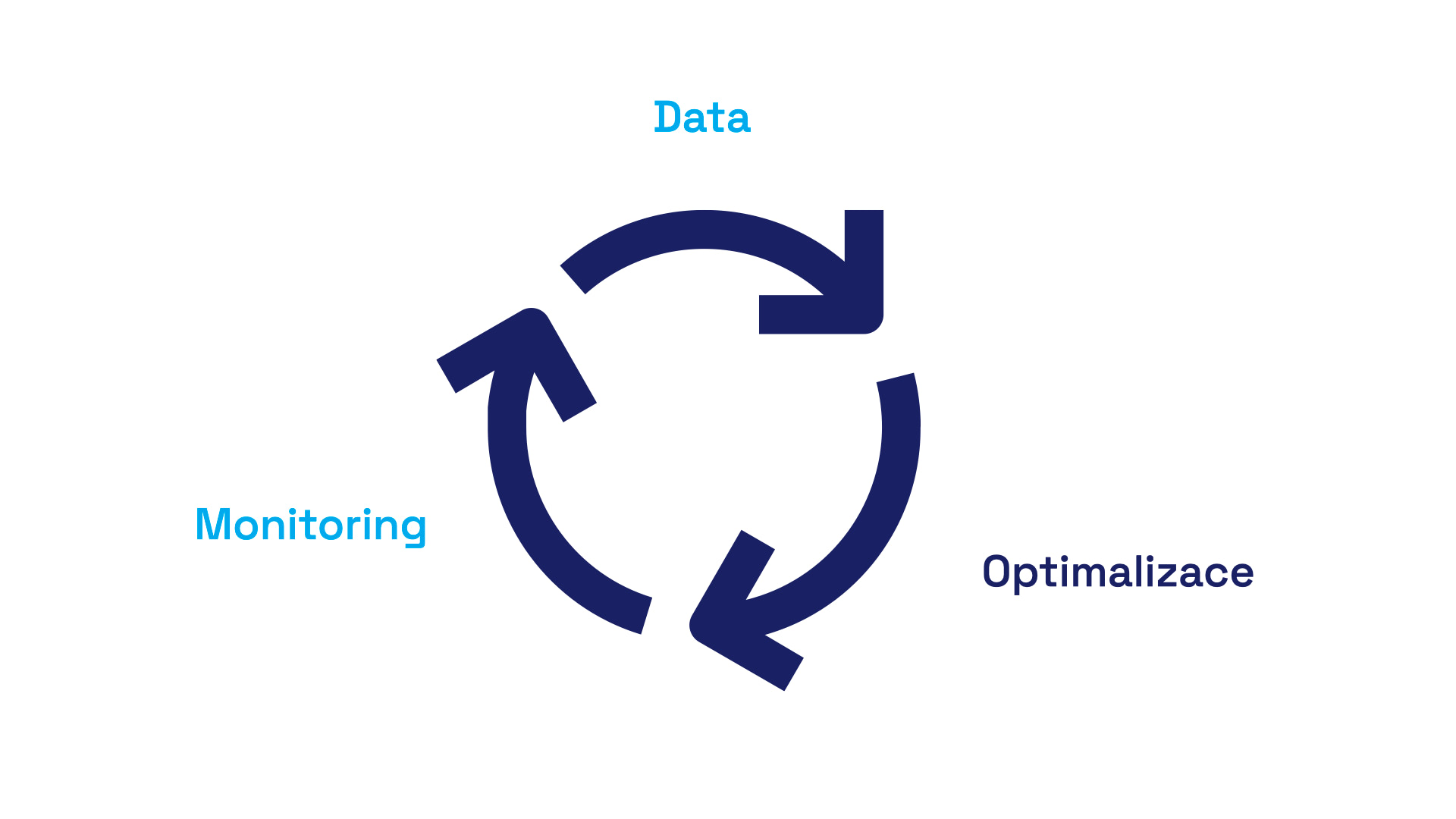
Google defines the process in its materials as a three-step one. First, we collect data, then optimize, and finally monitor, because typically, something tends to go wrong again just a few weeks after optimizations.
I will simplify this process into two steps:
- Optimization (usually handled by developers).
- Data and monitoring (also known as data collection over time—can be handled by developers, but it's usually overseen by someone analytical, who views the project more non-technically and "from above").
At PageSpeed.ONE, we work at the intersection of both—keeping an eye on data while also providing developers with specific optimization opportunities.
Google Page Experience and Pages, Groups, Domains
For the uninitiated, let me reiterate that web speed is assessed using Core Web Vitals metrics within a group of evaluation signals that Google calls Page Experience.
This involves data from the Chrome UX Report (CrUX), meaning data from actual users of your website, not data from tests using tools like Lighthouse or PageSpeed Insights.
By the way—Lighthouse score shouldn't concern you too much. It's just a rough figure, lacking ties to your users and rather misleading from a layperson's perspective.
User-derived data you need can be seen, for example, in Google Search Console:

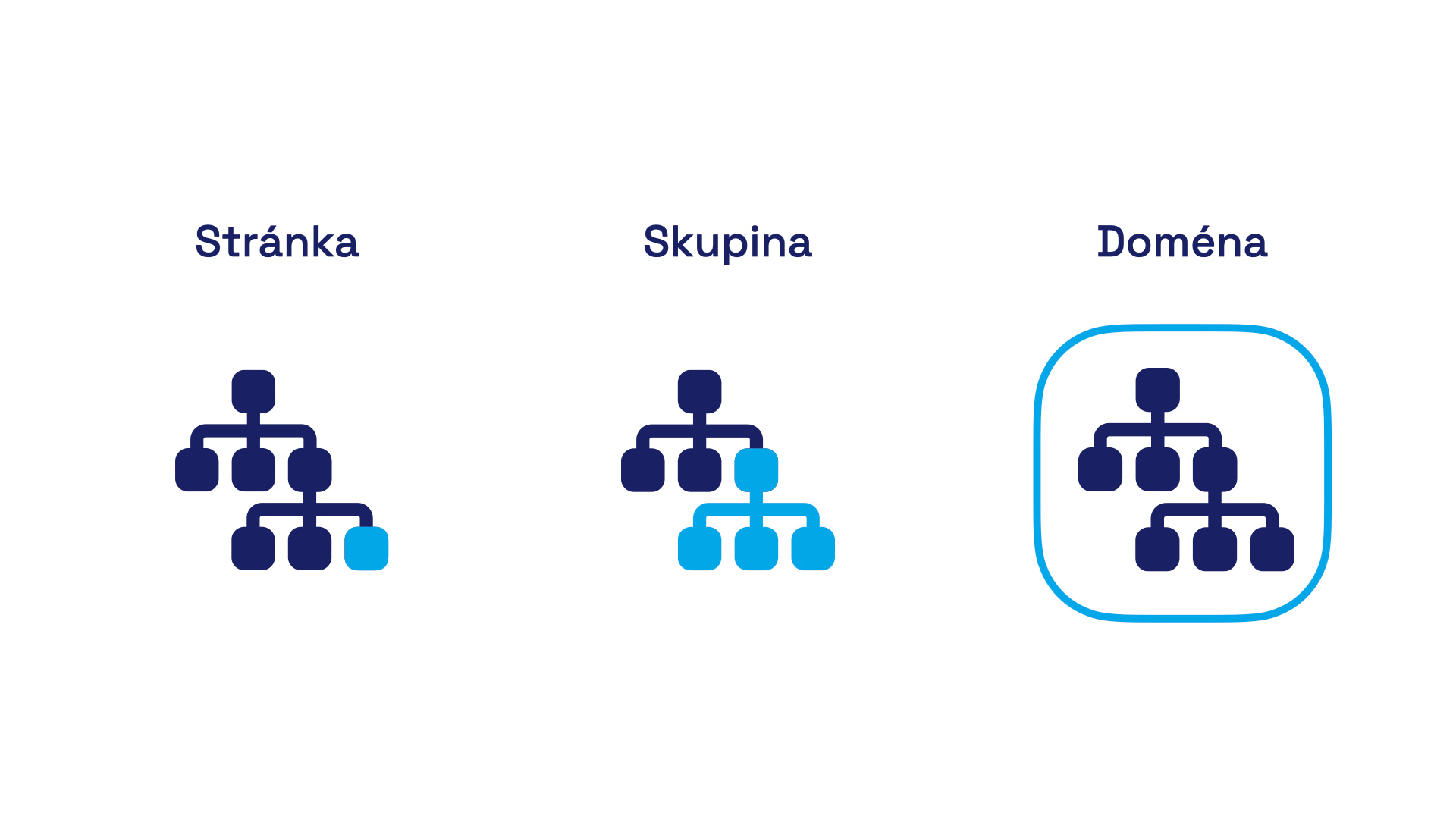
For the process outlined in the article, it's crucial to understand that there are three levels of Web Vitals assessment:
- Specific URL – the most visited addresses have their own assessment.
- Page group – if a URL lacks its own Core Web Vitals data, Google uses a group for assessment. For instance, for an e-commerce site, this could be a group with product detail pages.
- Domain – if a URL has neither its own assessment nor belongs to a group, Google assesses it using data for the entire domain.
In all cases, Google considers the 75th percentile of Core Web Vitals metrics from all visits over the last 28 days cumulatively. These are the data you'll see in all tools using CrUX as a data source, including our tester at pagespeed.one.
I initially thought almost every URL was at least categorized within a page group, but reality seems different.
With our clients, I see that URL assessments usually include only a few dozen addresses at most, often just a handful for less frequented sites. Group assessments, visible only in Search Console, cover roughly half of the URLs for our clients.
There are also extremes, like large sites such as Livesport.cz, where up to 90% of URLs might inherit the domain's assessment. This conclusion is based on the difference between the total number of URLs known to Google and the number of URLs included in page groups in the Web Vitals reports within Google Search Console.
What does this imply? Perhaps an unpleasant reality—ideally, you'd optimize Web Vitals values for the entire domain, page groups, and finally individual frequently visited URLs.
First Step: Domain Measurement
When measuring speed, we always start by looking at data for the entire domain. It's the simplest (albeit slightly simplified) representation of the site's speed status.
You can, of course, check PageSpeed Insights to see the Web Vitals status for the domain:
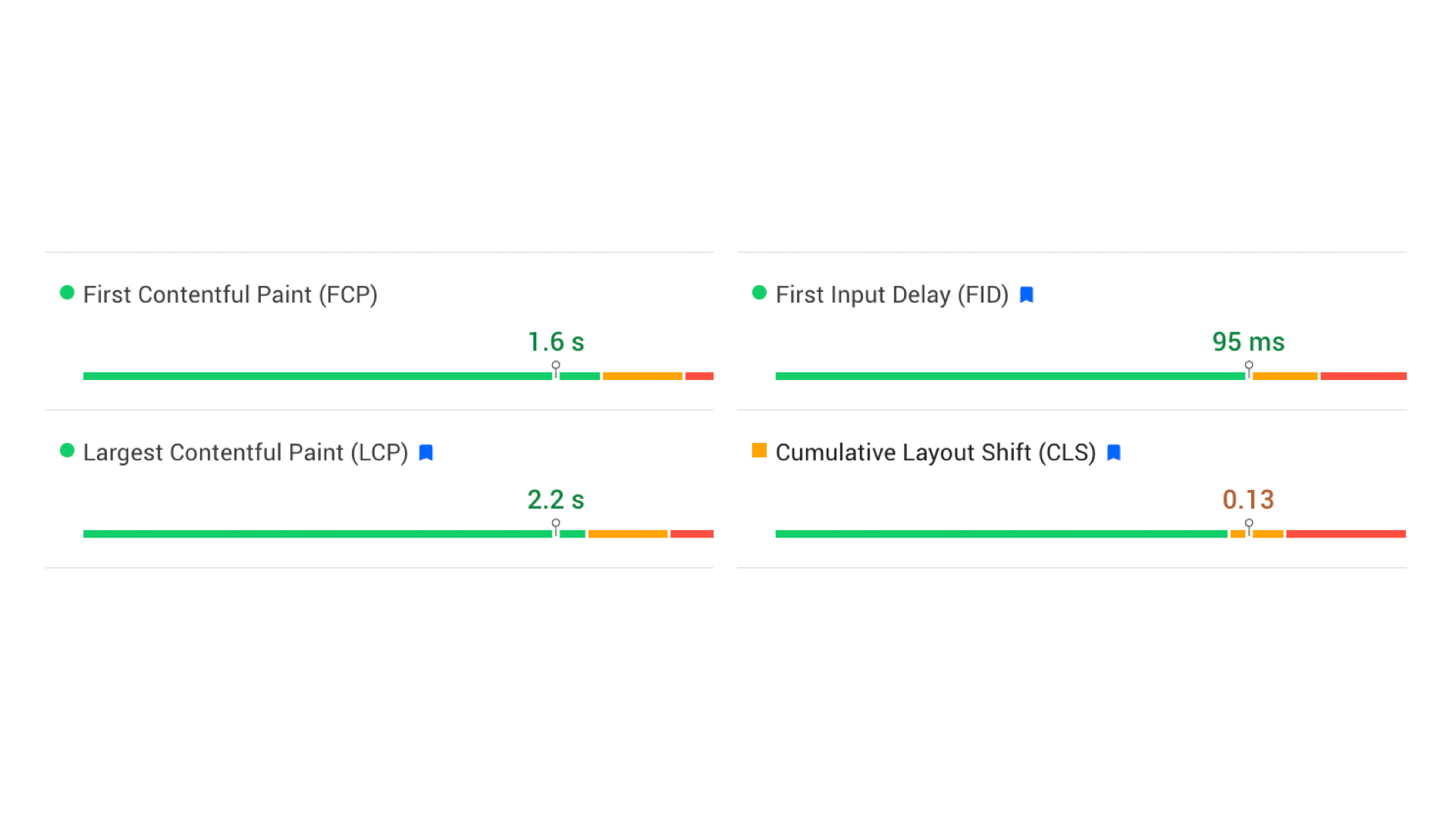
From these numbers and graphs, we can see the metric that needs the most optimization. For mall.cz, it's CLS (Cumulative Layout Shift).
PageSpeed Insights shows correct data, i.e., metric values for users cumulatively over a month from the Chrome UX Report. However, the issue is that we can't see the trend compared to the previous period or compare multiple domains simultaneously.
That's why our tester features a dashboard, where after logging in, you can monitor the numbers for all your clients' websites:
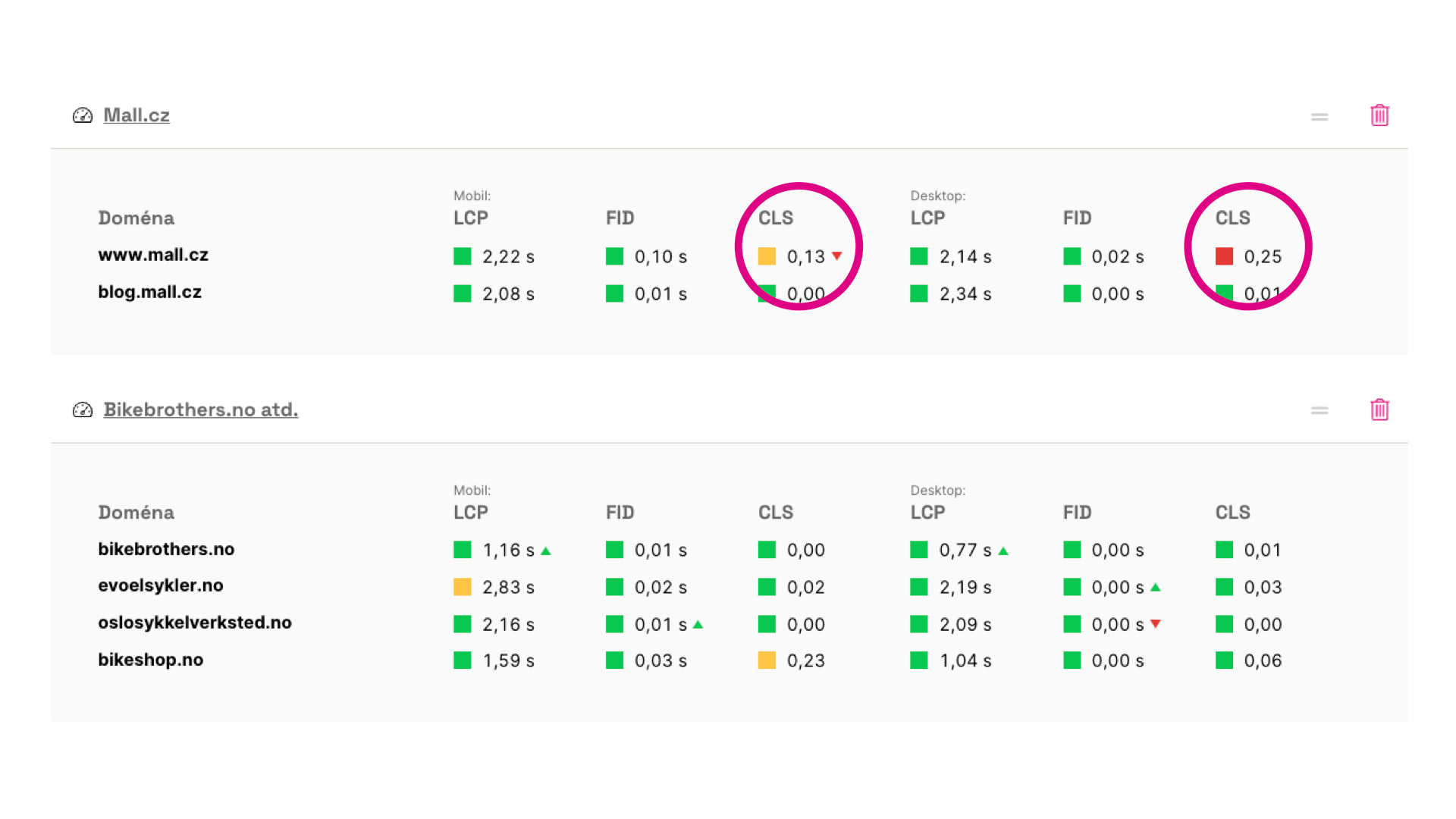
In the image above, you can see that the mall.cz domain on mobile not only fails to meet CLS (value is 0.13), but it has also worsened over the past month.
With this knowledge of what's wrong and regular monitoring, we can also see if things have changed recently. But what if we measure speed only occasionally?
Here, another feature of our tester becomes useful—monthly data from the Chrome UX Report:
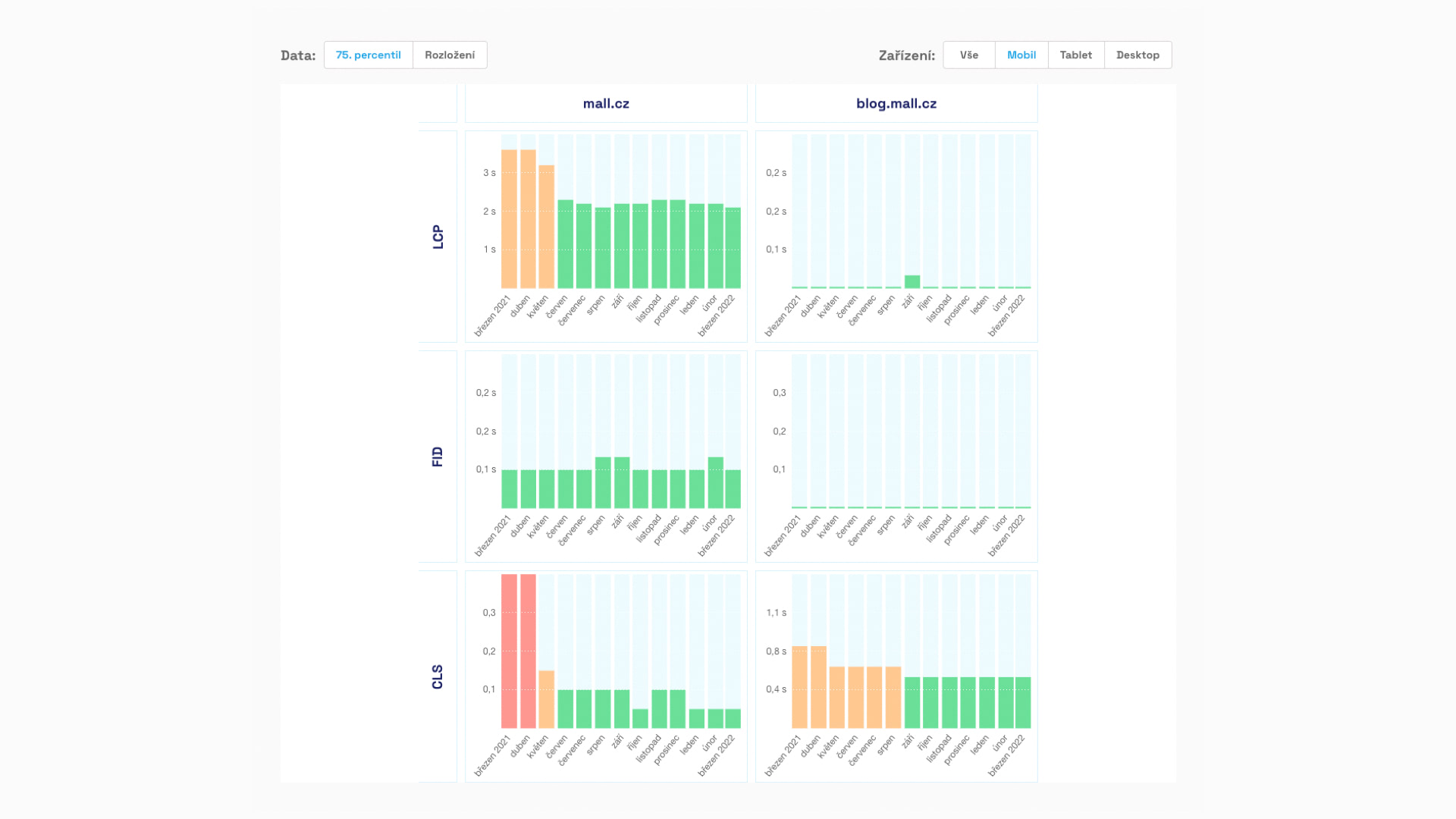
Google provides this data with a delay, and it has slightly different values than the data for the past 28 days, which it uses for page assessment. However, it's great because it shows speed trends and thus the impact of optimizations or, ahem, suboptimal developments.
In the graph above, you can see that mall.cz had very poor LCP and CLS metric values a year ago, but the situation is significantly better now. The "green" CLS value in March confirms that this metric was fine for the entire mall.cz domain on mobile until recently.
So, something unsightly likely happened with Cumulative Layout Shift on mobile in the past month.
With this knowledge of domain metric status, we could be content, but I recommend another view from the essential Google Search Console.
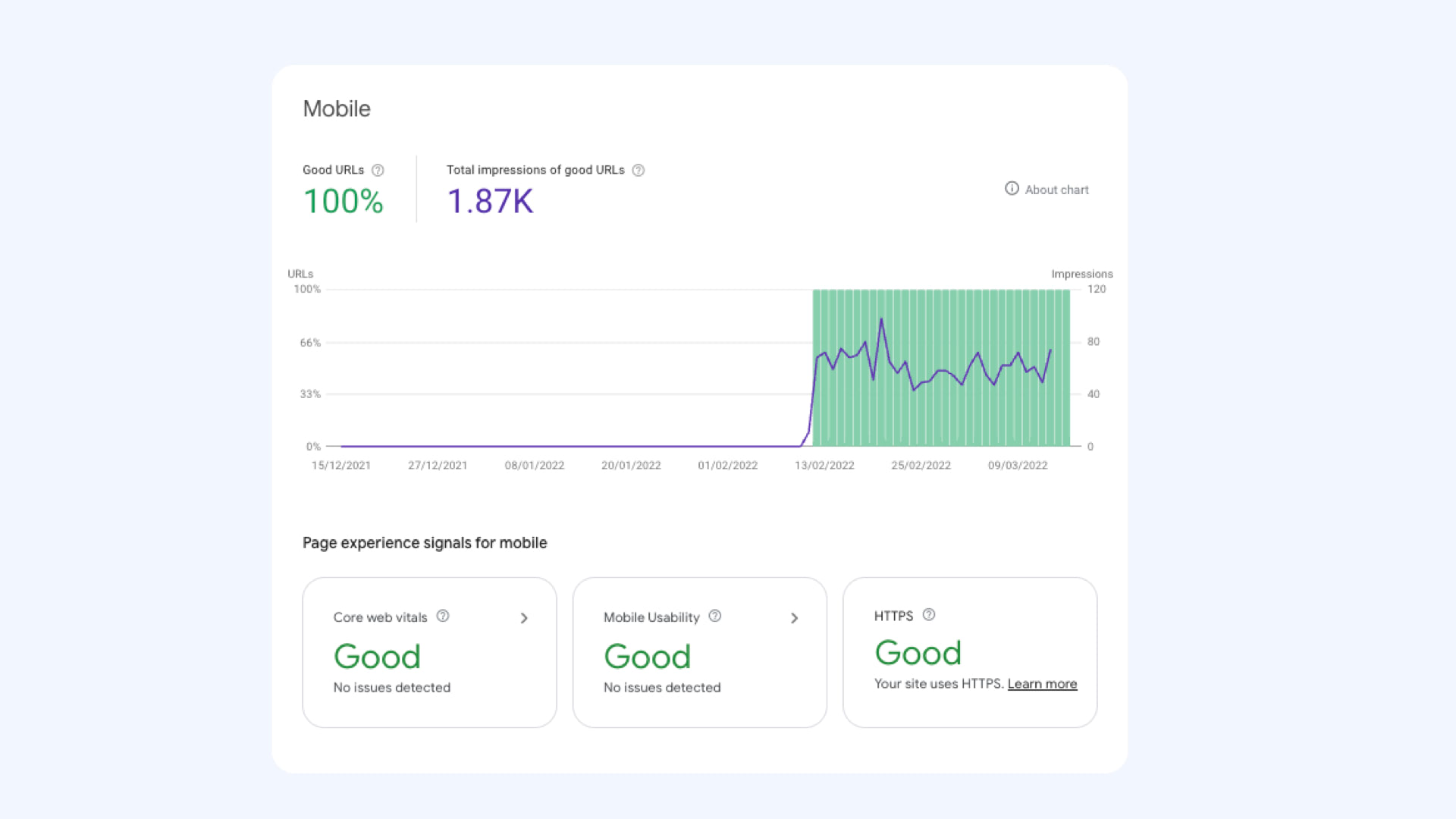
The Search Console in the Page Experience section shows a graph of the number of URLs that meet the evaluation signals in this area. Besides speed, it includes mobile usability or security level, which was recently "hyped" in the SEO community as HTTPS.
In the above graph, the client saw an improvement due to our optimizations, and values jumped from zero to one hundred percent in one day. However, you'd need some luck to see such a graph. Usually, it's far more "jagged," with values changing over time.
This graph is also heavily subject to various distortions—both in terms of data delay and potential bugs on Google's side. Therefore, we mainly take the long-term trend from it and don't panic over day-to-day fluctuations.
Let's recap what we know: The mall.cz domain has a poor CLS metric value on both mobile and desktop. On mobile, it has significantly worsened in the past month.
Second Step: Page Groups
At this stage of measurement, we almost can't do without Search Console. Google doesn't provide this data externally via its API. I hope this is temporary and we'll soon be able to work sensibly with it externally.
Nonetheless, what I'll show you here is visible in the Web Vitals section. There are reports available for mobile and desktop, all concerning page groups as internally divided by Google.
First, we see a somewhat confusing graph with yellow, orange, and green lines:
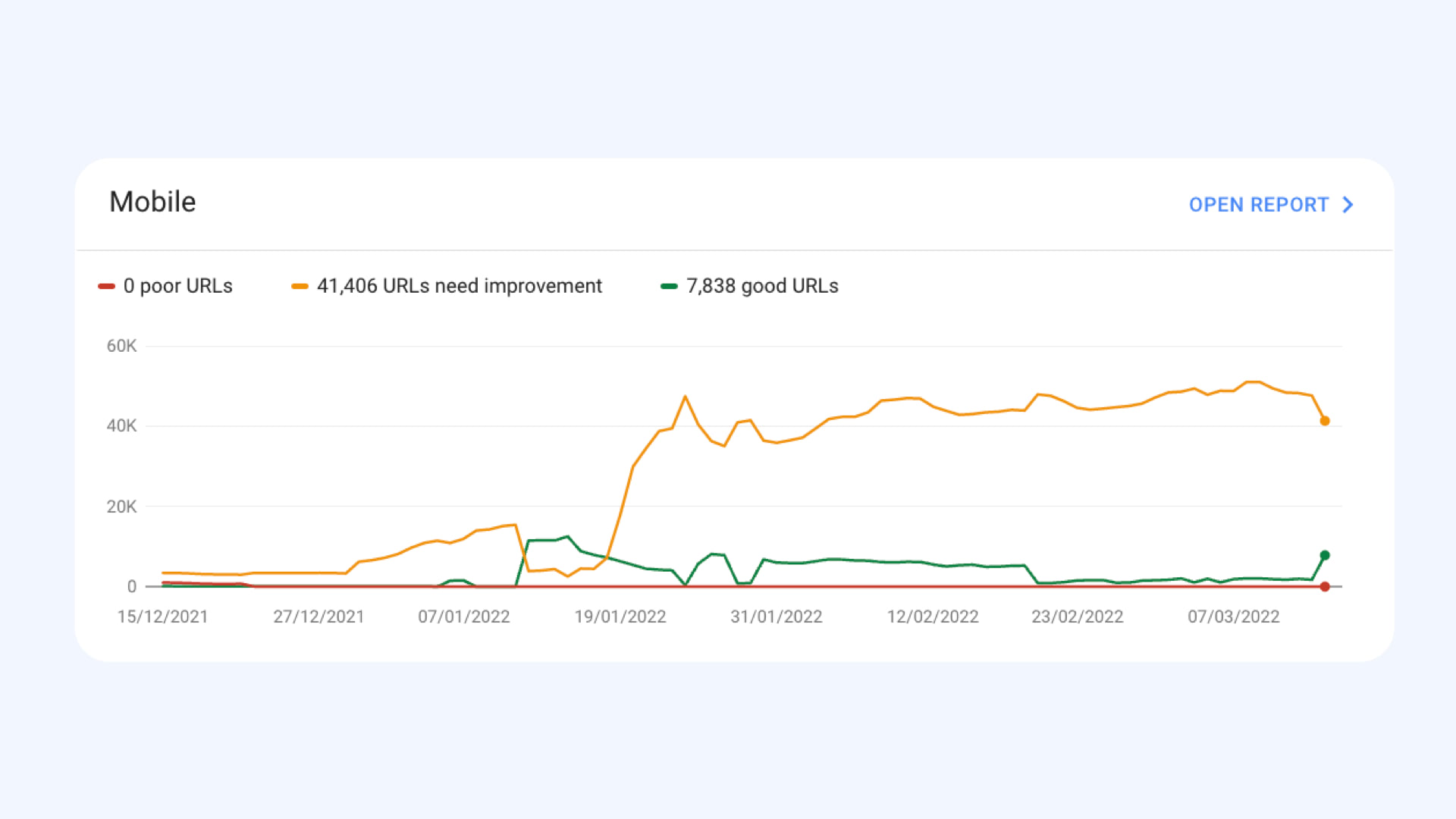
The problem with this graph is that it doesn't show the speed trend of the website, but only the number of URLs in groups meeting all metrics (green) or with at least one orange or red.
Since it concerns the number of URLs, graphs can appear to worsen, even if, for example, more addresses are categorized in a URL group. In reality, nothing worsens; only the number of pages increases.
It's bad if, at some point, the green decreases and the orange or red increases. That could be a reason for concern about speed.
Of course, even with these graphs, various distortions and delays apply, among other things… It's just good to have other regular measurements to verify whether a sudden change really occurred.
When you click on the graph, you see a breakdown for specific devices and metrics:
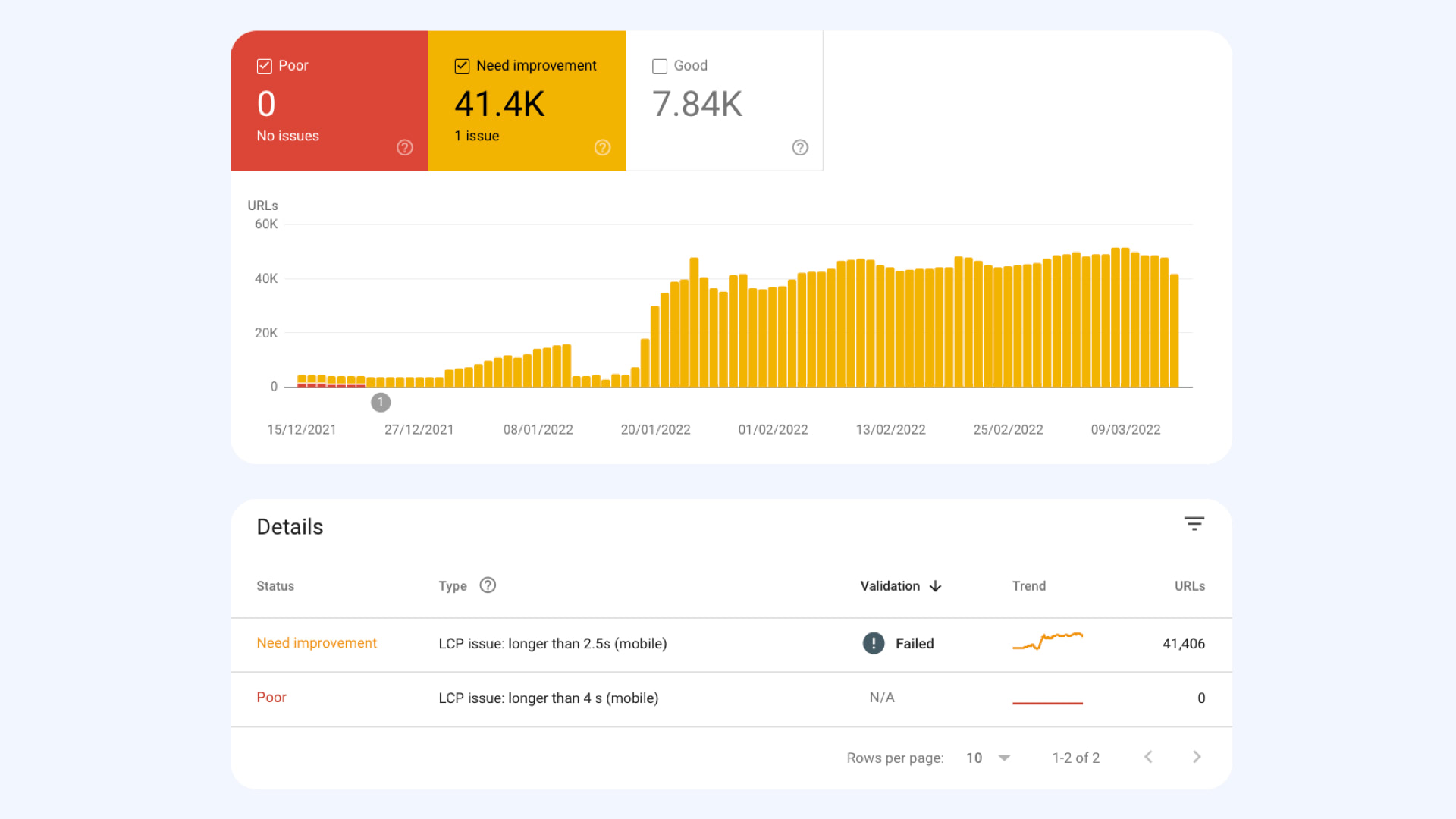
This graph shows us which metrics are problematic on the domain in the groups and what amount of URLs it affects.
In the case of this specific graph, it's the LCP metric and orange values (2.5 – 4 s). If we had access to Search Console for Mall.cz, we'd likely see issues mainly with CLS here.
You can further click on this report until you reach the crux of the matter—a list of URL groups with these metric values:

In the image above, I've hidden specific URLs, but you can certainly imagine them there.
This report is excellent because it reveals not only the page groups but also their frequency and "aggregated metric value." The more a group is represented and the worse its metric value, the more important its optimization is.
Google Search Console also provides many URL examples, so we can take those and test them in a browser or set them for regular monitoring, which we'll do in the next step.
In the second step, we identified which page groups have the most significant impact on a poor metric (in Mall.cz's case, it would be CLS) and, therefore, their optimization is a priority.
Third Step: Specific URLs
Choosing the right URLs to monitor is crucial for the success of the entire speed measurement. Here are a few tips:
- Find page types that are key for you and represent important content. For instance, on an e-commerce site, this might be the homepage, product detail, category, blog post, and perhaps the contact page.
- Select representatives from frequent address groups offered by Search Console.
- Choose URLs with the highest traffic from this group.
- Ideally, choose pages with their Web Vitals assessment in CrUX.
Our tester allows you to input up to five URLs, which should suffice even for larger websites. In the case of Mall.cz, it's a bit of a shot in the dark (since we don't have all the data), but we've chosen these pages:
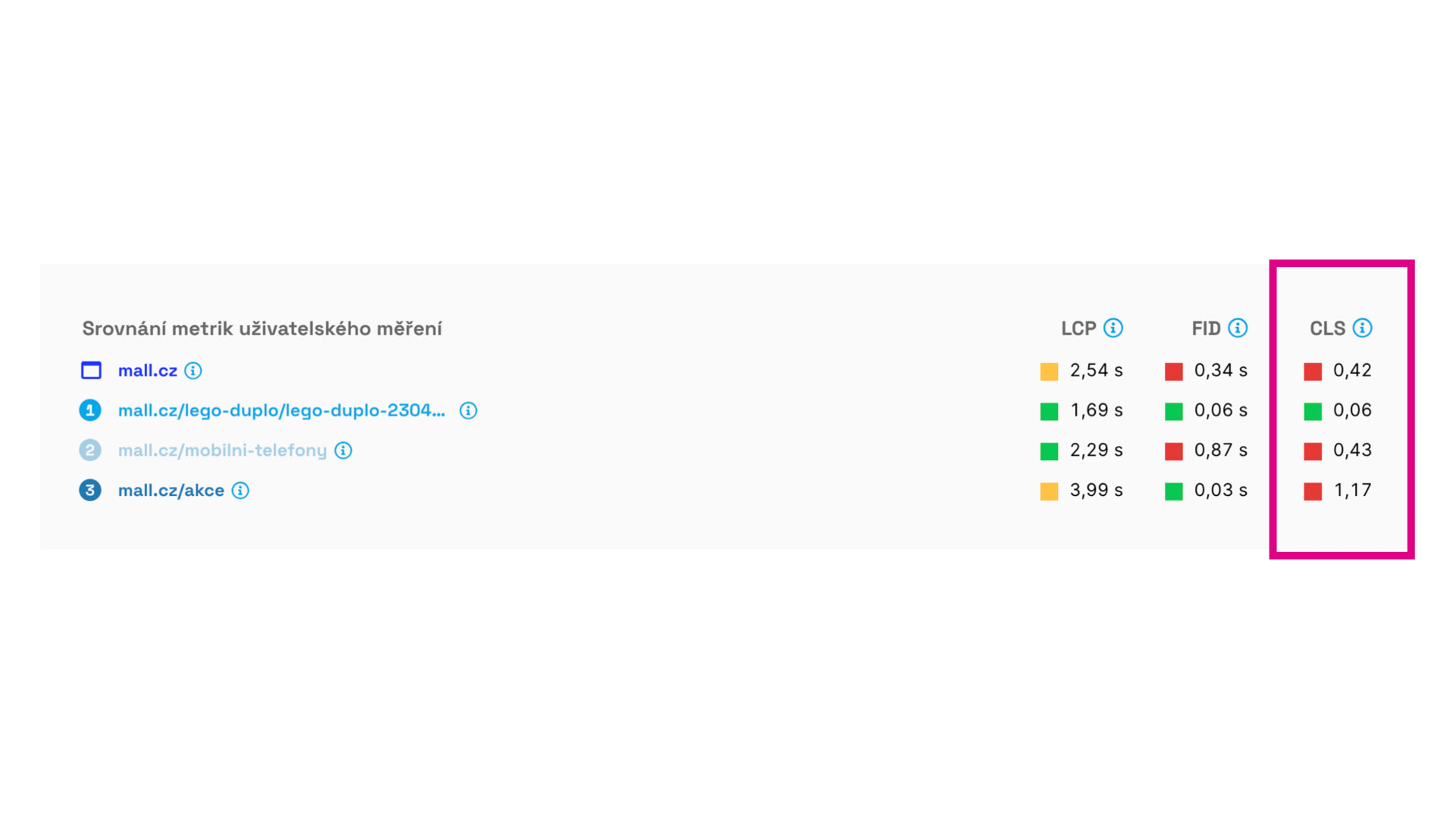
In the test image, we see that the problematic CLS is mainly in the category (/mobilni-telefony) and then on the /akce page. We also see a poor value on the homepage, but since it's just one page, it won't have as much impact on the domain's rating. We must optimize it, but not as a priority.
Regular Monitoring
Once we have URLs set in the tester, they will be measured regularly—once a day in our case. This service is provided for free, so feel free to use it.
The daily monitoring graph looks something like this:
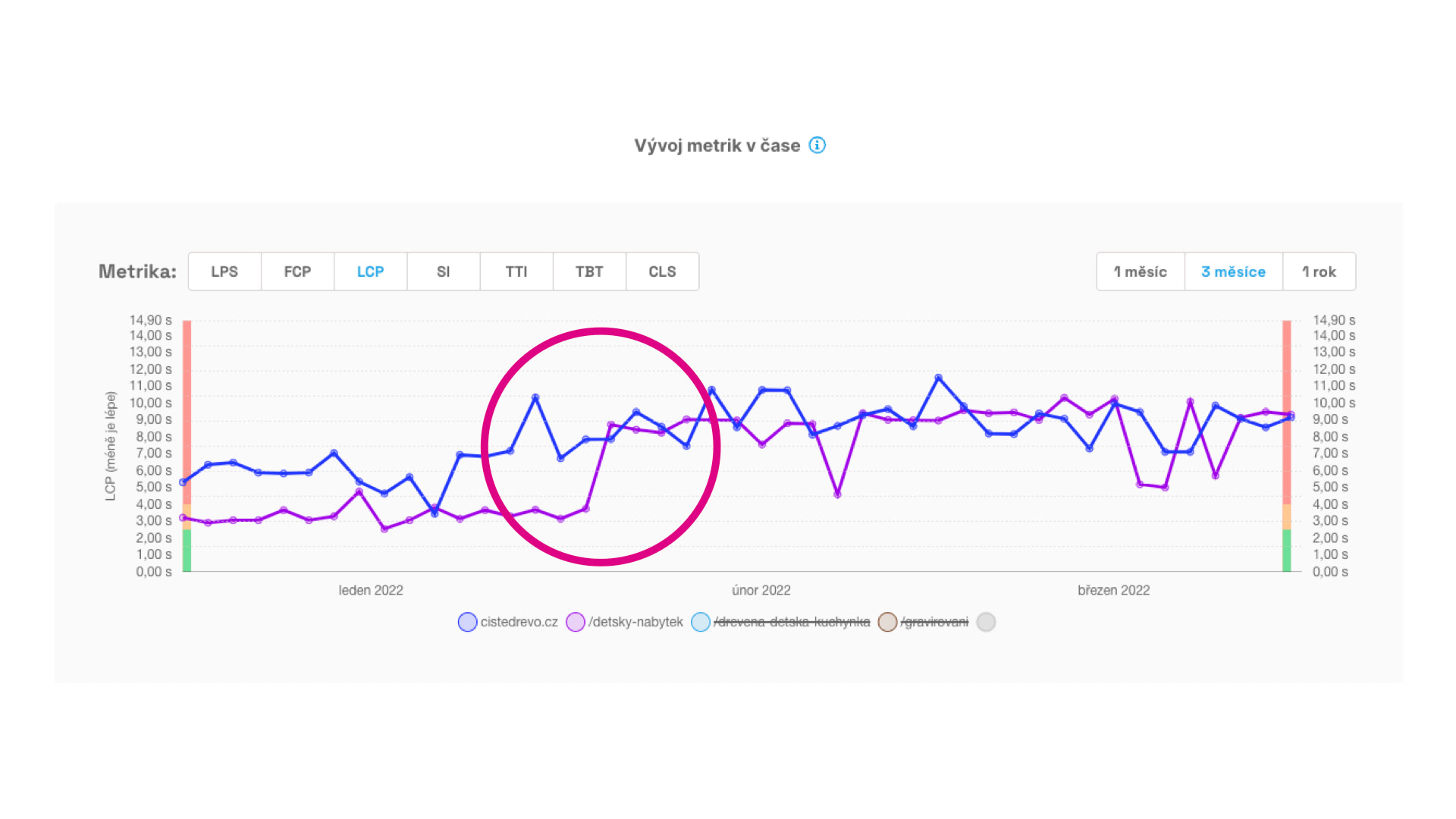
In the graph, you can see that the LCP metric worsened on one of the client's pages. This happened at the beginning of February, making it easier for us to trace the cause. (In this case, it's the cookie banner.)
So, besides the long-term view of domains and page groups, we now monitor specific URLs daily. This allows us to identify problematic metrics and the date of their sudden changes for the worse, thus pinpointing the likely cause.
Output from Web Measurement
We now have data for the domain, page groups, and specific URLs. You can provide developers with this concise output for optimization:
The mall.cz domain has a problematic CLS metric:
In CrUX, the values are 0.13 for mobile and 0.26 for desktop.The most critical groups for optimization and URL examples are:
…Measurement links:
Search Console: …
PageSpeed.ONE: …
PageSpeed Insight: …
Yes, it could be this simple.
Now, just figure out how to fix it, right…
Should Marketers Attempt to Provide Recommendations to Developers?
I believe most marketers understand data and its interpretation well, but they lack deep knowledge of browser functionality or various frontend technologies.
While there are general recommendations provided by tools like Lighthouse or PageSpeed Insights, these may work well only for some websites, typically those not well-optimized.

It's essential to remember that Lighthouse doesn't know the human and technological context of your project, so some advice might be completely off.
From our experience, Lighthouse's advice is often very demanding to implement. The goal of optimization should be to find "low-hanging fruit," meaning adjustments that bring the most significant effect for the least cost.
Such adjustments should be identifiable by the developers working on the project. However, it's increasingly evident with our clients that the ability to perform quality and effective development and the ability to optimize speed almost exclude each other.
Of course, you might be lucky, and your developers care for performance entirely on their own (we know such cases!), or you might be even luckier, and your marketer, designer, or product manager possesses these skills (we know such cases too).
If not, just reach out, and we'll be happy to help you. ;)
Jak je rychlý váš web?
Jak rychlý je váš web v porovnání s vaší konkurencí? To zjistíte
pomocí našeho online testeru.