Report "Summary"
The introductory page, known as the "Summary", serves as a quick display of the current state of your website’s speed across various contexts and types of measurements:
- From measured domains to specific pages.
- From the speed experienced by Google users (Chrome UX Report, CrUX) to synthetic measurements.
The "Summary" page provides you with an immediate overview of the situation and highlights where optimization priorities lie.
Speed Data in Tables
For each tested domain and URL, we display available speed data in a clear table, which many of our users have grown fond of:
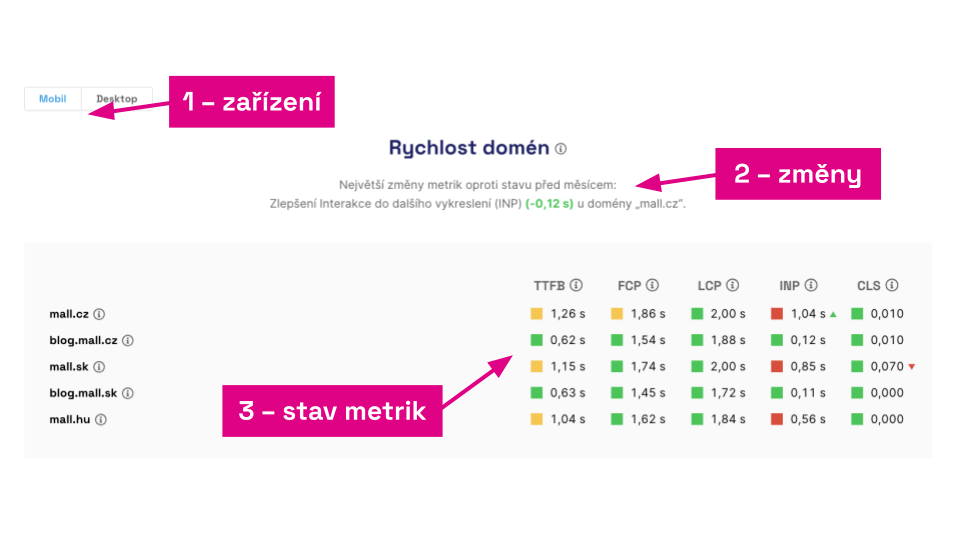 Data of all important metrics for Mall.cz in a clear format.
As you can see in the image, we display all Metrics that are part of the Core Web Vitals set or are auxiliary metrics provided by Google in the Chrome UX Report.
This is useful for immediate comparison of your websites' speeds or potential benchmarking against competitors.
Metric Changes in Graphs and Text
For all graphs, you'll find a textual summary of the current status and changes over the last month. This is visible in the image above under point (2).
Our users appreciate the arrows in the dashboard that indicate the metric's development compared to the previous month's status. This is also available directly in the "Summary" report, provided you have been measuring for at least a month.
If you regularly track your website's speed, this display quickly shows you the status, what is changing, and what to be wary of.
Specific Tables in "Summary"
Let's take a closer look at specific parts of the page and how they can be useful to us.
Domain Speed
The most important view of speed, as it shows the state of the entire website for users. The data comes from Google's Chrome UX Report. Here you see the 75th percentile of data from all Chrome browser users over the last 28 days. Not every domain has data from Google; it's determined by monthly traffic. More details are in the Domains Report.
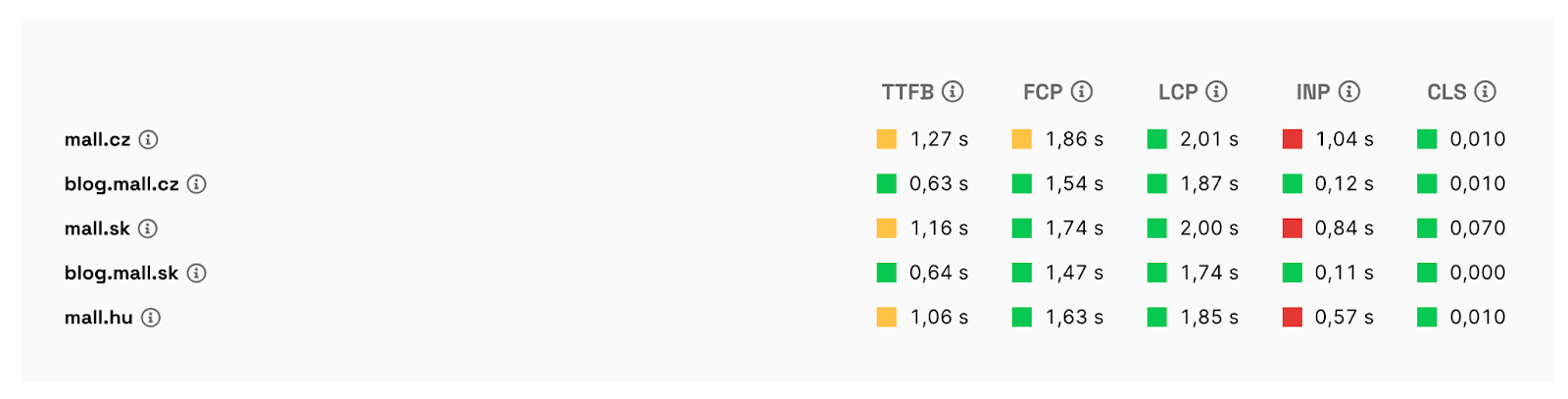 Domain speed status.
Watchdog
The state of daily synthetic measurement of all pages. Here, we're not concerned with the specific Metric value but rather with deteriorations lasting three or more days. If a metric meets the limits, it's green; if it doesn't, it's red. In the settings, you can arrange for notifications about status changes to be sent to your email, Slack, or Teams. More details are in the Watchdog Report.
 When the Watchdog is green, all is well.
🔐 Watchdog functionality is only available in PLUS tests.
Page Speed for Users
Here you will see the speed of specific measured pages. Again, the data comes from Google's Chrome UX Report and shows the 75th percentile of data over the last 28 days from all Chrome users. This data is only available for the most visited URLs. Even the largest websites typically have data for only a few dozen pages.
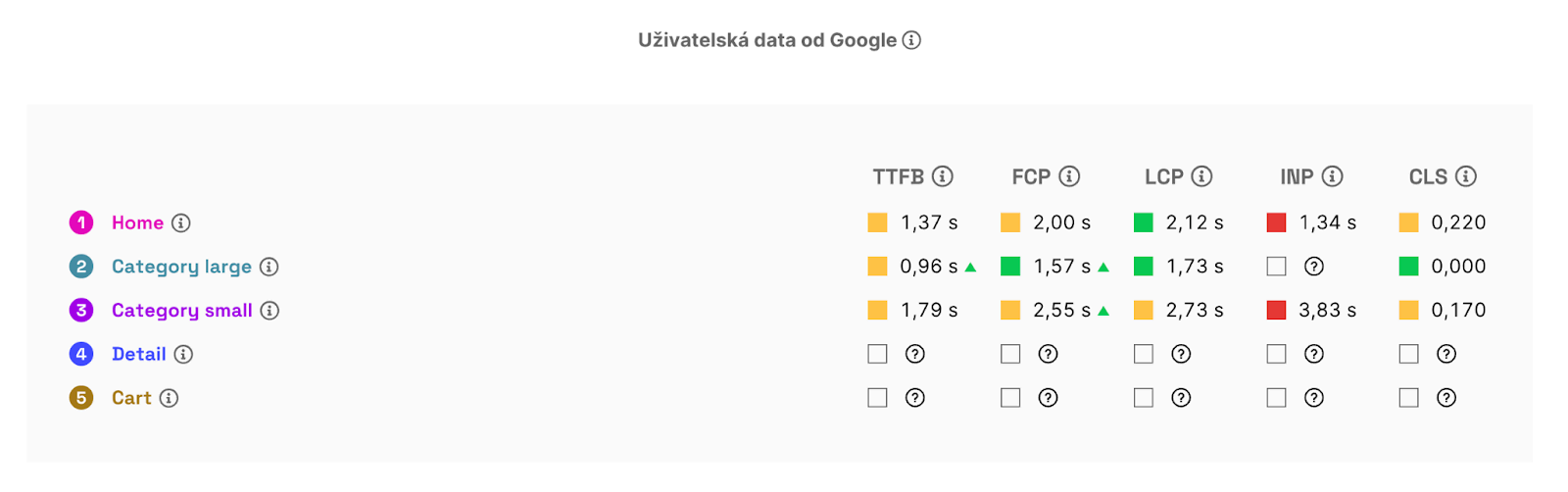 You probably won't see user data for all measured URLs.
Page Speed from Lighthouse Measurements
Data from Lighthouse tests. It's less precise machine measurement but provides more metrics, and we usually have data for almost every page. From an optimization priority perspective, these are the least important data since they generally do not correspond to user-measured data. These are values for monitoring and optimization needs, not target metrics.
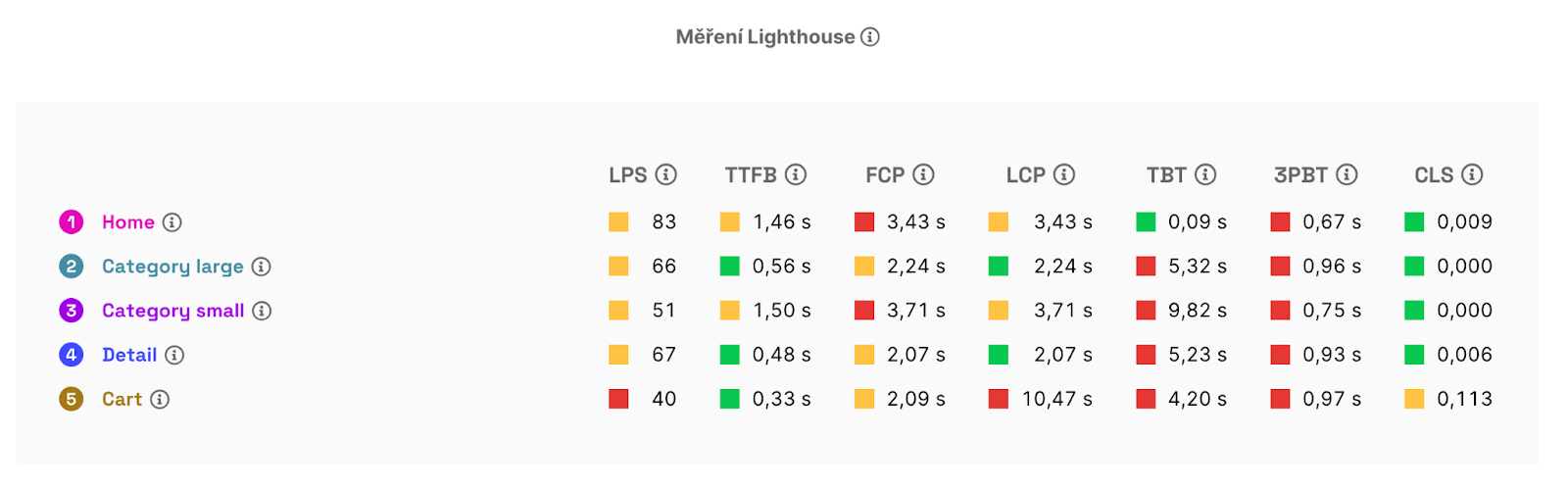 Lighthouse metrics can be seen on all pages, but they are not as precise.
How to Read the "Summary" Report for Optimization Planning?
Here are a few tips on how to think about the data:
- The most important thing is to have green values for Core Web Vitals, namely LCP, INP, and CLS, at the domain level. If the metrics in the "User Speed of Domains" graph on your site are not met, focus on them first. Optimize the red ones first, then the orange ones.
- The "User Speed of Pages" graph (if it contains data) or the "Synthetic Speed of Pages" graph shows the status of metrics for individual pages. Again, focus on meeting the three Core Web Vitals, and prioritize the red metrics.
- Remember that data from Lighthouse measurements ("Synthetic Speed of Pages") are merely indicative and may not correspond to how real users experience your website.
- If you lack sufficient user data for pages, focus more on the Core Web Vitals report in Google Search Console than on synthetic data. It will show you URL groups that might be problematic for your users.
A detailed view of your websites' speed is then provided in specific reports like “Pages”, “Domains”, and others.
