Metric “Total Third-Party JS Blocking Time” (3PBT)
3PBT stands for Third Party Blocking Time. It’s a measure of the slowdown your users might experience due to third-party components during interactions.
This is an internal indicator of PageSpeed.ONE monitoring, allowing you to hone in on issues caused by third-party components that might be worsening your interaction metric (INP).
🔐 This metric is displayed only to users of PLUS tests in the Pages Report.
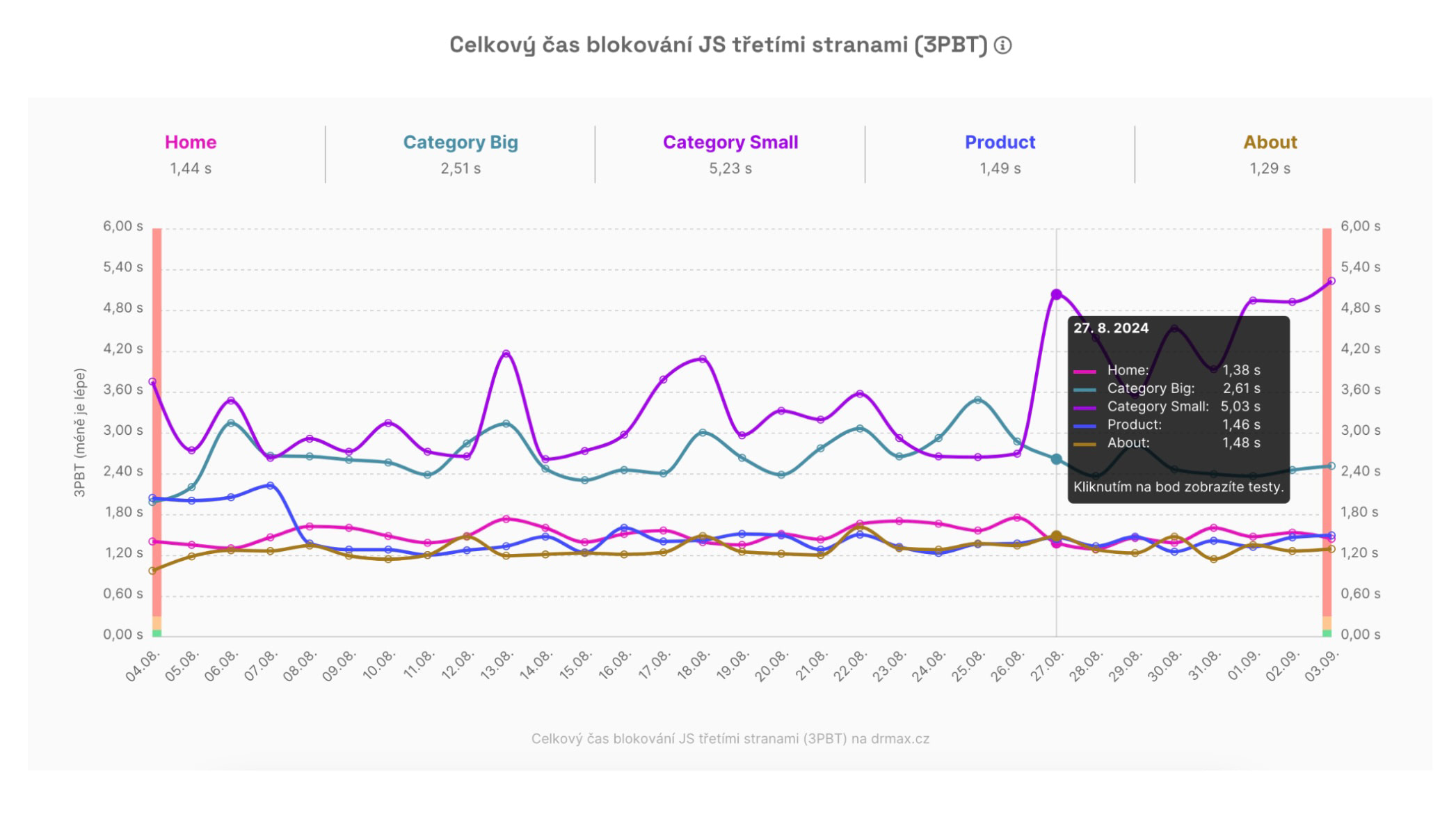 3PBT Metric Graph: Which page is being troubled by third-party components?
How Do We Calculate 3PBT Precisely?
Technically speaking, 3PBT is the sum of times between the First Contentful Paint (FCP) and Time To Interactive (TTI), when third-party JavaScript blocked the browser's work for more than 50 ms, potentially delaying user interactions.
In other words, it's a portion of the TBT (Total Blocking Time) metric, with third-party scripts (analytics, A/B testing, etc.) as the culprits.
Slowing Interaction, Not Loading
It's important to realize that the Third Party Blocking Time (3PBT) metric does not focus on page load slowdown, which is measured by the LCP metric.
A page can display very quickly even with many third-party components, as these usually load with lower priority and asynchronously, so they don't block the initial page display.
The 3PBT metric becomes particularly useful when diagnosing issues causing slower interactions, measured by the INP metric. If you notice that your site's INP metric (in the Domains Report) is outside the green zone, also check the 3PBT values.
How Do We Detect Third Parties?
Third-party scripts are automatically detected by Lighthouse, which we use for our synthetic measurements in PLUS tests (see how we test), but this detection may not be entirely accurate.
Lighthouse is adept at uncovering well-known third-party components (Google Tag Manager, Google Analytics, Hotjar…), but it’s less successful with less common or local providers of these components.
Thus, the displayed number might only represent a part of the actual value. Nevertheless, it serves as a useful indicator, especially when compared with the total value of the Total Blocking Time (TBT) metric.
What Is the Optimal 3PBT Value?
The optimal 3PBT value is under 0.1 seconds.
However, don't lose too much sleep if your site's measured URLs don't achieve this state. Consider 3PBT using these questions:
- Is the INP metric at the domain level outside the green value (see Domains Report)?
- If so, look in the Pages Report for URLs with worsened INP or TBT metrics.
- For these pages, compare the 3PBT metric value with TBT.
The goal is to determine whether third-party components might be influencing the Total Blocking Time (TBT) and thus specific interactions measured by the INP metric.
How to Identify Which Specific Components Have a Negative Impact?
In the 3PBT metric graph, you only see the overall impact of third parties on specific pages.
If you're curious about which specific third parties are causing issues, you need to delve into the specific Lighthouse report:
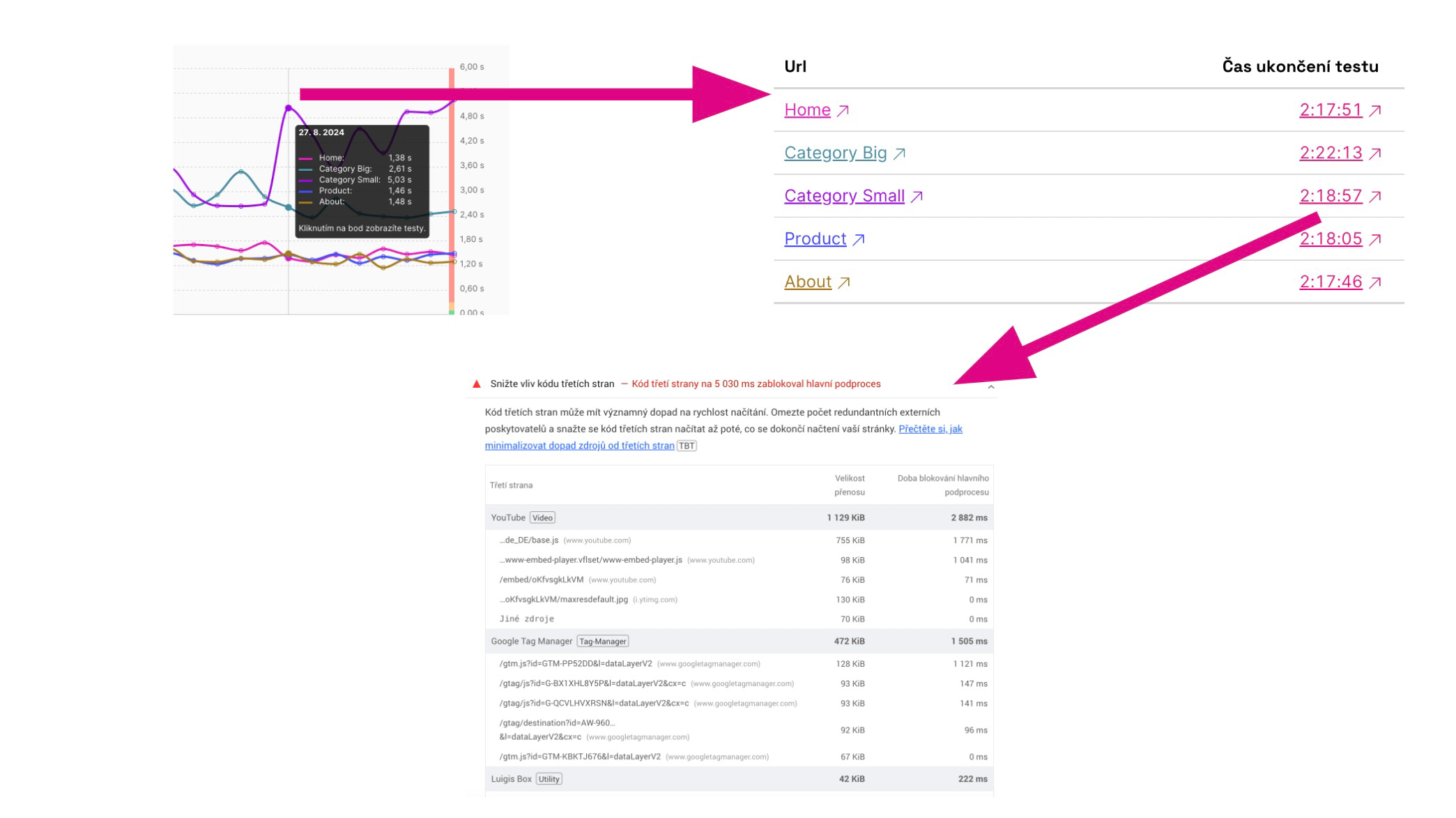 How to access the report with specific culprits of the 3PBT metric deterioration?
Let's break it down step by step:
- In the Pages Report, find the 3PBT metric graph.
- Click on a specific point in the graph.
- In the modal window, select a specific URL.
- Click on the test time.
- In the test run detail (in the Lighthouse report), look for the section “Reduce the impact of third-party code.”
This way, you’ll uncover specific problematic components on specific pages.
How to Optimize 3PBT?
The topic of optimizing the impact of third-party components is quite complex, but in brief, the optimization options are roughly as follows:
- Consider whether you really need the component on your site.
- For components used only occasionally, like Hotjar, remove them completely from the HTML code when not in use.
- Optimize GTM code or use the setTimeout() trick.
- For components that load only in specific parts of the page, use the lazy loading method.
- Stay in touch with the authors of third-party components.
More information on optimizing third-party code can also be found in the following resources:
- INP Metric Optimization in our help documentation.
- Third-Party Component Speed Optimization: When there's a will, there's a way on Vzhůru dolů (in Czech).
- Optimize third-party JavaScript on web.dev.