setTimeout: Optimising Long Tasks in JS
The setTimeout() method is employed to optimise long tasks in JavaScript (measurable by the JS Long Tasks (JSLT) metric) that block user interactions and degrade metrics such as Total Blocking Time (TBT) or Interaction to Next Paint (INP), an important component of the Core Web Vitals suite.
The Problem? Long Tasks in JavaScript
JavaScript in the browser operates on a single thread. In practice, this means all actions, events, and interactions are queued by a mechanism known as the event loop.
From a web speed optimisation perspective, an issue arises when a task takes too long, thereby blocking other tasks. This effectively blocks the entire browser and its main thread – the so-called main thread. These long tasks are measured by the JS Long Tasks (JSLT) metric.
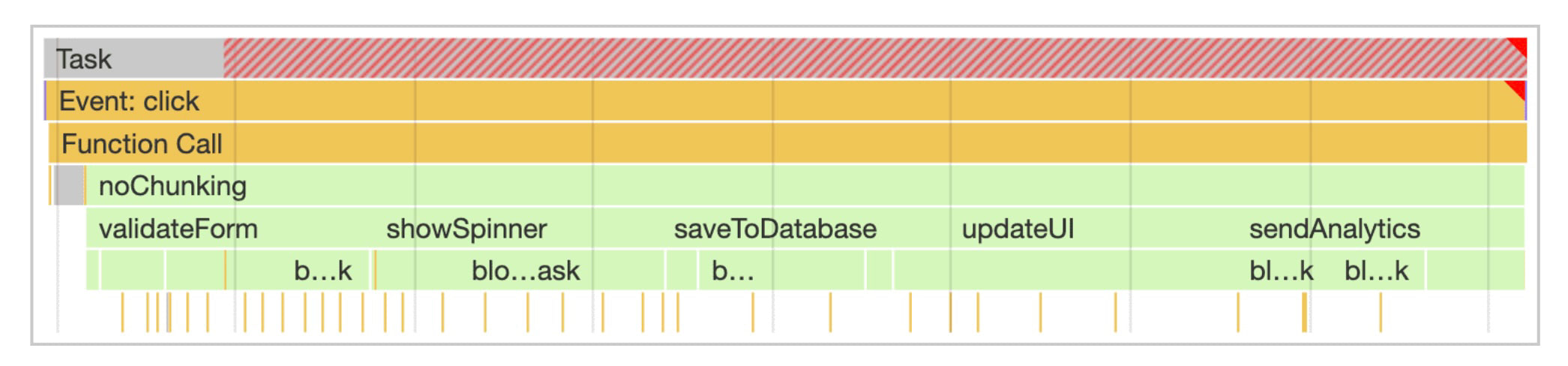 Long tasks last more than 50 ms, identifiable by the red highlights when measured in the browser's DevTools.
setTimeout() and INP Optimisation
To optimise a high INP metric value, it's essential to segment the code by importance, defer less critical parts, and thereby allow the browser room to handle further user interactions.
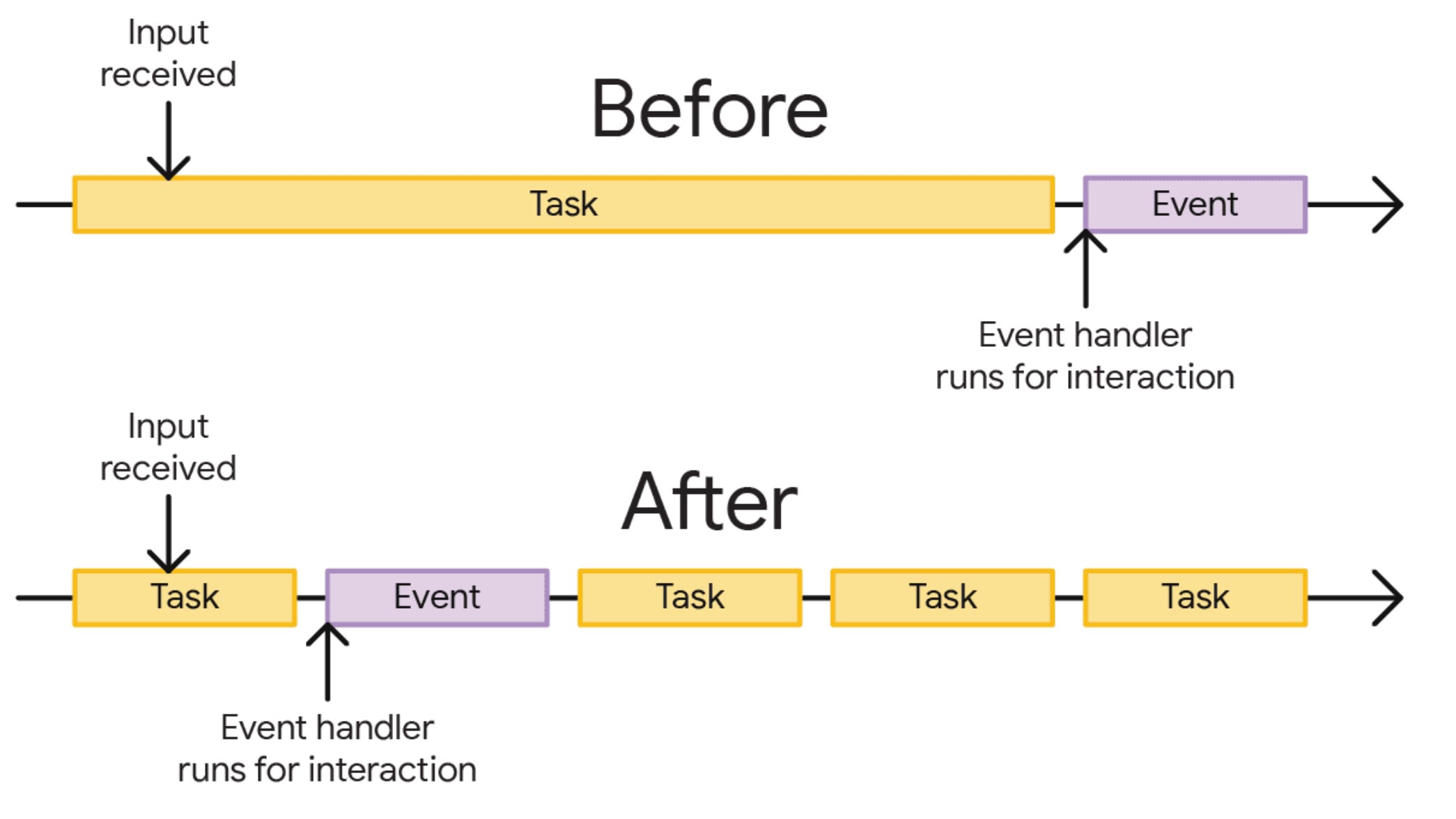 Before optimisation, the user must wait after input ("Input received") for a long task ("Task") to execute an action ("Event"). Post-optimisation, the long task is broken into smaller ones, allowing the action to run sooner.
JavaScript handles long tasks by employing asynchronous operations, including timer APIs, with the window.setTimeout() function leading the pack. This allows us to defer selected tasks. The setTimeout() function has a unique feature: if set with zero delay, the browser is likely to defer the task to the next rendering cycle:
setTimeout(() => {
	delayed_code_to_next_render();
}, 0);
Thanks to this feature, you can swiftly segment code and defer less critical tasks by a single rendering cycle. This creates the much-needed space for the browser to take control and render the output of important code on the screen:
function saveSettings() {
	// Do critical work that is user-visible:
	validateForm();
	showSpinner();
	updateUI();

	// Defer work that isn't user-visible to a separate task:
	setTimeout(() => {
		saveToDatabase();
		sendAnalytics();
	}, 0);
}
In the current rendering cycle, we update the UI. Logging the event to the database and analytics is deferred and executed asynchronously. This splits the task into two.
A Good Servant but a Rather Troublesome Master
Nothing comes without a price. This optimisation method seems simple, but simplicity often harbours complexity. There are scenarios where deferring code with setTimeout can lead to complications.
Beware of Analytics
Deferring the tracking of link clicks might lead to an analytical mishap. If a click triggers a new page load (not SPA routing), JavaScript execution halts, and the deferred code via setTimeout(fn, 0) won’t be executed. Only defer measurements where you know the user remains on the same page.
The Volume of Deferred Tasks
Tasks deferred with setTimeout(fn, 0) are merely queued for later processing. If you defer many tasks and work, you might create another long task in the future. Plus, remember that the browser has other matters to attend to than just processing your timers. Defer consciously and cautiously. You might also tweak the API’s second parameter, i.e., time, to virtually influence task priority.
JavaScript Frameworks
All modern JavaScript frameworks have their own mechanisms for processing tasks and interactions. Careless invocation of setTimeout(fn, 0) may lead to state conflicts. Always check the recommended procedure in your framework for deferring code by one rendering cycle. When optimising React, be cautious, as useEffect is not always asynchronous.
It’s All a “Hack”
One might say that using setTimeout() for optimising long tasks is a hack. After all, it’s an API meant for timing and executing tasks sometime in the future.
The connection to browser performance here is nonexistent, and the fact that the code executes in the next rendering cycle is more of a side effect. Specifications are responding to this need by creating new APIs like scheduler.postTask() and scheduler.yield(). Global support in browsers isn't available yet. Using “graceful degradation”, you can experiment with these APIs, of course.
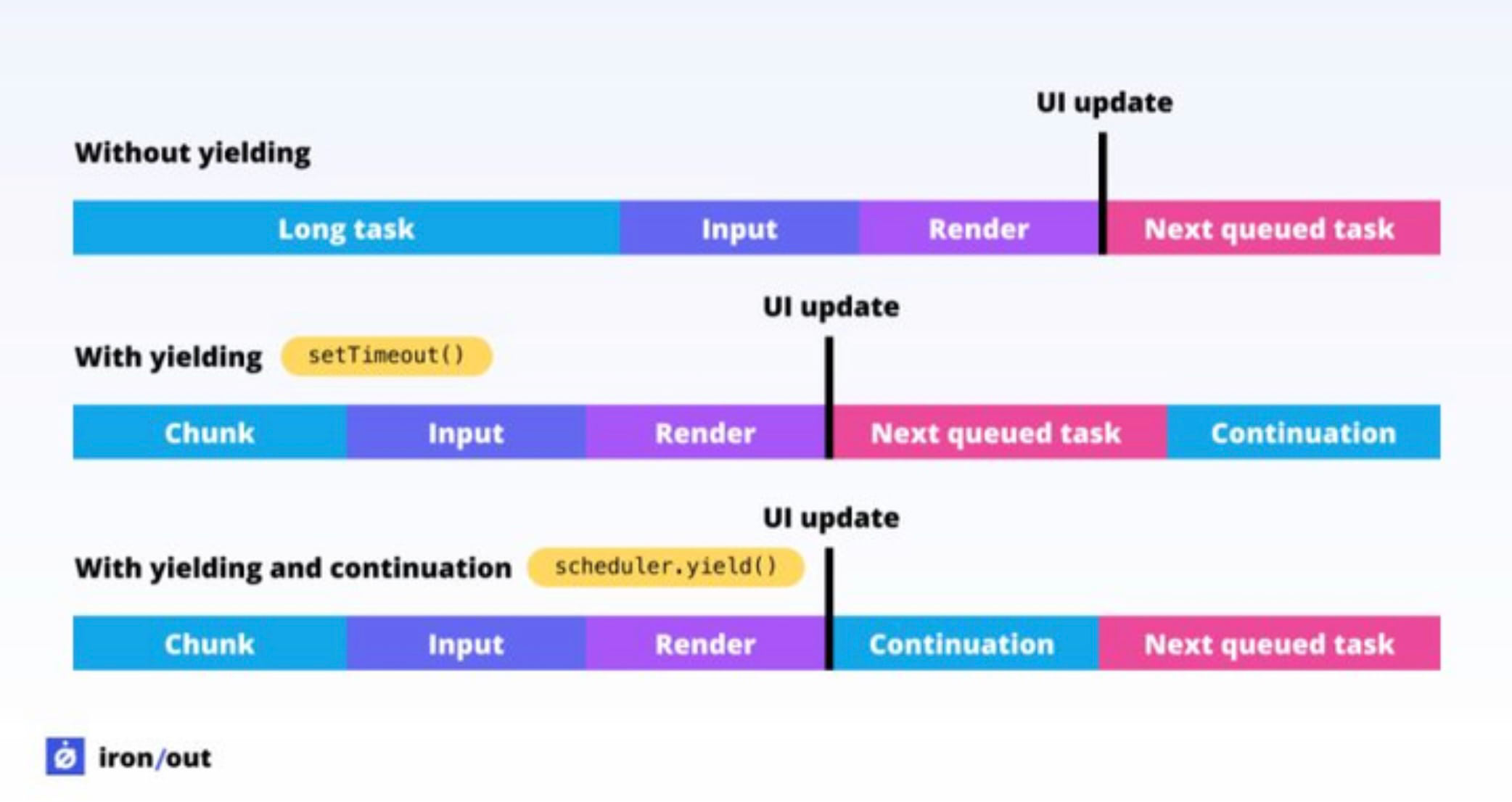 Difference between
 setTimeout and scheduler.yield(). A task divided using yield will be prioritised over other tasks in the queue.
Other Alternatives for Deferring Tasks
In JavaScript, there are indeed more ways to defer code execution. However, much like with setTimeout, they primarily serve other purposes.
- The
window.requestAnimationFrame()API is often mentioned as an alternative. It is intended to synchronise computed styles with DOM elements, making it ideal for animated elements managed through JavaScript. Using this API to "split tasks" will likely only degrade response speed. - The
window.requestIdleCallback()API does serve to optimise speed and defer work until the browser is idle. However, you have no control over the processing time, making it totally unsuitable for some actions, such as analytics. - The
MessageChannel()API can also be used to defer code to the next rendering cycle. React uses it internally. Again, though, it's just another hack.
Conclusion
While setTimeout is acknowledged as a "hack for optimising INP", it holds a significant advantage: it is very simple and quick to use.
In terms of support, it remains the only bulletproof solution, as timer APIs have been part of JavaScript from the dawn of time. However, if possible, opt for more modern APIs like scheduler.yield() or other sustainable long-term solutions.
Where to go next?
- Learn more about other methods for optimising INP.
- Fond of a particular framework? Check out React optimisation or Vue.
- Let us assist you with an INP metric analysis.
Tagy:INPJavaScriptReact