Web Speed Monitoring: Why It’s Crucial and How to Use It Effectively
Suddenly, it doesn’t work. Conversions drop, visitors vanish, the site slows down, but you don’t know why. You haven’t made any significant changes, so what’s the problem?
Perhaps your site has been slowing down for months unnoticed. Maybe a new feature you launched last week slowed down key pages. Or maybe a third party tweaked their code without notifying you. Without monitoring, you have no chance of finding out what's happening.
Web speed monitoring gives you oversight, control, and the ability to address issues before they affect your business.
What’s this article about?
- Why is web speed crucial? Impact on conversions, SEO, and overall user satisfaction.
- How does monitoring save you time and money? Return on investment and direct business impact.
- What kind of monitoring do you need? Why mixing different types of monitoring is beneficial.
- Why aren’t one-off tests enough? The difference between PageSpeed Insights and continuous monitoring.
- How to set up and use monitoring? Our methodology that saves time, money, and nerves.
If you want to keep your web speed under control, read on.
You can now set up a monthly trial of our monitoring. No card, no commitments.
Why Have Web Speed Monitoring? Business, High ROI, and Preventing Slip-Ups
Web speed is important because it can directly affect conversions and site traffic. Let’s look at some examples from our practice:
- For one of the largest sports result providers, Livesport, we improved Google Ads positions through speed optimization, saving a substantial PPC budget.
- Studies show that backend response speed correlates with Google search ranking, thus improving SEO. Some of our clients have seen increased traffic after optimizing Core Web Vitals.
- On a large e-commerce site, we measured that users with load times around one second show 3.5 times more conversions than users with load times at 2.5 seconds.
Let’s look together at a graph showing the correlation between speed (LCP, yellow) and conversion rate (CR, blue):
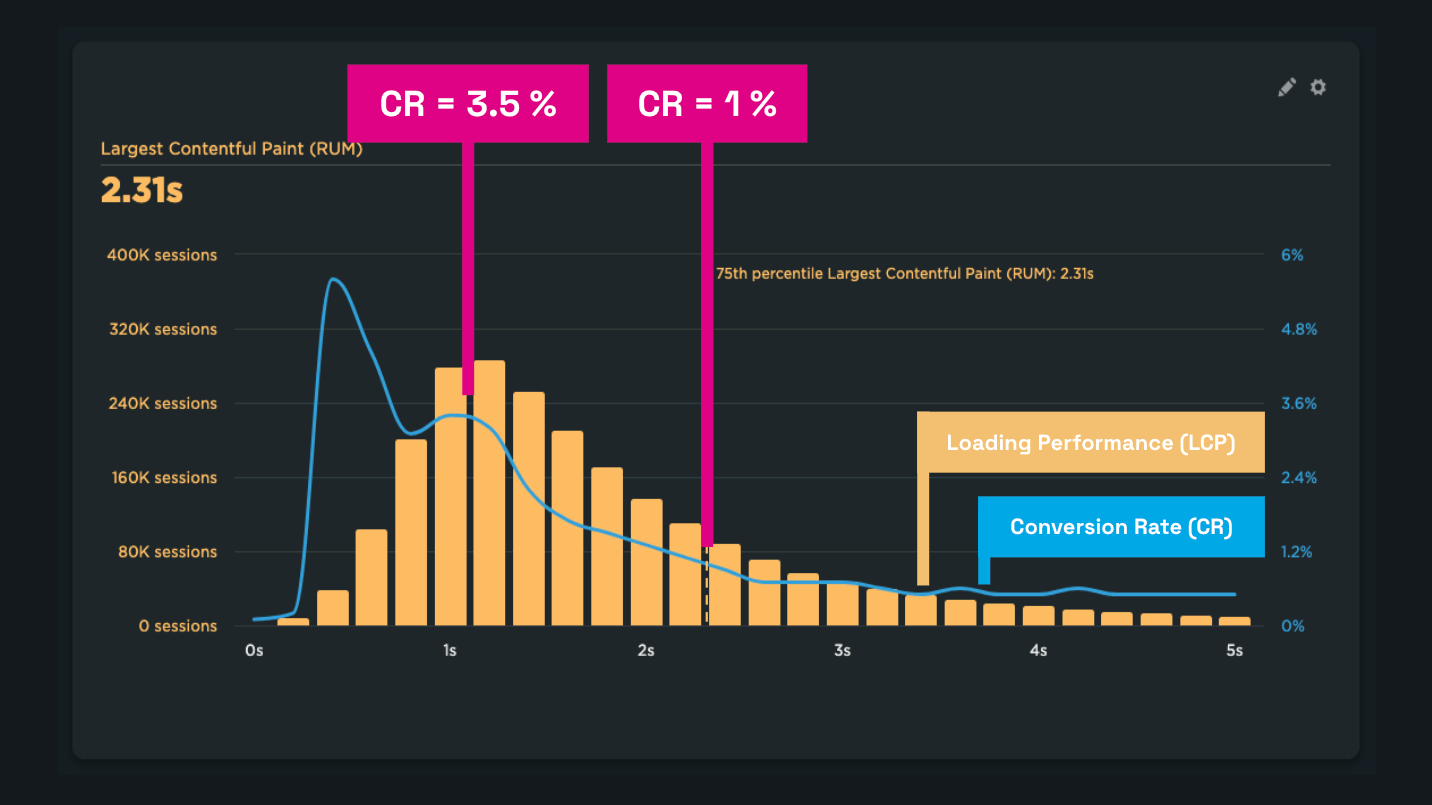 It often holds that the faster a user experiences a page load, the easier the conversion.
In all cases, without data, you cannot achieve or measure these successes. Missing monitoring often leads to situations where you know there's a problem, but you don’t know its cause.
Slip-Ups Arising from Missing Monitoring
You might think your site speed is stable because you haven’t made any changes that could affect it. But often the opposite is true.
Web speed constantly changes, usually for the worse. In our consulting practice, we often witness Core Web Vitals metrics worsening due to seemingly innocuous changes:
- For our client Innogy, monitoring detected a strange deterioration in the INP metric after deploying Server-Side GTM. Thanks to the technical analysis data, we could direct the client and their analytics providers to specific tasks to solve.
- Monitoring allows us to warn our clients like Dr. Max’s e-shop in time. For example, when the layout stability metric (CLS) worsened due to an error on one of the pages.
- Monitoring showed server response (TTFB) deterioration on a large e-commerce platform, providing our clients with exact data to communicate with support.
- In the Czech podcast IT Slip-Ups, there’s a story of how, without monitoring data, a team misjudged the cause of a problem and spent two weeks rewriting an application. The issue was actually just one line of configuration.
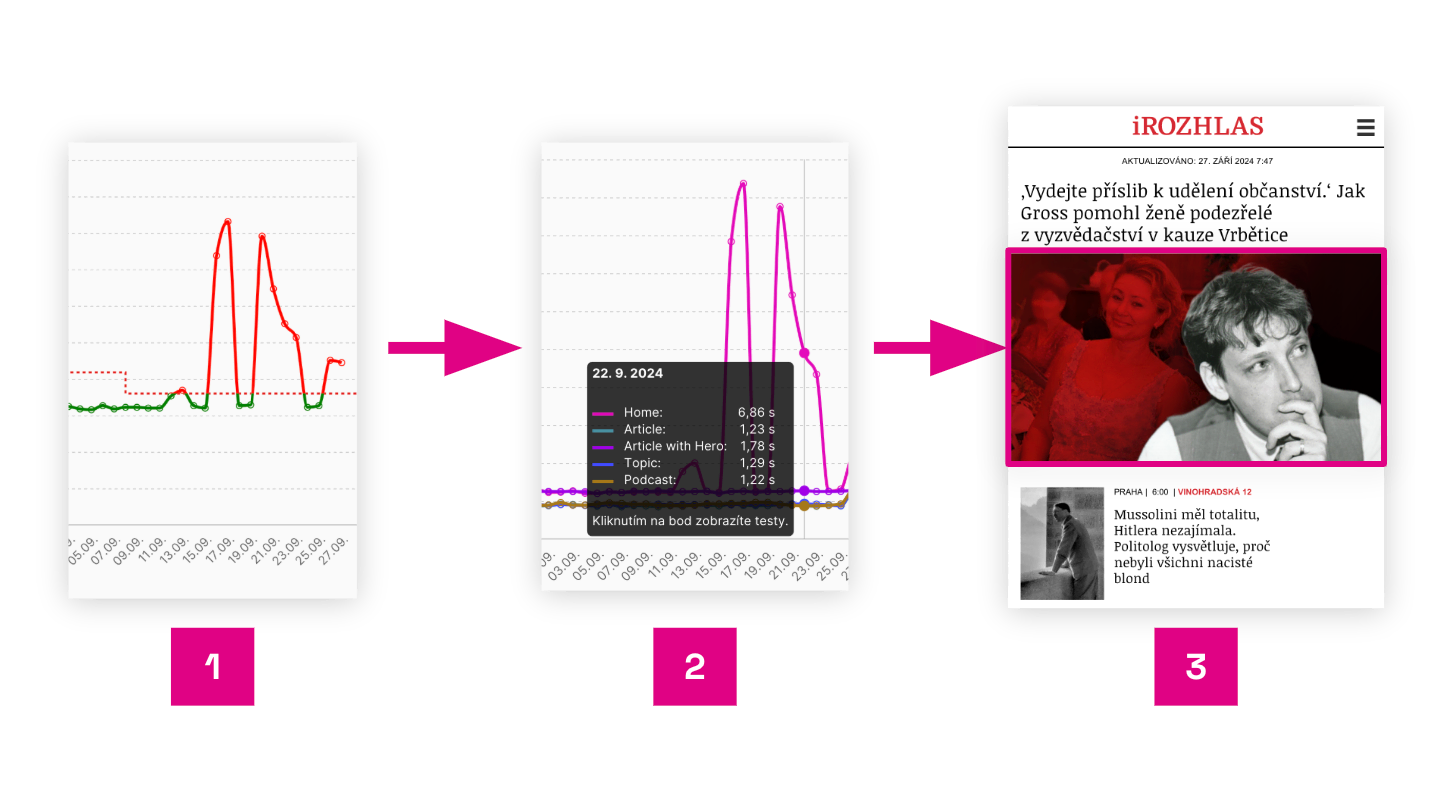 Good monitoring also provides data on change causes, guiding you to the specific issue on your site.
The image shows a report example from PLUS PageSpeed.ONE monitoring during incorrect image deployment on the homepage of the news site iRozhlas.cz:
- Synthetic data from Watchdog shows an LCP metric issue.
- Looking at the LCP breakdown by pages, we see a problem on the mobile homepage.
- Details of a specific Lighthouse test run identify incorrectly set lazy loading for the first image.
Without monitoring, you won’t notice changes. Without monitoring data, finding the cause of deterioration later will be very expensive, slowing your work on developing new site features.
One-Off Measurement Isn’t Monitoring
Many popular tools like PageSpeed Insights, Lighthouse, or WebpageTest.org show one-time metric results and a technical page analysis.
Don’t confuse one-time testing with monitoring. Speed monitoring runs automatically, at least once a day, thus providing you with data over a period you wouldn’t think to test with one-off measurements.
Why isn’t occasionally checking speed in PageSpeed Insights enough?
- You won’t learn about most mishaps.
- You don’t have historical data to pull when needed.
- You don’t see patterns and trends forming in the data.
- You don’t have data guiding you to easy problem solutions.
- You can’t celebrate successes when improvements happen.
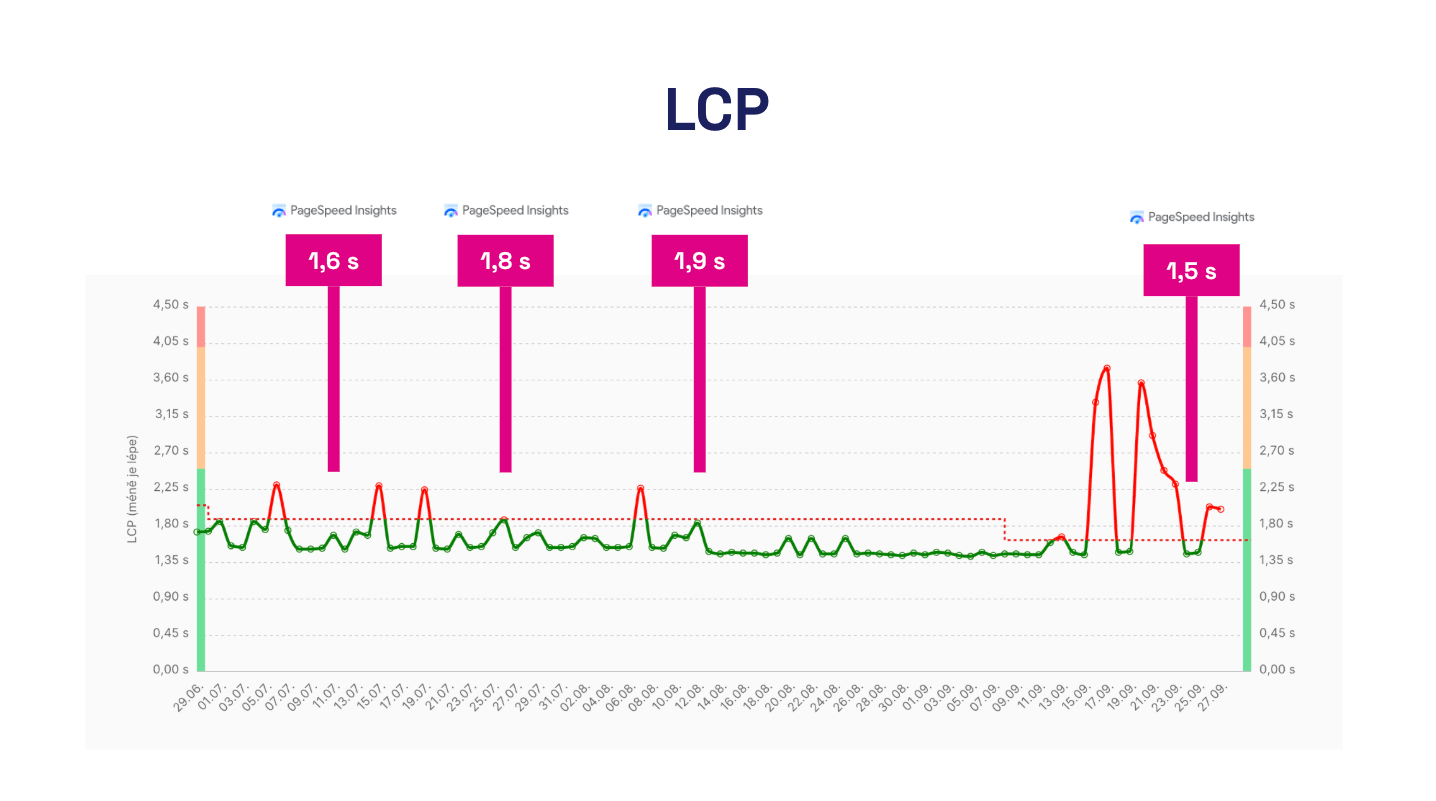 One-off tests in PageSpeed Insights, done only when remembered, will likely hide problems and could mislead you into thinking site speed is improving.
You Don’t Have Web Speed Under Control, Even If You Think You Do
A fast site is partly achieved by actively preventing its slowdown.
Unfortunately, speed reduction is common, rooted in the fact that web development teams often have much less control than they think.
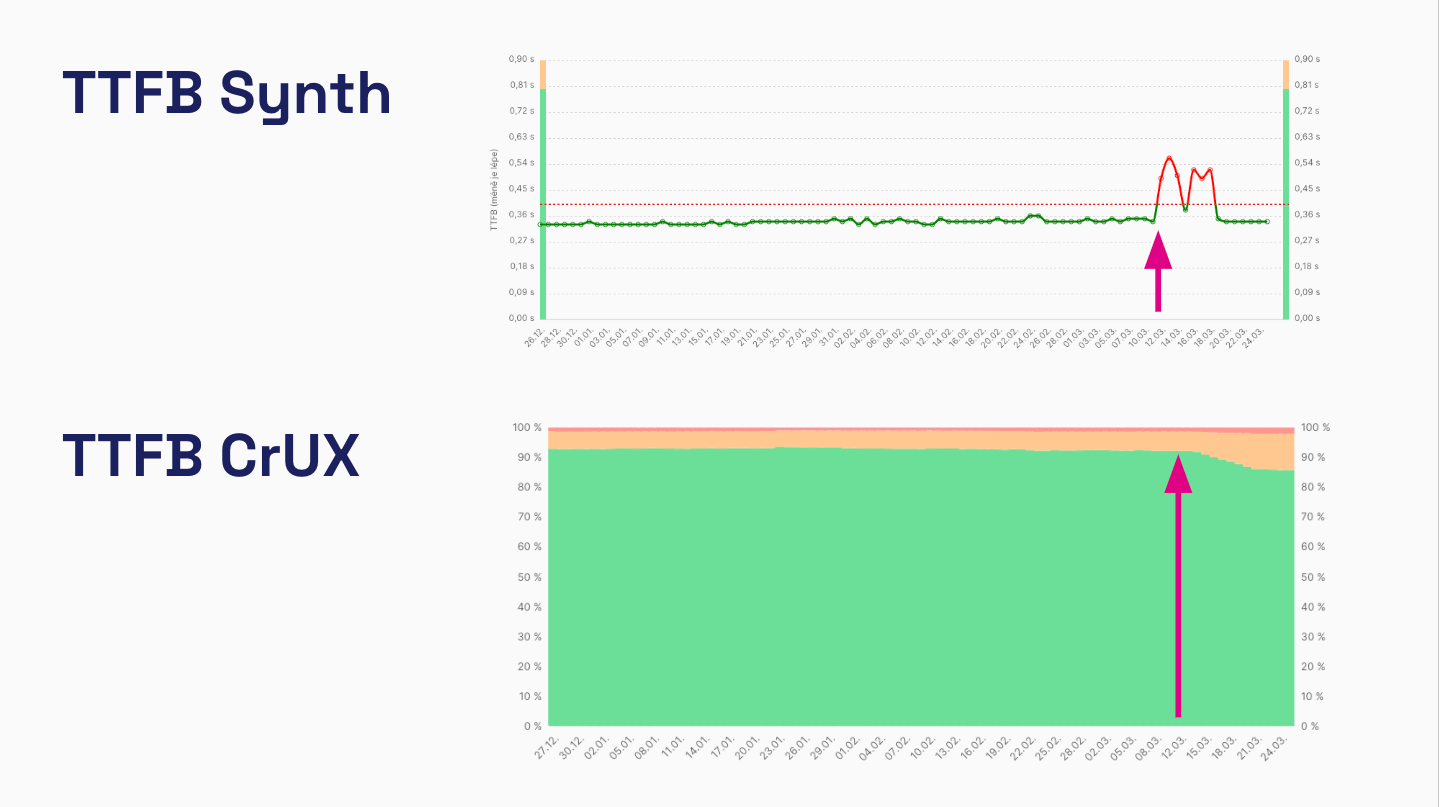 Unexpected server response (TTFB) degradation of a large Central European e-commerce platform. Synthetic data warns in advance, while CrUX provides a delayed but more accurate user impact picture. Now imagine planning a campaign on these days without this information.
Let’s look at examples showing that modern web development is much more complex than you might think:
- Websites consist of many parts (client-side, server-side) and components, often managed by different teams.
- Web speed can often be affected by third-party JavaScript code inserted via GTM by analysts, marketers, or UX people, often external vendors.
- Third-party components (analytics, advertising, personalization…) develop without your control and may further degrade web speed during development.
- Web speed can be affected by one-off events like a successful marketing campaign or a DDoS attack targeting your infrastructure provider.
- Speed changes may stem from shifts in user base distribution. Your campaigns might reach a new target audience, such as users on slow Android devices, suddenly worsening Core Web Vitals metrics.
- Websites, of course, evolve over time, with new content or features regularly deployed. Even seemingly innocent ones can negatively impact speed.
This complexity affects even relatively small websites today. Web performance is a multidisciplinary field requiring communication and agreement across many parties.
From our experience, speed monitoring provides clear data preventing unnecessary team conflicts and pinpointing specific problems.
Monitoring Has Excellent Return on Investment (ROI)
In our work on web speed optimization for small and large clients, enabling speed monitoring is a necessary first step to starting a collaboration.
Few things in the web speed domain have as good a return on investment (ROI) as monitoring.
For a few dollars a month, we prevent complex problems, investigations, and team disputes that could cost hundreds or thousands of dollars.
Different Types of Monitoring: You Need Availability, Synth, and User
We encounter people confusing several types of web monitoring with each other.
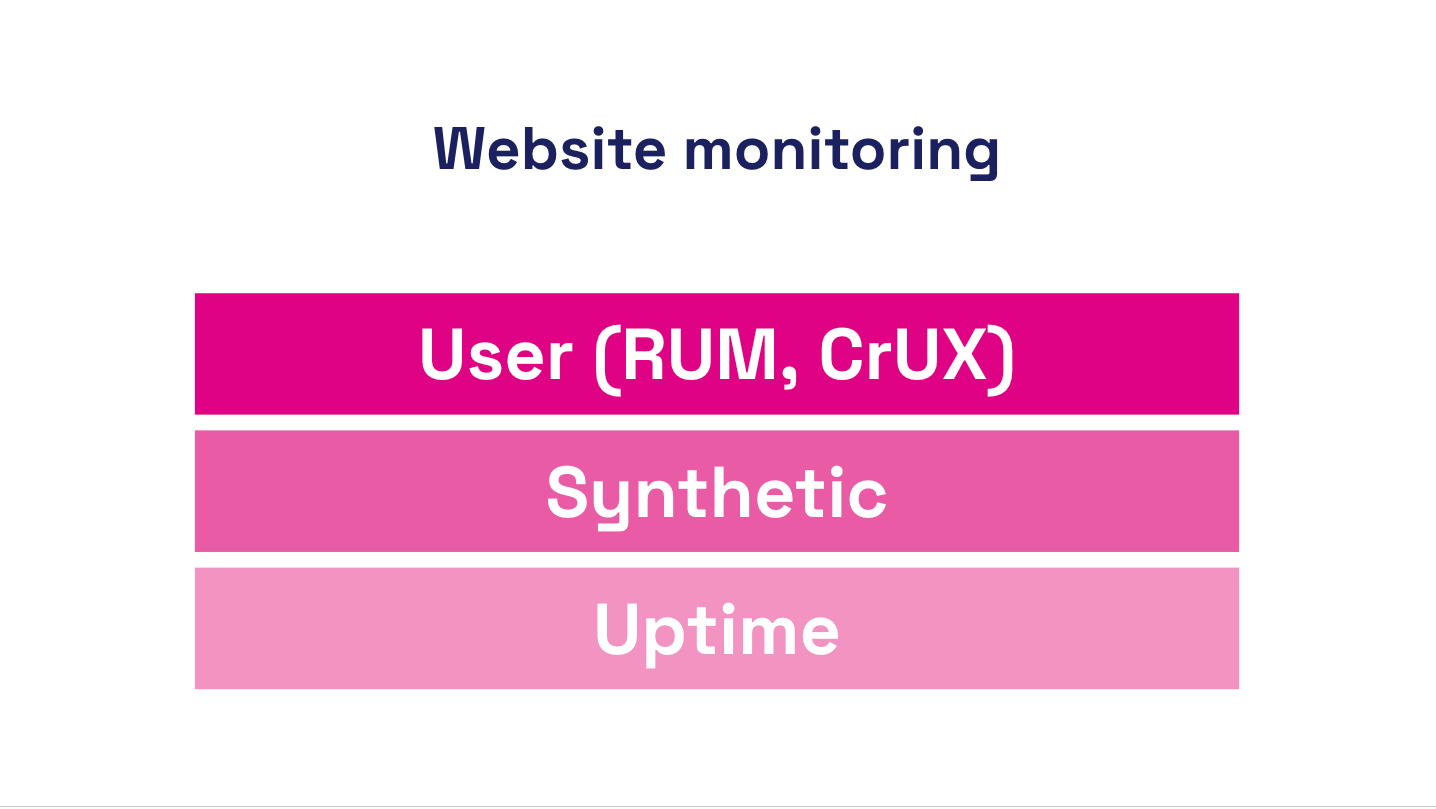 For successful web operation, you need at least three types of monitoring: availability, synthetic, and user.
Let’s clarify:
Availability Monitoring
Answers the question: “Can a bot see if your site is running?”
Availability monitoring ensures your site is functioning every hour, minute, and second of the day. This type focuses on technical indicators, scanning hosting and infrastructure.
Tools like UptimeRobot or BetterStack provide this monitoring.
Synthetic Performance Monitoring
Answers the question: “How does a bot see your site speed?”
Here, we enter the speed monitoring realm. Synthetic monitoring tests the site at set intervals using software like Lighthouse or WebpageTest. It returns web speed metrics, but they might not reflect user experience (limited CLS and INP metrics) or show skewed values of other metrics.
Users might experience the site differently than a machine test. The advantage of synthetic monitoring is the detailed technical data. It allows frequent testing, providing early warnings in case of site changes.
Tools like Pingdom or GTmetrix offer this monitoring, though unfortunately targeting outdated technical metrics. Our PLUS monitoring also measures synthetically, focusing on Core Web Vitals metrics and adding a user perspective.
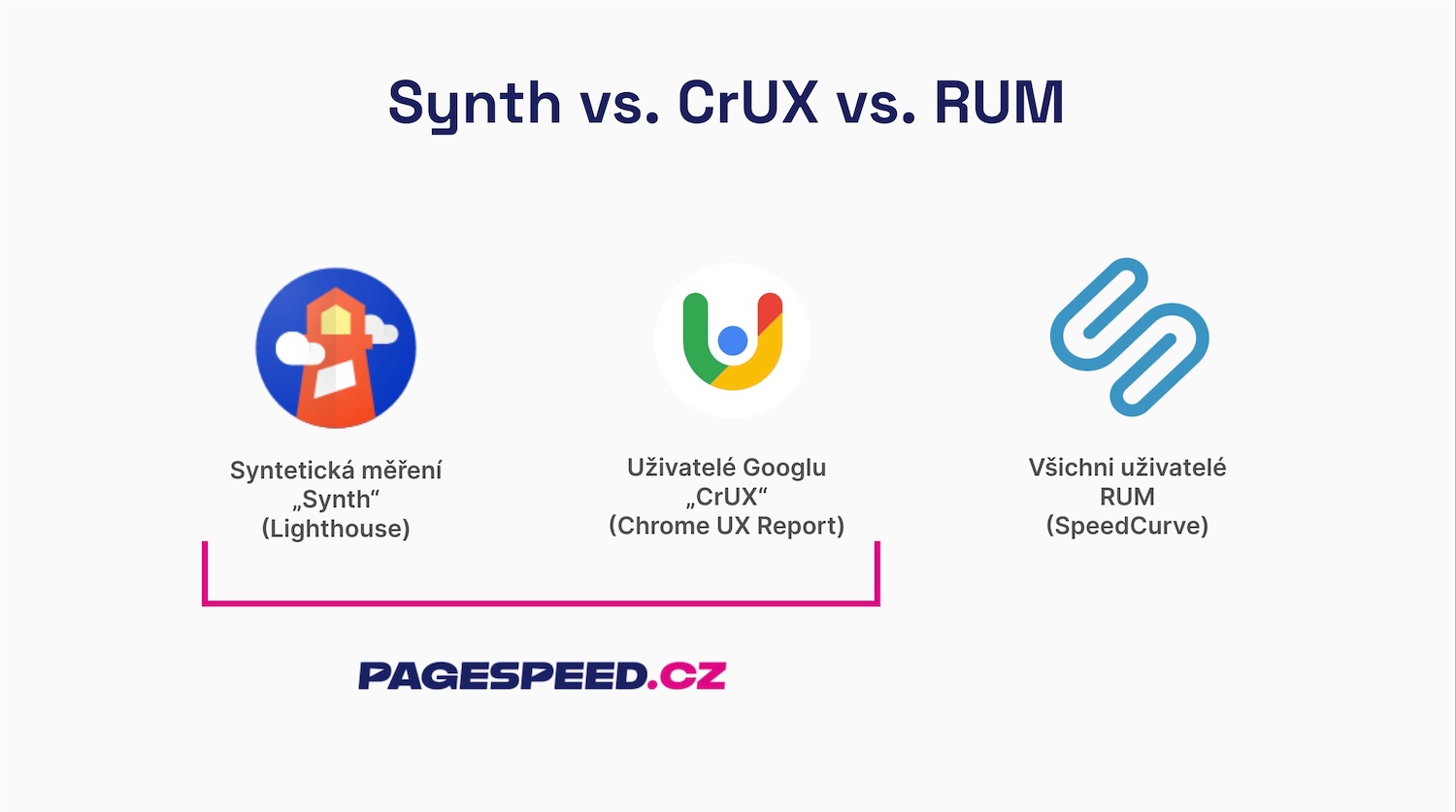 We believe every site needs synth and CrUX speed monitoring. RUM is important, but more for larger sites.
User Performance Monitoring
Answers the question: “How do users perceive your site speed?”
Core Web Vitals and other metrics allow us to see a technically measurable part of the user experience (UX) on large data sets.
User measurements are essentially of two types:
- Chrome UX Report (CrUX) – Google provides data from all Chrome users for domains or URLs with sufficient traffic. The disadvantage is cumulative data (always showing the last 28 days) and thus some delay, plus insufficient detail. The advantage is Google offers this data freely. CrUX-derived Core Web Vitals also determine how Google evaluates your domains and URLs for search results (SERP) or Google Ads.
- Real User Monitoring (RUM) – metrics are collected from all users via custom JavaScript measurement. The advantage is that measurement isn’t limited to the Chrome browser, data is available without delay and in detail you specify. RUM monitoring is also deployable on applications hidden behind logins. The disadvantage is data complexity, cumbersome measurement setup, and often higher solution costs.
User measurement is ideal since it concerns the actual experience. The downside is that user measurements aren’t always immediately available and don’t always provide sufficient technical detail. Therefore, we combine user measurements in our PLUS monitoring with synthetic data.
Let’s summarize what we’ve covered in this section. Availability monitoring only checks if the site is functional. Synthetic performance monitoring measures speed during machine loading. User performance monitoring then provides data on real user experience. Ideally, have all these monitoring types.
Tip: Check out our comparison of different measurement types – synth, CrUX, and RUM.
Speed Monitoring by Target Audience
An interesting aspect of monitoring is that different target audiences need different performance data:
- Developers – besides site speed status for users, they need change alerts, diagnostic data like technical metrics guiding them to problem causes and optimization opportunities. Availability monitoring should be a given.
- Website owners, marketers, UX designers, and others – need to see the current speed status, receive regular reports, and possibly change alerts. Ideally, the tool should also show the relationship between speed and business.
- Marketing and development agencies – besides the above, they need the ability to manage access to multiple projects, receive regular reports, and see the status of various projects in one place.
See our text on how monitoring is useful for development agencies.
Always demand from your monitoring tools what matches your goals.
Our Methodology: How Do We Approach Performance Monitoring?
We have years of experience with web speed consulting for small and large clients in Central Europe. Over time, we’ve developed a methodology for setting up speed monitoring, which we now present to you.
CrUX as a Foundation and SPS Score as the Main Indicator
We consider Core Web Vitals to be excellent speed metrics and Google users’ Chrome UX Report (CrUX) data a great gift for all website operators.
Metrics like LCP, INP, and CLS are not perfect but well-represent different parts of user experience. CrUX data isn’t ideal for all measurement cases but is a sufficient base for any reasonably sized site.
Core Web Vitals from Chrome UX Report also have the advantage of providing data for both main reasons for speed optimization – user experience (UX) and Google traffic (PPC, SEO).
For clients, our monitoring summary always first shows the current numbers of these metrics:
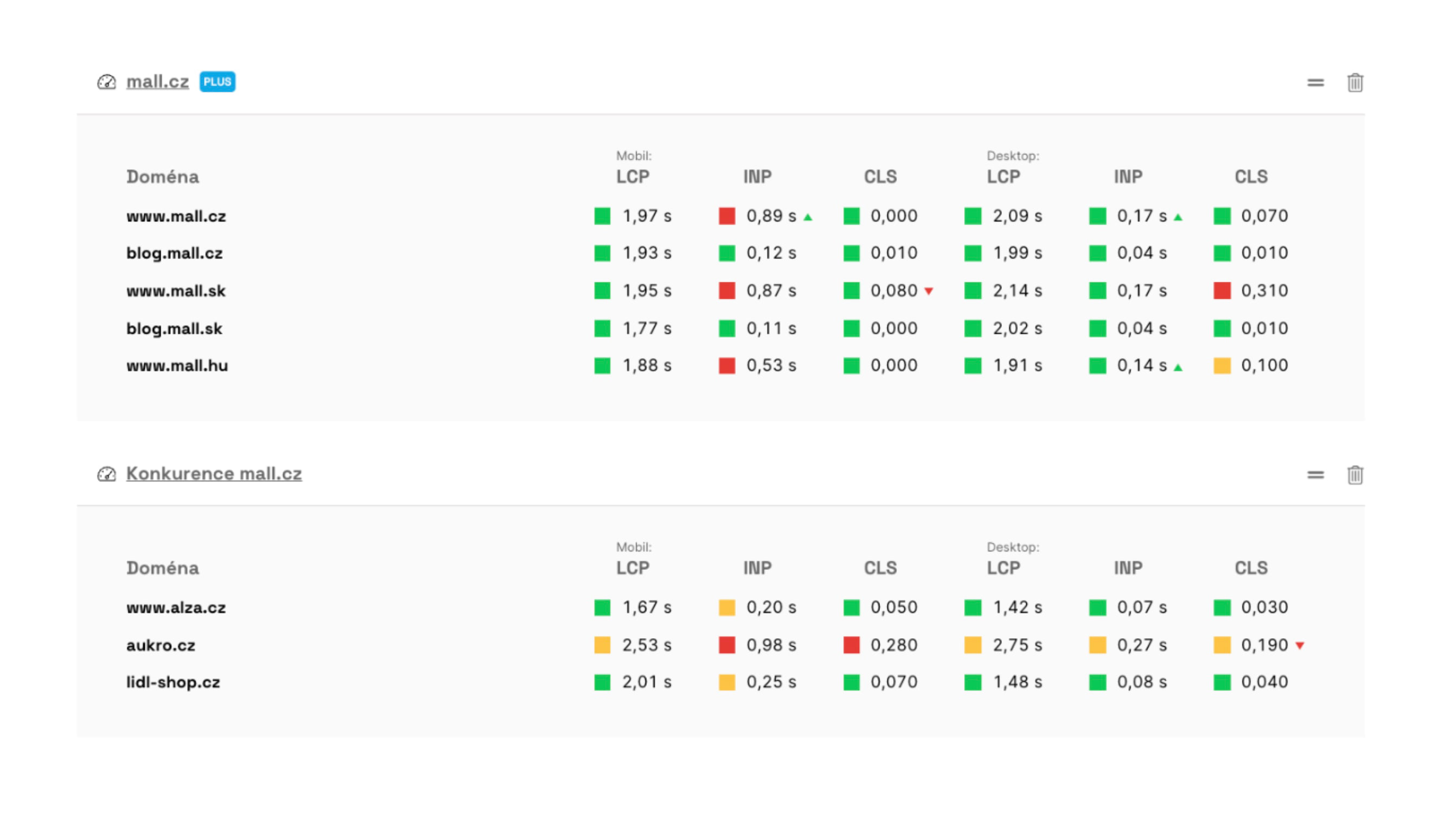 As seen, our monitoring also provides information on metric development.
There are three metrics to track for two different devices, so users often have to remember six different metrics across many domains.
Therefore, we have experimentally introduced a score into our monitoring that consolidates these six numbers into a single value, which we call the PageSpeed.ONE score (SPS):
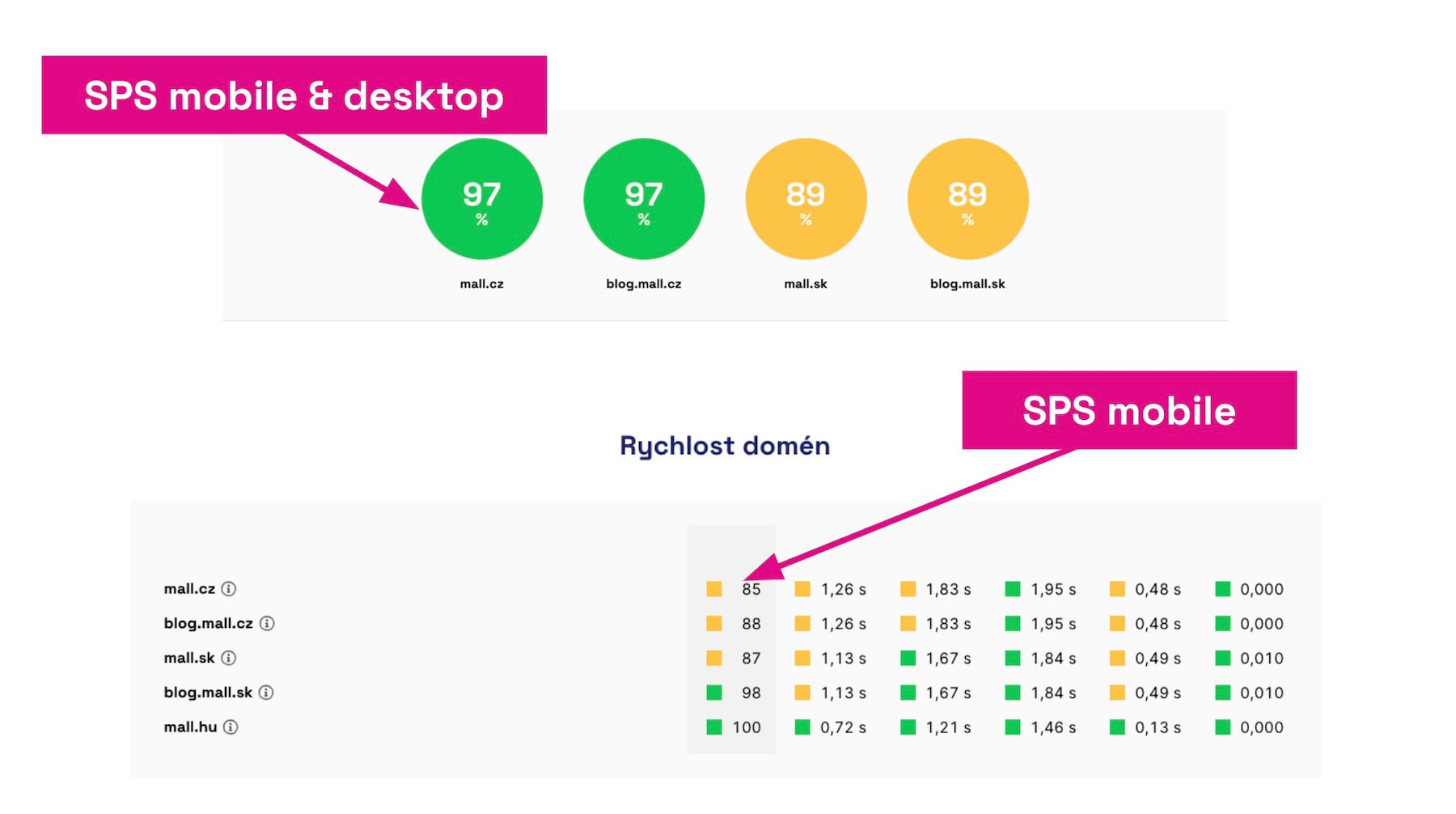 SPS score helps quickly summarize the current speed status of a site.
For smaller sites, it may happen that a client’s domain doesn’t have enough data. There, synthetic measurement is the only option.
Synthetic Measurements Once a Day
Synthetic testing using Lighthouse is a necessary complement to CrUX data from users. Data is available for practically all sites, always providing current metric values.
We experimented with running tests multiple times a day but ultimately settled on daily testing with a three-day cycle for potential warnings via Watchdog.
The reason is that practically all our clients work on speed optimization in weekly to monthly intervals. Alerts about fluctuations within hours or minutes always overwhelmed them more than desired. We’ve observed that this is how practically everyone works on web speed.
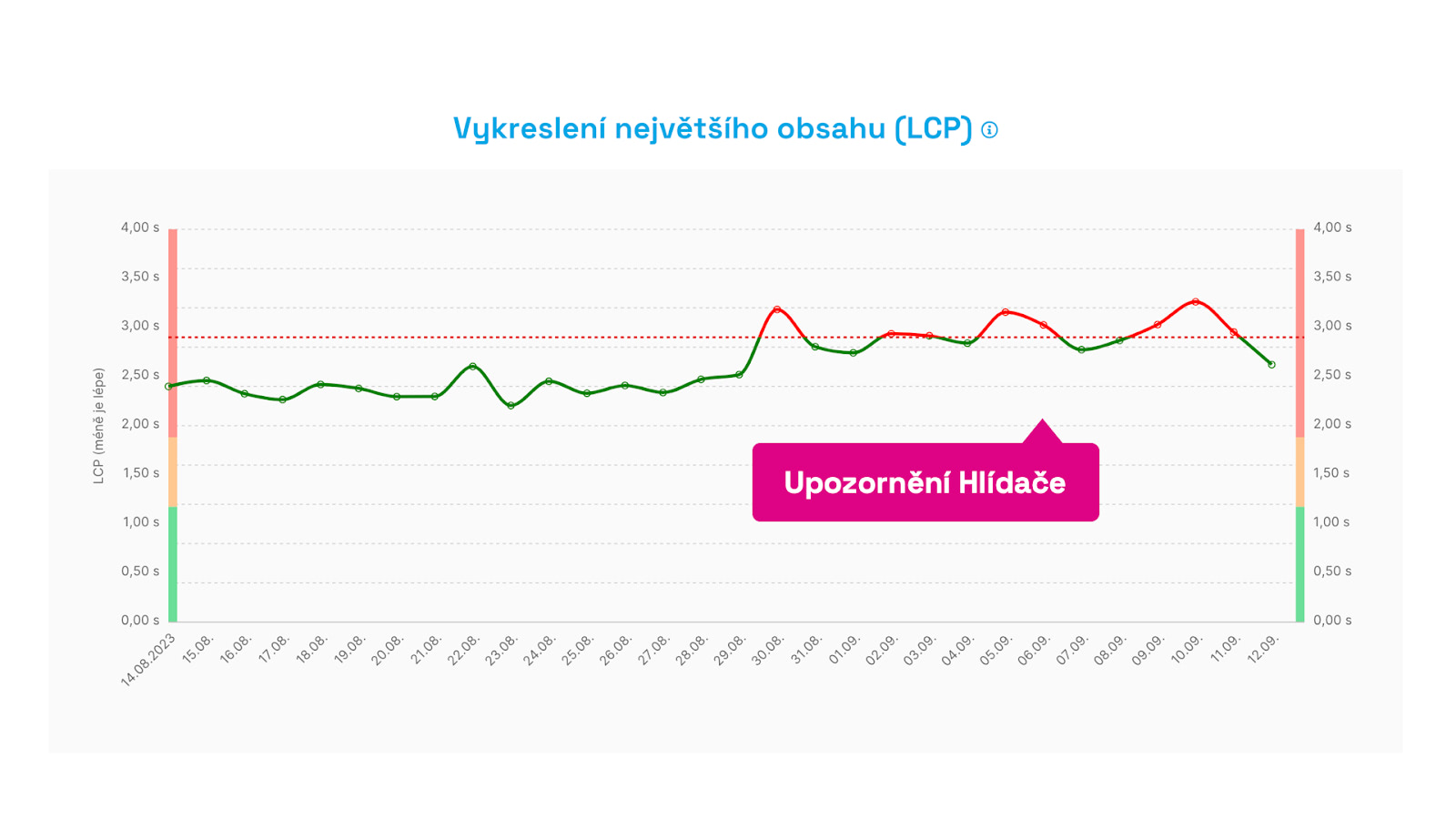 Watchdog alerts are not sent in case of a one-time fluctuation, but after three days when we’re sure.
For more detailed measurements on larger sites or during speed fluctuations (Black Friday and other seasons), we temporarily enable RUM measurements for clients.
RUM Monitoring for Larger Clients or During Optimizations
Having data from all users (RUM) sounds tempting, but as we’ve hinted, it often leads to data overload and an inability to evaluate it correctly. RUM measurement isn’t easy to set up correctly, especially for SPA applications, and isn’t exactly cheap.
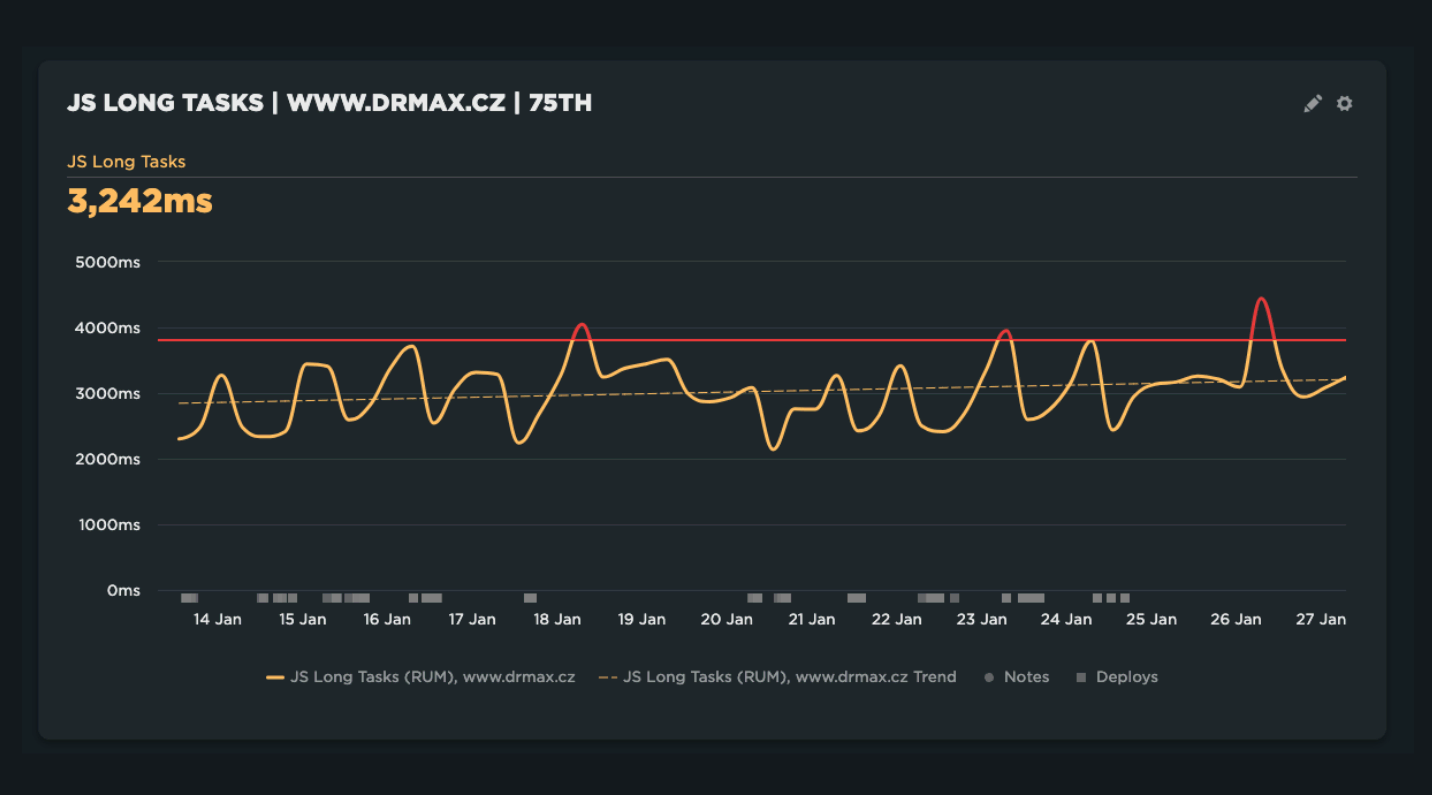
We offer our clients help with implementing SpeedCurve RUM, and we enable these measurements for smaller clients when we’re working intensively on optimizations or during a season that could affect site performance.
We also recommend RUM measurement to anyone monitoring non-public web applications, like SaaS (Software as a Service).
Where to Monitor: Production Server, Stage…?
We often address the question of where to run monitoring. Just production? Stage or test servers? Locally during development or within the CI/CD pipeline?
Ideally, the answer is: monitor speed at all levels.
However, in practice, this ideal state encounters many problems. The first is the instability of stage environments, which often don’t match the actual site in data or settings. In this, a so-called pre-production environment is better, but not all companies have it.
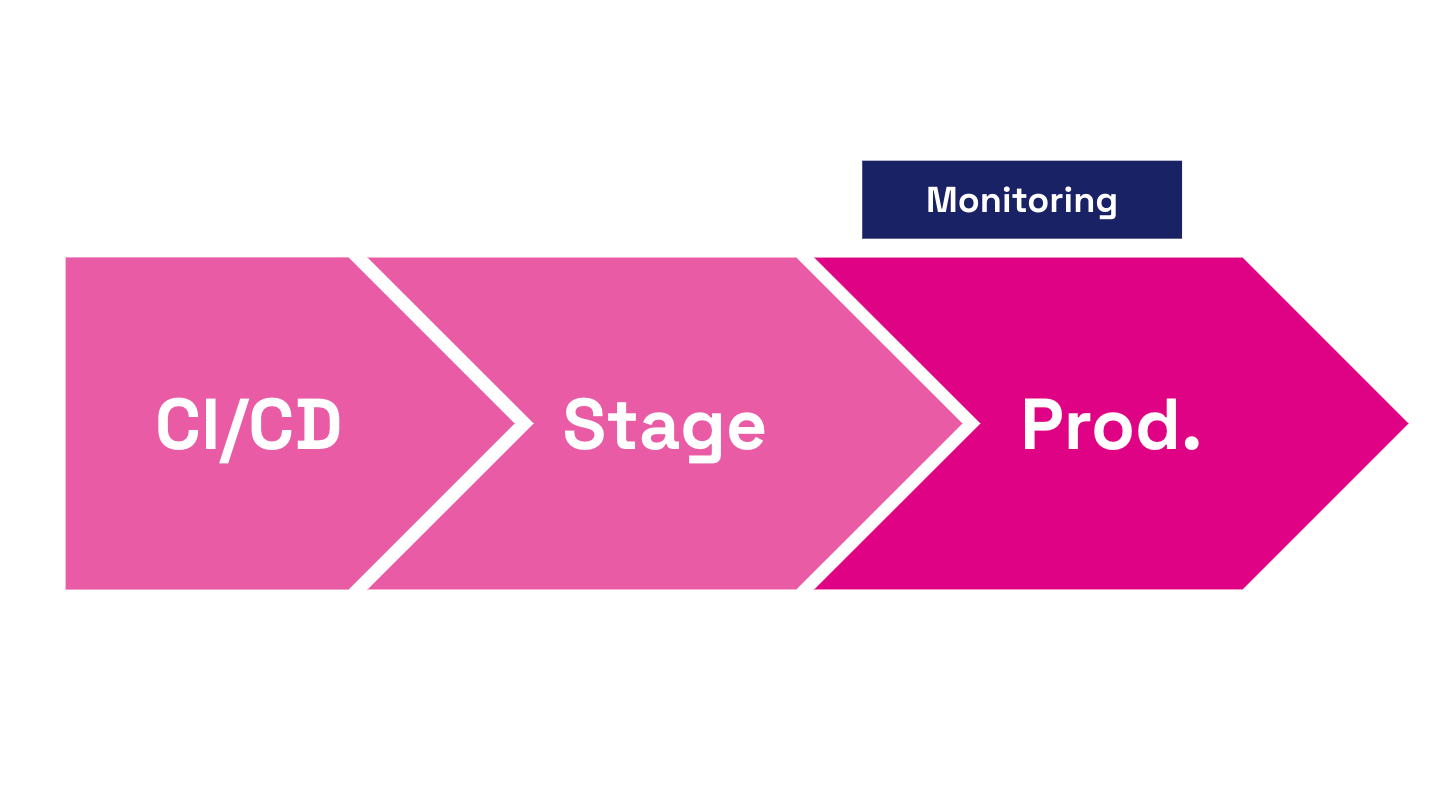 Ideally, have monitoring everywhere, but always on production sites.
CI/CD pipeline or localhost testing is also important, but developers and testers don't have user data (CrUX or RUM) in this process part. Again, we face localhost instability, so even synthetic tests often don’t provide comparable numbers.
The pragmatic response to where to have monitoring is: mainly on the production server.
Simultaneously, adjust your development cycle to quickly roll back problematic releases or fix them with hotfixes.
Special Emphasis on Notifications
You can distinguish good performance monitoring from bad by its ability to communicate with you effectively.
Monitoring applications often send nonsensical notifications, false negatives leading to alert fatigue, resulting in notification fatigue and subsequent ignoring.
Performance monitoring applications also often require manual setting of Performance Budgets (limit values for individual speed metrics). This again demands attention and time from someone on the client side.
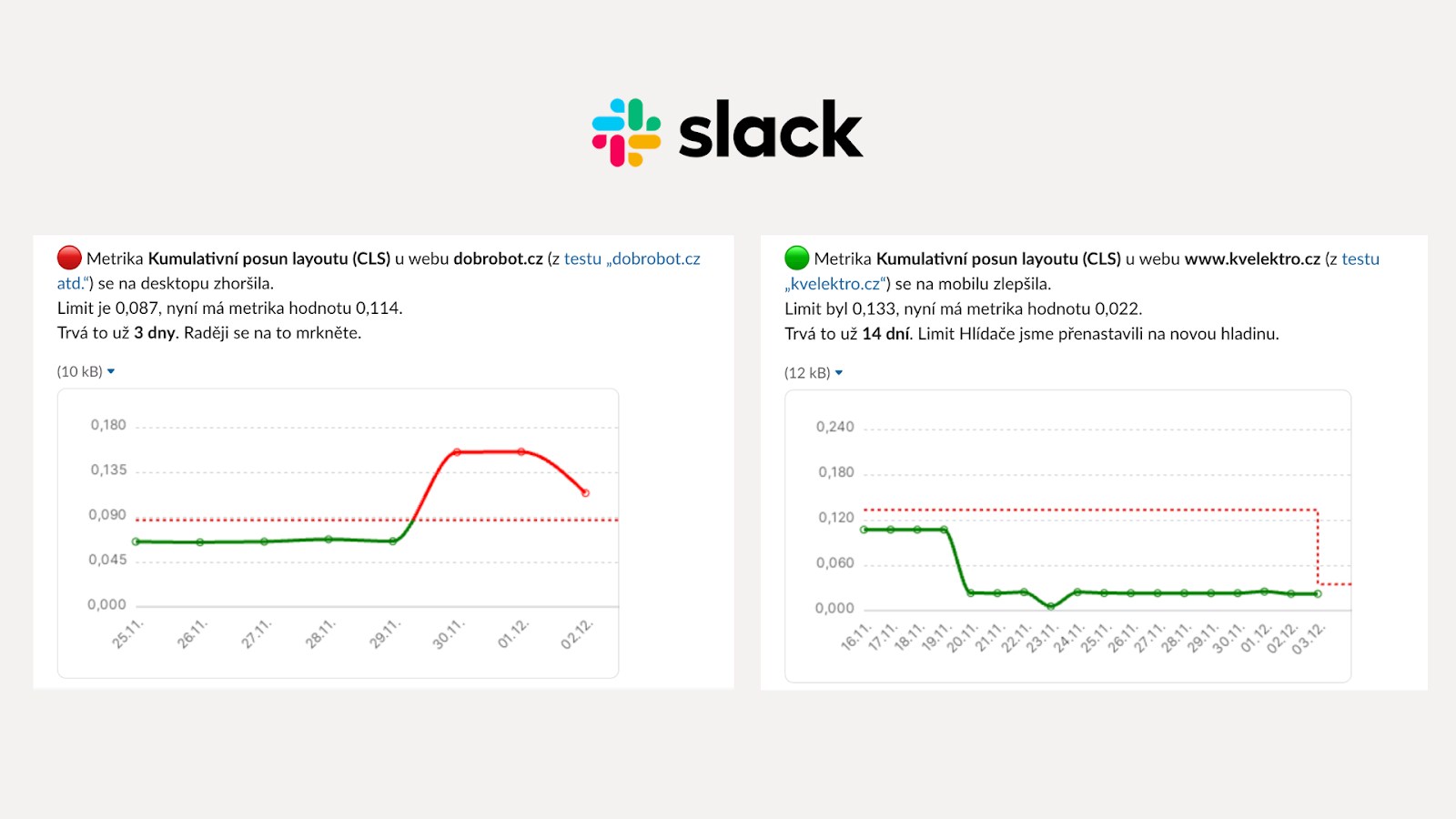 Watchdog reports can be sent to Teams, Slack, or email.
We designed Watchdog alerts to eliminate both problems. So we only send notifications when deterioration isn’t one-time.
We set limits for individual metrics automatically based on best-practice developed over many years of speed consulting.
We also provide our clients with know-how on evaluating Watchdog alerts and technical data needed to find the cause of metric changes.
In Conclusion
If you don’t measure, you can’t improve. That’s a phrase you should remember.
If you consider web speed important, rush to set up some Core Web Vitals monitoring.
It’s worth it because the annual cost of a tool that helps you find errors is a fraction of the cost of blind error discovery without data.

Speed optimization isn’t a sprint, it’s a marathon—a continuous effort to improve web UX or SEO and PPC positions. Speed optimization is a marathon where you’ll need a partner with data in their pocket, which speed monitoring can become.
Case Study: Svět Svítidel Redesign
For a real-world example of how measurement data helps, read the case study of the Svět Svítidel redesign. For clients with stable speed, we measure long-term with PLUS monitoring, just synthetically and using Google’s CrUX data. In the case of major changes, however, we launch detailed measurement from all users (RUM), which we did shortly before the redesign launch, thereby having real-time data.