Speed Optimization: How Can the Backend Help?
The backend plays a crucial role in website speed optimization, as proper code and server-side optimization can eliminate delays often caused during request processing and content delivery.
This article is primarily aimed at backend developers or server infrastructure administrators.
The Impact of Backend on Speed Metrics
Let’s start by acknowledging that speed metrics are not just a frontend affair. The backend affects numerous metrics, including those from the Core Web Vitals set.
We measure backend speed using the Time To First Byte (TTFB) metric. The ideal TTFB value is under 0.8 seconds. TTFB directly impacts the website’s load speed, specifically the Largest Contentful Paint (LCP), which measures the loading speed of the largest page element.
The following simplified graph illustrates this well. If TTFB takes 2.6 seconds, the website has a problem and will not meet the LCP metric threshold of 2.5 seconds. In such a case, even the best frontend optimization won't save you; backend optimization becomes necessary.
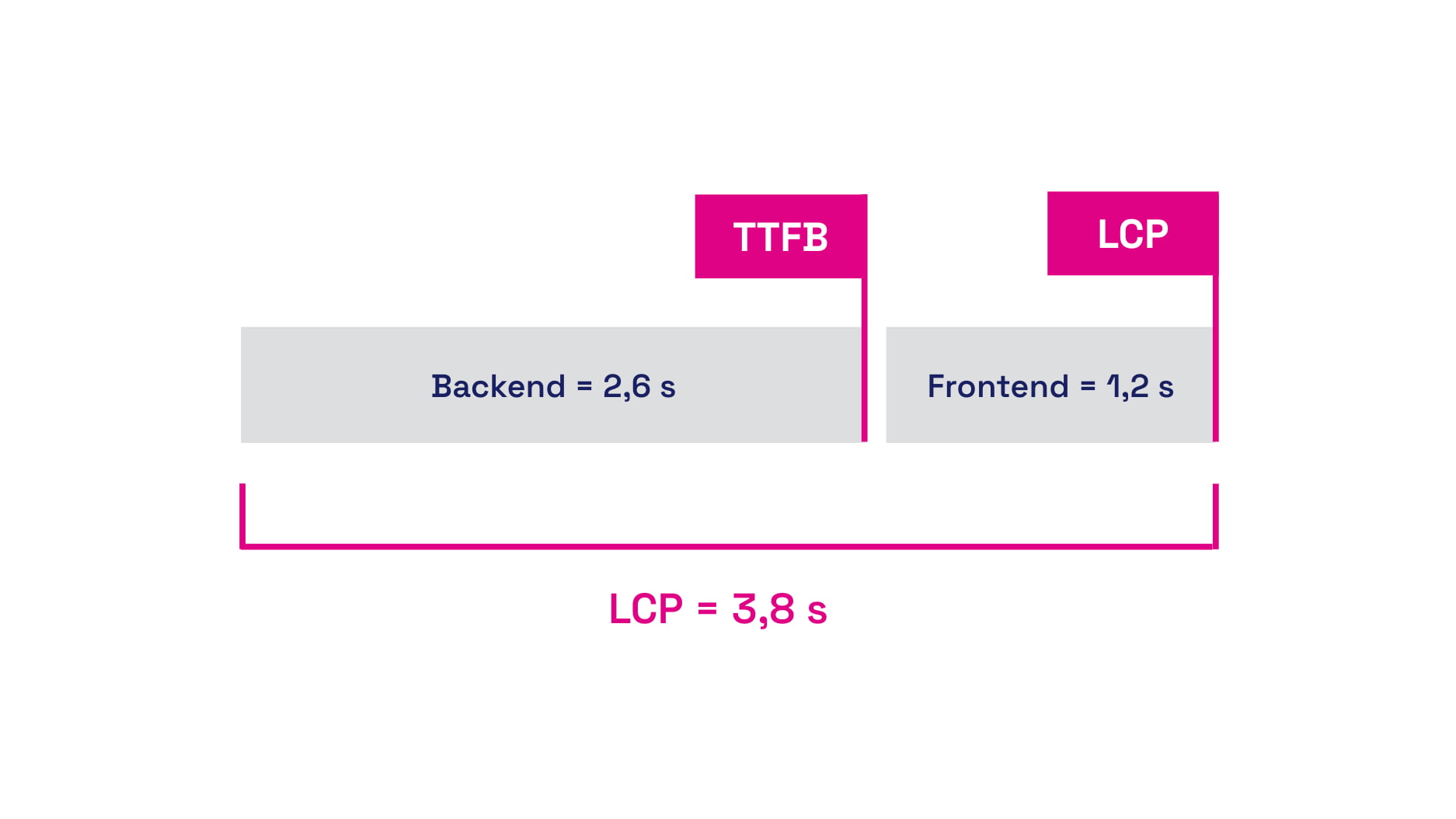 Backend and frontend time together make up the LCP metric value.
TIP: Speed optimization is one of the key factors for a website's success. A fast website not only improves the user experience but can also contribute to better SEO rankings.
In addition to LCP, the backend also affects one of the auxiliary Web Vitals metrics, First Contentful Paint (FCP), which measures the speed at which any content is rendered.
Backend optimization is the foundation on which you can build, even if you are optimizing WordPress, Shoptet, or another CMS system.
General Tips for Speeding Up the Backend
The potential places to optimize TTFB time are endless. To the list above, we can add a few “evergreen” points, which include:
- Increase server performance (CPU, memory)
Sufficient server resources can process requests faster. - Optimize the database
Tune database settings, make efficient queries, and use indexes. - Use caching
Implement caching at the database level, in-memory (e.g., Redis), or HTTP cache on frequently repeated queries or endpoints to eliminate the need for reloading data from the database. - Beware of multiple redirects
Long roundtrips extend the total page load time. - Optimize DNS and network latency
Set up optimized DNS and cache it for the fastest possible loading. In some cases, moving servers closer to the target audience regions can help.
How Can a Backend Developer Help with Website Speed?
The following tips are not focused directly on TTFB metric optimization but can help improve website speed in general.
Data Compression, Brotli, GZIP
Brotli and GZIP are lossless compression methods that save data volume when downloading text files like CSS or JS from the server to the browser. Few realize that GZIP and Brotli have so-called compression levels. GZIP has 9 levels, while Brotli boasts 11.
Generally, for compression, we recommend setting level 6. Higher levels than 6 do not bring significant differences in file size, and the higher the compression level, the higher the server performance and time demands.
Do not use compression for fonts (WOFF and WOFF2), as they are inherently compressed by their format nature. If you lack experience in setting compression, first test the compression level. Services like Cloudflare can automatically handle good compression levels for you.
Want to deploy Cloudflare on your site? Check out our Cloudflare setup service.
Ignoring UTM Parameters
Websites often use cache invalidated when a parameter is present in the URL address. However, it’s important to realize that a UTM parameter does not mean any change in content; they are only used for analytical tools.
Ignoring UTM parameters in the cache can be a good optimization step, as it can eliminate the double distribution seen in the TTFB metric, which is very typical for the cached and uncached versions.
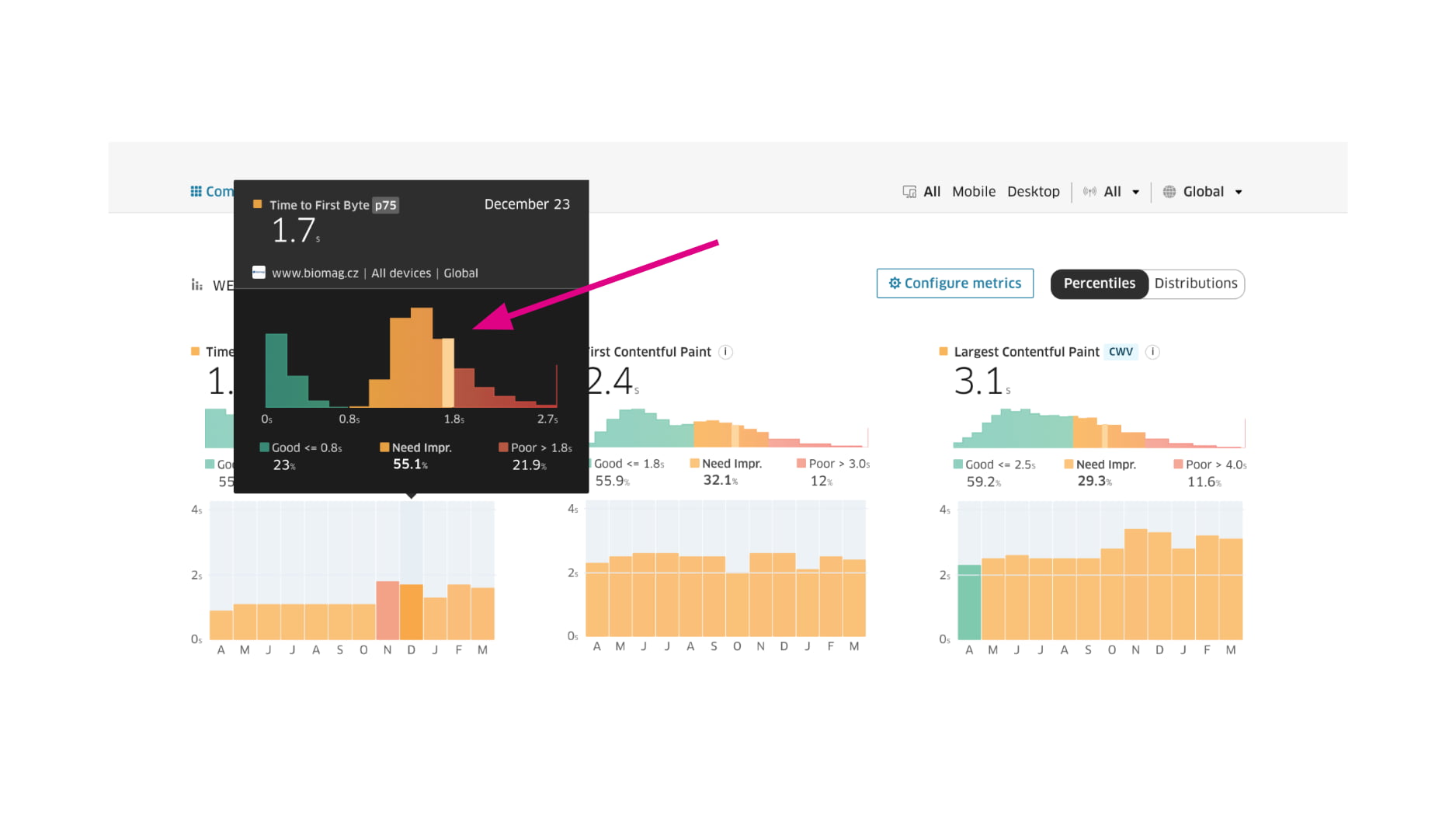 An exemplary case of two different user groups in the TTFB metric – green is cached, the other is not.
Upgrading the Backend Stack
Maintaining and upgrading technology versions in the development environment is very important. New versions often bring performance improvements, which can help speed up your project and eliminate technological debt.
For example, with PHP, you can compare versions using benchmarks. With the Laravel framework, increasing the version can lead to a significant increase in handled requests per second.
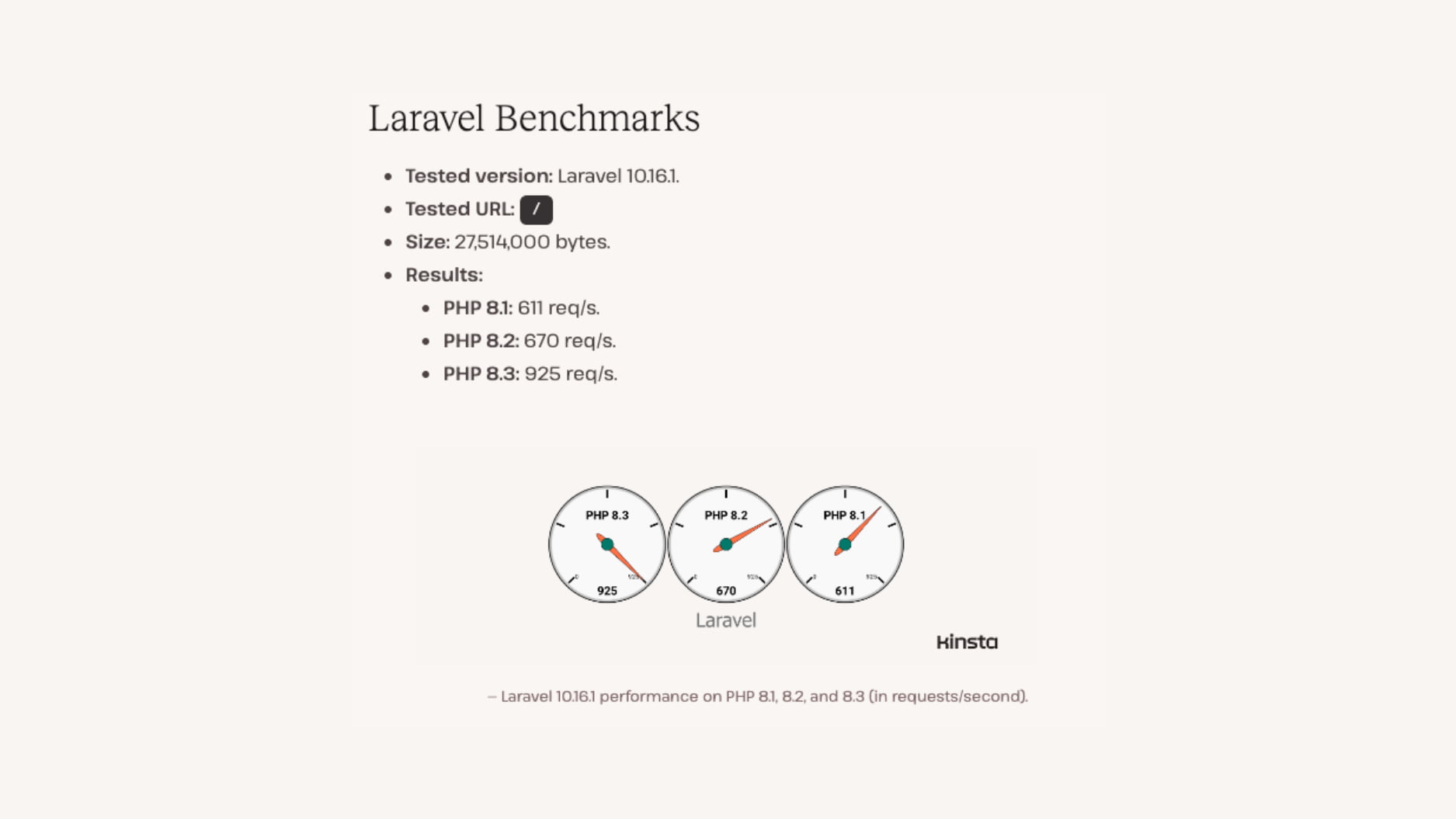 Performance and the number of handled requests for PHP version 8.3 is higher than older versions.
New Image Formats (WebP, AVIF)
Web image formats have undergone interesting developments in recent years, and we can now use two new formats, WebP and AVIF. Their main advantage is higher data savings. Both formats are now supported in all modern browsers, so you can use them without worries.
With the WebP format, you can work natively in PHP; among important parameters, we mention $quality, which sets the output image quality.
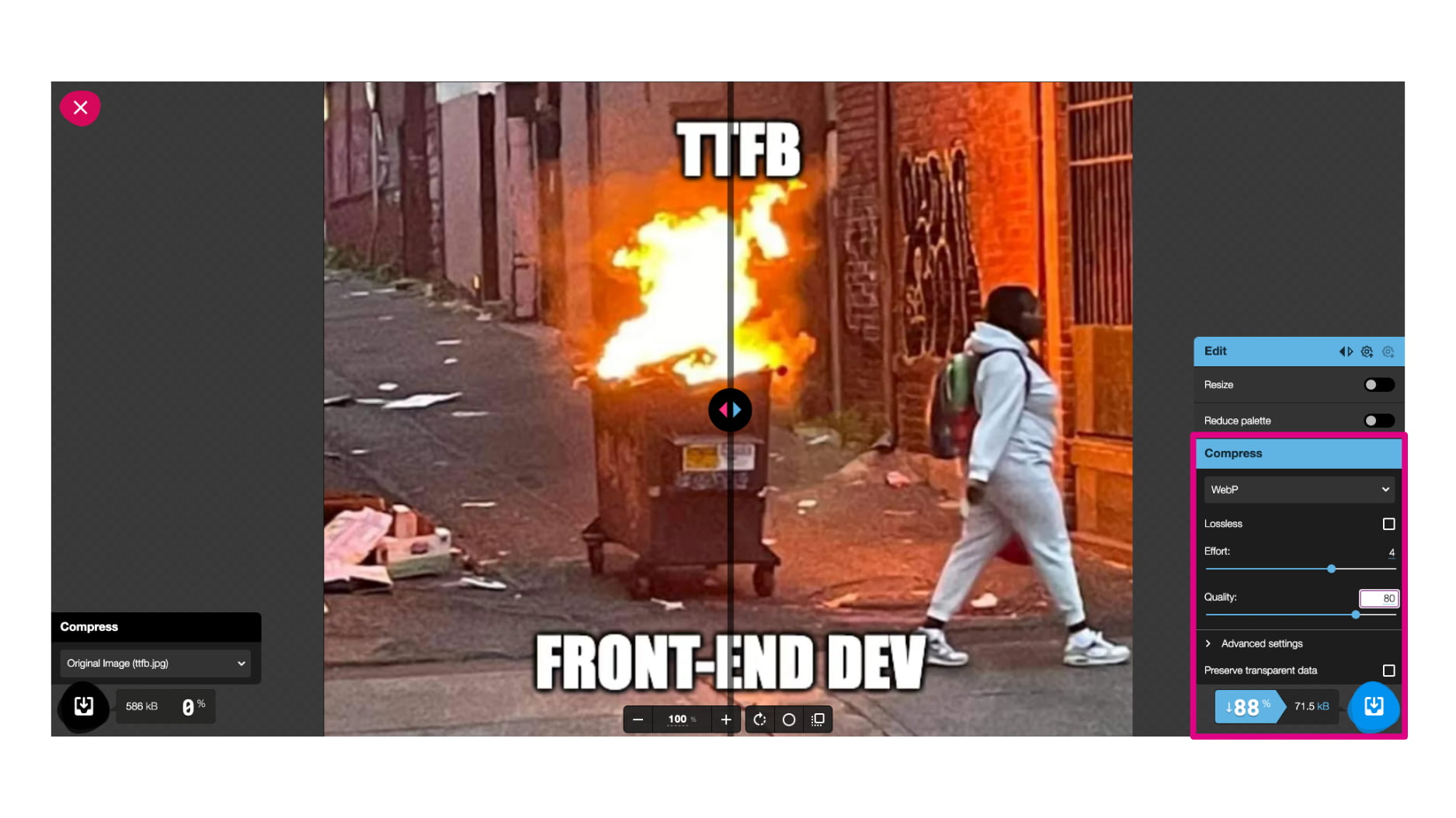 With the new WebP format, you can save up to tens of percent in image data size.
AVIF is natively available from PHP version 8.1 and above, and it also allows you to set the $quality and $speed parameters.
AVIF format is based on the AV1 video format and unfortunately has one drawback: generating an AVIF image takes a relatively long time. If you don’t work with images directly, implementing new formats can be handled for you by services like Cloudflare.
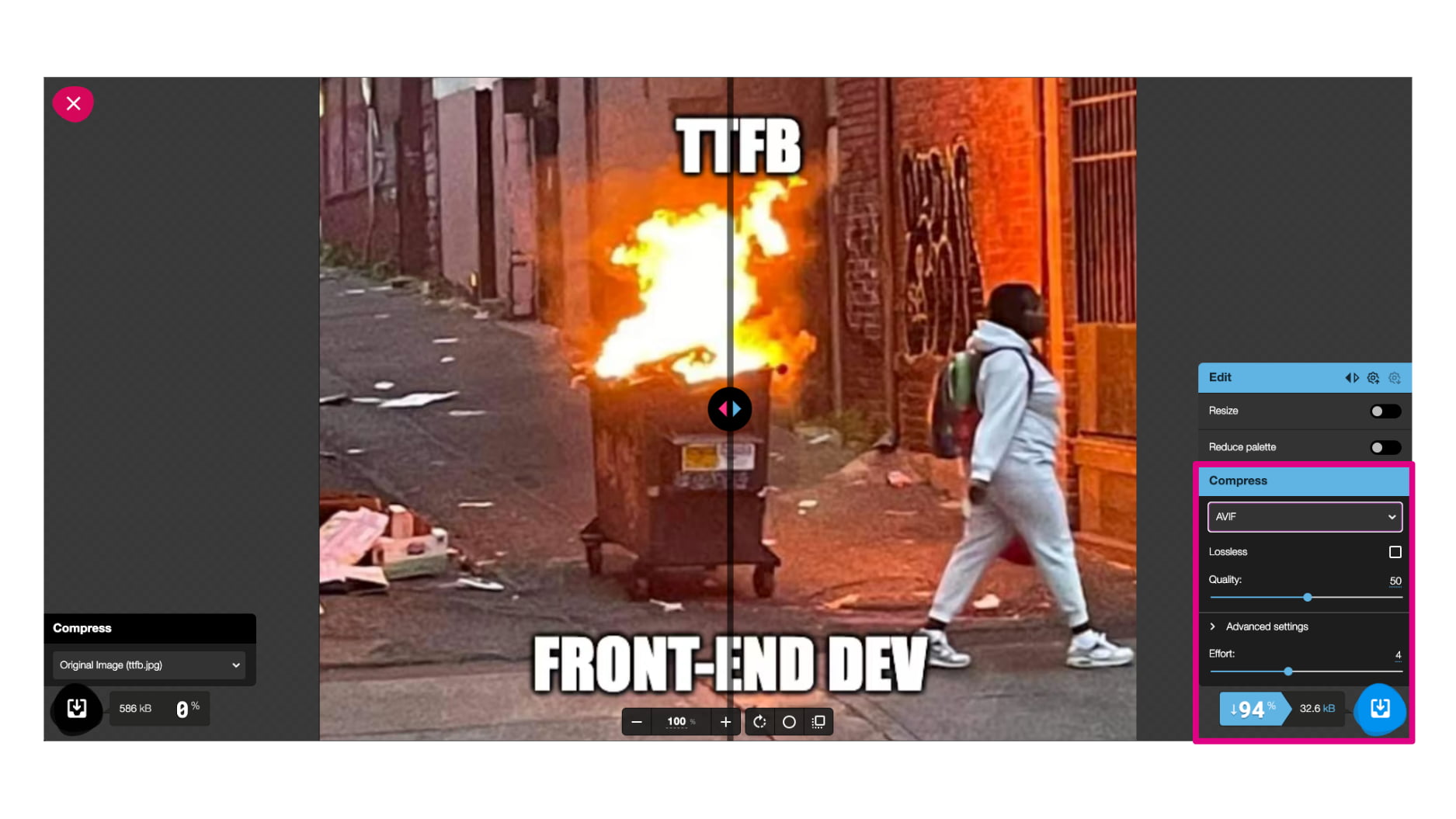 With the new AVIF format, you can save up to tens of percent in image data size.
A detailed guide to implementing AVIF, including our practical experiences, can be found in the AVIF format article. You’ll find more tips for optimizing images on the web there.
HTTP3
Interesting developments and acceleration are also seen at the communication level between the server and the client. HTTP3 brings improvements where the so-called handshake does not occur every time, significantly speeding up the entire process.
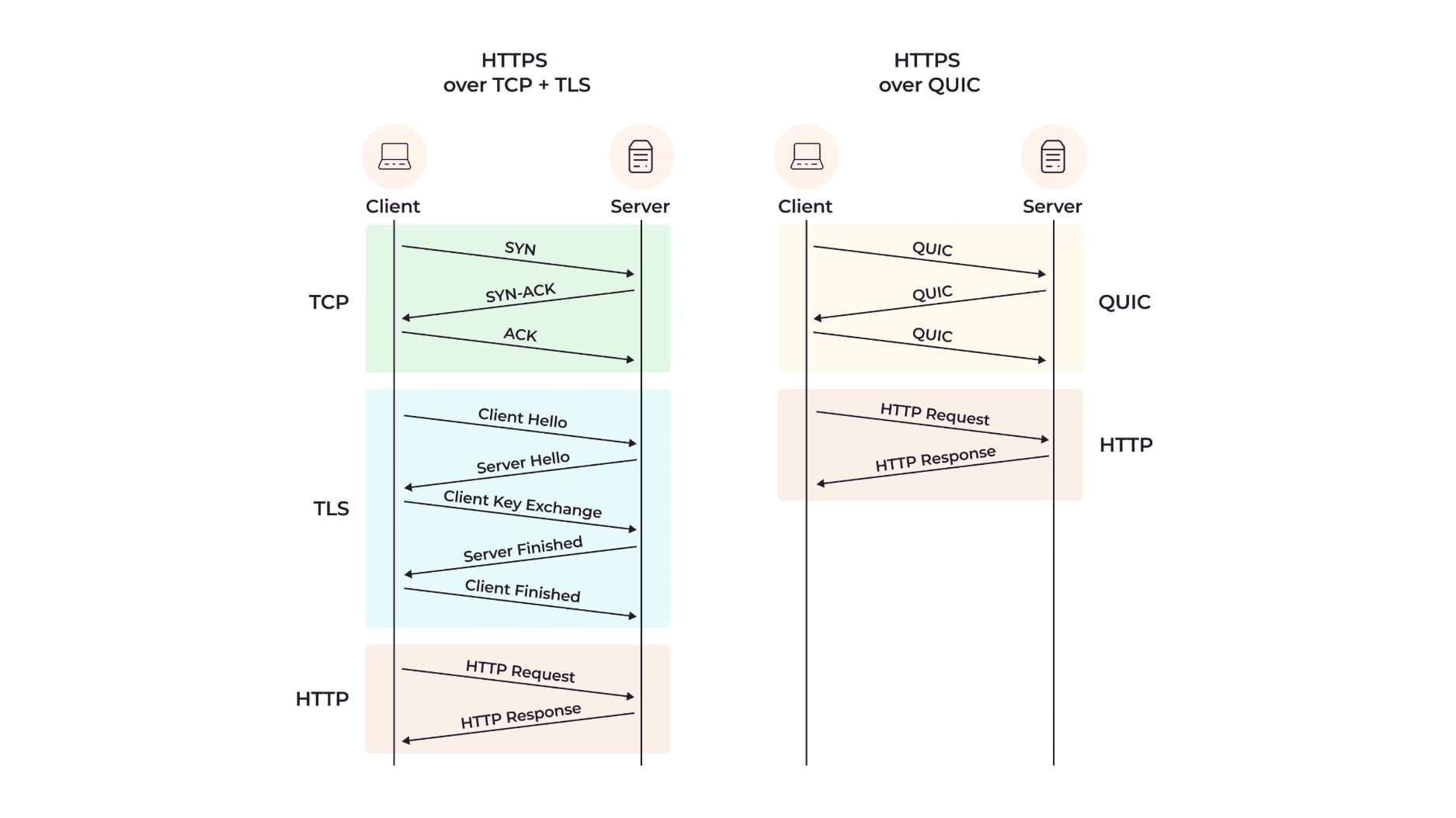 HTTP3 significantly simplifies server-client communication processes.
Other advantages include better handling of download priority (for example, if we use additional CDNs or subdomains besides the main domain), and improved handling of unstable connections. We definitely consider this an enhancement worth considering.
Early Hints
Another improvement in server-client communication comes with 103 Early Hints. Simply put, it’s about even more accelerated preload and preconnect, unlocking earlier start for downloading web resources.
103 Early Hint
Link: </style.css>; rel=preload; as=style
We certainly do not recommend using Early Hints for a large number of files, but they can be useful when downloading resources that block the first render. A good example would be downloading CSS with the help of Early Hints.
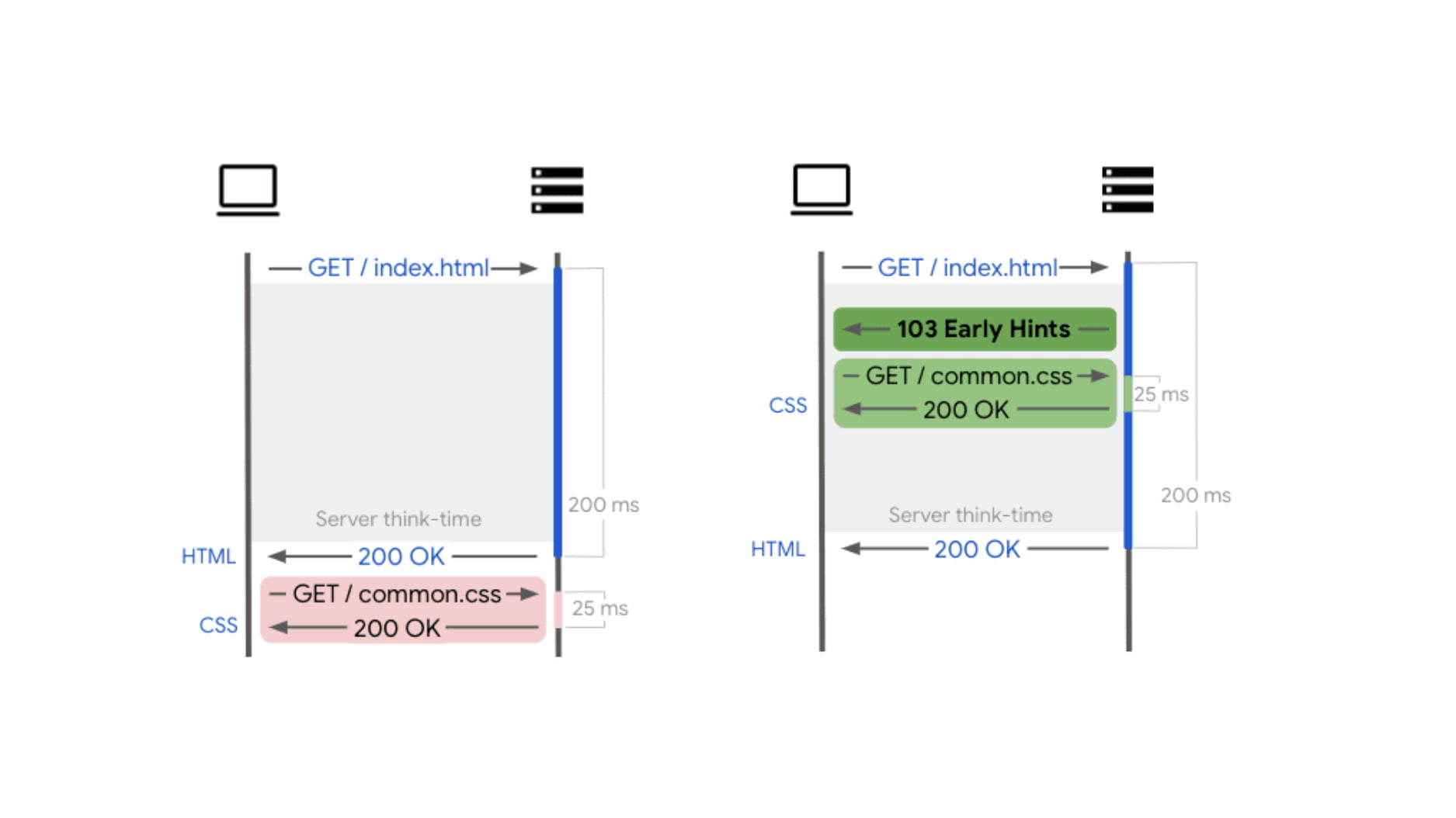 An infographic for easier understanding, displaying server/client communication without and with Early Hints.
Speculation Rules API
This year, Chrome introduced an enhancement with the Speculation Rules API, which allows preloading pages in advance. Currently, when implementing the Speculation Rules API, you can better select, e.g., using CSS selectors, so you can easily target a particular part of links. The prerender option is particularly interesting, where the page is loaded into memory, and its click is then instant.
<script type="speculationrules">
	{
		"prerender": [
			{
				"where": { "href_matches": "/next" },
				"eagerness": "eager"
			}
		]
	}
</script>
Speculation Rules are typically defined in HTML, but if that’s not possible on your project for some reason, you can also send them in HTTP headers:
Speculation-Rules: "/rules/prefetch.json","/rules/prerender.json"
Tools for Monitoring Metrics
You can monitor backend speed time using specialized monitoring. For our practice, the most important data are from Chrome UX report (CrUX), where you can find TTFB metric values.
These data can be monitored in the PageSpeed.ONE PLUS monitoring, where you will find them in an overview form on the Domains report. The advantage of the Tester is that it displays the development of metrics over time.
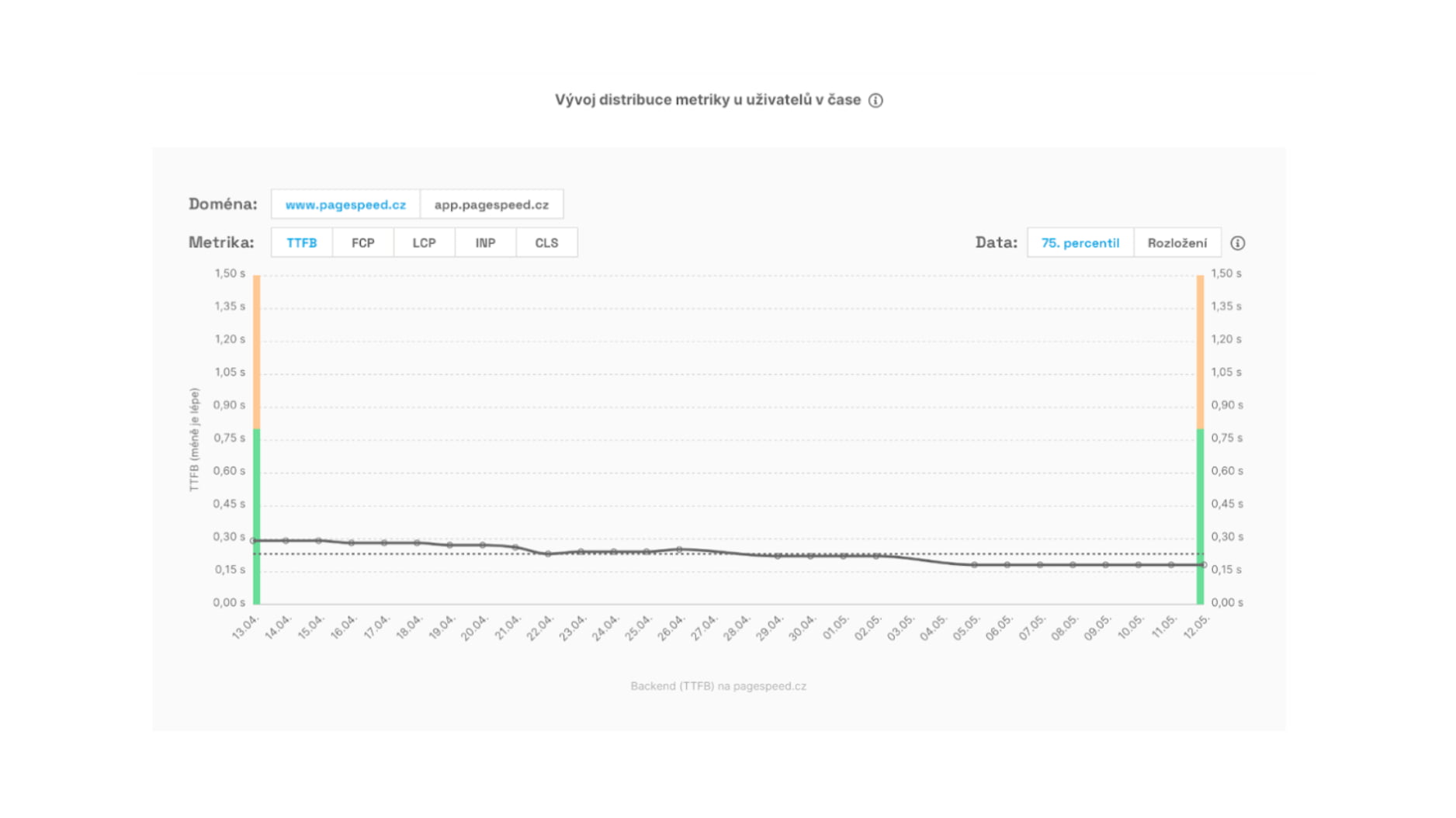 Track the historical development of the TTFB metric in the graph.
We have been dealing with optimization topics for a long time and recommend reading our other texts as well: