Cloudflare and AI Bots: Webinar Recap
 Zuzana Fatrdla11/5/20264 minutes reading
These days, it's not just humans clicking around on most websites. Bots are gobbling up a large chunk of your traffic without buying anything, and both your server and real customers pay the price. In a recent webinar, Martin Michálek and Tomáš Svoboda took a close look at bot traffic and discussed how Cloudflare can help manage it.
Webinar Recording
The Scope of the Problem
- Automated visits can make up over 60% of traffic. AI bots go after content: the more subpages and valuable information a site has, the more they like to crawl it. That's why e-shops and large blogs struggle more than small brochure sites. The same goes for filters: the more filter combinations a site offers, the heavier the bot load.
- AI bots don't buy anything, but every request they make puts a strain on your server and hosting, slowing down the site for real customers. They can increase the time it takes for the server to start responding (TTFB) by up to half.
- Cloudflare filters over 20% of global web traffic. The free plan is sufficient for basic protection and bot insights, but stronger protection is available in the paid plans.
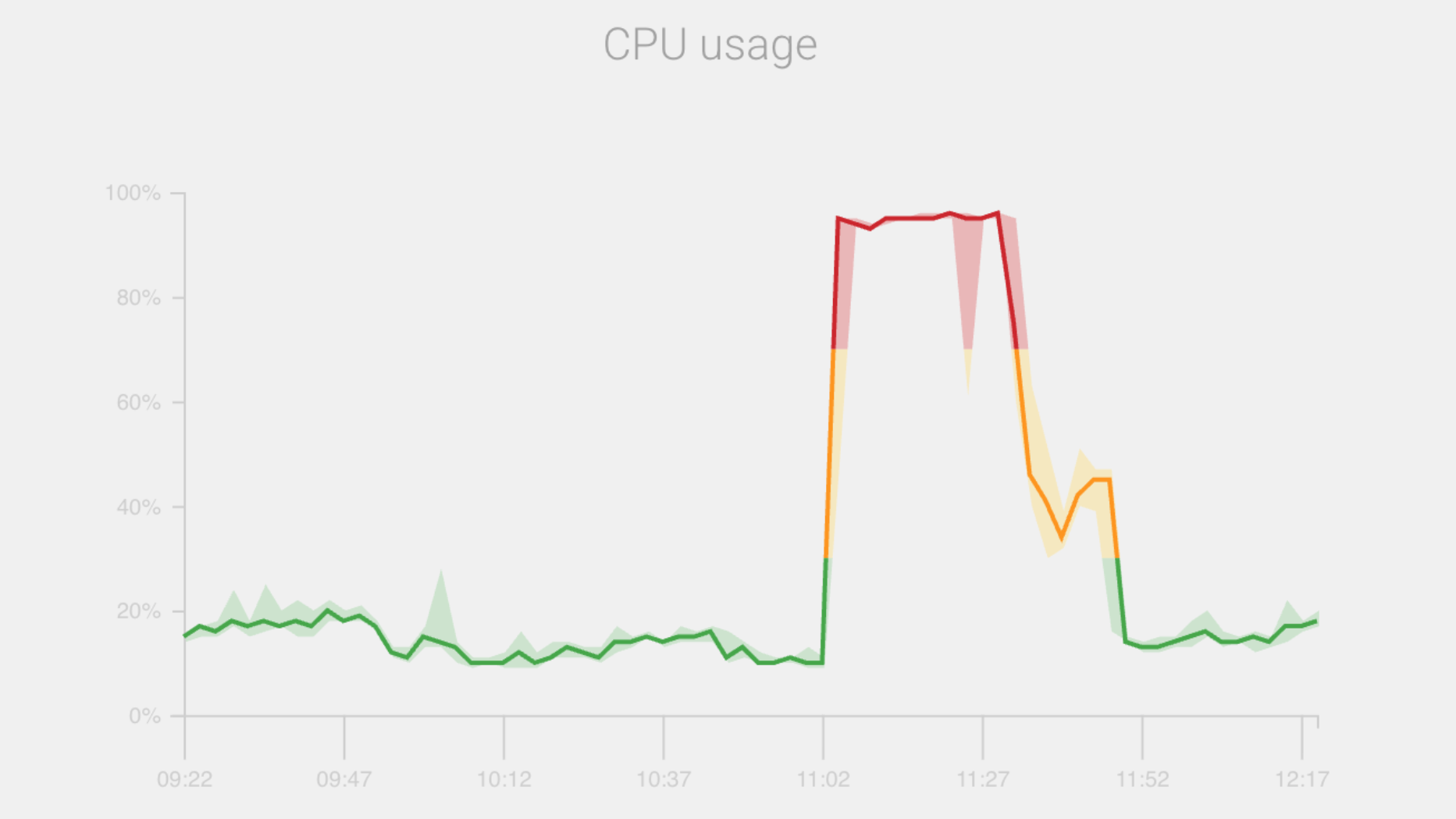 One of the signs of a bot surge: server CPU usage suddenly jumps from 15% to almost 100% and stays at the maximum for about half an hour.
The Pitfalls of Blocking Bots Altogether
- Bots aren't a monolithic group. Among them are search engine crawlers, data collectors for AI training, and AI chatbots fetching web pages to provide user responses. Each requires a different approach.
- Official AI bots from big companies identify themselves. Foreign and malicious bots, however, disguise themselves as regular browsers (faking what's known as a user-agent), so filtering by this alone isn't enough.
- Over 95% of AI bots ignore
robots.txt. - AI bots mainly download HTML and only partially execute JavaScript, so they can bypass traditional JavaScript-based protections.
Effective Protection
- Serve bots a cached static version of your pages to avoid server overload.
- For bot networks operating from typical residential connections (residential proxy botnets), managed challenges and CAPTCHA help. On the free plan, you enable them manually in the rules. The Pro plan (from around 25 USD per month) adds Super Bot Fight Mode, which decides on its own who gets the challenge. The Enterprise plan adds bot detection through TLS fingerprinting and more detailed bot management, starting in the range of 2,000 USD.
- Keep an eye on your site's security settings if traffic goes through the Cloudflare proxy (indicated by an orange cloud in the dashboard). Without an approved list of addresses and services (whitelist), payments, feeds, and monitoring might stop working.
Custom AI Bot Strategy
We'll review bot traffic on your site, propose rules, and configure Cloudflare or another CDN so that bots don't slow down the site for your customers.
Common Mistakes
- The whitelist of approved services is missing.
- The rules are too lenient.
- Overly strict rules accidentally block bots you do want on your site, such as Googlebot.
- The
robots.txtfile is poorly managed. - Nobody monitors the rules, so Cloudflare can override them.
- Cloudflare is enabled, but nobody has configured the rules. Simply turning it on won't protect your site.
Checklist: What to Check
- Server response times are increasingly slow (rising TTFB), even if nothing has changed on the site.
- The server is occasionally overloaded (fluctuations in CPU or memory usage), yet Google Analytics shows no rise in traffic.
- Your hosting provider is pushing for a higher plan or reporting exceeded limits.
- Google Analytics reports odd spikes: visits from unexpected countries, sessions lasting 0 seconds, or a 100% bounce rate.
- Server logs show numerous requests for filters, URL parameters, searches, and pagination.
- The website occasionally crashes or slows down, even without higher traffic or larger campaigns.
- Logs contain strange browser identifications (user-agents) or “Googlebot” from IP addresses that don't belong to Google.
- Attempts to log in, spam in forms, and fake orders are increasing.
- Competitors are copying prices or content sooner than expected.
- You're unsure how much traffic is bot-generated. Without data, you can't make informed decisions.
Stay informed about your website's speed.
Subscribe to our newsletter. Each month, we share the latest in website speed for site owners, marketers, and developers.