The Illusion of Speed: How to Hack Lighthouse Scores
 Martin Michálek8/26/202612 minutes reading
The web performance community is caught in a deceptive cycle. People often mistake Lighthouse scores for actual web speed. This is exploited by plugin developers who target improving this metric without enhancing the actual speed of the website.
There are numerous plugins on the market that promise to speed up a website with a single click. However, their impact often results only in improved Lighthouse scores.
What will you find in this article?
- Reasons why Lighthouse scores give us headaches instead of measuring speed.
- The unsavory behavior of the Website Speedy plugin. Another piece in the puzzle of previously proven dubious practices of plugins like WP-Optimize and the borderline behavior of WP Rocket.
- Our arguments for why we believe that deferring all JavaScript loading is more of a trick on Lighthouse scores than real optimization.
Let’s delve into the issue as a whole. We must start with the main culprit—Lighthouse scores and their perception by the lay community.
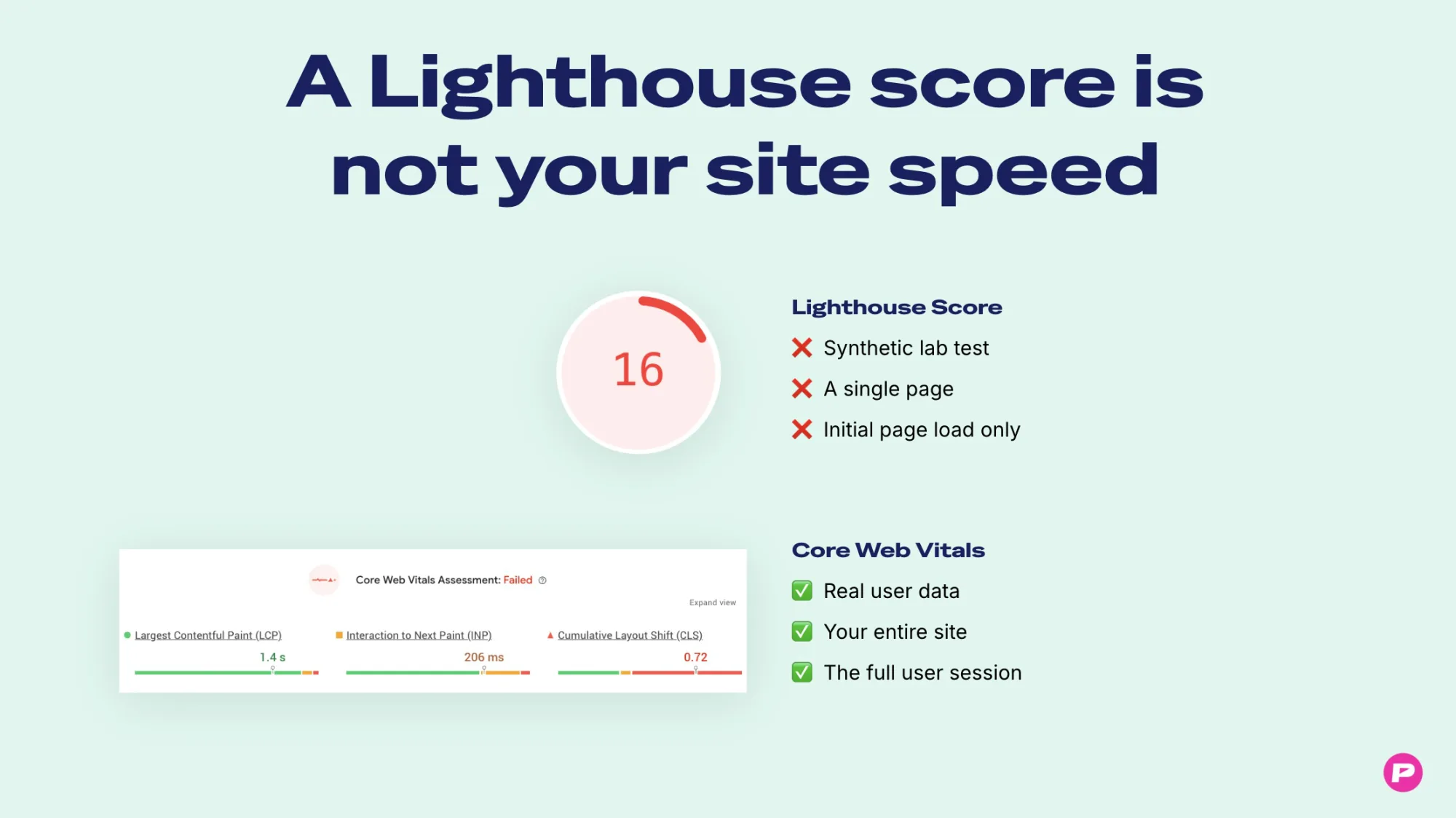 Web speed? Lighthouse scores are not it. Period.
Lighthouse Scores: The Misleading Metric Everyone Cares About
When onboarding clients to PageSpeed.ONE, I frequently talk to someone who wants to “improve the score in PageSpeed Insights”—that colorful circle at the bottom. You know, the Lighthouse score.
We get it. It’s a single number, nicely color-coded, easy to send to colleagues over Slack... But Lighthouse scores are the result of a synthetic test of a single page, in one environment, with one setting. Its composition and weights can change between Lighthouse versions. Similarly, Lighthouse on your computer will show a different number than Lighthouse in PageSpeed Insights.
Let’s reiterate:
Lighthouse scores are not a metric of web speed. They are a technical diagnostic indicator.
Web speed doesn’t emerge in Lighthouse. It emerges on your visitors’ phones, on bar Wi-Fi, on an old Chinese smartphone with three bars of signal, with ten open tabs, and while clicking through a cookie banner.
Lighthouse doesn’t see this. It is not a user. Lighthouse doesn’t scroll, click, log in, open product filters, or reach checkout.
Real speed is measured by metrics like Core Web Vitals from the Chrome UX Report database. (The differences between lab and user data are summarized in synth vs. CrUX vs. RUM.)
An Economist Might Say: “Clearly, Goodhart’s Law”
Economist Charles Goodhart once wrote a sentence that is now taught at universities:
“When a measure becomes a target, it ceases to be a good measure.”
This fits perfectly here. That’s exactly what has happened with Lighthouse scores.
People want a simple number. Google (in my opinion mistakenly) highlights it in PageSpeed Insights—big and colorful.
Clients ask agencies about Lighthouse scores. Some agencies then promise to improve it. And then come the plugins that promise the same, only faster and without effort.
When a diagnostic number becomes a business argument, a market for its improvement arises. And once the calculation is predictable, someone starts hacking the metric instead of optimizing the website.
Deferring JavaScript is Not Optimization, But Problem Shifting
A large number of today’s “speed-up” plugins have a checkbox that can raise Lighthouse scores by dozens of points in five seconds of work. It defers the execution of all JavaScript until the user's first interaction—scrolling, clicking, screen tapping.
Why does this work so reliably to hack Lighthouse scores? Lighthouse loads and measures the page. It doesn’t scroll, click, or touch the screen. Deferred JavaScript never runs in the test. This, for example, removes Total Blocking Time (TBT) from the measurement, a metric with the greatest weight in Lighthouse scores. Loading speed (LCP) also improves.
Lighthouse scores jump up, yet nothing on the site has actually sped up. For the real user, nothing has changed. It’s just postponed. Often to the worst possible moment.
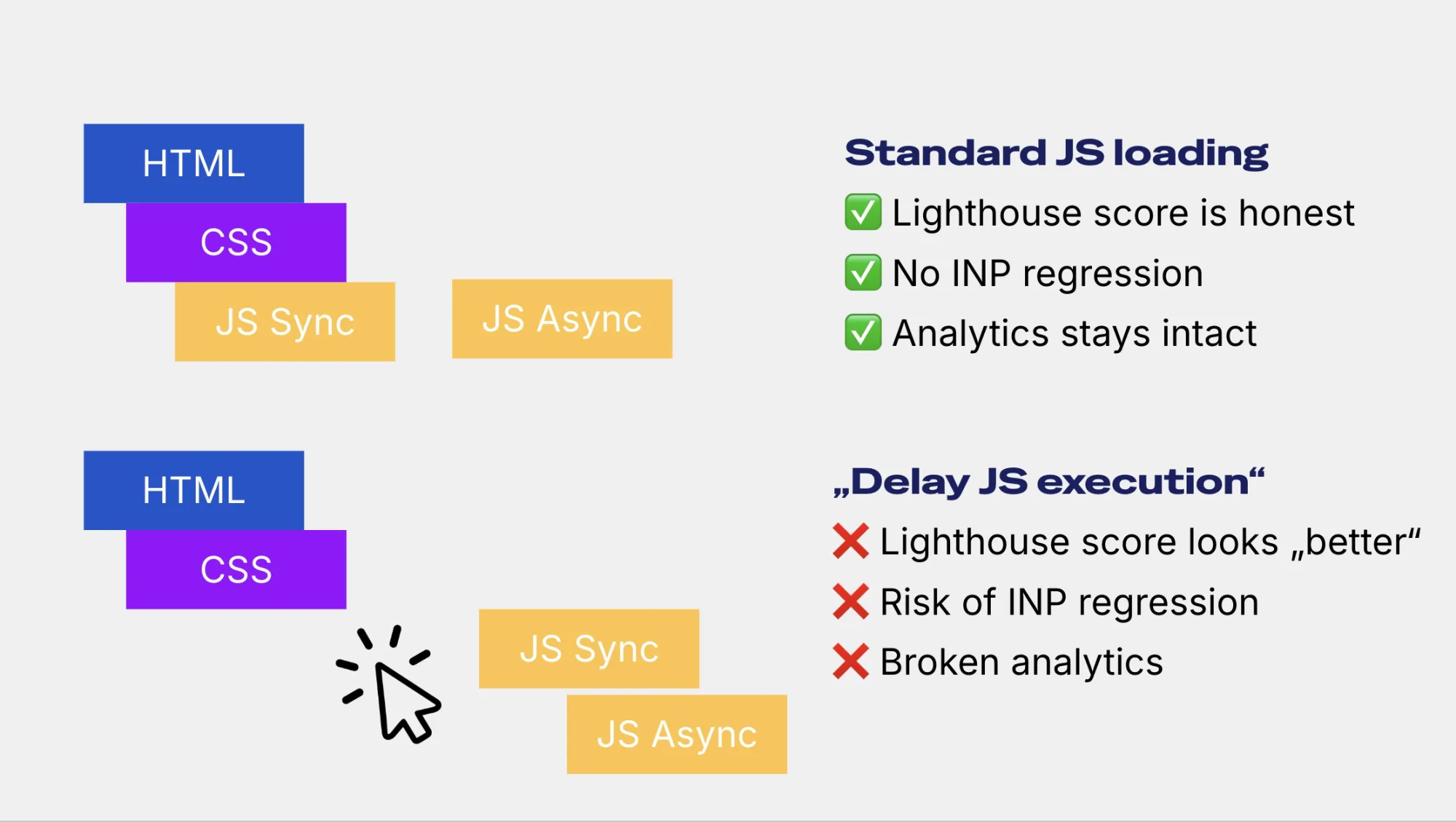 Illustration of deferred JavaScript. Scripts load only after user interaction. It’s problematic.
At PageSpeed.ONE, we've optimized hundreds of websites, but we never recommended this technique to clients. What are the risks of deferring all JavaScripts?
- Negative impact on interactions (INP). A user arrives on the page, reads the headline, and clicks. At that moment, all deferred JavaScript that has been accumulating runs. The main browser thread gets blocked, and the user’s first click waits. This can worsen the INP metric, which Google includes in Core Web Vitals.
- Negative impact on layout shifts (CLS). Scripts that render content, such as carousels, personalization, and others, run late when JavaScript is deferred. No shifts are measured in the Lighthouse test because the code never ran. Thus, you don’t see the true CLS value.
- Measurement functionality. Analytics, cookie consent, chat, A/B tests, and conversion tracking are also deferred. Your data may not align, and no one knows why.
- Devaluation of Lighthouse scores. As mentioned, while Lighthouse scores are not a web speed metric, they are useful for diagnosing changes or optimizations. Without JavaScript in the Lighthouse score, you’re measuring something entirely different than your site.
Deferring all JavaScript is a poor technique. Deciding what should load when and in what order is engineering work that requires knowledge of the specific website. One checkbox deferring all JavaScript doesn’t replace this work.
And the most problematic part is that the providers of these features typically do not indicate what it will do to Lighthouse scores and how it might endanger speed for real users. If they did, the customer would realize they are often buying not a faster web, but just a better number in a test.
WP-Optimize: The Caught Lighthouse Score Optimizer
In 2022, developer Gijo Varghese published a screenshot of the WP-Optimize plugin showing that JavaScript only loads on the page if the browser is not Lighthouse, GTmetrix, headless Chrome, or Pingdom.
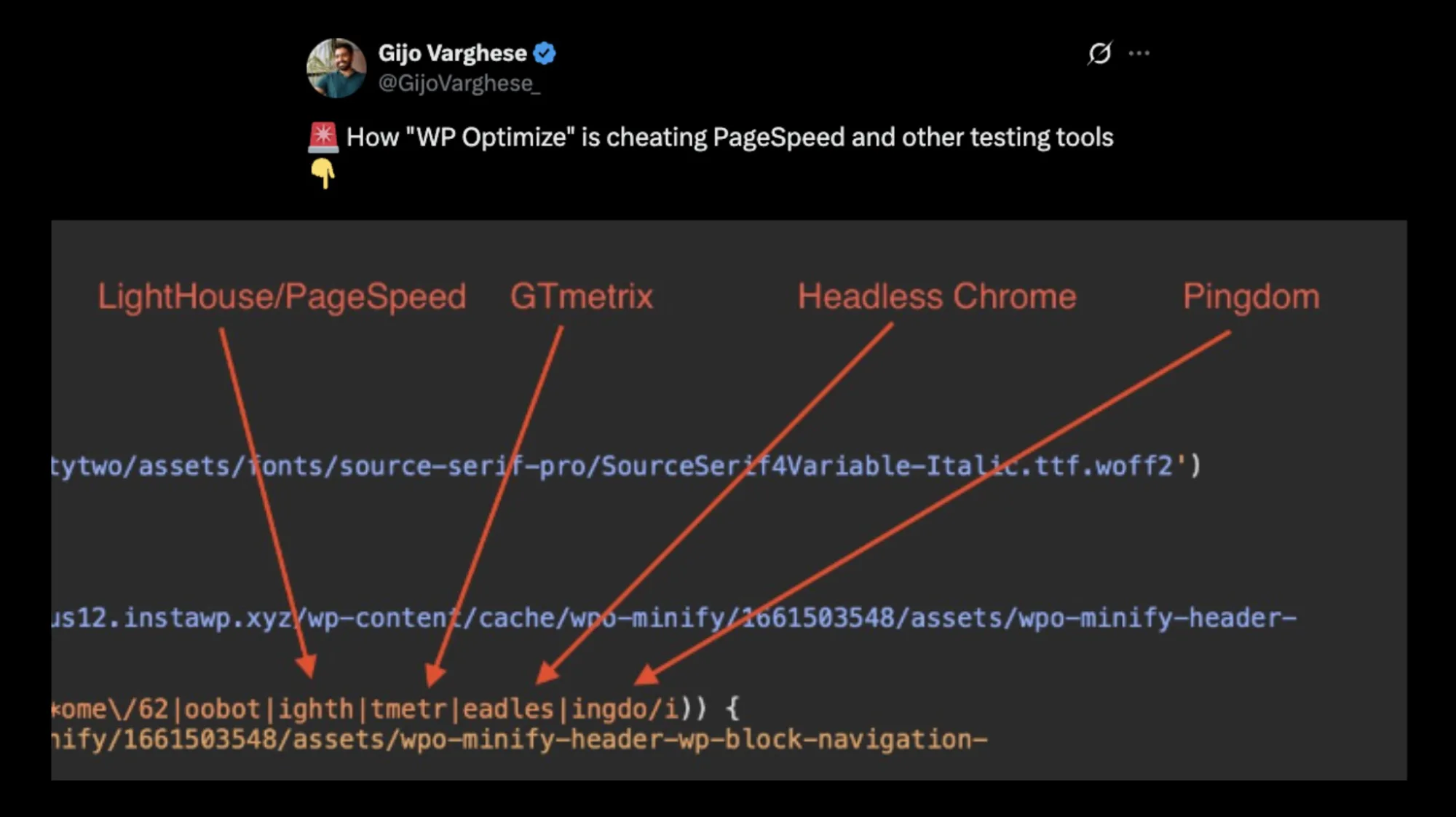 The code in WP-Optimize attempts to detect Lighthouse, Pingdom, or GTmetrix.
The developer of this WordPress optimization plugin publicly denied the allegations. They claim it’s a specific setting “Defer using JavaScript.”
Fine, but why is this setting even there? We’re back to the point that such setup is not made by any speed optimizer. General tips for WordPress speed are available in our WordPress optimization.
WP Rocket: The Boundary Where Optimization Ends
The well-known optimization plugin WP Rocket has a similar problem. It includes a feature with the innocuous name Delay JavaScript Execution. You check a box, and all scripts wait until the user scrolls, clicks, or touches the screen.
Details were already written in 2021 by Alexander Goller in an article where this issue is rightfully compared to the Dieselgate emissions scandal, where Volkswagen cars changed engine settings during emissions tests to meet required levels.
What is the state today? This setting in WP Rocket still exists. WP Rocket only states on the page for delaying JavaScript execution that it is one of the most powerful optimizations.
An innocent single plugin setting? I don't think so. Nowhere on the feature page does WP Rocket mention what this does to Lighthouse scores. And that is a problem.
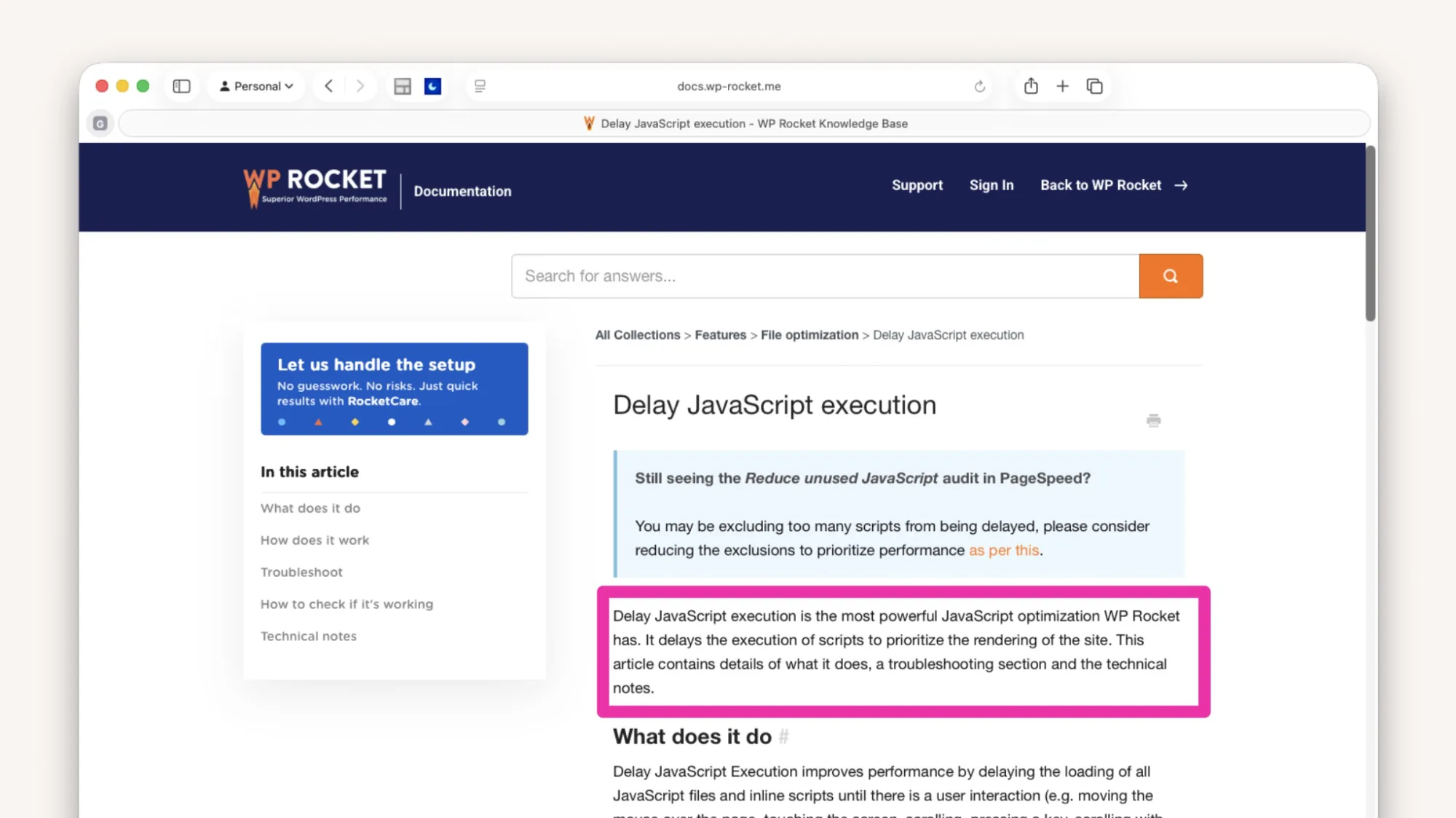 WP Rocket only talks about the benefits of “Delay JS execution” but doesn’t mention the risks.
Thus, both WP-Optimize and WP Rocket continue to sell this feature without warning that it can artificially inflate Lighthouse scores and the other risks I mentioned above.
Website Speedy: Speed Enhancement or Lighthouse Score Boost?
Website Speedy is a tool for several different platforms that claims to be an “Automatic Website Speed Optimizer.” One of our clients believed this and used the addon for months, thinking it was helping the website's speed.
Our colleague Michal Matuška found that this addon could also artificially inflate Lighthouse scores. Judge for yourself.
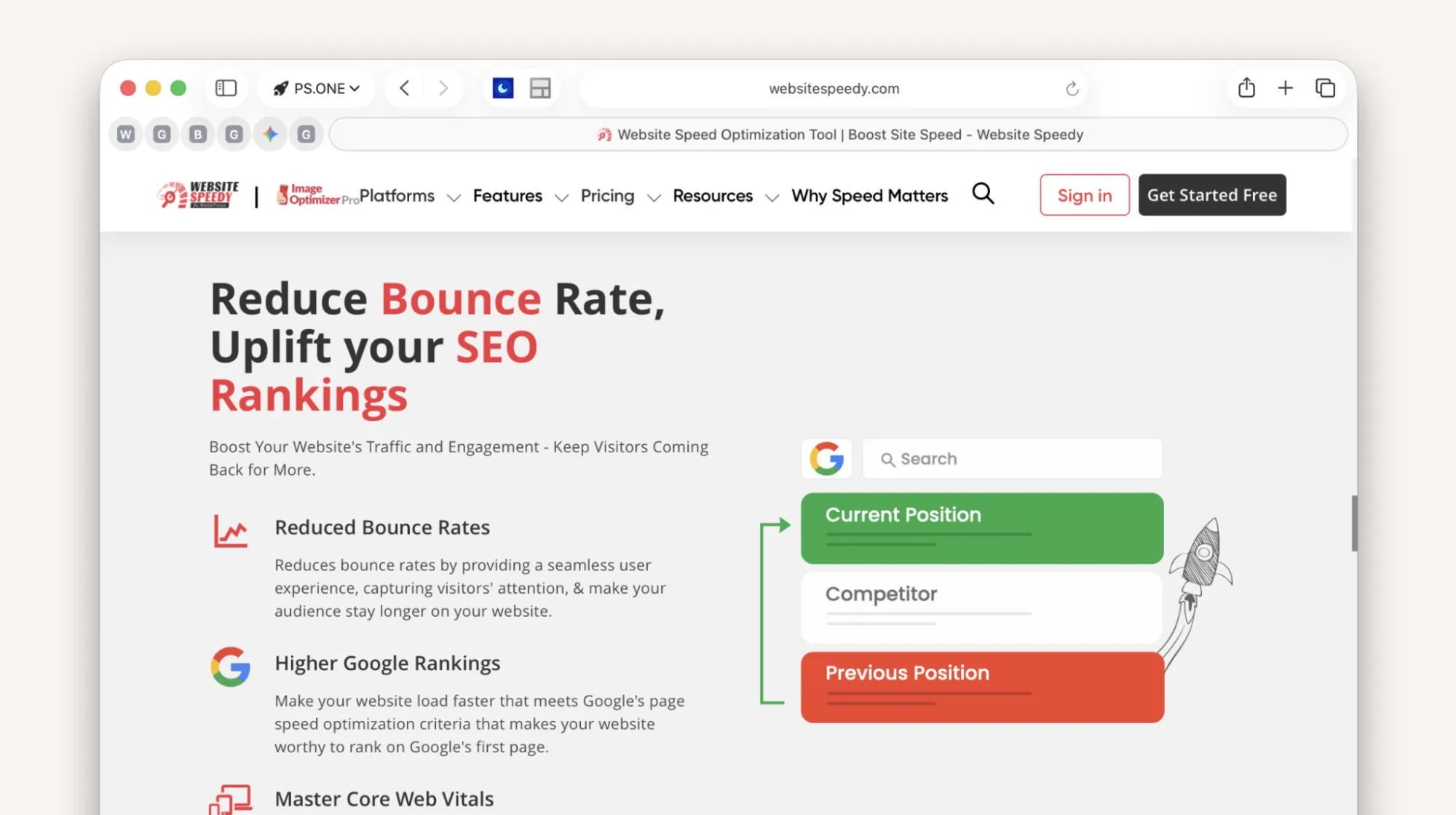 Website Speedy promises impact on bounce rate and SEO rankings on its homepage.
Our Investigation Around Website Speedy
It starts with the website itself, which lumps together “impact on business metrics” and “Lighthouse scores.” Speed certainly impacts business, but this cannot be linked with a synthetic metric.
The marketing of these extensions relies on users believing that Lighthouse scores are web speed. And there are many who do.
The authors of Website Speedy admit this in communication with us:
“Our dashboards and documentation currently lead with lab scores, and we do not spell out that lab results can differ from what real users experience.”
In Website Speedy’s Source Code, We Found Tool Detection
Our colleague Michal couldn’t resist and wanted to delve into the source code of Website Speedy. It is heavily obfuscated, intentionally made unreadable.
In the code, after decoding it through several AI agents, we found a condition that decides whether JavaScript on the site runs at all. And what do you think? Yes, it doesn’t run if it detects speed testing.
Before publication, we asked Website Speedy about their stance. Founder Ishan Makkar responded very quickly:
“Our script does not detect or branch on Lighthouse, PageSpeed Insights, GTmetrix, headless browsers, or any synthetic testing environment.”
He added that he personally reviewed the code on several live customer sites and couldn’t reproduce our findings. He offered us a clean demo with his current production version to verify ourselves.
The demo came on August 18. In his script, our colleague Michal Matuška found this:
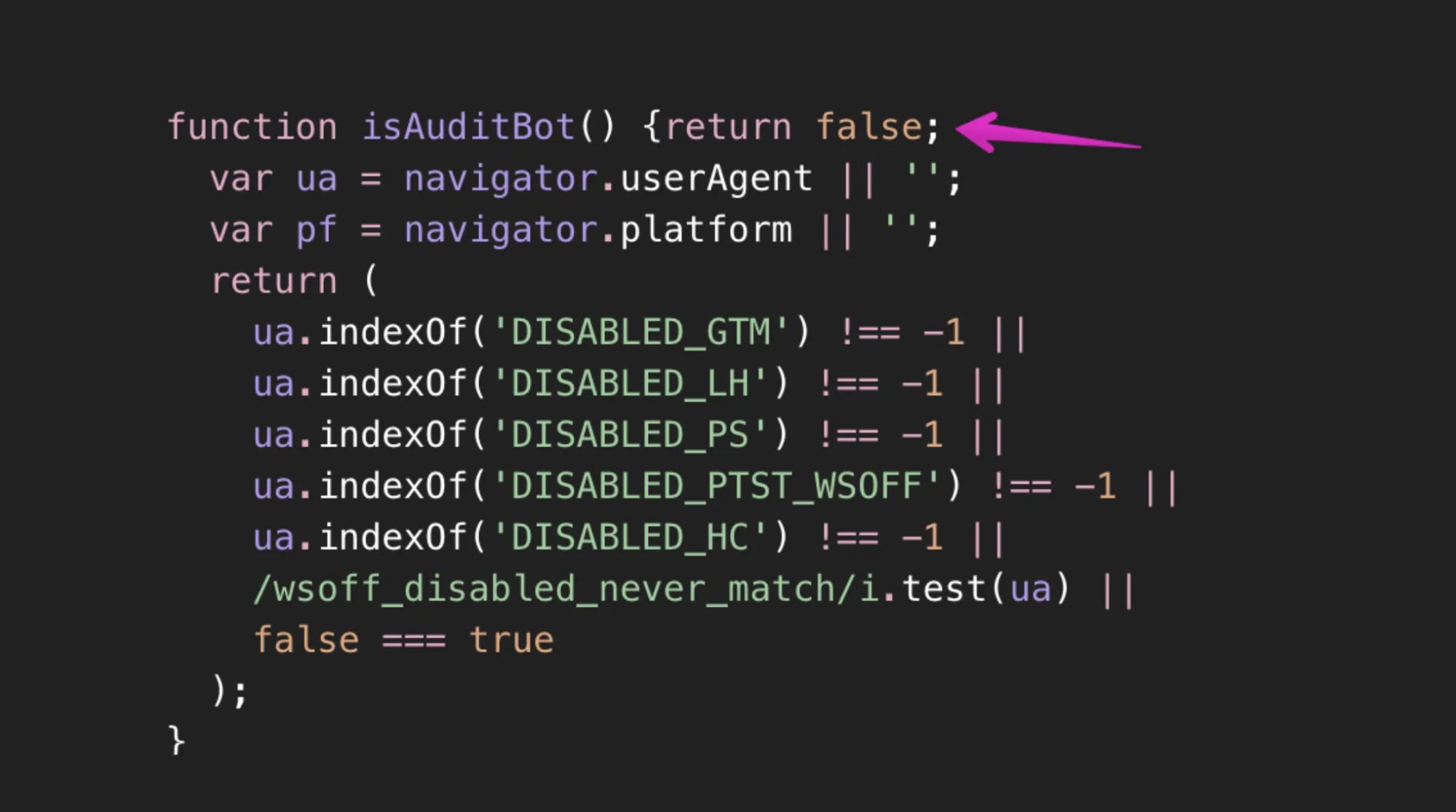 A bit of code from Website Speedy’s demo. The hack was hidden from us.
The function is called isAuditBot, meaning “is it an audit bot.” The first line returns false, so in the demo they provided, the entire detection never executes. In the script from our client’s site, it wasn’t turned off.
By the way, in that dead code section, strings are tested that strikingly resemble the names of the most common synthetic measurement tools—GTmetrix, Lighthouse, PageSpeed, WebPageTest, and Headless Chrome.
As proof of innocence, we received an installation where tool detection was stripped away in the fastest possible way.
What Happened When We Turned Off Website Speedy on the Client’s Site?
We agreed with the client to temporarily turn off Website Speedy. We can see quite precisely what happened to speed when the plugin stopped working. Almost nothing.
The Lighthouse score drastically worsened…
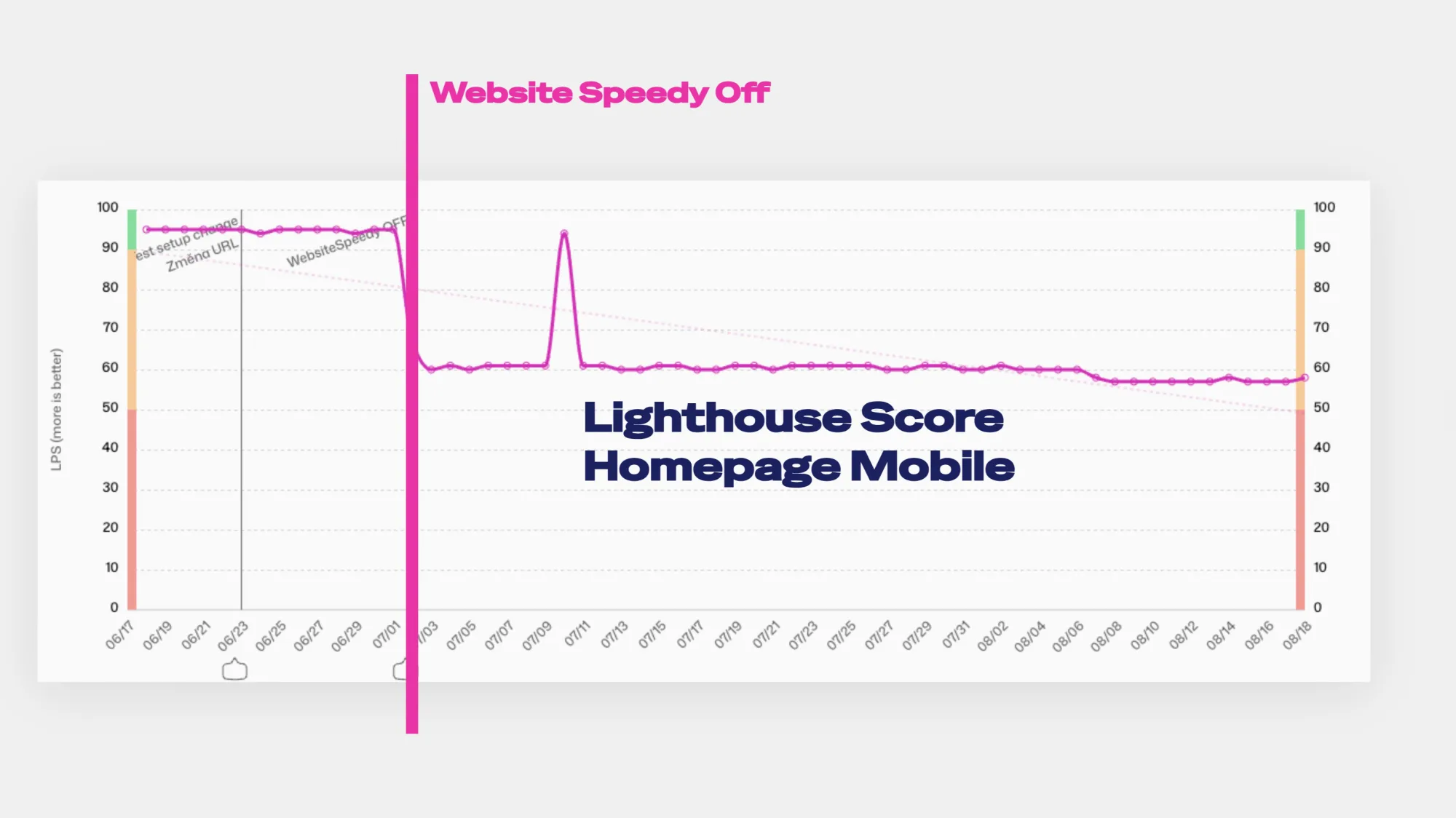 Change in Lighthouse score on the homepage after Website Speedy was turned off.
After turning off Website Speedy, the Lighthouse score on the homepage changed from 95 points to about 60. Did it worsen? No, it normalized.
However, turning off the plugin had no impact on Core Web Vitals:
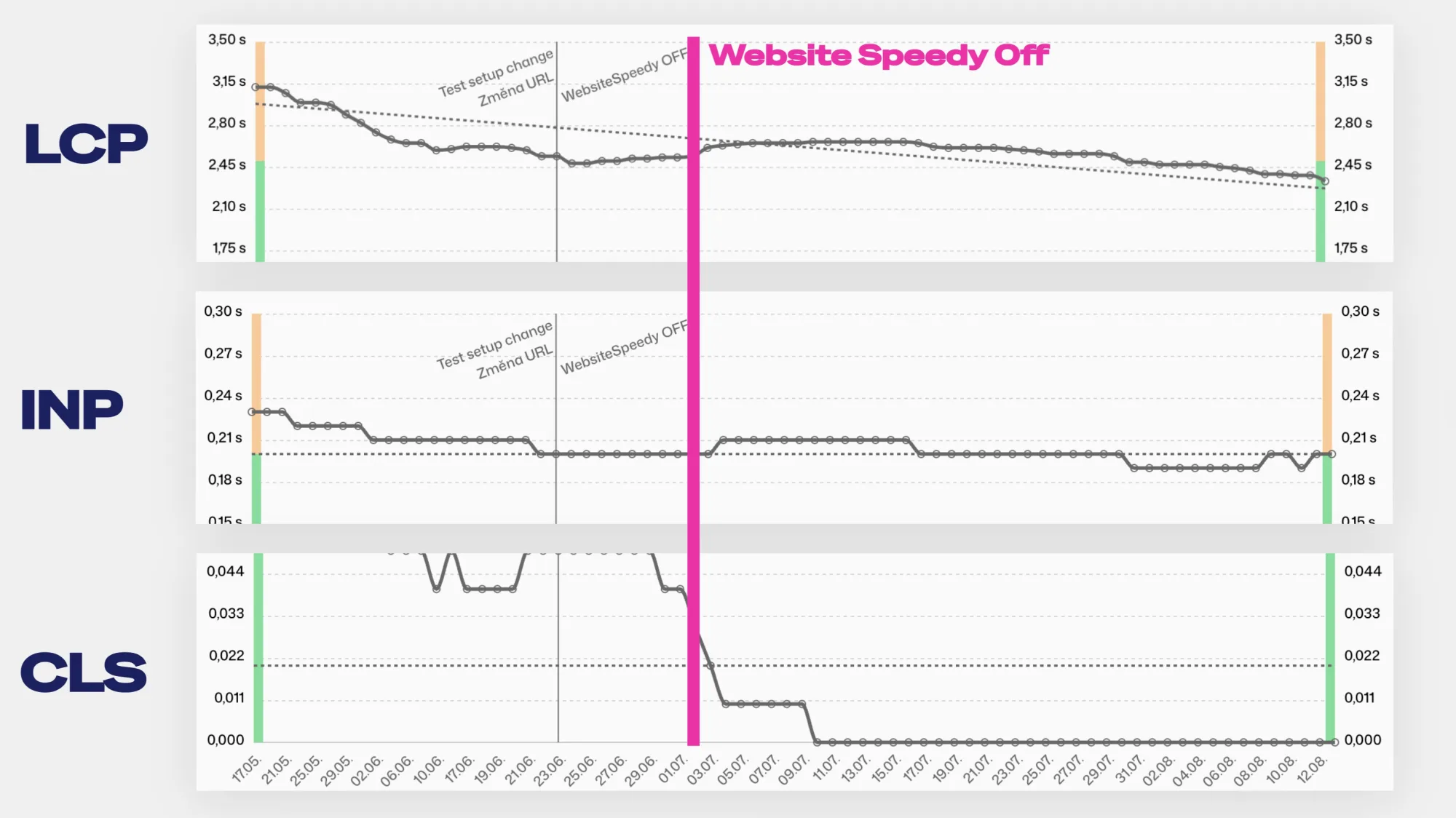 Development of Core Web Vitals after turning off the Website Speedy plugin.
We see no change except for other influences occurring on the site:
- A slight deterioration in web speed (LCP) correlates with a fluctuation in TTFB (backend response).
- CLS improves with the adjustment of another site feature and is not time-related.
- It’s worth noting that Google’s CrUX data shows a cumulative 28-day status, so changes manifest over a longer period.
After turning off Website Speedy, the Lighthouse score on our client’s site normalized. But the speed of the site remained unchanged.
Our Methodology and What We Don’t Claim
To be fair, we should clarify our methodology in the case of our investigation around Website Speedy:
- Website Speedy does not wish for the plugin source code to be published, so we are only publishing the demo source code they provided, which differs from the plugin’s source code.
- We experimented on one of our client’s websites.
- We do not have quantitative data from multiple projects here.
- Plugin shutdown and our code examination took place in July 2026.
- Besides turning off the plugin, we didn’t optimize anything else on the site.
The Website Speedy plugin kept the Lighthouse score high for our client without providing measurably faster web experiences for real users.
One problem lies with the plugin authors. But the bigger problem is with the users themselves, who pay for these plugins.
Don’t Dismiss Lighthouse. Just Don’t Make It Your Goal
Use the Lighthouse tool for diagnostics. It will find slow images, unnecessarily large JavaScript bundles, or blocking CSS. For these purposes, Lighthouse is great.
For main business metrics for web speed, track real user data. Core Web Vitals from the Chrome UX Report or your own measurement data (RUM). Monitor the entire domain and the most important templates in monitoring, not one URL occasionally.
We know the demand for one score for everything is high, which is why at PageSpeed.ONE, we also use our own PageSpeed.ONE Score, built on user data metrics from Core Web Vitals.
In our one-off web speed test, we also downplay Lighthouse scores as much as possible. Instead, we highlight trends in Core Web Vitals and a verbal evaluation of speed status.
If you wish to verify a similar case yourself, the following checklist will help.
How to Check a Suspicious Jump in Lighthouse Scores
Checklist to detect suspicious hacking of Lighthouse scores:
- Start with the question of whether the score suspiciously jumped quickly after installing a plugin or configuring one setting.
- Compare network requests and executed JavaScript in Lighthouse with regular loading in the browser.
- Verify the first scroll, click, cookie banner, filter opening, form, and checkout. Lighthouse doesn’t scroll or click, but users do.
- Check user data (CrUX or RUM) before and after the change. Greener lab scores without improved user data are not a win.
- And most importantly: stop buying plugins that promise miraculous speed-up with one click.
Next time someone offers you a plugin that magically boosts scores in five minutes, ask them one thing:
What impact will it have on real user speed, like Core Web Vitals? If they can’t answer that question, you know the answer yourself.
Keep your sites fast. And measure speed correctly.
Stay informed about your website's speed.
Subscribe to our newsletter. Each month, we share the latest in website speed for site owners, marketers, and developers.