Core Web Vitals: Everything About Key Website Speed Metrics
 Zuzana Fatrdla
 Martin MichálekUpdated 7/28/202613 minutes reading
Core Web Vitals is Google's foundational set of metrics designed to reflect website loading speed and user experience.
Let’s discover the metrics it includes, why they matter, and how to measure them. Core Web Vitals represent the absolute minimum you should know about your website's speed.
Metrics of Core Web Vitals
Core Web Vitals (CWV) offer three perspectives on website speed – loading speed, interaction speed, and visual stability.
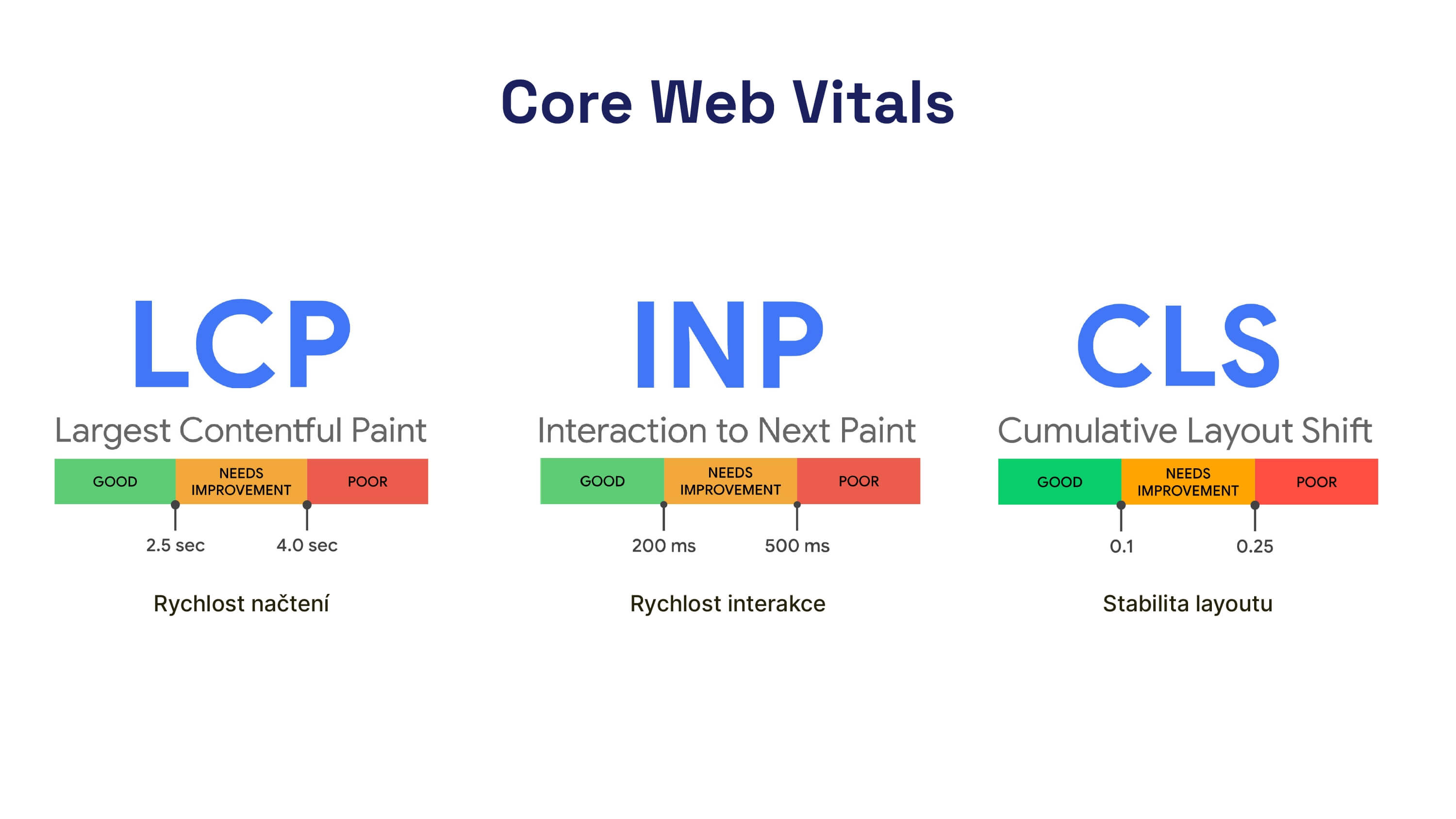
- Loading Speed (LCP) measures the time it takes to load the largest visible element on a page. It answers the question "How quickly does it load?" The threshold for a good score is 2.5 seconds.
- Interaction Speed (INP) measures the time from when an interaction is initiated to when the new frame is rendered, across all interactions on the page. It answers "How fast does it respond?" A good response is under 200 ms.
- Visual Stability (CLS) examines the visual stability of a page during loading and browsing. It answers "How much does the page jump around?" Google considers a CLS score below 0.1 as acceptable.
Here's a concise summary in a table:
| Metric | 🟢 Good | 🟠 Needs Improvement | 🔴 Poor |
|---|---|---|---|
| Loading Speed Largest Contentful Paint (LCP) | ≤ 2.5 s | 2.5–4 s | > 4 s |
| Interaction Speed Interaction to Next Paint (INP) | ≤ 200 ms | 200–500 ms | > 500 ms |
| Visual Stability Cumulative Layout Shift (CLS) | < 0.1 | 0.1–0.25 | > 0.25 |
How and Why Core Web Vitals Were Created
Google introduced the Web Vitals initiative in May 2020. The goal was to unify website speed into a small set of numbers that accurately reflect user experience, as opposed to what a one-off lab test might show. The initial trio of Core Web Vitals included loading speed (LCP), visual stability (CLS), and interactivity measured by First Input Delay (FID).
Google based its choice of metrics on data from the Chrome UX Report and human-computer interaction research, summarized in the article The Science Behind Web Vitals. Since June 2021, Core Web Vitals have been part of search rankings as part of the Page Experience signal. For website owners, this means speed is no longer just a technical optimization for developers but a component of Google visibility.
Google is also keen to prevent users from being directed from its ecosystem – search, ads, or Chrome links – to sites that load slowly or are difficult to use. The aim is to prioritize websites with a good user experience (UX). Thus, Core Web Vitals monitor a fundamental aspect of UX, especially important for visitors arriving from Google's ecosystem.
Another benefit of Core Web Vitals is their authority. They provide a common language between website owners, developers, and marketers. You know what to ask for in reports and can track the same numbers.
What Do "Good" Core Web Vitals Mean?
Google considers a website as "meeting CWV" when all three metrics are in the green zone at the 75th percentile of data from the Chrome UX Report over the last 28 days, specifically for both mobile and desktop.
Google wants three-quarters of your users to experience the site in the green zone of metrics on both device types.
This is a reasonable technical target. However, it is not the definition of a "fast website". Google set the thresholds to be achievable for decently crafted sites, not to represent top-notch speed.
If you need to see not just the 75th percentile but the shape of value distribution among users, use the histogram in the Chrome UX Report.
At PageSpeed.ONE, we say that meeting Core Web Vitals is the minimum from which to launch further speed improvements.
For business decision-making (conversion, retention, cart abandonment), you need more than just meeting the LCP, INP, and CLS thresholds; you also need our business analysis.
Can It Be Expressed in a Single Number?
It can be – but beware of which number you choose. To know the state of a website for real users, you need to track the three Core Web Vitals metrics separately for mobile and desktop. That's six values per domain, and across multiple domains, dozens of numbers.
A website owner, marketer, or project manager might not easily interpret whether things are going well. Thus, it’s tempting to grab a single synthetic score from Lighthouse – but that doesn't correlate with CrUX data and can be misleading for website speed decisions.
At PageSpeed.ONE, we have the PageSpeed.ONE Score (SPS). It emerged from consultancy practice: we first show clients CrUX and CWV in monitoring, but for a quick summary, domain comparison, or management report, we need a single value derived from the same source – from Google users, not a lab test.
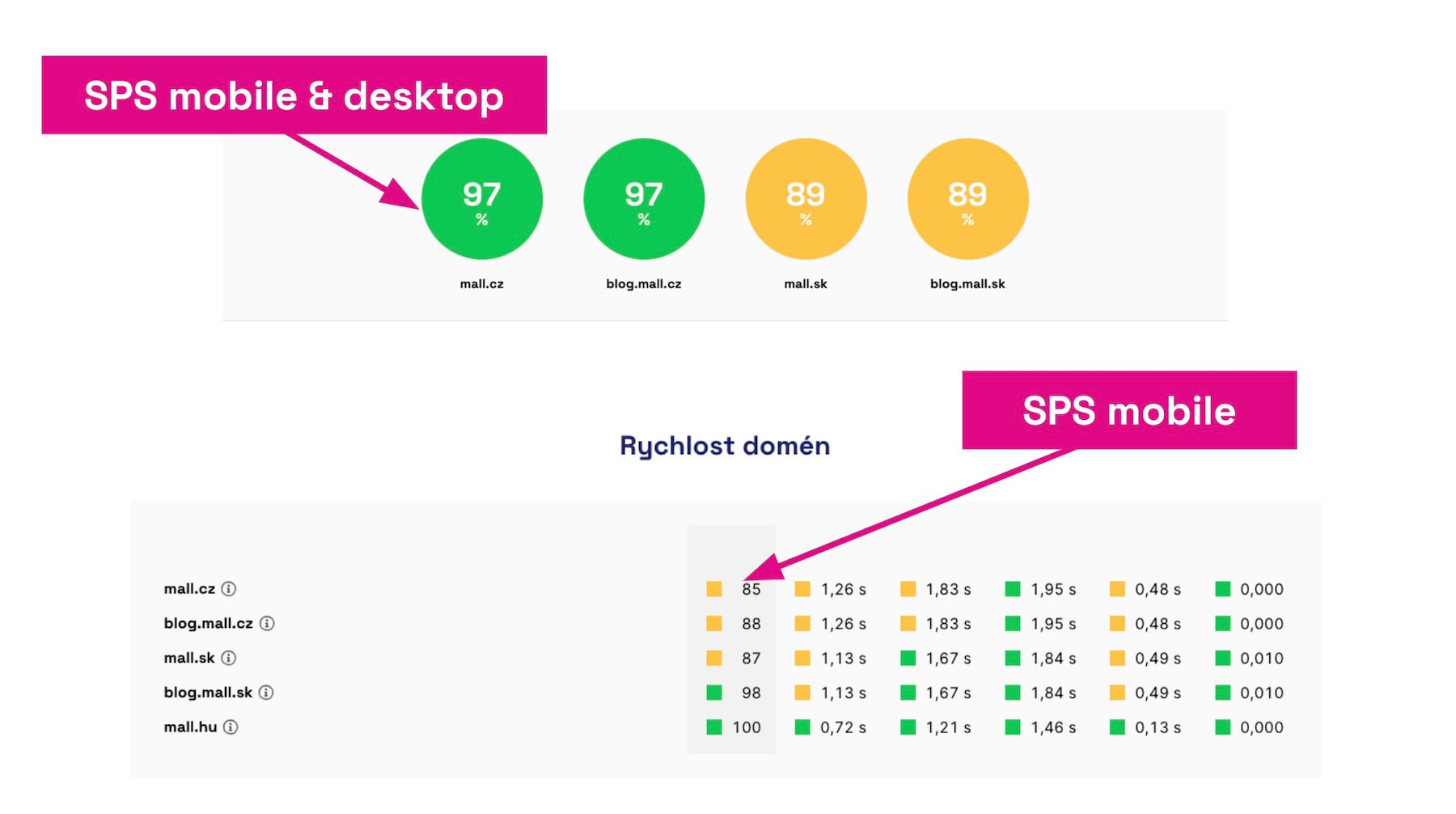 Speed Score (SPS): consolidating six Core Web Vitals numbers into a single summary from CrUX data.
SPS consolidates LCP, INP, and CLS for both mobile and desktop into a single percentage. It considers the entire user distribution, not just the 75th percentile, and weights metrics according to business and real traffic responsiveness. It doesn't replace CWV in optimization; it quickly tells you how you're doing overall. Detailed calculations and interpretation can be found in the PageSpeed.ONE Score (SPS) article.
How to Measure Core Web Vitals Values from Users?
We must acknowledge that Core Web Vitals metrics represent data collected from real Google Chrome users in the Chrome UX Report dataset. However, you can also obtain this data through Google's API, and various providers offer it as well.
In practice, for a one-time status check, we recommend going to the PageSpeed.ONE web speed test (Insights) as the first choice:
Measure your website speed
The website speed test shows you the results straight away.
Another option is PageSpeed Insights by Google for a quick one-time check of a foreign domain. However, this tool does not show trends over time, which you can get from another Google tool, the CrUX Vis.
Google Search Console as an Important Supplement
An important tool is also the Google Search Console for summarizing data by URL groups.
Be cautious with data interpretation! At PageSpeed.ONE, we often explain non-intuitive reports to clients regarding speed in consultancy. These reports show counts of URLs in color bands, not direct metric values.
Moving pages from orange to green can easily mean improving LCP from 2.51 s to 2.49 s, where the color shifts, but the actual speed remains almost unchanged. Search Console counts URLs in each band. Just shifting a few URLs across a boundary (e.g., LCP from 2.51 s to 2.49 s) can make a domain jump from orange to green, even if the average metric value remains nearly the same.
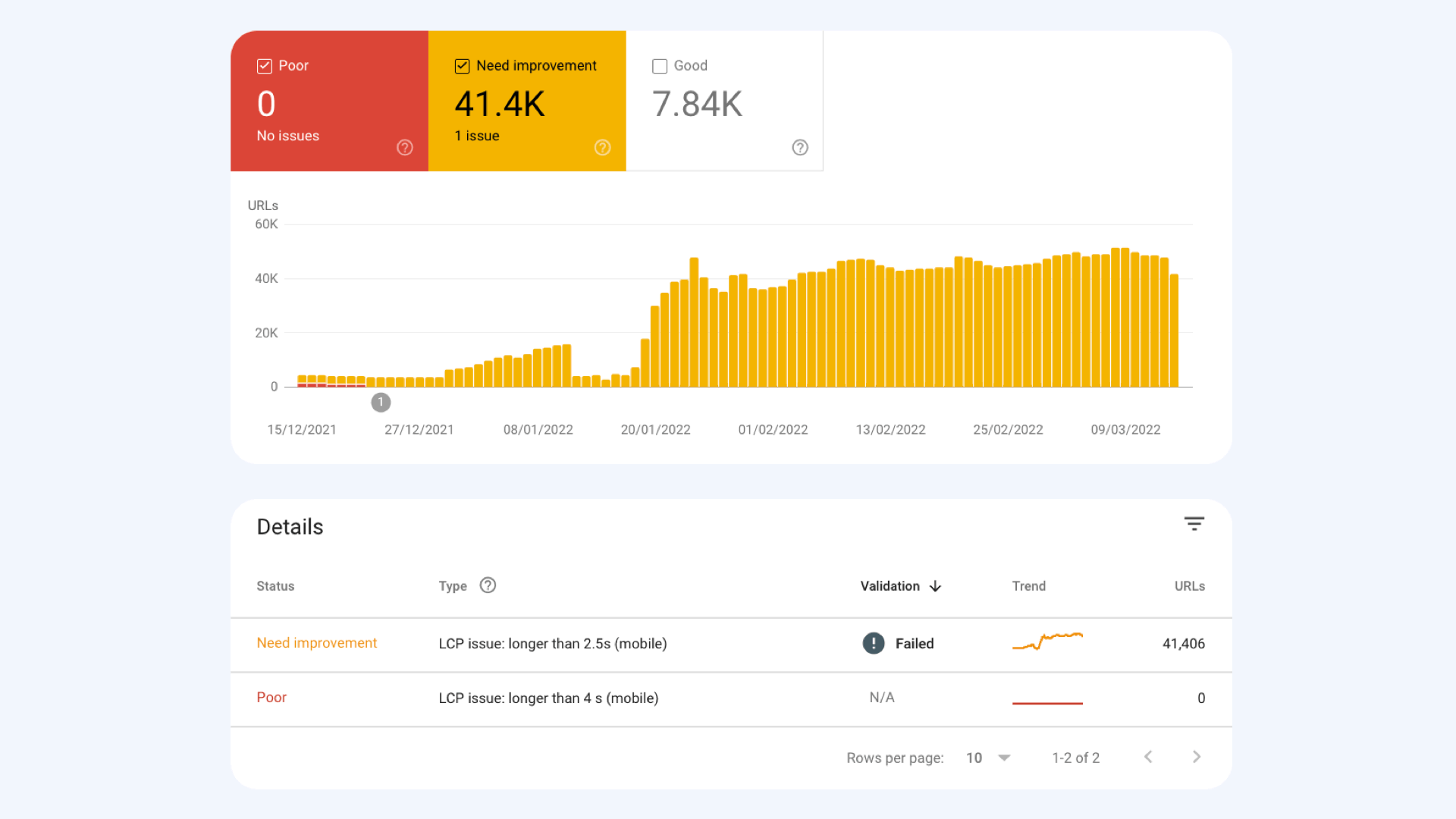 A report in Google Search Console shows how many URLs fall into the "needs improvement" band, not the average domain value.
Detailed analysis of data collection, rules, and limitations can be found on the separate Chrome UX Report page. We dissect how to read speed step-by-step in the guide Google Search Console and Core Web Vitals.
How to Test Core Web Vitals in Synthetic?
The Chrome UX Report tells you how your website performed for real users over the past 28 days. For checking a specific page, regression after deployment, or testing a page without Google user data, you need another source – synthetic ("lab") measurements in controlled conditions.
Lighthouse, for example, is used for synthetic testing of CWV and is available in the PageSpeed.ONE monitoring tool or in our web speed test tool.
PageSpeed.ONE Monitoring also offers the Watchdog feature, which monitors possible speed degradations.
However, synthetic results only offer partial truth, so be cautious.
Meeting Core Web Vitals: User Data vs. Synth
When we say "a website meets CWV", we mean user data, not synthetic data. Specifically: Chrome UX Report data from the past 28 days, 75th percentile, all three metrics in the green band, separately for mobile and desktop.
A synthetic score in Lighthouse won't tell you this; it shows its own one-time result and tends to be unnecessarily harsh for CWV.
Reasons why synth might not be as precise as reality:
- INP isn't captured by synth
Lab tests have no user clicks, so INP is unavailable for "meeting CWV" in synth measurements. - CLS only for the first load
Real shifts after interaction (sorting products, opening a filter) usually don't appear in lab measurements; in CrUX, they're collected throughout the entire time the page is open. - One device at one moment
Synth measures a defined network and CPU profile. CrUX is a distribution of real people on various devices; aggregation makes it more lenient towards rare fluctuations.
If you praise green status in lab measurements but CrUX remains orange, it doesn't mean tool errors. Synth measures the technical potential of a page; CrUX measures user reality. It's sensible to optimize so that Core Web Vitals data from users is in order.
For a complete picture, always combine synth and CrUX, and possibly add RUM. We've detailed the differences in the article synth vs. CrUX vs. RUM.
The Importance of Core Web Vitals Metrics and Their Impact on Business
Pages meeting these metrics typically offer a better user experience, leading to higher conversions, better search rankings, and cheaper PPC ads.
Google didn't randomly choose the metrics and threshold values but based them on long-term work and analysis of numerous studies in the field of human-computer interaction. For these reasons, we regard CWV as important limits for optimizing website speed.
However, not all three metrics carry the same business weight. From our consultancy practice, we see that LCP or INP can significantly impact e-shop conversion rates more than CLS.
In this sense, CLS is the least business-oriented and its influence is often overshadowed by the appearance of the page in search results, brand campaigns, or navigation.
Meeting the thresholds is the starting point; for prioritizing optimizations, we recommend adding our business analysis (conversion flows, RUM, A/B tests).
We Often See the Impact of Core Web Vitals on SEO
From long-term consultancy practice at PageSpeed.ONE, we see the most significant impact of Core Web Vitals on SEO in two types of projects: e-commerce sites and content websites.
The balanced technical level of the competition also plays a role. Where competitors haven't monitored speed, a well-crafted website can gain additional positions. Where they've all monitored it, red metrics exacerbate the disadvantage.
A specific example from e-commerce:
 After addressing a slow INP, we saw gradual position improvements. In the modeled comparison, an additional +17.3% sessions from Google.
At Denatura, an e-shop with natural cosmetics that we monitor long-term, we combined CWV optimization with continuous analysis in Google Search Console and internal deploy logs.
After optimizing the INP metric on the product detail page (particularly third-party code and code that unnecessarily blocked the main thread), we saw position stabilization and gradual speed improvements for users. This roughly aligns with what we see elsewhere: the effect doesn’t manifest immediately as a jump in traffic but gradually through positions and impressions on long-tail queries targeted by problematic pages.
From another anonymized case study of an e-shop in PageSpeed.ONE, we see that after fixing INP in February 2026, there was an almost immediate stabilization of the average position (from ~5.2 to ~4.3) and the cessation of large oscillations in search. Impressions and clicks didn’t shoot up immediately; the influence went through improving the quality of long-tail queries. This aligns with historical experience from September 2025, when a combination of “green” CWV with a Google Core Update created growth that mere technique wouldn’t likely have triggered. Conversely, poor CWV acts like a handbrake. A site will grow in season thanks to marketing, but the technique constantly slows it down.
Do Core Web Vitals Still Make Sense?
Yes, and for several reasons simultaneously. Core Web Vitals remain the minimum a website owner should understand, and from our consultancy practice, we see three recurring arguments:
- Impact on SEO and PPC
Core Web Vitals metrics remain a signal for search and are part of the quality score in Google Ads. We regularly see poor status reflected in accounts and CPC. - Basic UX and Conversion Benchmark
The three metrics describe three real dimensions of experience that human psychology reacts to: how quickly it appears, how fast it responds, how much it shifts. Your visitor asks these three questions, whether you want them to or not. - Proxy Metrics for Other Technical Indicators
During a Core Update, many things move at once. From observing numerous projects, we see that sites in good technical condition tend to suffer less during updates or even gain. Loading speed (LCP) acts as a proxy for backend speed (TTFB), which can positively affect Google's crawl budget and AI bot availability (handled by our AI Bot Strategy).
What don't Core Web Vitals metrics do? They don’t tell you if your site is fast for business. For that, you need other numbers, typically business analysis on your own conversion flows, or possibly collecting RUM data. Taking CWV as the sole measure would be as erroneous as taking the Lighthouse score as the measure of web speed.
How to Improve Core Web Vitals
Optimization of each metric has its own rules and its own article. Here’s a short guide, combined with experience from our own projects:
- Loading Speed Optimization (LCP):
There’s a lot to it. From backend improvements (TTFB), optimizing the critical path (CSS, fonts), correct image formats and sizes,fetchpriorityandpreloadfor the LCP element, to lazy loading outside the viewport. The detailed process is discussed in LCP optimization. - Interaction Speed Optimization (INP):
Break up long tasks (setTimeout,scheduler.yield()), defer non-essential JS after interaction, limit third-party code in critical moments, provide immediate visual feedback to the user. A long-term process on a real application is described in the Innogy case study (INP improvement by 38%). Recipe in INP optimization. - Visual Stability Optimization (CLS):
Address image and iframe dimensions (CLS dimensions), proper font space settings, asynchronous banners with fixed space, be wary of shifts after clicks. A comprehensive view in CLS optimization.
From PageSpeed.ONE team consultancy practice, we add a few advanced notes:
- Cloudflare
For many websites, we recommend considering a CDN installation – when set correctly (Cloudflare setup), it can help with all Core Web Vitals metrics. - Platform Limits
Shoptet as a platform requires a different approach, see Shoptet optimization (asynchronous GTM, cookie bar shifts, JS modernization).
Changes in Core Web Vitals will appear in Google data (CrUX) with a delay (typically movement starts to manifest 1–2 weeks after deployment). To ensure regression doesn’t sneak into production unnoticed, we recommend implementing long-term web speed monitoring with alerting on degradation.
Core Web Vitals Dashboard in PageSpeed.ONE Monitoring
A summary of Core Web Vitals metrics for mobile and desktop can be found in our web speed test tool, as well as in PLUS monitoring – in the Summary Report and others. It’s also possible to track metric developments at the domain or URL level over months.
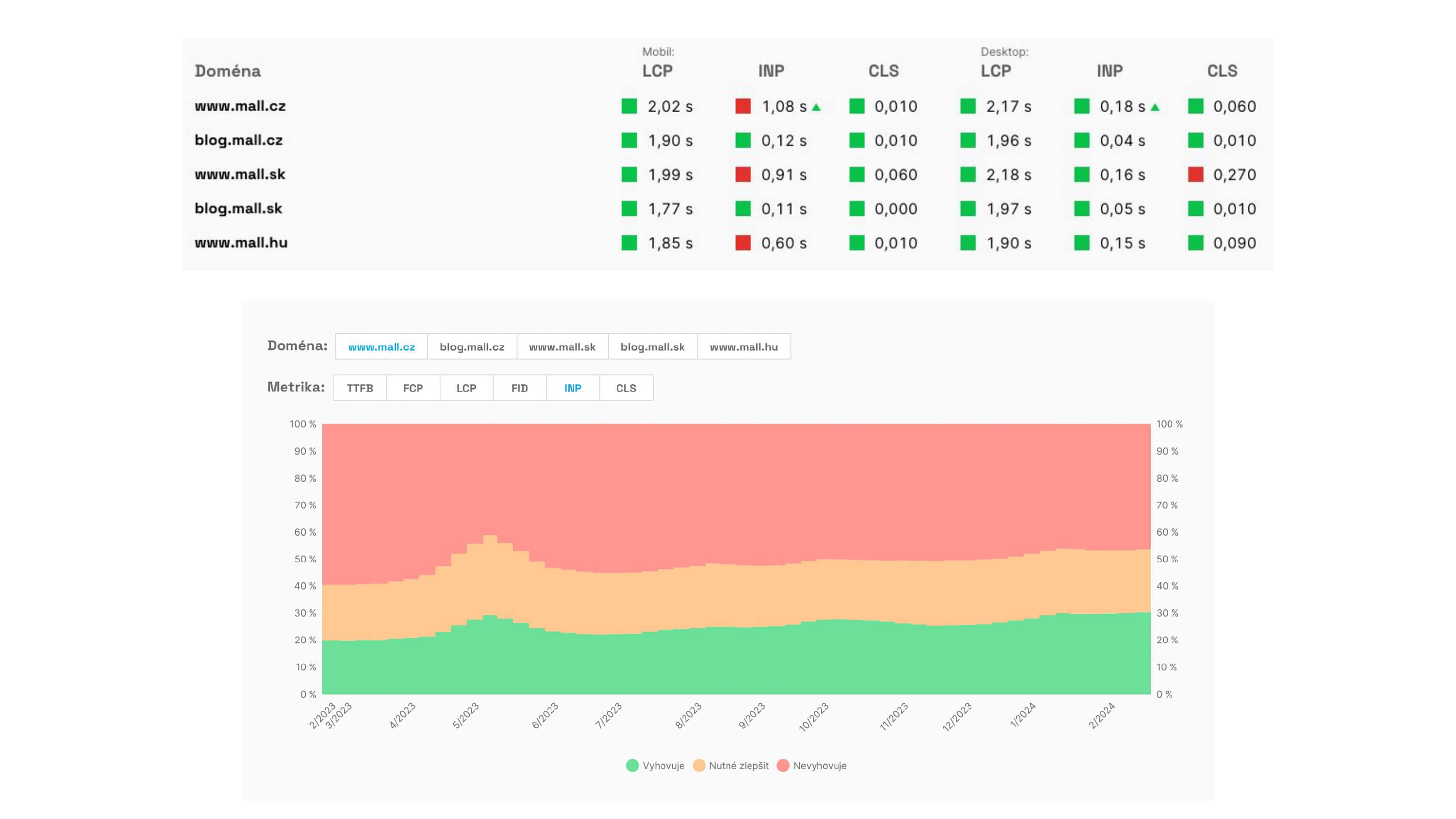
Regular PLUS monitoring complements synthetic tests and alerts on regressions, ensuring you don't encounter poor states blindly.