JS Long Tasks (JSLT) Metric: When Your Website Forgets to Breathe
 Martin Michálek2/9/20266 minutes reading
Imagine clicking a button and nothing happens. The website simply freezes. This is often the result of a “long task” – a JavaScript operation that takes too long. It's that moment when the browser is deep in thought and ignores everything else.
In this article, we'll explain how the JS Long Tasks metric measures these digital gridlocks and what they might mean for your users and your business.
Website Freezes Due to JavaScript: More Than 50 ms Is Too Much
The programming language of the web, JavaScript, is undoubtedly industrious but has one crucial trait. It typically runs in a single thread.
Think of the browser as a chef who can only do one thing at a time. If they're chopping onions for a huge stew, they can't simultaneously answer the phone.
A Long Task in JavaScript is any operation that takes longer than 50 ms. This threshold is derived from the RAIL model. A user perceives a response within 100 ms as instantaneous. The remaining 50 ms is a buffer for the browser to react to your click.
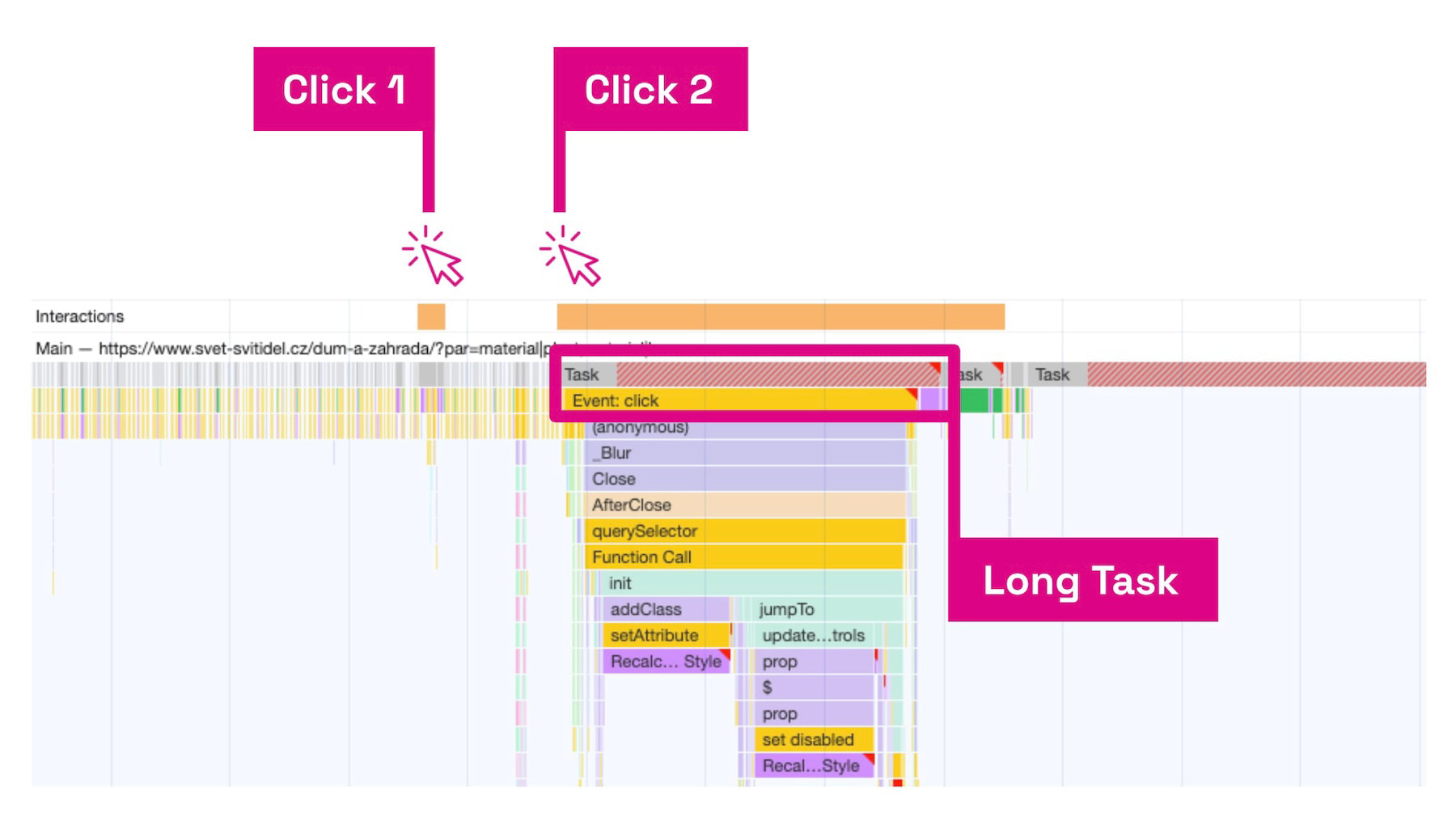 This is how the browser sees it. The user's second click lands in the middle of a long task. The browser is now like that chef chopping onions and unable to answer the phone.
The main thread of the browser is like a script that occupies the processor and memory. When a long task runs, the main thread is blocked. At this point, the user can't click or type.
Many JS Metrics, Much Confusion
We all want green numbers in Core Web Vitals. The JS Long Tasks metric isn't part of this core set, but it can be quite revealing.
Clients often ask the experts at PageSpeed.ONE about the difference between Long Tasks and metrics like Interaction to Next Paint (INP) or Total Blocking Time (TBT).
Specifically, TBT and JSLT metrics are rather similar. To put it succinctly: TBT is a stringent laboratory test, while Long Tasks in RUM are records of how the web actually struggles in users' hands. Total Blocking Time (TBT) is measured synthetically and only during loading. JSLT is measured with real users. For more on the differences between synthetic and RUM measurements, see the article synth vs CrUX vs RUM.
We've prepared a handy comparison table for you:
| Property | Total Blocking Time (TBT) | JS Long Tasks (JSLT) |
|---|---|---|
| Data Source | Laboratory (simulated bot) | Real users (RUM) |
| Time Window | Only during loading (FCP → TTI) | Entire page lifecycle (post-loading) |
| What Counts | Only the time over the 50 ms limit | Entire duration of all tasks |
| Main Goal | Quick technical check | Business analysis and real UX |
| Typical Tool | Lighthouse, PageSpeed.ONE Monitoring | SpeedCurve RUM |
And the INP metric? Both TBT and JSLT can have direct, yet often indirect, correlations with that Core Web Vitals metric.
Real-World Stories: Innogy and an E-commerce Client
If you can't measure, you can't manage. We measure to manage the speed of websites, because it affects business parameters.
Let's take a look at how it appears in the real world with our clients.
Innogy: How We Tamed Interactivity
At Innogy, PageSpeed.ONE was battling slow JS metrics on mobile devices. Analysis revealed that hefty scripts and complex styles were blocking the main thread.
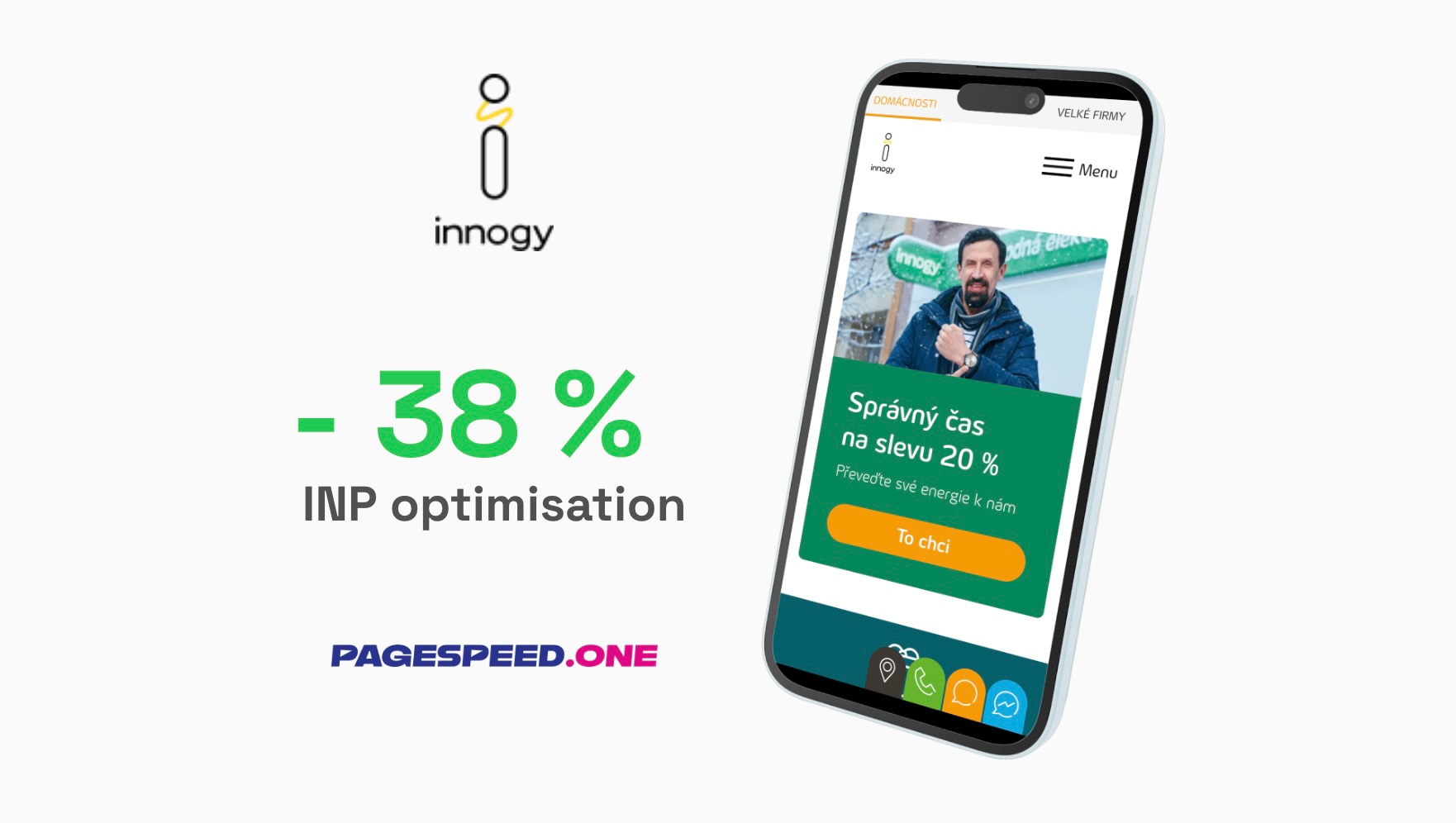 By breaking down long tasks into smaller chunks, we reduced the INP metric by 38%.
The website now runs smoothly even on budget phones. You can find more details in the case study.
Fewer JavaScript Gridlocks, More Orders
With another client in the e-commerce sector, our analyses identified a clear link. The longer the JS Long Tasks and INP metric, the lower the conversions.
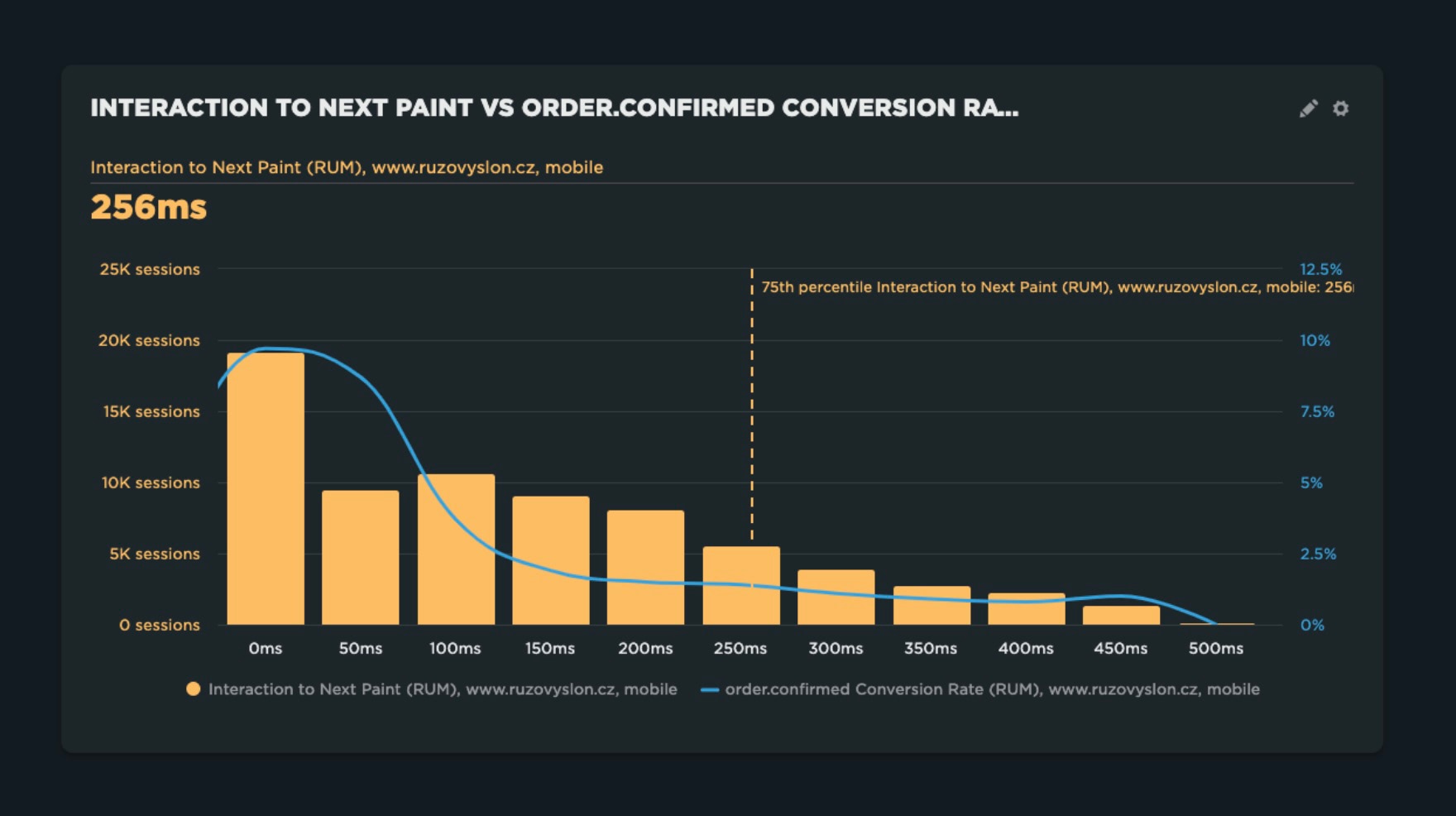 The blue line is the conversion rate, the orange bars represent the metric value. More long tasks mean lower conversions.
Long tasks effectively "froze" the website at crucial moments. That's why we consistently focus on JS metrics for this client, optimizing them to help keep customers in the purchase process.
Simply put: a smooth website without Long Tasks can directly boost your revenue. Is this the case for you? Our business analysis can find out.
How to Optimize the JS Long Tasks Metric?
Diagnostics are essential. Without them, you're merely reading a crystal ball. You need monitoring and Chrome DevTools. For practical tips on breaking down long tasks, check out our article on INP metric optimization.
Want to dive deeper? You essentially have two options.
- Chrome DevTools: Open the Performance panel and record an action on the website. You'll see Long Tasks as blocks with a red right corner. It's a clear warning.
- Long Tasks API: If you're a developer, you can collect data through this browser interface.
// Example of tracking Long Tasks in the browser
const observer = new PerformanceObserver((list) => {
	for (const entry of list.getEntries()) {
		console.log(`Warning, Long Task! Duration: ${entry.duration}ms`);
	}
});
observer.observe({ entryTypes: ['longtask'] });
Just look at the console and you'll immediately see who's struggling in the kitchen.
Cookbook for Better JS Long Tasks
Optimizing JavaScript metrics is challenging, to put it mildly. It's always necessary to view the website in a broader context and choose the most effective solution from the possibilities. Our advisory team at PageSpeed.ONE can help with that.
Optimizing Long Tasks isn't magic, it's a discipline. Here are the basic practices:
- Yielding: If you have a long calculation, break it up. Use techniques like
setTimeout(0)or the modernscheduler.yield(). When working with React, check out our tips in the React optimization article. This allows the browser to "take a breather" and process user clicks. - Code Splitting: Don't send all your code to the browser at once. Split it into smaller bundles that load only when needed.
- DOM Optimization: The fewer elements your page has, the faster the modifications. A massive DOM structure of elements slows down every browser operation.
- Web Workers: A tip for the geeks. Offload heavy computations to a "side office" (a separate thread). This keeps the main thread free for user interaction.
Monitoring PLUS: Your Watchful Eye
Monitoring Long Tasks on your computer is just the beginning. But what about your customers? Our monitoring PLUS tool tracks metrics for you. This way, you'll know in time if a new marketing script or the developers' work is starting to degrade your website's performance. More on website speed monitoring can be found in our monitoring guide.
We assist with monitoring Core Web Vitals and will send you alerts for significant changes.
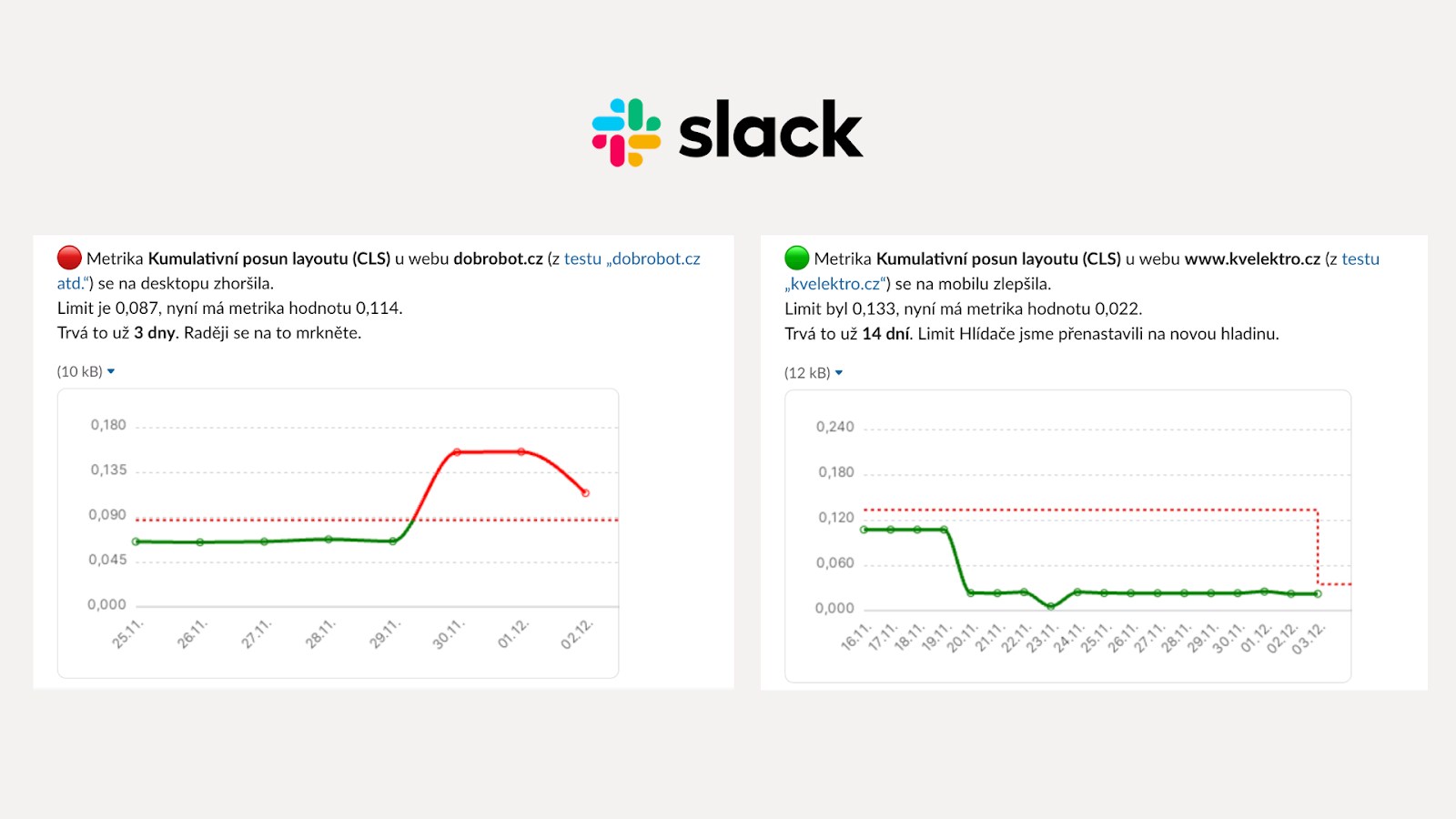 Do you receive alerts on changes to your JavaScript metrics and your website's speed in general?
Conclusion
JS Long Tasks can be a subtle killer of user experience. You might have a beautiful design, but if the site doesn't respond, conversions drop. Focus on ensuring your main thread always has room to breathe and keep an eye on the INP, TBT, and JSLT metrics.
What's next?
- Want to know how your site is doing? Test it.
- Need to optimize metrics? Check out the SpeedSprint analysis.