setTimeout: Optimising Long Tasks in JS
 Michal MatuškaUpdated 2/11/20265 minutes reading
The setTimeout() function serves as a method for optimising long tasks in JavaScript (measurable by the JS Long Tasks (JSLT) metric), which block user interactions and degrade metrics such as Total Blocking Time (TBT) or Interaction to Next Paint (INP), a crucial component of the Core Web Vitals set.
The Problem? Long Tasks in JavaScript
JavaScript operates in the browser as a single-threaded entity. In practice, this means that all actions, events, and interactions are queued in systems controlled by a mechanism known as the event loop.
From the perspective of web speed optimisation, problems arise when a task takes too long, thereby blocking other tasks. This, in turn, blocks the entire browser and its main thread – the so-called main thread. These long tasks are measured by the JS Long Tasks (JSLT) metric.
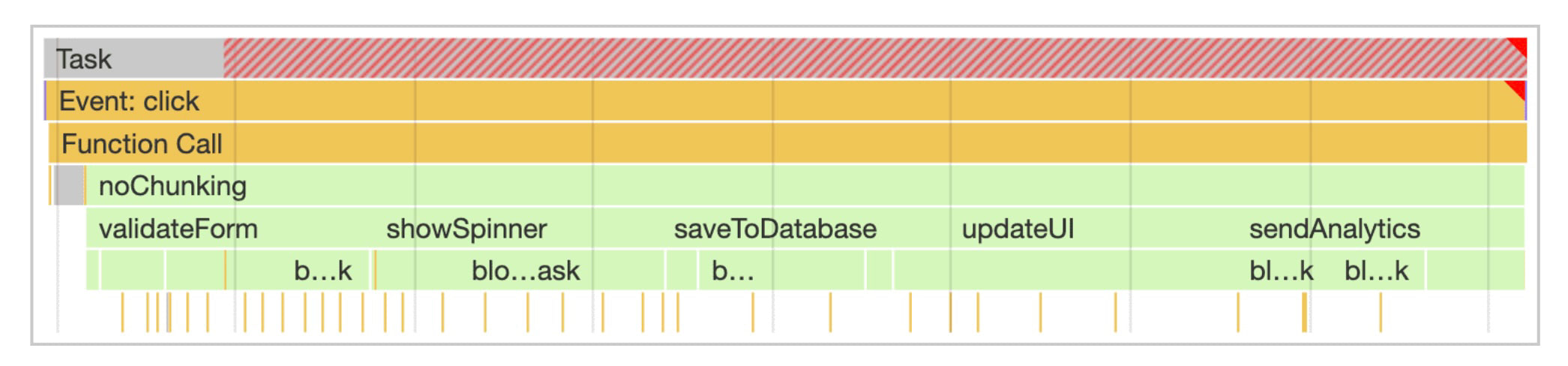 Long tasks take longer than 50 ms and can be identified by red highlights when measured in the browser's DevTools.
setTimeout() and INP Optimisation
To optimise a high value of the INP metric, it is necessary to prioritise code, defer less important parts, and thus allow the browser space for processing additional user interactions.
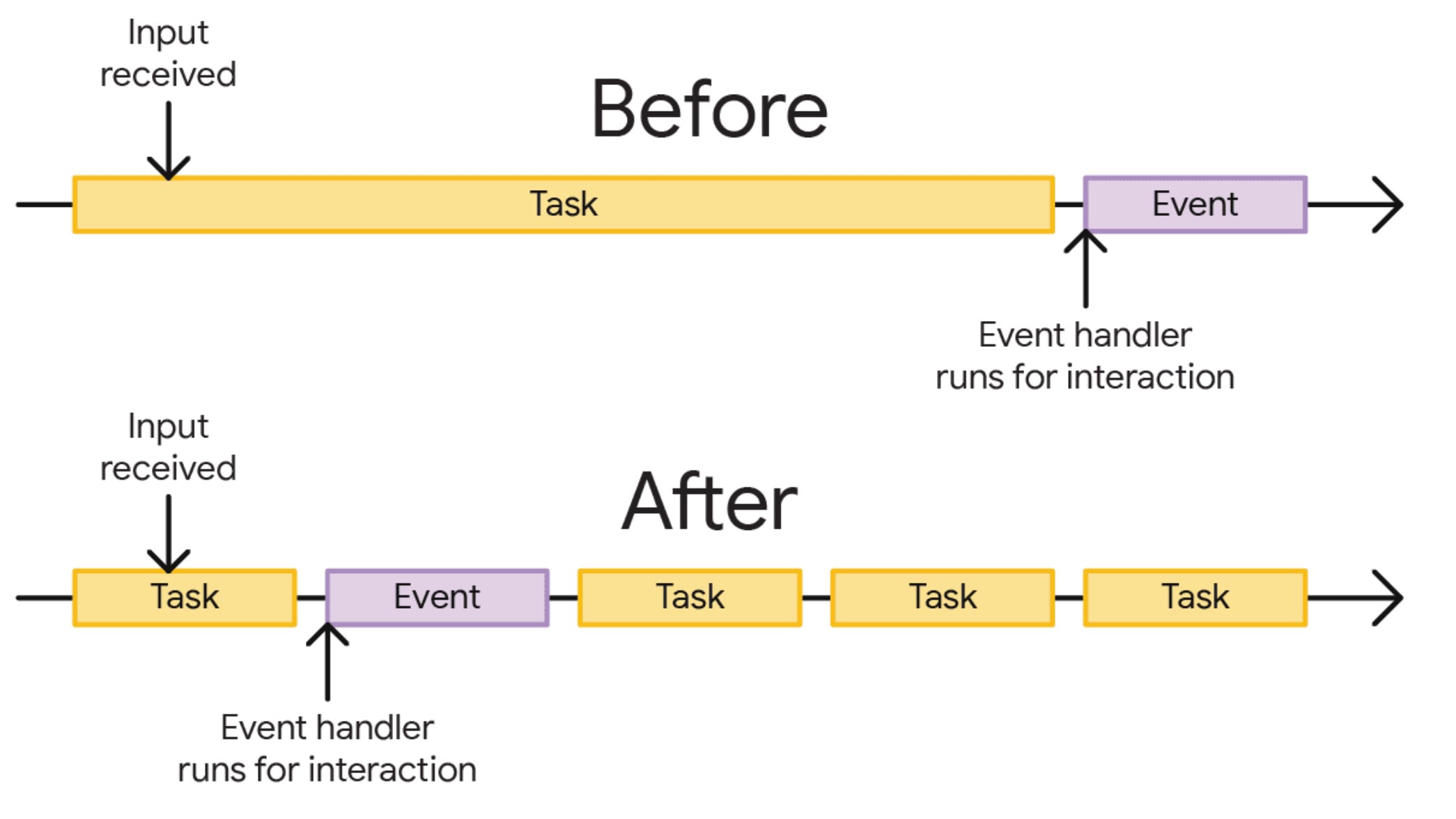 Before optimisation, a user must wait for a long task ("Task") to execute before an action ("Event") is triggered. After optimisation, the long task is broken into smaller ones, allowing the action to trigger sooner.
In JavaScript, long tasks can be managed by employing asynchronous operations. Among these is the timers API, led by the window.setTimeout() function. This allows selected tasks to be deferred. The setTimeout() function has a unique feature: if set with zero delay, it's quite likely the browser will defer the task to the next rendering cycle:
setTimeout(() => {
	delayed_code_until_next_render();
}, 0);
Thanks to this feature, one can quickly split up code and defer less important tasks by a single rendering cycle. This creates much-needed space for the browser to take control and render the output of critical code on screen:
function saveSettings() {
	// Do critical work that is user-visible:
	validateForm();
	showSpinner();
	updateUI();

	// Defer work that isn't user-visible to a separate task:
	setTimeout(() => {
		saveToDatabase();
		sendAnalytics();
	}, 0);
}
In the current rendering cycle, we update the UI. Recording the event in the database and analytics is deferred and executed asynchronously, effectively splitting the task in two.
A Good Servant but a Bad Master
Nothing comes for free. This optimisation method seems simple, but simplicity often hides pitfalls. There are situations where deferring code with setTimeout may cause complications.
Beware of Analytics
Deferring the tracking of a link click can lead to an analytical calamity. If the click triggers a new page load (not SPA routing), JavaScript execution pauses, and the code deferred with setTimeout(fn, 0) won't be called. Only defer measurements where you know the user stays on the same page.
Quantity of Deferred Tasks
Tasks deferred using setTimeout(fn, 0) are merely queued for later processing. If you defer many tasks, you'll create another long task in the future. Moreover, remember that the browser has other tasks beyond processing your timers. Defer mindfully and cautiously. You can also play a bit with the second parameter of the API, the time, to virtually influence task priority.
JavaScript Frameworks
All modern JavaScript frameworks have their mechanisms for handling tasks and interactions. Careless invocation of setTimeout(fn, 0) might lead to state conflicts. Always consider the recommended approach for deferring code by one rendering cycle in your framework. When optimising React, remember that useEffect isn't always asynchronous.
It’s All a “Hack”
One might say that using setTimeout() for optimising long tasks is a hack. After all, it's an API designed for timing and executing tasks at some future point.
There is no inherent connection with browser performance, and the fact that code executes in the next rendering cycle is more of a side effect. New APIs like scheduler.postTask() and scheduler.yield() are emerging to address this need. Global support in browsers is not yet widespread. Using "graceful degradation", you can, of course, experiment with these APIs.
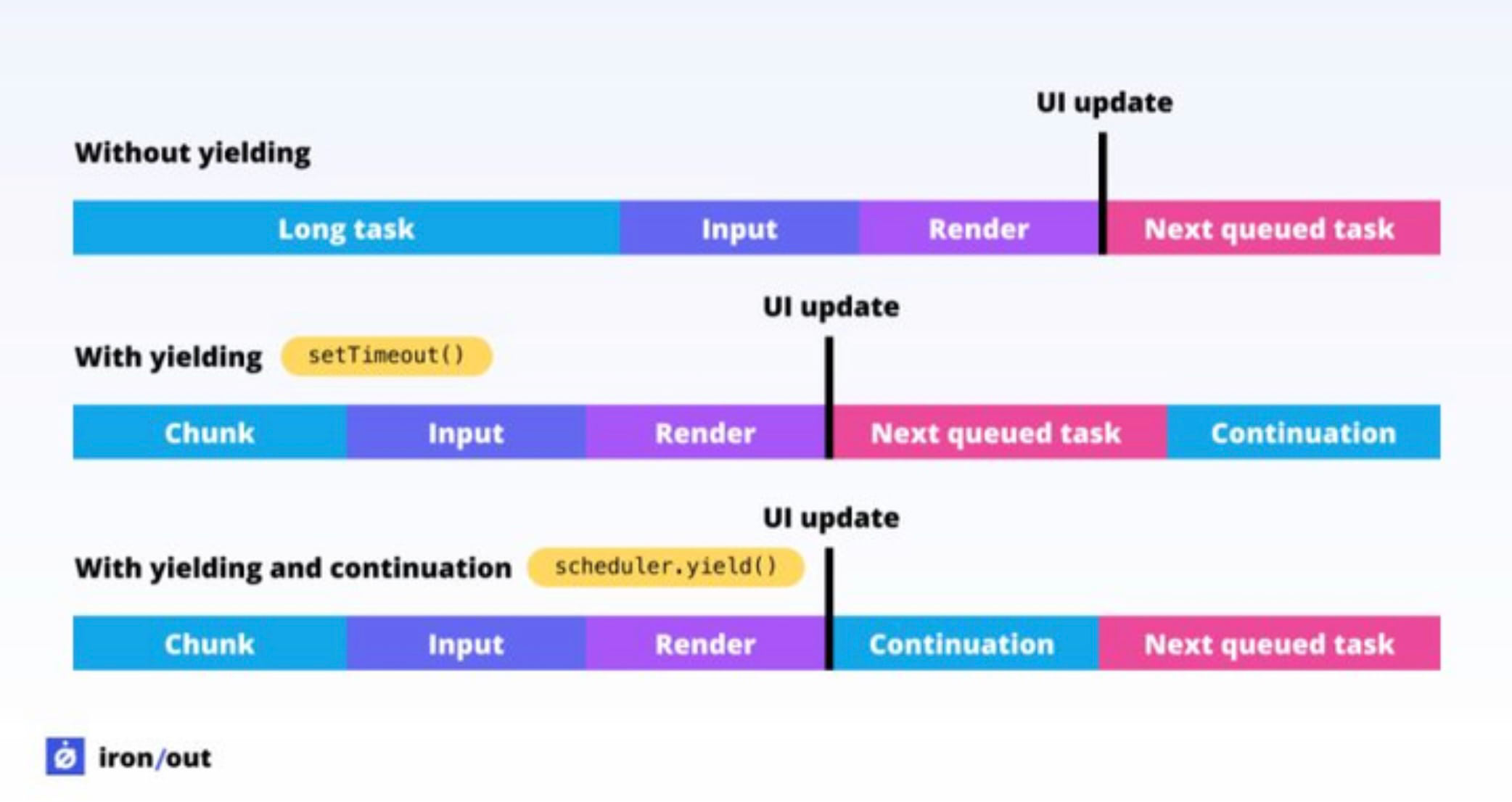 The difference between
 setTimeout and scheduler.yield(). A task split using yield will be prioritised over other tasks in the queue.
Other Alternatives to Defer Tasks
In JavaScript, there are indeed more methods to defer code execution. However, much like setTimeout, they primarily serve other purposes.
- The
window.requestAnimationFrame()API is often mentioned as an alternative. However, it is intended to synchronise computed styles with DOM elements. It's the ideal method for animated elements animated via JavaScript. Using this API to "split tasks" would likely worsen response speed. - The
window.requestIdleCallback()API is indeed for optimising speed and deferring work until the browser is idle. However, you have no control over the processing time, making it entirely unsuitable for some actions, such as analytics. - The
MessageChannel()API can also be used to defer code to the next rendering cycle. It’s internally used by React. Yet again, it’s just another hack.
Conclusion
While we recognise that setTimeout is a “hack for INP optimisation”, it boasts one significant advantage. Its use is remarkably simple and quick.
In terms of support, it remains the only bulletproof solution, as timer APIs have been inherent to JavaScript from the start. However, if possible, opt for more modern APIs like scheduler.yield() or other long-term sustainable solutions.
Where to go next?
- Dive deeper into other methods of INP optimisation.
- Prefer a specific framework? Check out React optimisation or Vue.
- Let us assist you with INP metric analysis.