Cloudflare: Your Secret Weapon for a Faster and More Stable Website (Checklist Article)
 Martin MichálekUpdated 11/28/20257 minutes reading
Imagine if your website could become faster, safer, and more stable almost overnight. And better yet – what if it was managed by a tireless assistant who never sleeps and never takes a holiday?
Cloudflare is precisely that tool. And the best part? The basic version is free.
Check out our Cloudflare setup services or AI Bot Strategy.
What is Cloudflare? The Intelligent Assistant Between Your Website and Visitors
Cloudflare acts as a middleman between your website and its visitors. Unlike a typical CDN (Content Delivery Network), it is not merely a system for distributing images and files.
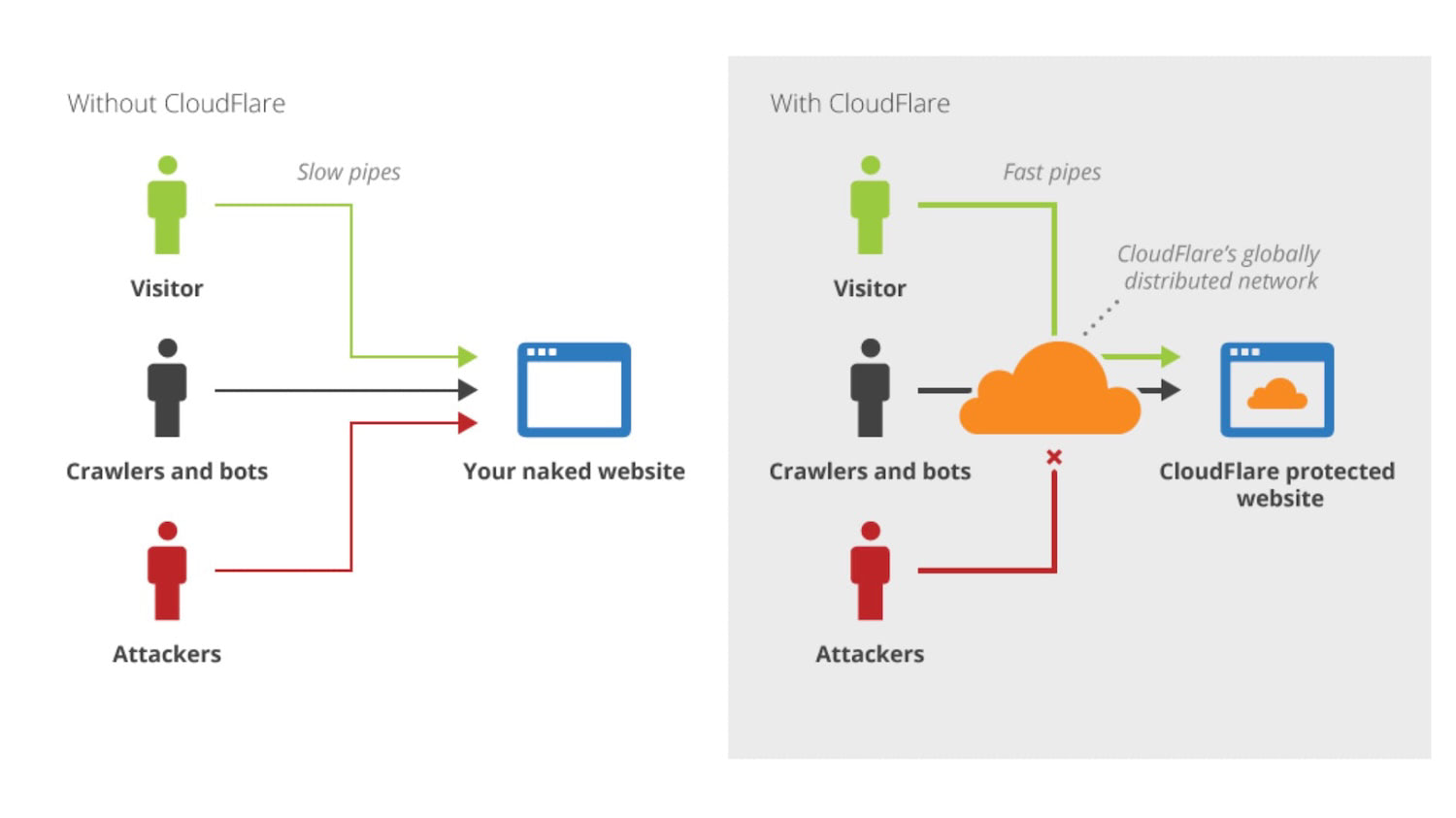 Cloudflare is the intermediary between your website, visitors, bots… and also attackers.
In practice, it works quite simply. Visitors, without realizing it, first connect to Cloudflare’s servers, which then facilitate communication with your actual server, making adjustments along the way.
This allows Cloudflare to optimize data transfer, protect your site, and ensure stability even under high traffic.
Cloudflare is thus a smart filter and accelerator for your website simultaneously.
Why We Recommend Cloudflare for Every Website
Based on PageSpeed.ONE’s experience with dozens of clients, we recommend implementing Cloudflare for nearly every website. It is one of the easiest optimizations you can make.
The reasons are straightforward:
- Improved website speed, especially for distant visitors.
- Protection against DDoS attacks (massive server overload by requests) and other threats.
- Higher website availability even during hosting outages.
- Reduced server load, which can save hosting costs.
Our measurements show that websites using Cloudflare achieve better results in Core Web Vitals (Google’s speed metrics).
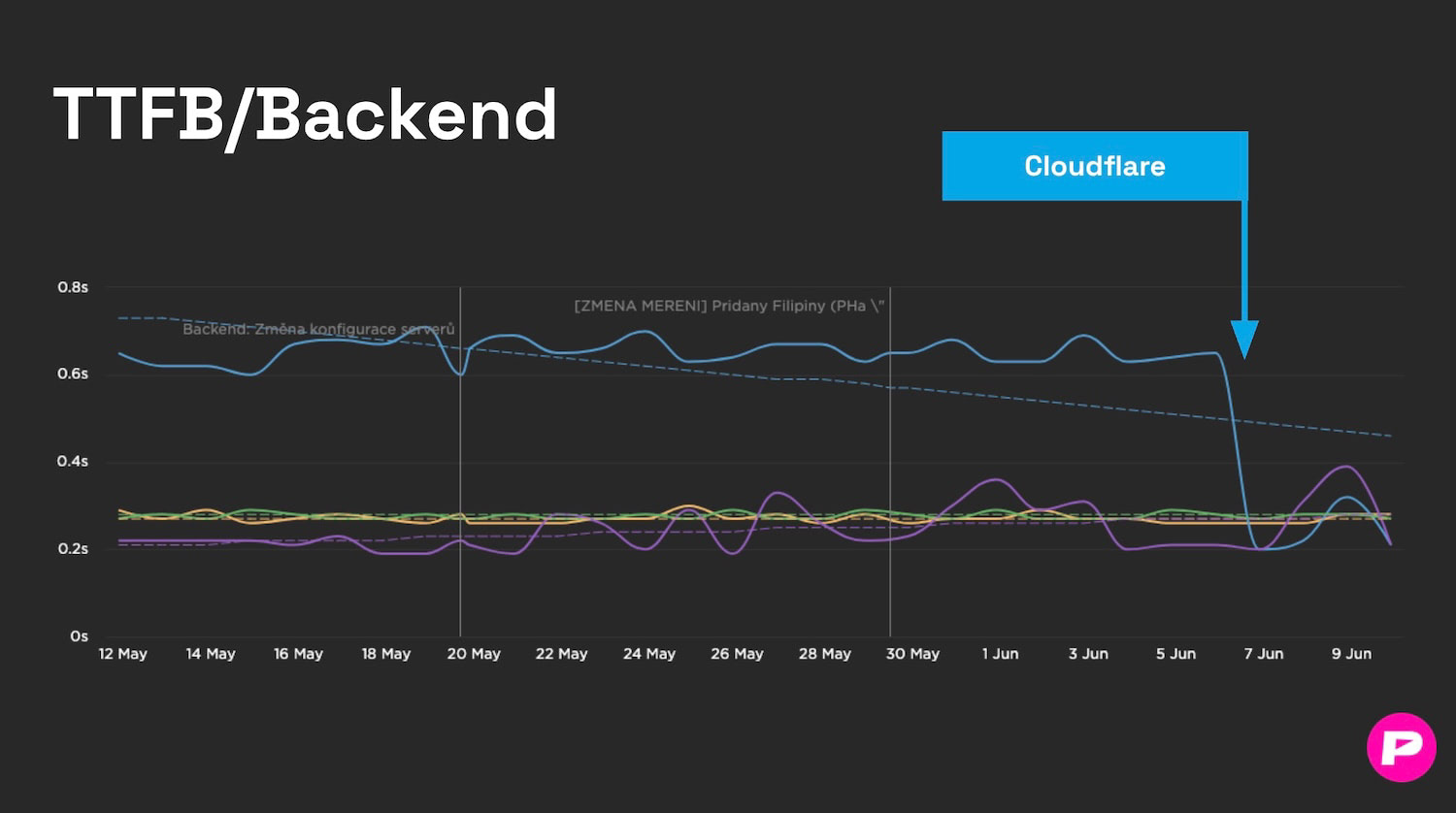 After PageSpeed.ONE implemented Cloudflare, a client’s server response (TTFB) improved more than threefold.
How Cloudflare Helps with Speed
Cloudflare has servers all over the world, so your content is always nearby. This service offers several features for significant acceleration:
-
Global network of servers means your website’s content is closer to users. Instead of loading from your server’s location, files load for Germans from Germany and Americans from the USA. Simply put, 21st-century logistics instead of carrier pigeons.
-
Automatic image optimization ensures the right compression and format for each device. Mobile devices receive smaller images than desktops. This is managed by Polish. (More on image optimization.)
-
Efficient caching means that static content like CSS, JavaScript, and images are stored on Cloudflare’s fast servers.
-
Dynamic content caching allows acceleration of dynamic pages generated for each visitor. You can set product pages to cache for 2 hours, articles for a week, but never the cart or customer account.
-
With Brotli compression, Cloudflare uses level 4, providing an optimal balance between file size and compression speed. (More on Brotli and Gzip.)
-
HTTP/3 support automatically activates the latest and fastest version of the HTTP protocol.
-
Enabling Early Hints according to Cloudflare data improves First Contentful Paint (FCP – first content display) by more than 20% and Largest Contentful Paint (LCP – main content display) by nearly 16%.
TIP: A faster website brings more conversions and better positions on Google, but also many other benefits.
Security and Cloudflare: Your Website Under Protection
Cloudflare protects your website 24/7 without requiring your manual intervention. It provides robust security features:
-
DDoS attack protection automatically blocks malicious traffic before it reaches your server.
-
Web Application Firewall (WAF – firewall for web applications) protects against common threats like SQL injection or XSS attacks (cross-site scripting). The WAF acts like an experienced doorman at a luxury hotel – it throws out troublemakers and lets decent guests in.
-
Bot blocking – Bot Management identifies and blocks malicious bots that could steal content or slow the site down, including AI bots.
-
SSL/TLS encryption ensures secure HTTPS connections for all visitors automatically.
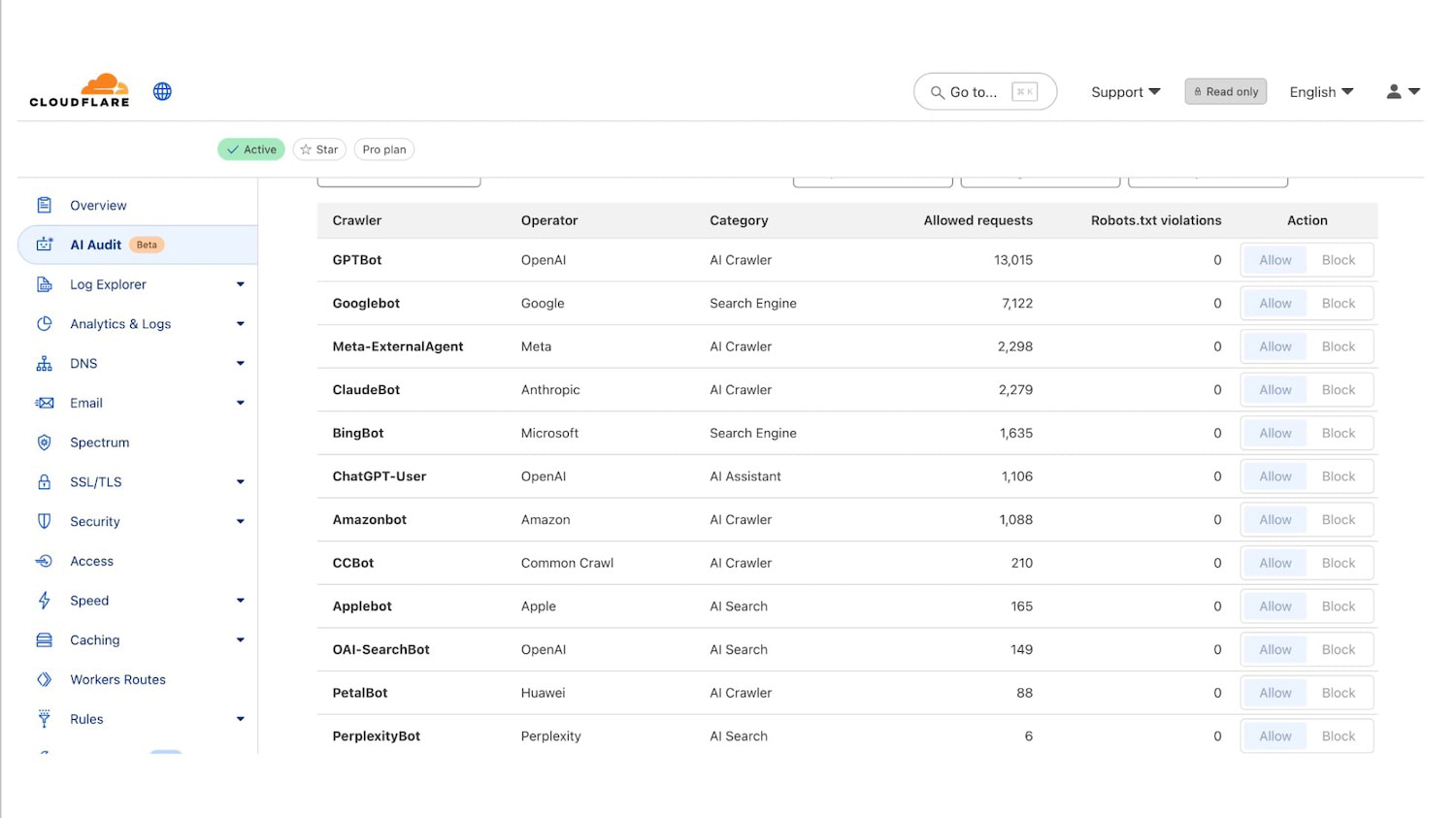 Access statistics from AI bots on the Cloudflare dashboard show the interest in your content from AI chatbots.
How Cloudflare Helps with Stability: A Website That Never Goes Down
Even if your hosting fails, the website can continue to function. Cloudflare helps keep the site operational under challenging conditions:
-
Always Online™ displays a cached version of your site even when your server is unavailable.
-
Load Balancing distributes traffic across multiple servers to ensure stability.
-
Argo Smart Routing intelligently routes traffic via the fastest path across the internet.
-
Stale-While-Revalidate displays an older version immediately while loading a new one in the background. Visitors get the site from cache instantly, even if it has technically expired.
It’s like having a backup generator that switches on automatically during a power outage – the website just works, even when your hosting has a meltdown.
From PageSpeed.ONE practice: for e-commerce sites, we’ve observed that Cloudflare can mitigate the impacts of sudden traffic spikes. For instance, during Black Friday or marketing campaigns, the site doesn’t crash.
A stable website means satisfied customers and no lost orders. For that, you need a service like Cloudflare and ideally monitoring of website availability and speed.
What Does Cloudflare Cost?
You can start for free, paying only when necessary.
Cloudflare offers several pricing plans:
- Free Plan – basic features for free, suitable for personal websites and blogs.
- Pro Plan ($20/month) – advanced features for small and medium websites. At PageSpeed.ONE, we recommend this as a baseline if your websites are your livelihood.
- Business Plan ($200/month) – comprehensive solutions for corporate sites with high traffic.
- Enterprise Plan – tailored solutions for large projects with a dedicated account manager.
In our experience, free versions usually aren’t enough for e-commerce due to a limited number of Page Rules (rules for different parts of the site), but there are more reasons for the Pro Plan. Check out the comparison of features and prices.
How to Cloudflare? Quick Deployment Guide and Basic Setup Checklist
Deploying Cloudflare can be done in 30 minutes, even if you’re not a technician. However, more detailed settings require knowledge and experience. Basic deployment is relatively simple:
- Sign up at Cloudflare.com.
- Add your domain and let Cloudflare scan your DNS records.
- Change the nameservers at your domain registrar to Cloudflare’s nameservers.
- Set security level and caching according to your needs.
Deployment is simple, but the correct setup is key to success. The basic setup is as follows:
- Verify that all DNS records imported correctly.
- Set SSL/TLS to "Full".
- Enable "Always Use HTTPS" and 0-RTT.
- Activate HTTP/3.
- Keep Brotli enabled. Turn on Early Hints (HTTP 103).
- Cache Rule – DYNAMICS/ADMIN → Bypass cache (non-GET/HEAD, /wp-admin, login, previews).Cache Rule – STATIC FILES (e.g.
.css, .js, .jpg, .woff2) → Eligible for cache, Edge Cache TTL: 1 year (ideally for fingerprinted files). - Optionally: Cache Rule – PUBLIC HTML (e.g.
/blog/) - Enable Tiered Cache (Smart).
- WAF – Bot Fight Mode as needed; enable Browser Integrity Check.
- Optionally (Pro+): Polish/WebP and Image Resizing for image optimization.
- Test the website on main pages (including login/checkout), check CF-Cache-Status and Security → Events.
- Measure website speed using PageSpeed.ONE and set up regular monitoring PLUS to see changes.
Tip: Changes take effect gradually (up to 48 hours), so don’t panic if you don’t see dramatic improvements immediately.
The Cloudflare dashboard also shows basic traffic data with important recommendations.
How Can PageSpeed.ONE Help You with Cloudflare?
Over years of working with Cloudflare, we’ve gathered a wealth of valuable insights. Based on work with dozens of websites, we can confirm it’s one of the most effective “quick win” optimizations.
Here are some of our key insights:
-
For international websites, we’ve observed up to double speed in foreign locations. A case of one of our clients with content sites: loading in Australia sped up from 2.5 seconds to 1.4 seconds.
-
For larger WordPress sites, Cloudflare is almost a necessity, and many plugins can work directly with Cloudflare. (More on WordPress speed optimization.)
-
Beware of e-commerce sites and other websites with dynamic or personalized content – careful caching setup is needed to avoid displaying outdated prices or another user’s login.
We use Cloudflare on our own websites and regularly recommend it as part of our speed audits and other services.
Of course, we can help you with deployment and proper Cloudflare setup. On website speed monitoring, you’ll soon see that it pays off.
Speed Monitoring PLUS
Try our monitoring app free for a month.
5,400 CZK annually per website. Invoice only, no credit card needed.