Optimising Vue.js and Nuxt.js: Tips and Tricks
 Martin MichálekUpdated 1/27/202613 minutes reading
Vue.js is fast. But only if you use it correctly.
A visitor waits for your website to load, but within three seconds, they've moved on. Sadly, this isn't science fiction – it's the reality for many modern websites built even on frameworks like Vue.js or Nuxt.js.
Let's clarify what we're discussing here:
- Vue.js is among the most popular JavaScript frameworks for creating web applications.
- Nuxt.js is a meta-framework that allows Vue.js, which runs in the browser, to also operate on the server, thereby enhancing performance.
Proper optimisation is not just a technical trick for programmers. It's an investment that results in higher conversions, better search engine rankings, and happier users.
PageSpeed.ONE clients like Dr. Max and Airstop using Vue.js achieve better results through proper optimisation.
Why Speed is Crucial for Websites
You might think, “So what if a website loads a second later?” But the reality is harsh, and numbers don't lie. Website speed has a direct and measurable impact on your business. Let's take a few examples:
-
Google measured that if a page meets Web Vitals, it's 24% less likely that users will leave before it loads.
-
The conversion rate of an e-commerce site drops by an average of 0.3% with each additional second of loading time.
-
Speed is a direct ranking factor for SEO in Google's algorithm.
Speed isn't a luxury; it's a necessity. Every millisecond counts. These numbers apply doubly for websites built on modern JS frameworks like React or Vue.js.
Why? Because they almost always load and execute more JavaScript than traditional websites and must undergo a more complex initialisation process.
But don't worry. With the right approach, your Vue.js website can be faster than many static pages.
Is Vue.js Inherently Slow? Separating Myths from Reality
There's a frequent belief that Vue.js and similar modern frameworks are inherently slow. Yes, more JavaScript means more work during the speed optimisation process. However, Vue.js is designed for performance, and sites built with it can be very fast.
Performance issues usually stem from human errors, not the framework itself:
-
Incorrect architecture
Using Single Page Application (SPA) where server-side rendering would be better. -
Insufficient optimisation
Ignoring best practices. Some of these are hinted at in this text. -
Testing only on fast devices
Developers often don't see the real problems of common users and ignore the so-called Performance Inequality Gap.
Vue.js can indeed be fast. The key is using it correctly and knowing when to apply which technique.
How to Tell if Your Vue.js Website is Struggling
You might think your website is fine because it works quickly for you. But are you testing it properly?
Measure your website's speed on PageSpeed.ONE.
Core Web Vitals: The Three Pillars of Speed
Core Web Vitals are three key metrics that determine whether your site is fast from a user's perspective:
| Metric | Meaning | Recommended Value |
|---|---|---|
| Largest Contentful Paint (LCP) | Loading speed. Time to load the largest visible element on the page. | ≤ 2.5 seconds |
| Interaction to Next Paint (INP) | Interaction speed. Response time to user actions (clicks, taps). | ≤ 200 milliseconds |
| Cumulative Layout Shift (CLS) | Layout stability. Stability of the visual layout of the page. | ≤ 0.1 |
Seven Steps to a Faster Vue.js Website
Now comes the most important part. Let's look at the fundamental tips to speed up your Vue.js website.
1. Proper Architecture: SSR and SSG Instead of Pure SPA
The acronyms sound complicated, but the essence is simple. Instead of your website waiting to download and execute JavaScript, send the user ready-made HTML code.
To exaggerate a bit, it's like the difference between getting a ready-made meal or having to wait for someone to cook it in front of you.
Let's get into those acronyms:
-
SPA (Single Page Application) is a website that loads most things right at the start and then pretends to handle everything on the client device without reloads, but at the cost of a very slow start and other disadvantages. It's like cooking a meal at the table. Today, this is an outdated approach.
-
Server Side Rendering (SSR) means the server generates ready-made HTML code for each page. The user sees the content immediately while interactive JavaScript loads in the background. This is what we want.
-
Static Site Generation (SSG) goes even further. HTML files are pre-generated (during an internal development process called build) and served as static files. This is the fastest possible option. However, it is not suitable for e-commerce and other more dynamic websites.
-
Hybrid approach combines both methods depending on the page type – static pages like blog posts as SSG, dynamic ones as SSR. Consider if you can use this for your site.
Let's illustrate an SSR configuration for the server-side part of Vue.js, known as Nuxt.js:
// nuxt.config.ts or nuxt.config.js for SSR

export default defineNuxtConfig({
  // Enable server-side rendering
  ssr: true,

  nitro: {
    prerender: {
      // Pre-generate static pages
      routes: ['/about-us', '/contact', '/blog']
    }
  }
});
If your website is sensitive to loading speed, avoid purely client-side SPA. Consider SSR and SSG combinations.
2. Progressive Rendering: Lazy Loading as a Lifesaver
Imagine building a house. You don’t bring all the bricks at once, but gradually, as needed. Your Vue.js website should behave similarly.
How to achieve this?
-
Lazy loading components means components are loaded only when they are truly needed. Typically, these are components that the user does not see on the first screen or uses only occasionally.
-
Progressive hydration is a process where JavaScript gradually "attaches" to server-generated HTML. The user sees the content immediately, but interactivity is added progressively where needed.
-
Code splitting automatically divides your code into smaller parts according to pages or functions. Instead of downloading one large file, only the necessary parts are downloaded progressively.
Example of lazy loading components:
// Use lazy loading
const HeavyChart = defineAsyncComponent(() => import('./HeavyChart.vue'));

// With loading state (e.g., spinner)
const HeavyTable = defineAsyncComponent({
  loader: () => import('./HeavyTable.vue'),
  loadingComponent: LoadingSpinner,
  delay: 200
});
Load only what is visible. The rest can wait.
We have an entire separate article on lazy loading in general terms.
3. Bundle Size: Less JavaScript, More Speed
Every kilobyte of JavaScript must be downloaded, parsed, and executed. On slow devices or weaker connections, this can take an eternity. Therefore, it's important to keep your JavaScript bundle size as small as possible. How to do that?
-
Tree shaking is a process that automatically removes unused code from your bundle. Modern bundlers like Webpack or Vite do this automatically, but you must help them by importing correctly.
-
Dependency audit means regularly checking which libraries you actually need. Often libraries remain in the project that you no longer use, but still enlarge the bundle.
-
File compression can reduce bundle size by up to 70%. Modern Brotli compression is even more effective than traditional Gzip.
// Incorrect – imports the entire library (several MB)
import _ from 'lodash';

// Correct – imports only the needed function (a few kB)
import { debounce } from 'lodash-es';

// 💡 Even better – simple custom implementation
const debounce = (fn, delay) => {
  let timeoutId;
  return (...args) => {
    clearTimeout(timeoutId);
    timeoutId = setTimeout(() => fn.apply(this, args), delay);
  };
};
A simple tip: the tool bundlephobia.com shows the size of each dependency and suggests alternatives.
Every kilobyte counts. Keep your bundle on a diet.
4. Optimisation for Better INP: Quick Responses to Clicking
Interaction to Next Paint (INP) measures how quickly a website responds to user actions. If a user clicks a button and nothing happens, or it happens slowly, our dear user is frustrated.
The most common problem is heavy operations performed in the browser's main thread, known as long tasks (measured by the JS Long Tasks (JSLT) metric or synthetically by the TBT metric). When your JavaScript processes a lot, the browser cannot respond to clicks in the meantime.
 Hydration, or reviving the application, can give the browser a hard time and prevent users from interacting. We tackled this issue, for example, with the Airstop.cz project.
What to do about it?
-
Use lazy hydration. Especially for components where it's clear that the user won't activate them immediately. These typically include menus, modals, filters, footers, etc.
-
Debouncing and throttling are techniques that limit the number of function calls during rapid repetition of an action. Typically when typing into a search field or during scrolling.
-
Reduce the DOM. The dynamic structure of HTML (DOM) is fundamental. Keep it as small as possible, ideally within 3,000 DOM nodes.
Debouncing for searching:
// Debouncing for searching – responds only after 300 ms from the last keystroke
import { debounce } from 'lodash-es';

const searchProducts = debounce((query) => {
  // Searching starts only after a pause
}, 300);

// 🖱️ Throttling for scroll – triggers at most once every 100 ms
import { throttle } from 'lodash-es';

const handleScroll = throttle(() => {
  // Optimise scroll listener
}, 100);
Heavy operations like filtering large datasets or complex calculations should be moved to the server via API calls.
Keep the browser's main thread free. The user must feel an immediate response.
5. List Virtualisation: Thousands of Items Without Slowdown
If you have a list with thousands of products, articles, or comments, you can't render them all at once. That would slow down the site unbearably.
Virtualisation means rendering only visible elements plus a small buffer around. As you scroll, elements are dynamically swapped. It's like reading a book – you don't read all the pages at once, just the current one.
There are ready-made libraries for Vue.js that implement virtualisation for you. The most popular are vue-virtual-scroller or vue-virtual-scroll-grid.
Virtualisation can improve list performance by hundreds of percent, especially on mobile devices with limited capabilities.
Render only what the user sees. Thousands of items can wait.
6. Proper Image Handling: Modern Formats and Lazy Loading
Images make up the majority of data volume for some websites. Proper image optimisation can be the most effective way to speed up a site.
-
Modern formats like WebP and AVIF offer 25-50% better compression than traditional JPEG while maintaining quality. Modern browsers already support WebP and AVIF.
-
Responsive images means delivering the correct dimensions for different devices. Why load a 2000px-wide image on a mobile phone with a 400px-wide screen?
-
Lazy loading images means images load only when they enter the user's viewport. This significantly speeds up the initial page load.
-
Placeholder images prevent layout shifts (content jumping) during loading. You can use blurred thumbnails, coloured backgrounds, or skeleton loaders. However, be cautious as they can worsen speed if used incorrectly.
Example in code – responsive images with lazy loading:
<!-- AVIF image with fallback to WebP + lazy loading -->
<picture>
  <source src="product-image.avif" type="image/avif" />
  <img src="product-image.webp" loading="lazy" alt="Product description" width="800" height="600" />
</picture>
Optimise images carefully, especially if they are your LCP element.
7. Profiling: Measurement is the Basis for Improvement
Optimising without measurement is like shooting in the dark. You might optimise something that isn't a problem while missing the real bottleneck.
What tools to use besides the absolute basics, which include synthetic and CrUX monitoring?
-
Chrome DevTools Performance panel shows where your code spends the most time. You can see which components render the slowest or which functions burden the CPU. Learn more about measuring Core Web Vitals in the browser.
-
Vue DevTools provide specific Vue.js metrics – which components re-render, how long their mount or update takes.
-
Real User Monitoring (RUM) tracks real users on real devices with real internet. Lab tests are important, but RUM shows reality. It's the most accurate of all three types of speed measurement.
What you don't measure, you can't improve.
Advanced Tricks: CDN, Prefetching, and Modern Technologies
If you've mastered the basics, you can go further. Let's give a few tips for optimisations beyond the above:
-
Choose good infrastructure and a Content Delivery Network (CDN). CDN means your files are loaded from the server closest to the user. It's like having branch offices in every city instead of just one headquarters. Use Cloudflare or AWS CloudFront.
-
Optimising BFCache, i.e., quick returns to the previous page, can yield decent rewards with little effort.
-
Speculation Rules API brings intelligent navigation prediction, but implementation is advanced, so be careful.
PageSpeed.ONE Successes: Real Results of Optimisation
Theory is nice, but what about practice? We've worked with several Vue.js projects where performance optimisation has significantly manifested.
One of them is the holiday retailer website Airstop.cz, where we helped the development team from DesignDev improve the user experience during an ongoing redesign.
The project is still in progress, but we're already seeing improvements in Core Web Vitals metrics by tens of percent:
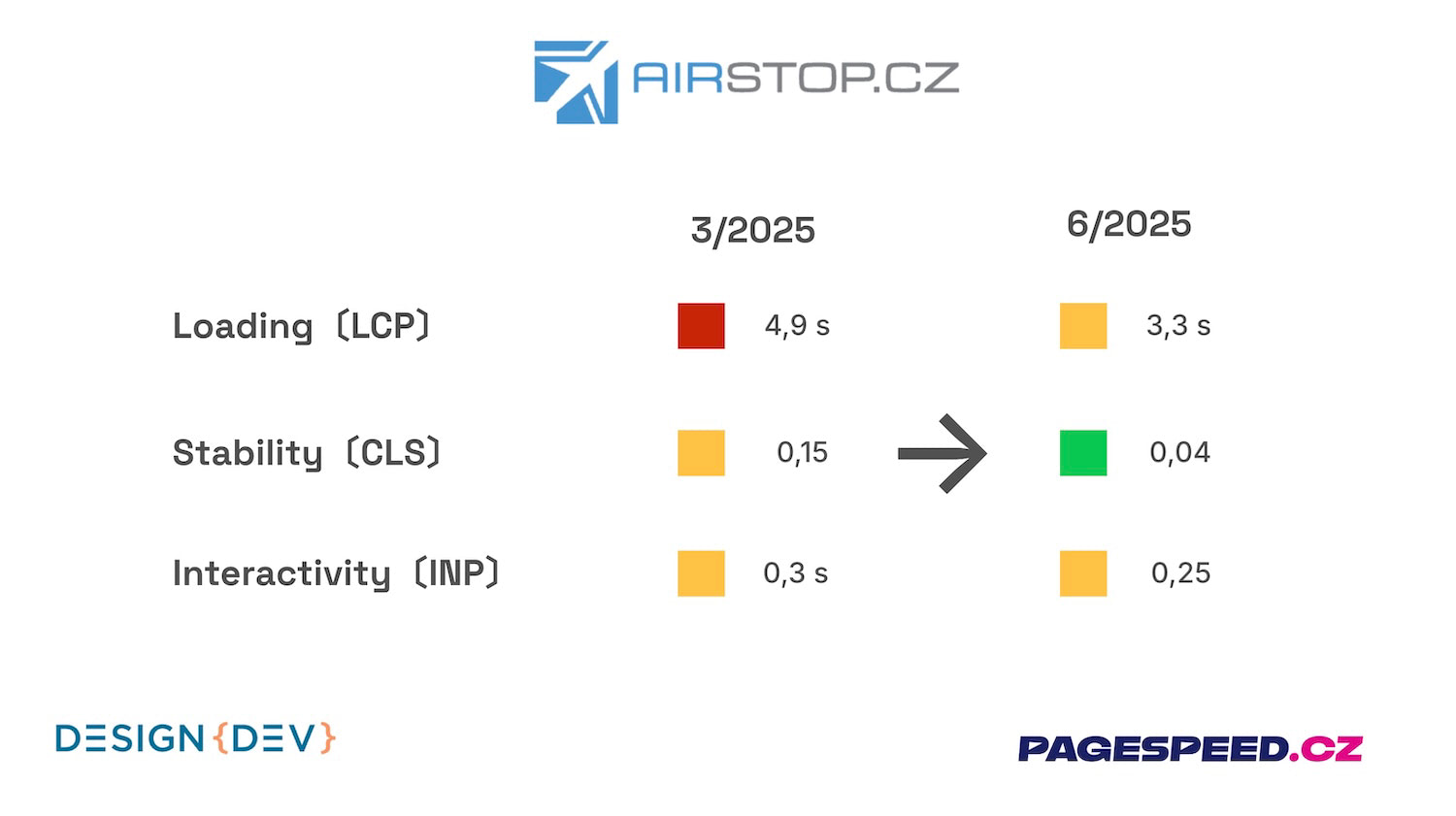 Airstop.cz shows that Vue.js projects can make significant progress in speed. And it's still early days.
For another client of ours, the pharmacy chain Dr. Max, we already have LCP and CLS metrics in the green, and work is underway to improve interactivity (INP). Examples of these optimisations include:
- Optimising user interactions with loaders using the
nextTickmethod across the site. - Speeding up user interactions in complex product searches.
- Optimising events triggered from GTM (Google Tag Manager).
Each project is unique, but the principles remain the same – without optimisation following development, speed cannot be maintained at a good level. The most important thing is to start with measurement and gradually implement changes.
How PageSpeed.ONE Monitoring Can Help You
In our PageSpeed.ONE speed monitoring, you can track Core Web Vitals metrics in real-time and identify specific issues. We often see problems with large JavaScript bundles or slow hydration (the process where interactive JavaScript attaches to HTML) in Vue.js websites.
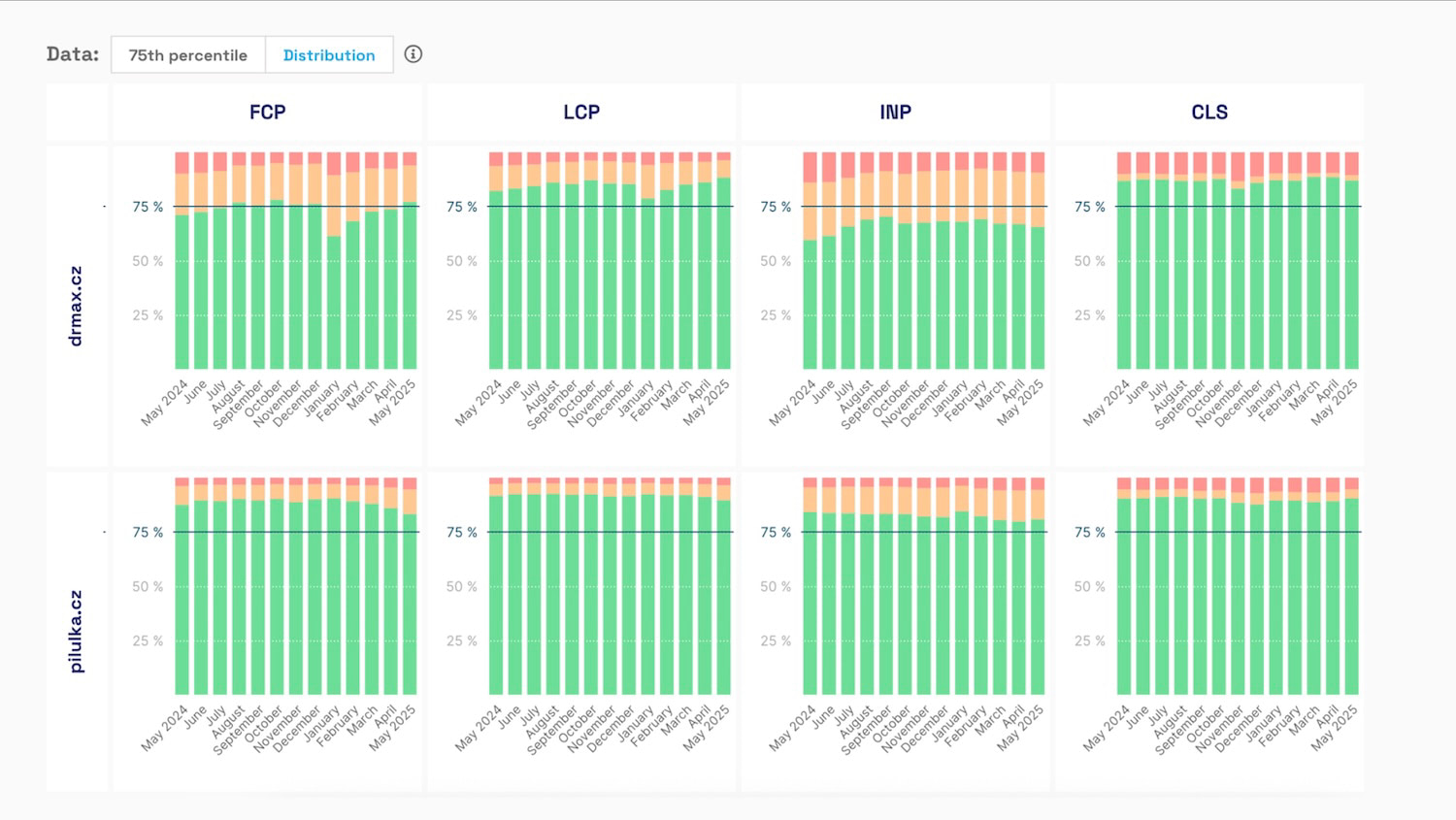 We monitor the long-term development of Core Web Vitals metrics for our client Dr. Max and its competitors.
Measurement is crucial. Without data, you're optimising blindly.
Our PageSpeed.ONE monitoring PLUS offers these benefits:
- Continuous monitoring of Core Web Vitals from CrUX data and synthetically.
- Comparison with competitors in your industry and other domain data.
- Detailed analyses from every test.
- Watcher and alerting for performance degradation with the possibility of a quick response.
We highly recommend automating monitoring so you can focus on optimisations.
Speed Monitoring PLUS
Try our monitoring app free for a month.
5,400 CZK annually per website. Invoice only, no credit card needed.
Conclusion: Speed as a Competitive Advantage
Optimising Vue.js applications shouldn't be a one-time action but a continuous process. Vue.js itself isn't slow; problems arise from incorrect use or insufficient optimisation.
Start measuring with Core Web Vitals, consider implementing SSR, and gradually optimise according to our list. Remember, every millisecond counts, and speed can be your competitive advantage.
Not sure what to do next? Feel free to contact us.
The result of optimising Vue.js will be a faster website, happier users, better search engine rankings, and, last but not least, higher revenues.