Cookie Banners and Web Speed
 Martin MichálekUpdated 7/23/20256 minutes reading
Deploying cookie banners without speed optimization poses quite a significant threat to the speed and thus also to the Web Vitals metrics. In this article, we share insights from our work with clients.
You probably know that cookie banners (or "CMP banners") will become mandatory on most websites due to legislative changes. We won't delve into legislation (Petra Dolejšová has done that here) or design (Ondřej Ilinčev has discussed it here); we'll focus solely on not ruining your speed with their deployment.
First, let us introduce you to a champion. The worst possible cookie banner, one that will undoubtedly ruin your metrics.
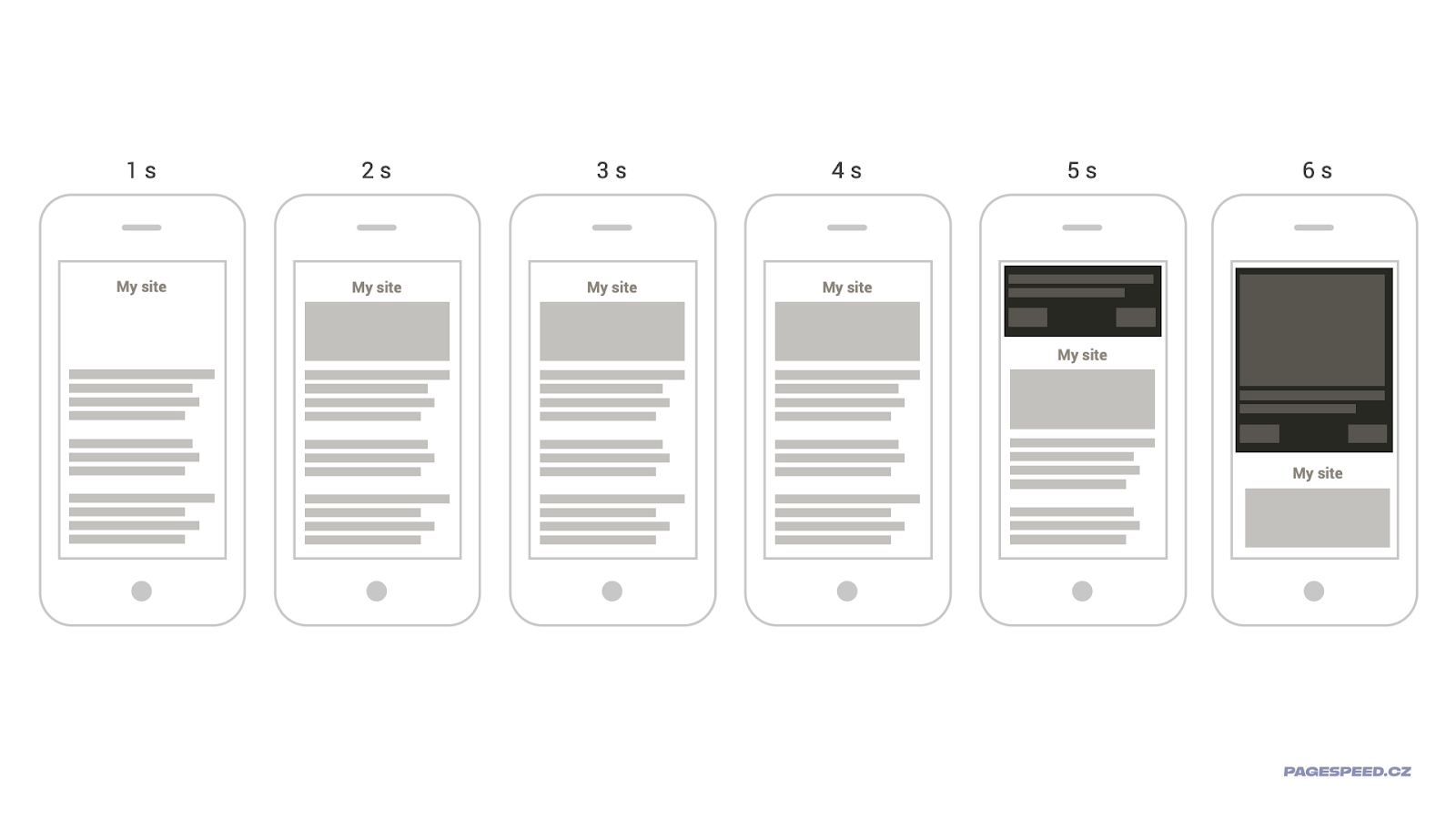
Here it is, the champion of web speed destruction! Five seconds of nothing happening. Then the banner slowly starts to shift content. More so when a really large image is rendered into it.
Why is this so bad from a speed perspective? Take a moment to ponder, you'll surely figure it out.
Have you?
These are the most critical issues this banner causes:
- It loads late, when the user might already be consuming page content.
- It worsens the CLS metric significantly with its shifting. The metric could spike to more than five times the maximum possible value due to the cookie banner alone.
- In the final step, an image is rendered in the cookie banner. Ideally, a little later than the banner itself, poorly optimized and preferably larger than any other element on the page. Here we have ideal conditions for ruining the LCP metric.
There are plenty of these speed destruction champions on the web. And as you've rightly deduced, it doesn't necessarily have to be cookie banners…
Let's now look at the specific ailments cookie banners can cause to metrics.
LCP Metric: Render As Soon As Possible
Among developers, there's a myth that rendering content like a cookie banner should be postponed as much as possible. After all, it isn't the main content of the page.
This is one of the major mistakes you can make when implementing banners. From the user's perspective, the cookie banner is the main and most important content. Ideally, they should read it, click through, and only then proceed to your website.
Moreover, if you've managed to design the banner to include large elements (long texts or images), it can become an LCP element, based on whose rendering the Largest Contentful Paint metric is calculated.
So, by delaying the banner, you might also delay the LCP metric.
Look at the image below; there are two websites. Both large and technically complex. For their developers, rendering the cookie banner in a timely manner is problematic, despite their best efforts. How does it look from the user's perspective on a slower connection?
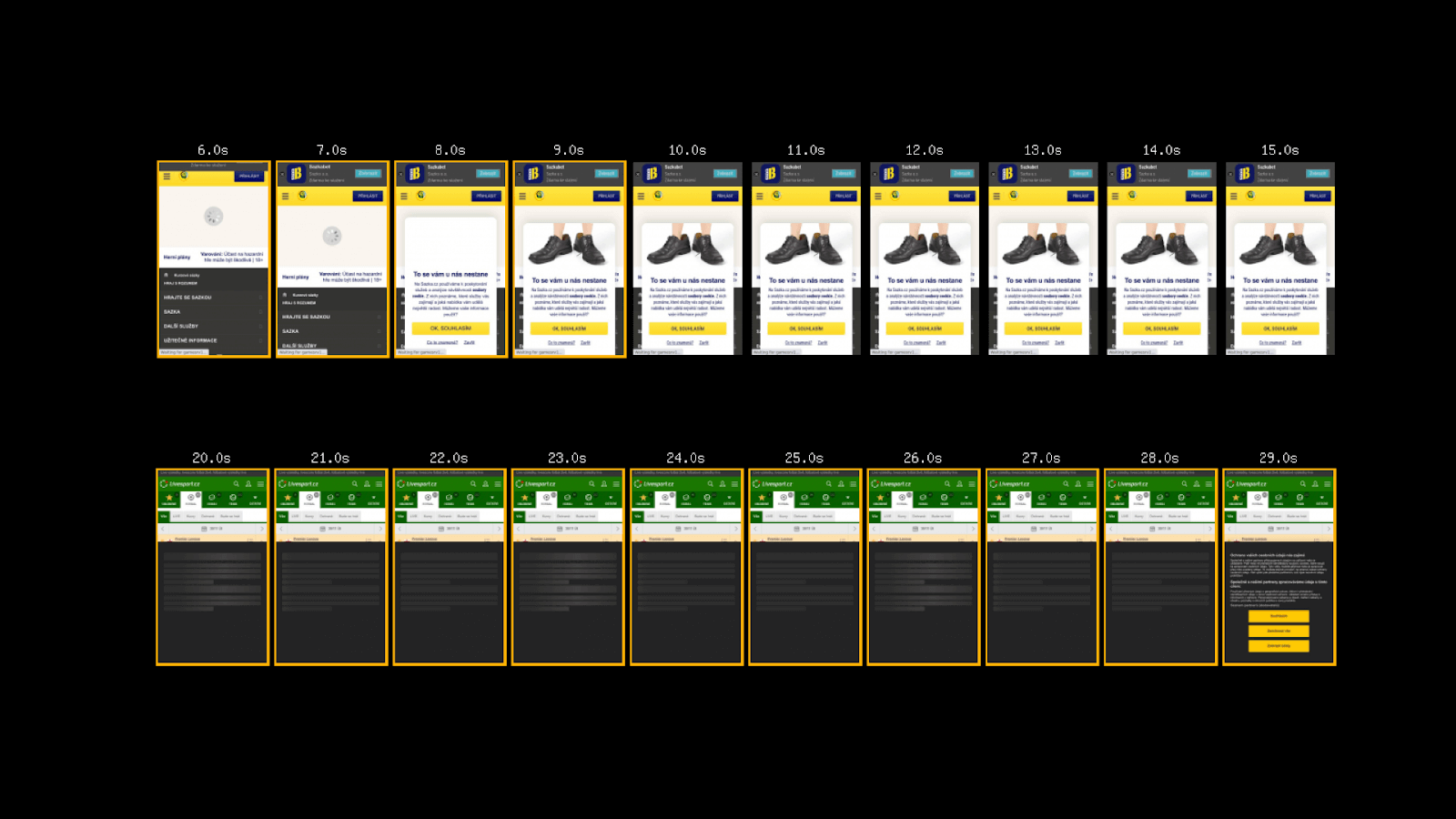 In both cases, the LCP metric is calculated from the banner's content. In the first case, the banner appears later than the website's layout, and then there's unfortunately a wait for the image to download.
The second variant is slightly better. Before the banner downloads, a skeleton is visible on slow connections, holding space for the banner's content rendering.
More information on how to hold space for components can be found in this article.
CLS Metric: No Shifting, No Animating
You probably already know that the Cumulative Layout Shift metric is ruined by unwanted content shifts. In the initial example of a really bad banner, we saw the biggest problems that can be caused to the CLS metric (and users) through poor design or implementation.
In the context of CLS, pay attention to specific solutions. For one of our clients, for example, the implementation of Google Funding Choices worsened this metric threefold:
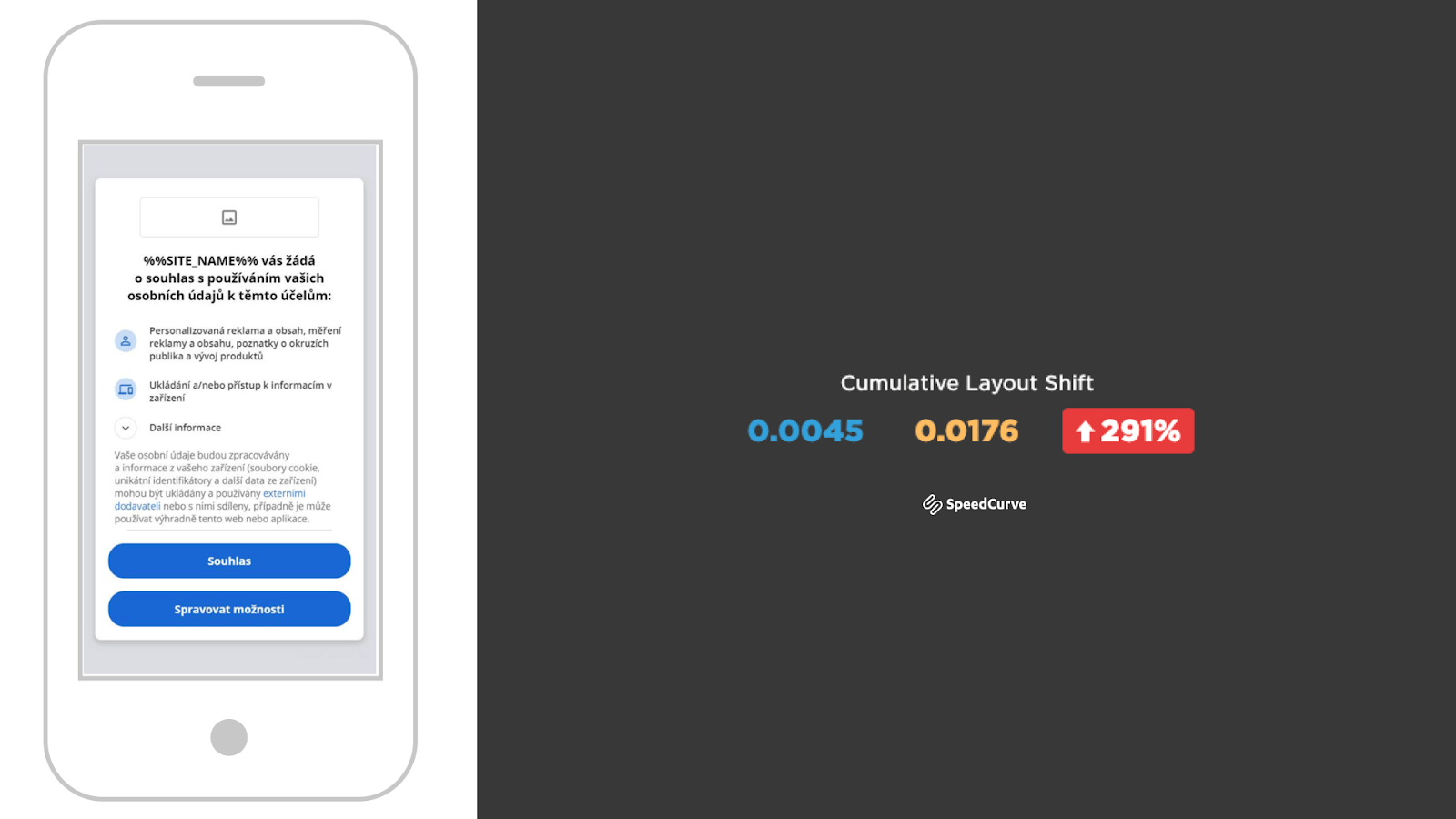
We've confirmed that, on user data (Web Vitals from the Chrome UX Report), it didn't have such a large impact. However, it's definitely a warning against blindly implementing third-party solutions.
Test. And measure, measure, and measure. Perhaps in our web speed test.
Be cautious with animations in CLS as well. You probably know that it's necessary to animate correctly, using CSS properties like transform. However, if you leave their animations enabled in some solutions, they're done poorly and will worsen your CLS. We could cite OneTrust (formerly Optanon) as a poor example here.
INP/TBT: Measure the Impact on Browser Performance
The "JavaScript" Interaction to Next Paint metric (or Total Blocking Time in synthetic measurement) isn't typically worsened by cookie banners. But even here, exceptions can be found.
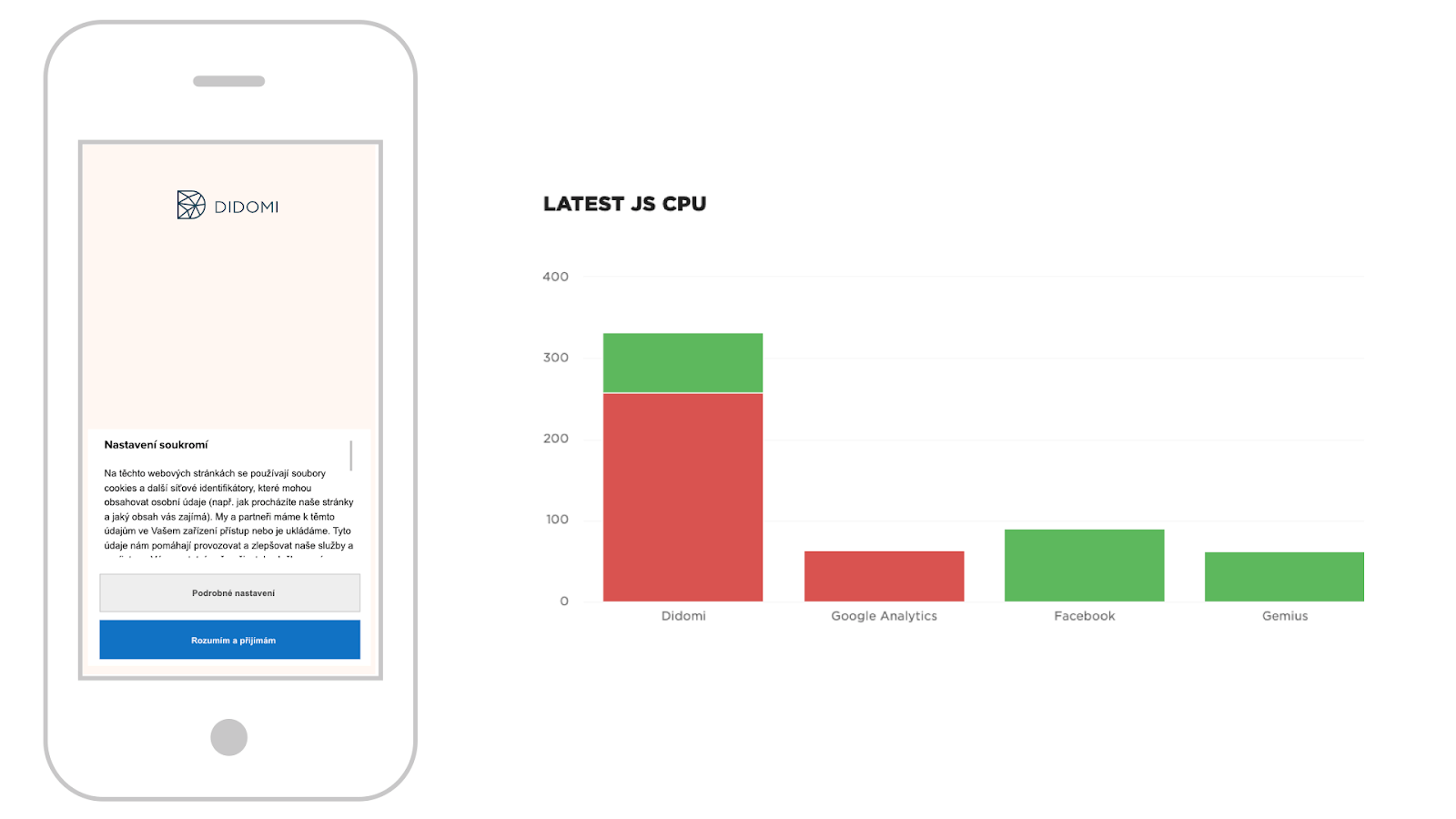
In this respect, be cautious with the Didomi solution, which can block the main browser thread on a slower mobile device for four times the value of Google Analytics. On regular websites, it's just a bit of a nuisance, but for sites where rendering is heavily loaded with third-party JS (content websites with ads), this could mean a deterioration in INP for users.
A Note on Measurement
We often encounter the opinion that third-party components shouldn't be included in speed measurements because developers aren't responsible for them.
However, users don't see the web without third-party components and web.dev on third-party JS. There's no choice but to accept the cookie banner and other third parties and simply measure the real state.
With cookie banners, though, a special situation arises: Some users see the web with it and some without it. Therefore, we recommend testing both variants.
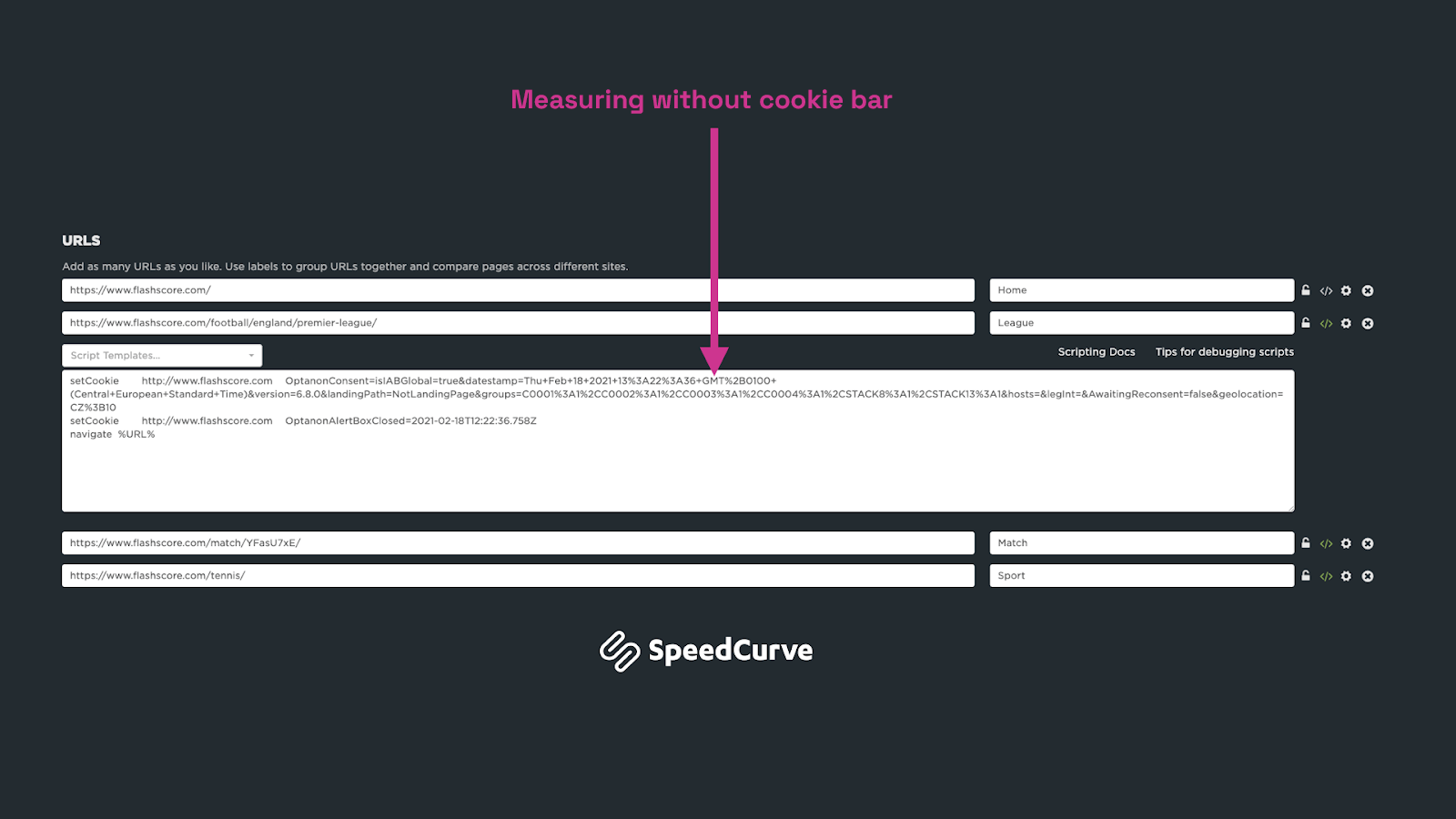 The image shows SpeedCurve settings for Livesport, where we test only the homepage with the cookie banner. Technically, this is done using WebpageTest scripting. You can create a similar solution using Lighthouse User Flows.
Recommendations for Your Implementation
Let's summarize:
- Load the cookie banner as soon as possible.
- If possible, avoid large elements in it that might be LCP elements.
- Be cautious with animations and sliding the banner from the top.
- Test the speed impact of chosen solutions.
- Measure the speed impact with and without the cookie banner.
Video Conclusion
If you prefer spoken word, a webinar recording by Pavel Ungr about cookie banners is available.
Of course, we can assist you with implementation and optimization in just a few hours of consultation. Feel free to contact us at: martin.michalek@pagespeed.cz.
We wish you fast websites! Even with a cookie banner.