Performance Culture: How to Maintain Web Speed with Your Team
 Martin Michálek11/6/20264 minutes reading
Web speed isn't a project with a finish line. Every new feature, marketing tag, or template redesign can wipe out months of optimization efforts with a single deployment. Companies that consistently maintain speed don’t rely on a one-off audit but embrace a Performance Culture — a way of talking about, measuring, and deciding on speed.
Below is a practical framework we recommend to management and product teams during speed audits. Technical guides are in separate articles; this is about habits and processes.
Why Performance Culture, Not Just an Audit
An audit or analysis will show you the priorities and tasks for developers. Without ongoing care, however, Core Web Vitals metrics typically decline as the team moves on to other topics. Monitoring alerts you to regressions; Performance Culture ensures someone responds to regressions and that new features aren’t broken right from the start.
Measure Speed Continuously and Consistently
- Don’t rely on one-time tests. Running PageSpeed Insights or Lighthouse once a quarter won’t reveal the slow erosion from small releases.
- Combine measurement types according to synth vs. CrUX vs. RUM: CrUX for “how Google sees us,” synthetic for developers' daily work, and RUM for larger sites to track conversion links.
- Set limits — performance budgets or Watchdog in monitoring PLUS — and respond to breaches just like test failures or production errors.
A short monthly ritual suffices: review domain data, Core Web Vitals report in Search Console, and open alerts from monitoring. Detailed steps on what exactly to check are described in the article Measuring Web Speed.
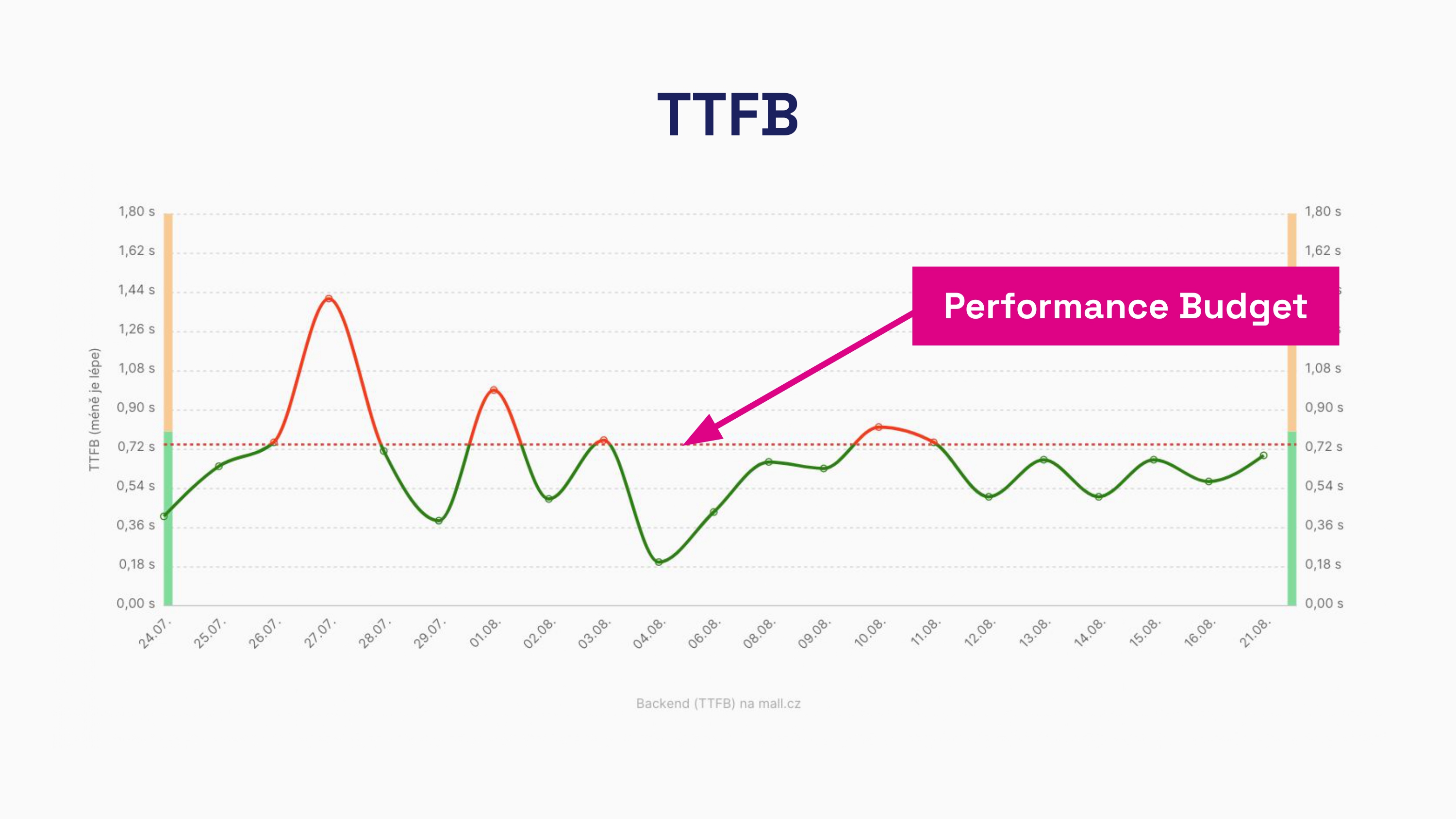 Metric limits help keep Performance Culture in everyday development practice.
Educate Your Team
A fast web is built by a whole set of roles, not just “that one frontend developer.”
- Developers need to know how to optimize LCP, INP, and CLS within their stack.
- Designers and editors influence media sizes, font counts, and lazy-loaded elements.
- Marketers add third-party scripts — often the largest source of INP regressions.
Workshops focused on specific URLs from your site, rather than generic lectures, prove effective. A shared knowledge base and metrics in documentation provide the team with a common language.
Highlight the Importance of Speed to Management
Speed requires time and budget just like security or accessibility.
- Connect speed with business — why speed affects conversions and advertising — and where possible, show impact on KPIs (conversions, bounce rate, cost per click).
- Include Core Web Vitals in the definition of done for larger releases (e.g., “mobile LCP and INP must not degrade Watchdog”).
- Don’t expect developers to “handle speed in their spare time.” Without capacity, optimization will be postponed indefinitely.
Consider Speed Impact When Launching New Features
Before choosing a widget provider, A/B tool, or new template, ask:
- How much JavaScript and how many network requests will be added?
- Must it run immediately on load, or can it be deferred until interaction or cookie consent?
- How will the solution impact metrics that are currently in the green?
A cheaper integration that worsens INP on mobile may cost more than a pricier option with less performance impact. Include speed impact consultations in regular product discovery — just like GDPR or SEO.
Summary
| Habit | Practical Step |
|---|---|
| Measurement | Monitoring + regular measurement process |
| Limits | Performance budgets or Watchdog |
| People | Role-specific training, shared documentation |
| Management | Capacity in backlog, link to business |
| New Features | Impact assessment before deployment |
When these habits are maintained, speed remains a priority even after the initial wave of optimizations — not just a topic for a few weeks. The team knows what to measure, when to respond, and how to assess new features; deeper analysis or external consultation then makes sense as a regular checkpoint, not as the only intervention.
Speed Monitoring PLUS
Try our monitoring app free for a month.
30 days free, no card required. Then from annually, or monthly per site.