PageSpeed.ONE Study: The Impact of Chat Widgets on Website Speed
 Martin Michálek
 Michal MatuškaUpdated 9/29/202512 minutes reading
Live chat is used by twenty percent of Czech e-shop operators. But how do these components affect website speed? We took a closer look at the ten most popular live chats and discovered some rather interesting insights.
We summarized our findings in our streamed show It’s All About Speed. The detailed study is presented in the following text.
From a speed perspective, widgets from LimeTalk, Daktela, or LiveAgent came out on top. Choosing the most popular SmartSupp isn’t a mistake either in terms of loading performance.
Conversely, be cautious with Manychat, Zopim, and even the well-known Facebook Chat Plugin (also known as Messenger). The impact on speed varies greatly among chats. Incidentally, one of them can drop your Lighthouse speed score by a whopping 35 points out of 100.
What are the most popular live chat services in the Czech Republic?
According to this year’s Reshoper study, roughly a fifth of Czech e-shops use some chat widget. Live chats thus influence the user experience of a significant portion of Czechs shopping online.
Thanks to Filip Podstavec from Marketing Miner, we obtained updated data on the most used web chats in the Czech Republic in November 2020. Smartsupp clearly dominates among them, but the entire top ten is as follows:
- SmartSupp
- Facebook Chat Plugin
- Tawk
- Zendesk/Zopim
- FoxyDesk
- Livechatoo
- LimeTalk
- Daktela
- LiveAgent
- Manychat
How did we measure?
Our methodology was as follows:
- Each live chat was inserted according to the manufacturer’s basic instructions into a completely blank page, and then also into a more complex page – for these purposes, we chose the Landkit template.
- Each resulting test page was measured for several days using synthetic tests from the SpeedCurve tool emulating a slow mobile device, the Samsung Galaxy S4. The resulting dashboard. Table with results.
- The most popular services were also manually tested by colleague Michal Matuška in a browser. He focused on validating the outputs of synthetic tests and sought improvements for both website owners and widget authors.
What did we measure?
To compare the results obtained, we naturally did not hesitate to use several available web speed metrics.
Let’s start with the technical indicators. They play a somewhat less significant role in the overall picture, but you’ll soon see why we bothered with them.
Transferred Data
The data volume that widgets download might seem like a less significant metric from today’s perspective.
However — as website operators, you probably wouldn’t want your users downloading an entire megabyte of data just for a chat service. Think that can’t happen? Then please stay with us a little longer.
Furthermore, if live chat data is transferred at an inappropriate time, the browser might slow down the download of far more important elements of your website.
How did it turn out?
- Limetalk excelled here, with only 8 kilobytes transferred (!).
- Conversely, thanks to Facebook developers, over a megabyte of data downloads into your website with Messenger. For Manychat, the indicator even stopped at 1.1 MB.
Number of Downloaded Files
In the era of modern HTTP/2 and HTTP/3 protocols, the number of files doesn’t play such a significant role, provided the files are small.
But again – it’s courteous for every service to keep the number of downloaded files in check because they have to share bandwidth with your website files.
- LimeTalk and Daktela (both 5 files) or LiveAgent (7 files) produced beautiful results here.
- Facebook downloads 42, Manychat even 49 files. From such a number, we could already assemble a decently sized website.
It must be said, however, that the rendering strategy chosen by the chat authors plays a role here. Some services download a large amount of data right from the start, but their chat “bubble” is available quite soon. With other, data-conserving services, the initial display takes a bit longer.
Let’s move on to another indicator. This one is rather serious, as we consider it an important indicator of speed impact.
Lighthouse Performance Score (LPS)
The “Lighthouse score” couldn’t be omitted. It consists of six significant metrics, providing a comprehensive picture of the website’s potential speed. More about LPS.
What impact do chats have on the LPS metric on a blank page?
- LimeTalk, Daktela, and LiveAgent excel – the Lighthouse score (measured via SpeedCurve) remains at 100 points. Let’s also appreciate the excellent results of Livechatoo (99 points out of 100) and SmartSupp (95 points).
- A look at the tail end of the group is rather dismal for this metric. Zopim reduces the Lighthouse score of a blank page from 100 to 67 points, Manychat even to 65 out of 100. That’s quite alarming.
At this point, we might say we know the winners and losers. But it’s not that simple. We’d like to point out some other significant factors.
Let’s start with a metric that, while part of the Lighthouse Performance Score, we consider one of the most crucial when it comes to third-party components.
Total Blocking Time (TBT)
“Total Blocking Time” indicates the interval the browser needs to process complex JavaScript tasks, during which the user won’t be able to interact with the already rendered page. More about TBT.
Let’s look at the winners and losers for this indicator as well:
- LimeTalk and LiveAgent recorded zero blocking time in all SpeedCurve tests, which is excellent. Livechatoo (10 ms), FoxyDesk (28 ms), Daktela (46 ms) also show great results, and even the popular Smartsupp doesn’t perform too badly (270 ms).
- From our perspective, Zopim (1,079 ms) is beyond acceptable values, and Manychat (438 ms) is on the border.
For context – we measured on a mobile emulation, where, for example, regularly set Google Analytics consumes around 100 ms TBT.
In an ideal world, it would be best if components during JavaScript processing had no intervals blocking the page longer than 50 ms, which TBT measures. As developers, we realize this is a rather lofty goal.
Apart from the aforementioned Zopim, we could state that the measured live chats have less negative impact on user interactivity than we expected.
Chat Display Speed
As you might have seen in the video, Michal Matuška, during a detailed browser examination of the most popular widgets, also focused on display speed. The results were as follows:
| Chat | Display Speed |
|---|---|
| SmartSupp | 5 s |
| 7 s | |
| Tawk | 2.7 s |
Tawk displays the fastest, but it’s true that its authors chose a strategy of quickly displaying the initial “bubble”, so the communication window initialization at Tawk takes a while.
We’d wager that most website operators are interested in displaying their essential content first, with communication tools rendered to the user second or third.
This strategy might not be universal, but if adhered to, the later display of SmartSupp or Facebook might not be an issue. Conversely, it might be wise to lower the priority or otherwise slow down the fast-downloading and rendering Tawk.
And now we come to the finale, as you’re surely interested in the final verdict.
Overall Evaluation
First, let’s put all the results into a table.
| LPS | Downloaded kB | Files | TBT in ms | |
|---|---|---|---|---|
| SmartSupp | 95 | 247 | 12 | 270 |
| 78 | 1,052 | 42 | 319 | |
| Tawk | 93 | 177 | 16 | 135 |
| Zopim | 67 | 554 | 15 | 1,079 |
| FoxyDesk | 87 | 517 | 30 | 28 |
| Livechatoo | 99 | 49 | 16 | 10 |
| LimeTalk | 100 | 8 | 5 | 0 |
| Daktela | 100 | 36 | 5 | 46 |
| LiveAgent | 100 | 27 | 7 | 0 |
| Manychat | 65 | 1,127 | 49 | 438 |
Test result table: LPS represents the Lighthouse Performance Score, followed by the number of downloaded kilobytes, number of files, and Total Blocking Time in ms. See above for metric explanations and a deeper analysis.
For each evaluated criterion, we identified the two to three best and worst live chats (highlighted in red).
The more green numbers a chat widget received, the better. Conversely, you should be cautious with communication tools marked with more than one red number.
Let’s summarize the results into a few recommendations based solely on speed tests:
- We warmly recommend choosing any chat from the trio LimeTalk, Daktela, or LiveAgent. Especially the first mentioned achieves truly excellent ratings. You won’t go wrong in terms of loading performance by choosing SmartSupp, Tawk, or Livechatoo either. They didn’t excel, but their results aren’t bad at all.
- Conversely, Manychat, followed by Zopim and Facebook, didn’t fare well in our study.
We’d like to emphasize once more that we didn’t consider other parameters than speed in this study, but we assume you will when selecting a suitable component.
A Detailed Look in the Browser
In addition to Martin’s measurements from SpeedCurve, Michal conducted a detailed analysis of the downloading and rendering of the three most popular chat tools using the developer tools in the Chrome browser.
We conducted the measurements via Lighthouse in Chrome (Version 86.0.4240.183 (Official Build) (x86_64)) and in an incognito window, in mobile view.
SmartSupp
The chat appears around the fifth second. The waterfall of downloading individual files necessary for launch could be improved. This would speed up the chat’s display. The chaining is unnecessary. Every removed link here means a significant leap.
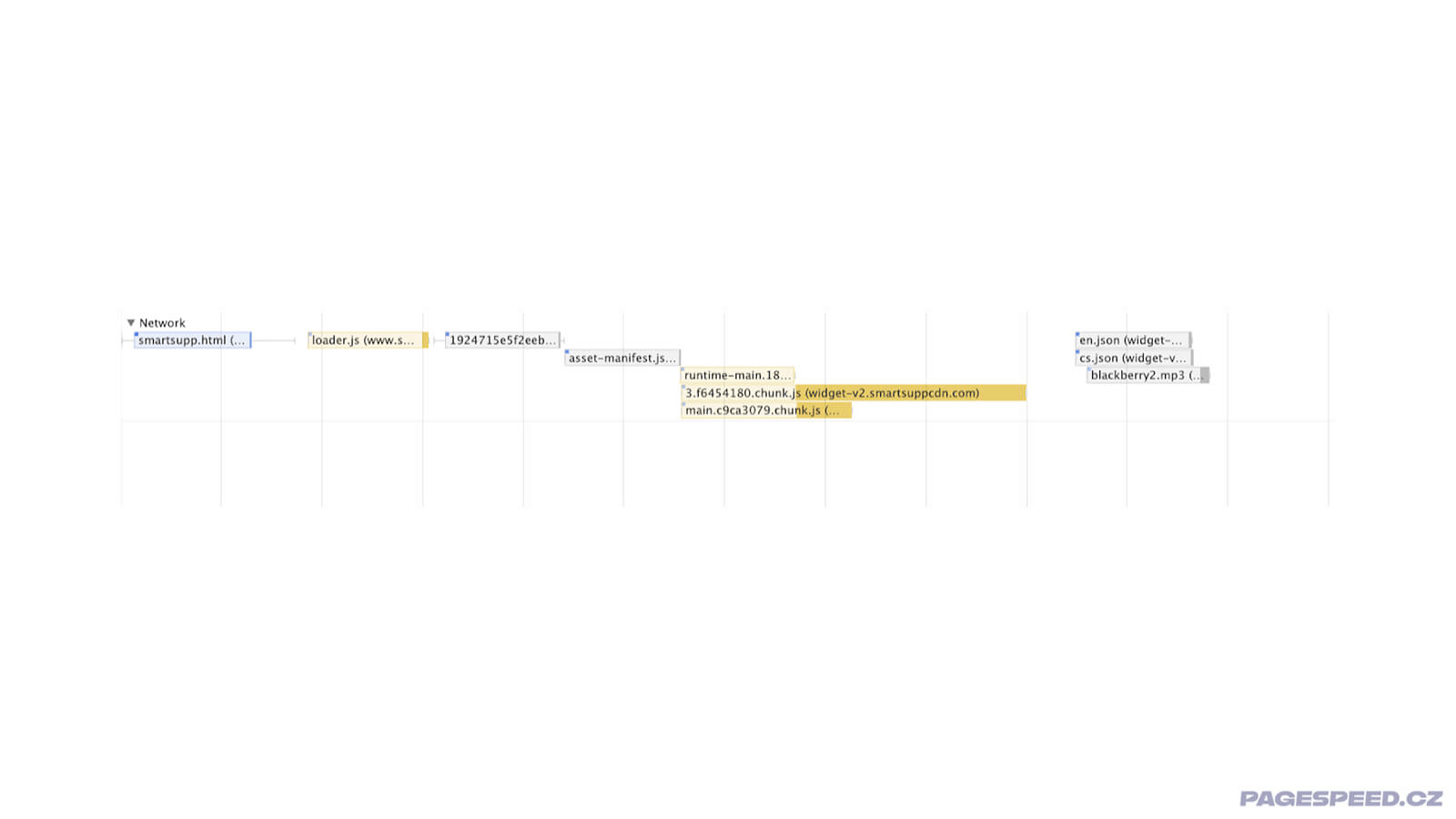 SmartSupp file download chaining.
The JavaScript runtime itself is about 380 ms in the browser, which we consider a good result.
Facebook Chat Plugin
The chat appears around the sixth second. A suggestion for improvement to Facebook is definitely the previously mentioned data size. There are a lot of transferred data in large files, JavaScript that needs to be downloaded and executed. This delays the display. The transferred data also slows down the transfer of other resources on which the website depends.
Given the data volume, you’d most help by implementing lazy loading for the Facebook Chat, which we mention further in the text.
Tawk
The chat appears around the third second. The download waterfall looks almost exemplary:
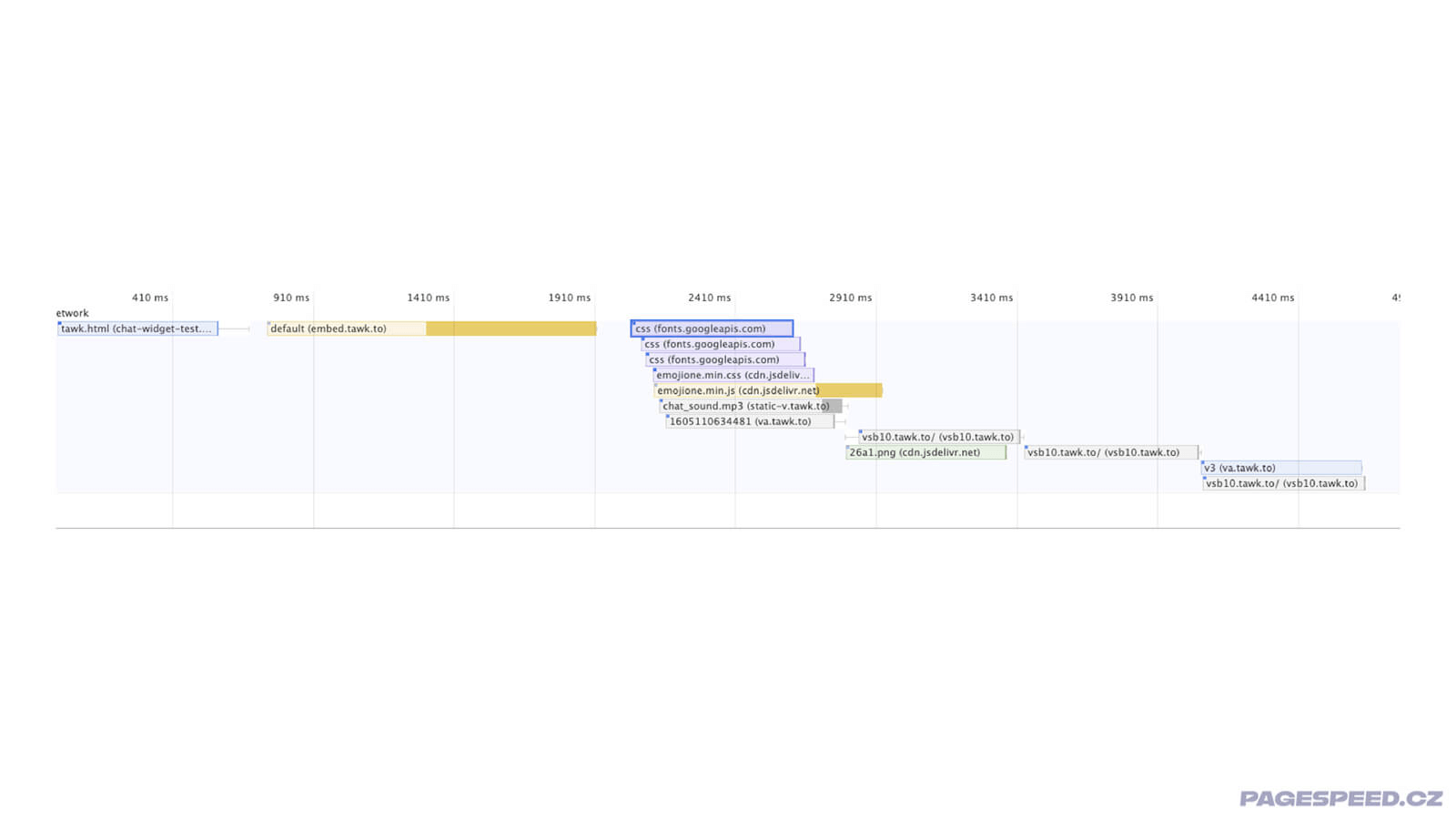 The Tawk widget file download waterfall really looks like a waterfall. Source: Chrome DevTools.
We have little to add here. We were only surprised by three references to a font from Google. Moreover, it seems to be a link to the same file:
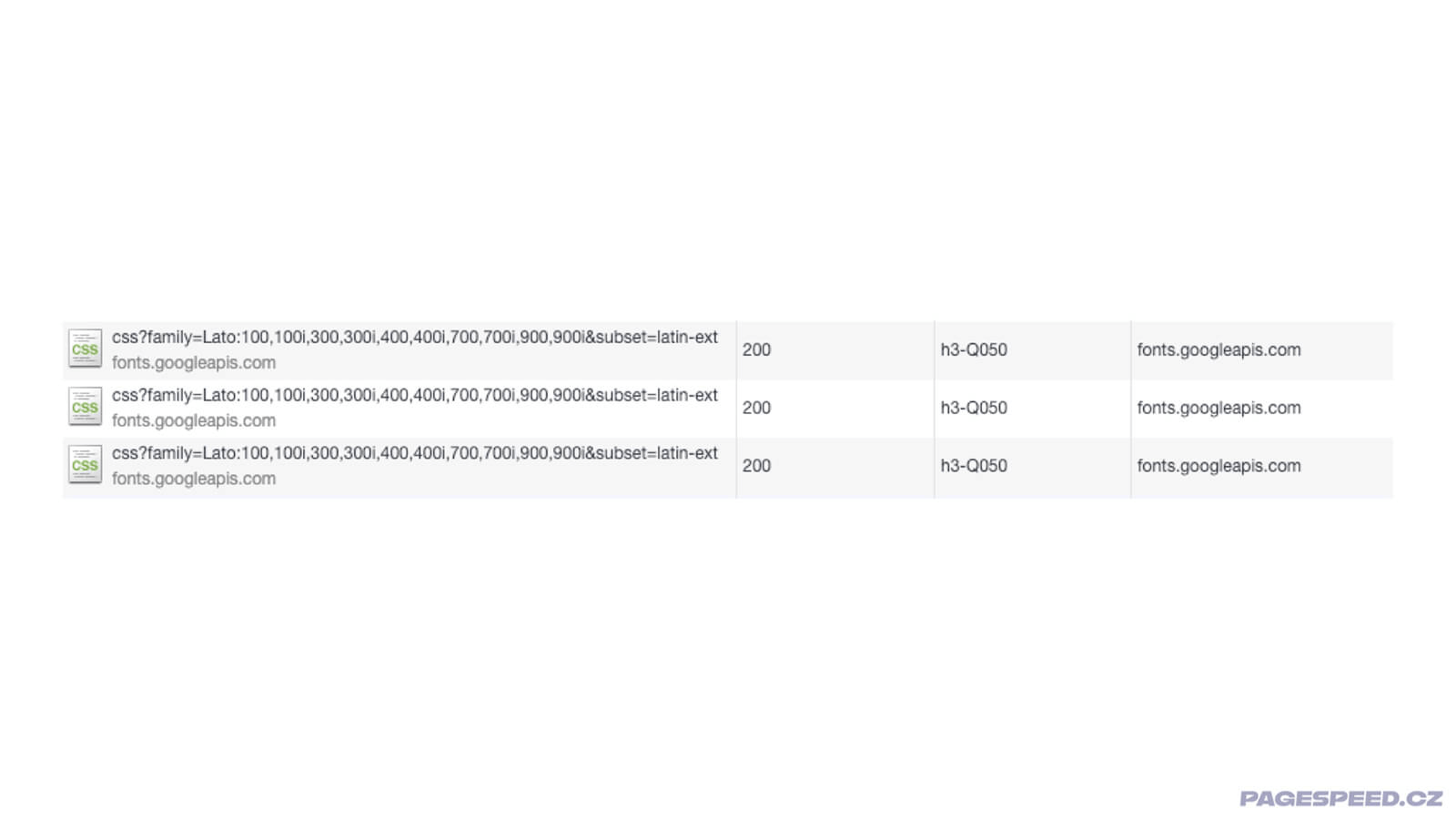 Multiple requests for the same files slightly mar the otherwise excellent impression from Tawk. But this is a minor issue that won't appear in normal operation thanks to HTTP caching.
The runtime itself is processed around 300 ms, which is again very good.
A Few Notes on SmartSupp and LiveAgent
We were pleased with the very good results of two local products – Czech SmartSupp and Slovak LiveAgent.
Until recently, Smartsupp wasn’t a champion in website speed matters, but the transition to the new widget version has significantly improved numbers for many clients.
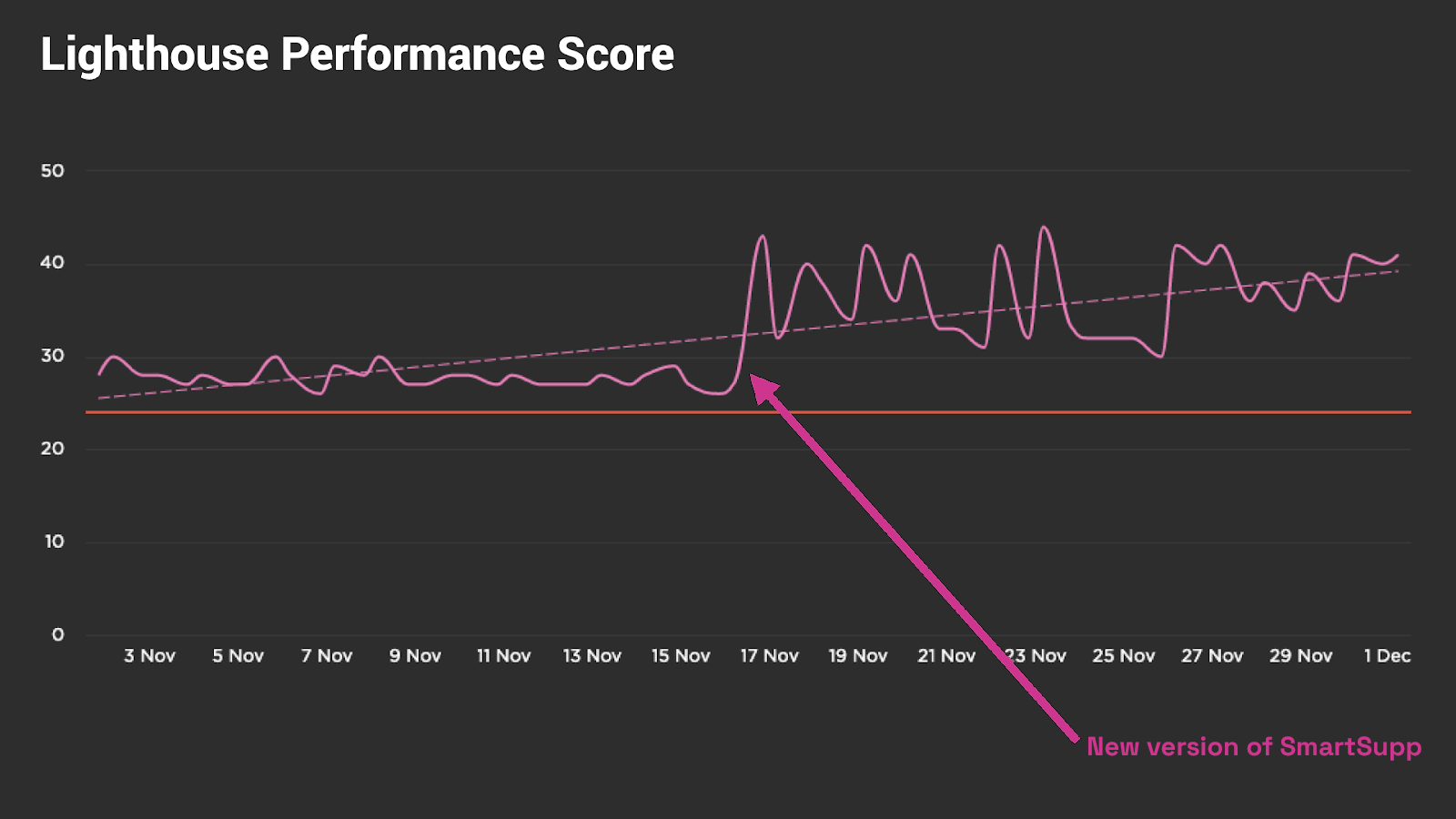 Deployment of the new SmartSupp widget version for one of our clients, a medium-sized e-shop.
We’ve been in touch with both companies and must say they don’t take speed lightly.
We’d like to motivate you as well. If you’re using one of the slower chats for some reason, don’t hesitate to contact the authors. But this leads us to general recommendations, which we’ve saved for the end.
Another Czech software – FoxyDesk – also achieved decent results, but we’d prefer if the widget downloaded fewer files and data.
General Recommendations for Developers, Marketers, and Website Owners
Finally, we’ll give you general recommendations, regardless of which live chat tool you use.
Choose a Live Chat Based on Speed
Add speed to your criteria for selecting a live chat. As our study shows, many of them can significantly impact your website’s speed.
Measure the Impact of Third-Party Components
Measure the impact of third-party components. We use third-party analysis in SpeedCurve, but even a third-party breakdown from a regular Lighthouse can help you significantly. More about third-party component analysis and optimizing third-party JS on web.dev.
In monitoring PLUS, we offer the possibility to measure the overall impact of third-party components using the 3PBT metric.
Speed Monitoring PLUS
Try our monitoring app free for a month.
5,400 CZK annually per website. Invoice only, no credit card needed.
Do you see an unpleasant widget impact on the initial rendering speed of the page? First of all, write to the authors; they might simply not have addressed it yet.
Consider Lazy Loading the Widget
Try the method of lazy loading the chat.
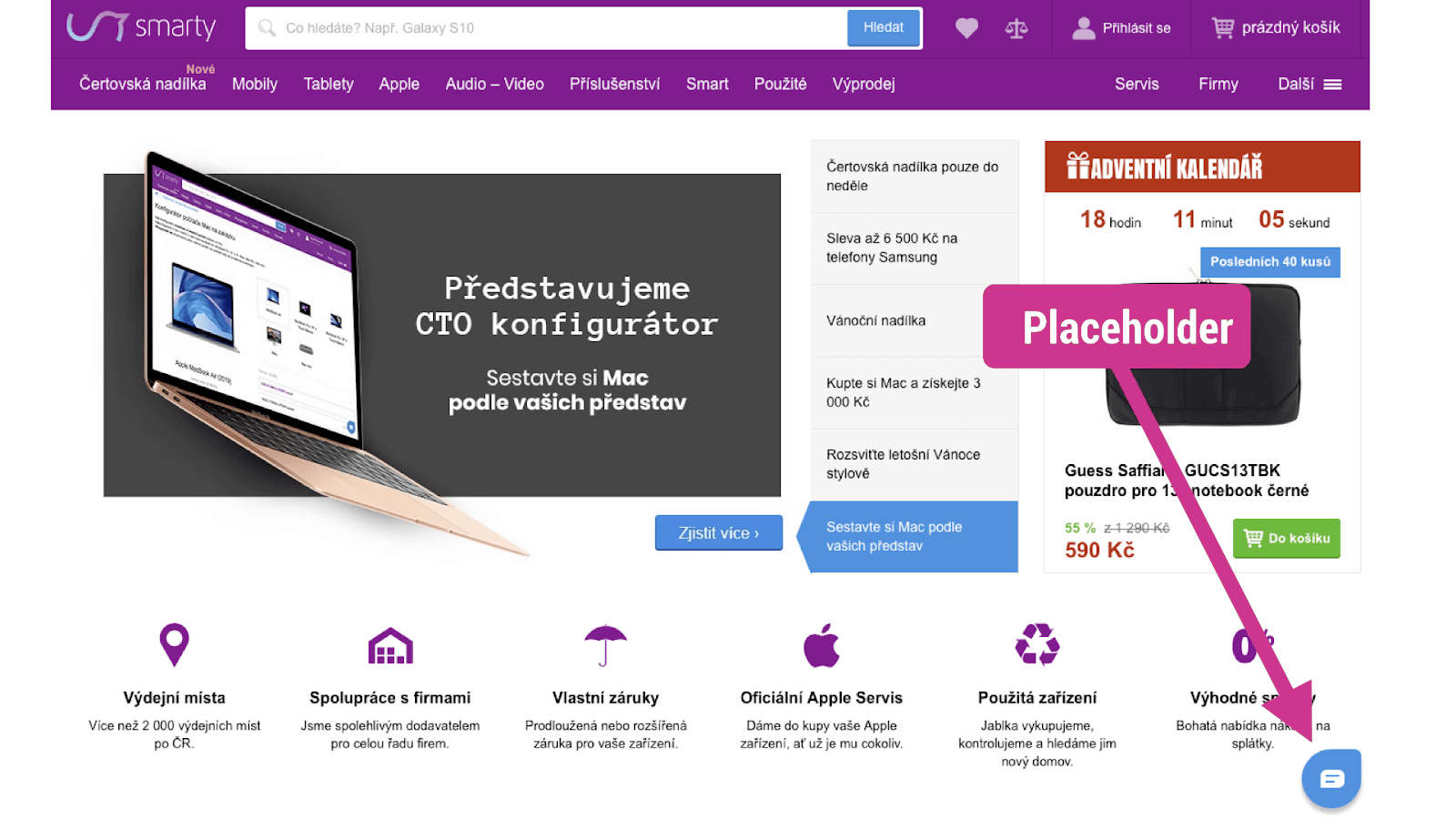 Optimized widget on Smarty.cz.
The lazy loading method involves replacing a live chat with a placeholder, often an image.
The actual chat widget then loads later. The first option is triggered by a user action, such as clicking on the placeholder or moving the cursor closer. The second option is downloading after a certain time, so the widget files don’t slow down the downloading and execution of more important page elements.
If you need help with optimizing live chat or website speed, don’t hesitate to contact PageSpeed.ONE.