AVIF Images: Up to 40% Data Savings Compared to WebP
 Martin MichálekUpdated 2/7/20266 minutes reading
WebP is splendid. But what if you crave more? AVIF is like WebP, but with turbo boosters.
This format, based on the AV1 video codec, can save 30–40% more data than WebP, while maintaining the same or even better quality.
AVIF (AV1 Image File Format) emerged in 2019 as a collaborative effort by the Alliance for Open Media. Like WebP, it leverages technology from video codecs, but this time from the more modern AV1. The result? Even more efficient compression and smaller files.
If you’re already utilizing WebP and are eager to elevate your image optimization, AVIF is the logical next step.
 AVIF (AV1 Image File Format) – a modern format for even more efficient image compression.
Why Use AVIF?
AVIF offers several advantages over older formats:
- Better Compression than WebP
AVIF typically saves 20–30% more data than WebP at the same quality. Compared to JPEG, the savings are even more pronounced – up to 50% or more. - Transparency Support
Just like WebP, AVIF supports alpha channels, so you can use transparent images without resorting to the now outdated PNG format. - No Blockiness
While JPEG tends to “block” at high compression (blocking artifacts), AVIF tends to blur the image gently, which is much more tolerable for the human eye. - HDR Support
AVIF can display images with a higher dynamic range, a boon for photographers. - More Colour Spaces
Supports a wider range of colour spaces, including Rec2020.
Browser Support
Browser support for AVIF is rapidly improving. Currently, all modern browsers support it:
- Chrome (from version 85) and other Chromium-based browsers
- Firefox (from version 93)
- Safari (from version 16)
- Edge (from version 85)
See AVIF support on CanIUse. However, older browser versions that don’t support AVIF still exist, so we recommend monitoring your browser stats and implementing a fallback to WebP or JPEG.
How to Implement with WebP Fallback
To ensure compatibility with older browsers, you can use the HTML <picture> element with multiple sources. The browser will automatically choose the format it supports:
<picture>
  <source srcset="image.avif" type="image/avif" />
  <source srcset="image.webp" type="image/webp" />
  <img src="image.jpg" alt="Image description" width="1600" height="900" loading="lazy" />
</picture>
The browser will check the sources from top to bottom and use the first one it supports. If it doesn’t support AVIF, it will choose WebP. If it doesn’t support WebP either, JPEG will be the last resort.
Always include width and height attributes on images to avoid CLS issues. This applies even to images within the <picture> element.
Automating the Conversion
Ideally, automate the generation of AVIF images. Several options are available:
- Cloudflare
Cloudflare can automatically convert images to AVIF if the browser supports this format. You don’t need to manage anything on your server. - PHP 8.1+
From PHP 8.1, the native functionimageavif()is available for generating AVIF images. You can set thequalityandspeedparameters. - ImageMagick
The tool ImageMagick supports conversion to AVIF using themagick convertcommand. - External Services
Services like AWS Lambda with CloudFront can automatically convert images on demand.
Generating AVIF images is slower than generating WebP. If converting images on-the-fly, this can slow down server response. It’s better to pre-generate images or use a CDN service. Likewise, decoding on the client side can also be slower, especially on very slow devices.
Our Practical Experience
During our web speed consultations, we at PageSpeed.ONE have helped implement AVIF on several projects. Here are our experiences and recommendations:
Expected Data Savings
With AVIF, it’s possible to achieve data size savings in the range of approximately 30 to 40% compared to WebP. This, of course, varies depending on the type of image – savings are typically higher for photographs than for graphics with sharp edges.
Recommended Parameter Settings
Based on our tests, we recommend the following settings:
- Quality: around 50
- Effort: value 4
A higher effort value increases image generation time, but also potential data savings. We recommend testing this setting on your specific images, as optimal values may vary depending on the content type.
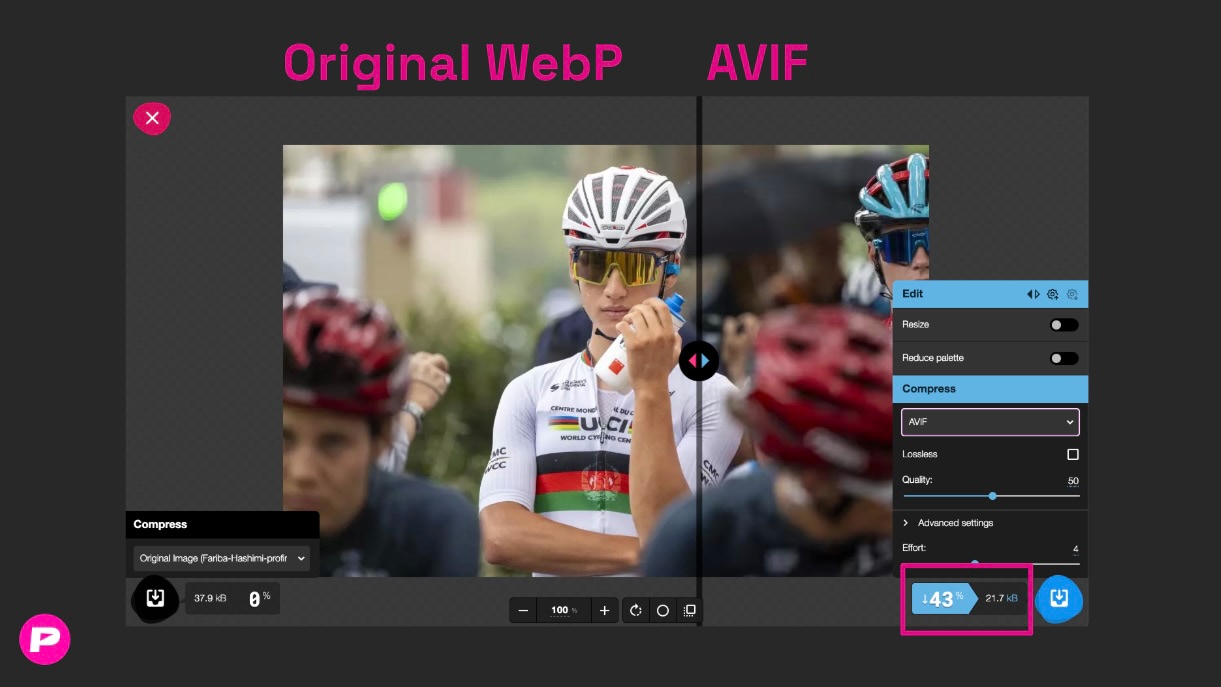 Practical comparison of data volume savings when using AVIF compared to WebP. Source: Technical report in monitoring PLUS on a client's content website PageSpeed.ONE. Tool: Squoosh
Speed Monitoring PLUS
Try our monitoring app free for a month.
5,400 CZK annually per website. Invoice only, no credit card needed.
Implementation Options
There are two main routes to deploying AVIF:
-
Self-Generation
If you have control over the server, you can generate AVIF images yourself. The advantage is full control, the downside is higher server load. -
External Services
It’s quite varied – sometimes Cloudflare fits, other times CloudFront and AWS Lambda do the job. We recommend making your own assessment based on your needs and image volume. -
Manual Conversion
For smaller static websites, manually compress images into the AVIF format using tools like Squoosh, Image to Avif on Cloudinary, or the well-known TinyPNG.
Monitoring Impact
As with WebP, it’s crucial to monitor the data volume of images and their impact on the LCP metric. In our monitoring PLUS, you can track how image sizes change over time and their effect on page load speed.
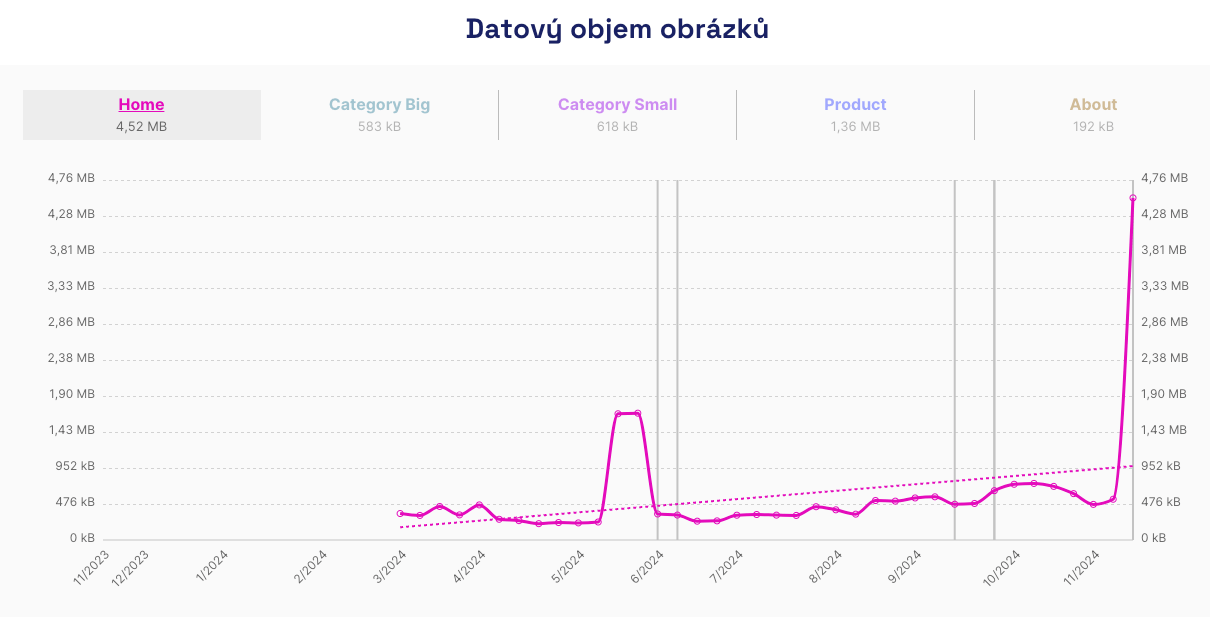 Always monitor the data volume of images. Even a change in a single image can cause fluctuations in speed and affect your website's conversions. Source: Technical report in monitoring PLUS.
When to Use AVIF vs WebP?
AVIF isn’t always the better choice over WebP. Here’s a quick guide on when to use what:
-
Use AVIF if: You want maximum data savings. You’re targeting modern browsers. And you have the time and resources for testing settings.
-
Stick with WebP if: You need a universal solution with maximum compatibility. Generating AVIF would slow down your server. And you want a simpler implementation.
-
Ideal Solution:
Use AVIF with a fallback to WebP. Browsers that support AVIF will get the smallest files. Older browsers will receive WebP. Everyone’s happy.
Summary
AVIF is the logical next step after WebP. It offers significantly better compression but requires a bit more effort with implementation and testing.
If you’re already using WebP and want to push optimization further, AVIF is worth considering. Especially if you can leverage automation through Cloudflare or similar services.
Always remember to provide a fallback for older browsers and monitor the impact on website speed. Every saved kilobyte counts, but not at the expense of compatibility.
Find more tips for optimising images on the web and detailed information about the WebP format.