Get Your HEAD Straight
 Martin MichálekUpdated 7/23/20252 minutes reading
You love WebExpo and you love performance. And we also love Harry Roberts because his talks and articles always go in-depth.
At this year's WebExpo, Harry lectured on how the mere order of elements in the <head> can influence your website's speed.
Properly Test the Order of Elements in <head>
In his lecture, Harry shared an example where such a small detail potentially cost his clients millions of dollars. Don’t expect such a dramatic effect on your websites, as Harry's example is rather like finding a needle in a haystack – a win in the optimization lottery.
However, if you believe the major speed issues are resolved, or you simply want to check if everything is in its proper place, utilize his tool CT.CSS.
This is a snippet of CSS that will alert you to any potential errors in the order of elements within the <head>:
- Add this CSS directly to your page.
- Use a bookmarklet.
- Save it to Snippets within Chrome DevTools.
The choice is yours. Impatient? Have a look at the demo.
We've tried this on several websites. Examples:
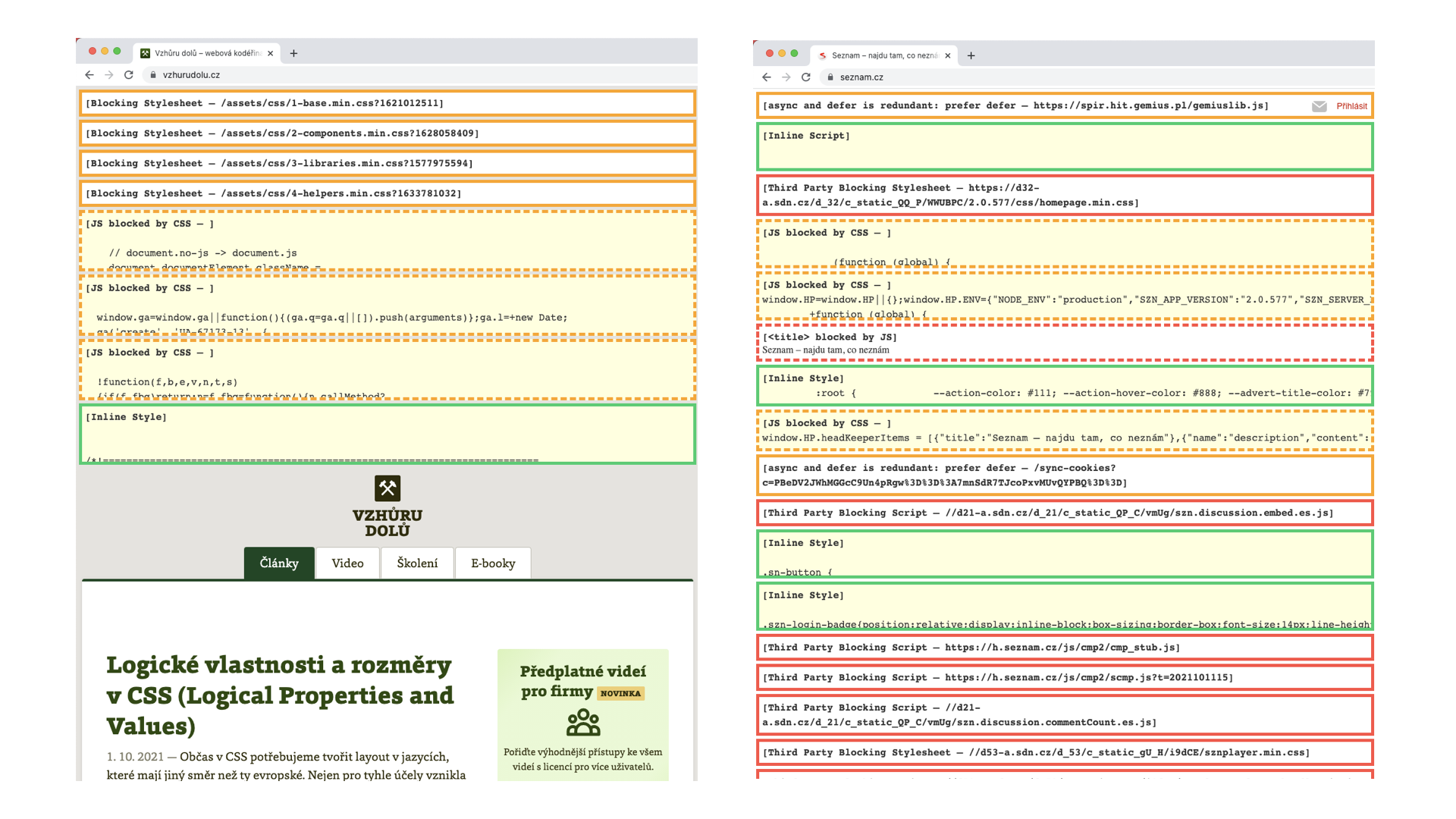
The image shows a very popular Czech website. Can you recognize it? :-)
If you see a red-framed alert, take it seriously. It could be that your site is one where fixing this could have a significant impact.
Then again, you might also find that the culprit behind your site's speed isn't hidden here.
What is the Correct Order of Elements in <head>?
Let's see how it should be done properly, at least according to Harry:
<meta charset | http-equiv | viewport>
<title>

<!-- Preconnect (https://web.dev/articles/preconnect-and-dns-prefetch) -->
<link rel="preconnect">

<!-- Asynchronous JS (analytics, etc.) -->
<script src="" async></script>

<!-- CSS containing @import -->
<link rel="stylesheet" href="…">

<!-- Synchronous JS: -->
<script src="…"></script>

<!-- Synchronous CSS: -->
<link rel="stylesheet" href="…">

<!-- Preload (https://web.dev/articles/preload-critical-assets): -->
<link rel="preload">

<!-- Asynchronous JS with low priority: -->
<script src="" defer></script>

<!-- Prefetch and prerender: -->
<link rel="prefetch">
<link rel="prerender">

<!-- Etc.: SEO, meta tags, icons, Open Graph… -->
Interested in more? Check out the slides from Harry's talk.