Version 4.10: PageSpeed.ONE Domain, History, Manual Testing, Custom Times…
 Martin Michálek2/25/20265 minutes reading
Over the past few days, we've been rolling out release 4.10. It's quite unequivocally the largest we've ever crafted at PageSpeed.ONE.
Alongside nearly one hundred thousand changes across almost 1,400 files, we are introducing measurement history to our speed monitoring, the ability to manually initiate synthetic tests, custom measurement times, faster test start-ups, and significant changes to our website.
Curious for more? Read on.
 Release 4.10 is quite the hefty package.
What's New in Speed Monitoring?
Our public website and internal monitoring application are now unified in our approach, so the changelog entries pertain to both parts. Let's first focus on the monitoring application.
Notes Transform into Measurement History
Our long-term aim is to visualize everything happening around your site's speed. Enter the new Measurement History (Log).
Measurement History merges previous notes and newly displayed synthetic measurements into a single view.
What new insights does this view provide?
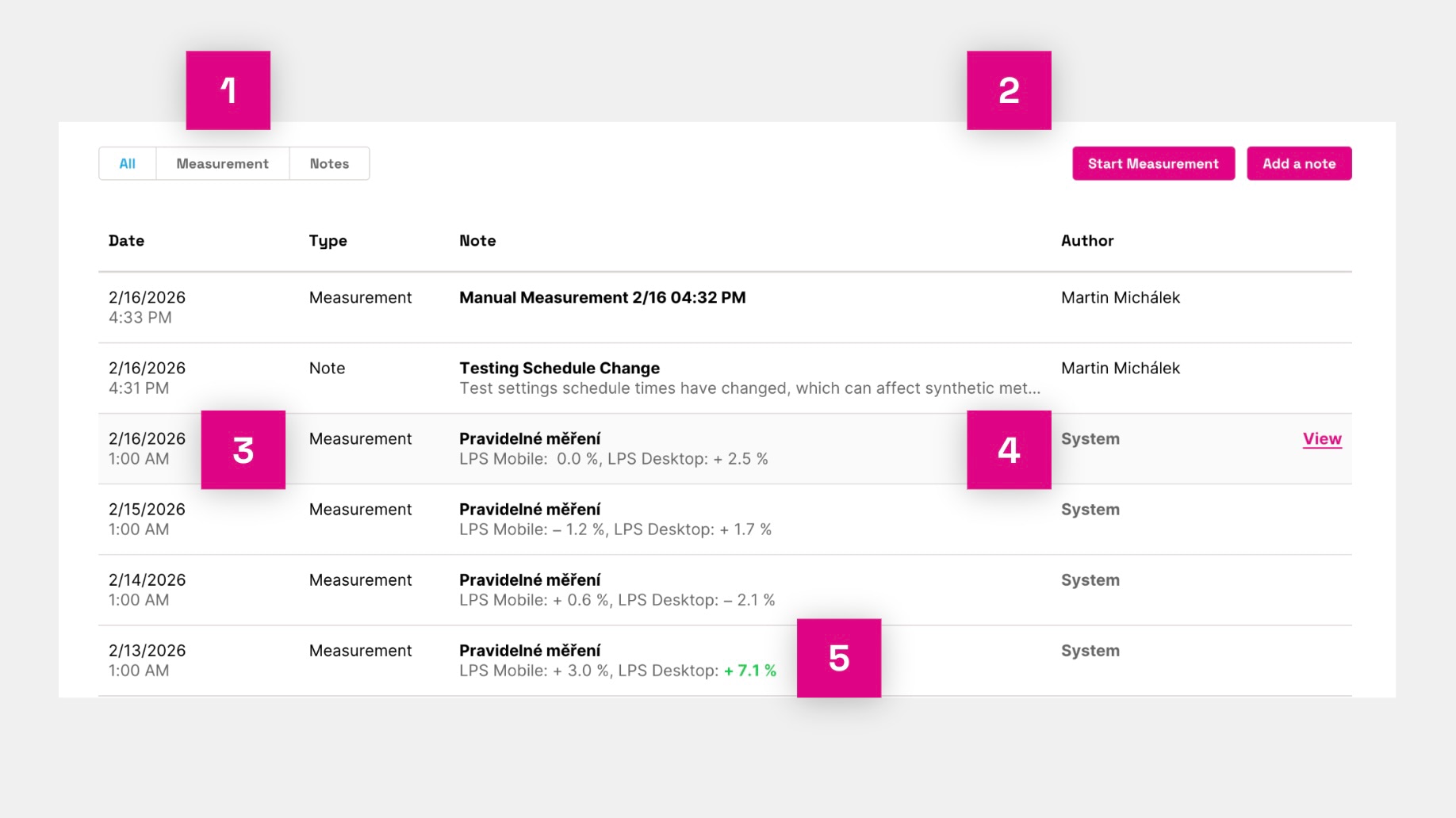 New Measurement History table.
Let's clarify the numbers in the image:
- The table displays a list of Measurements and Notes, allowing you to toggle between these content types.
- Above the table on the right, you can initiate a manual synthetic measurement (currently in beta) or add a note.
- Each row can be clicked through to a modal window with details of the measurement or note.
- System entries are inserted automatically, while those labeled with the author's name can be edited.
- For measurements where we observe a significant change in Lighthouse score compared to the original state, we also add color coding.
In the measurement details, you can view individual Lighthouse measurement details or Lighthouse Diff for comparison.
Measurement History is available only for PLUS tests.
Manual Testing (Beta)
You can now initiate manual testing on the Measurement History page.
Whenever you want, outside of regular measurements, you can start your own measurement. This is useful for testing modifications in developmental versions or after deployment.
Once the measurement completes (which may take about 15–20 minutes), we'll email you.
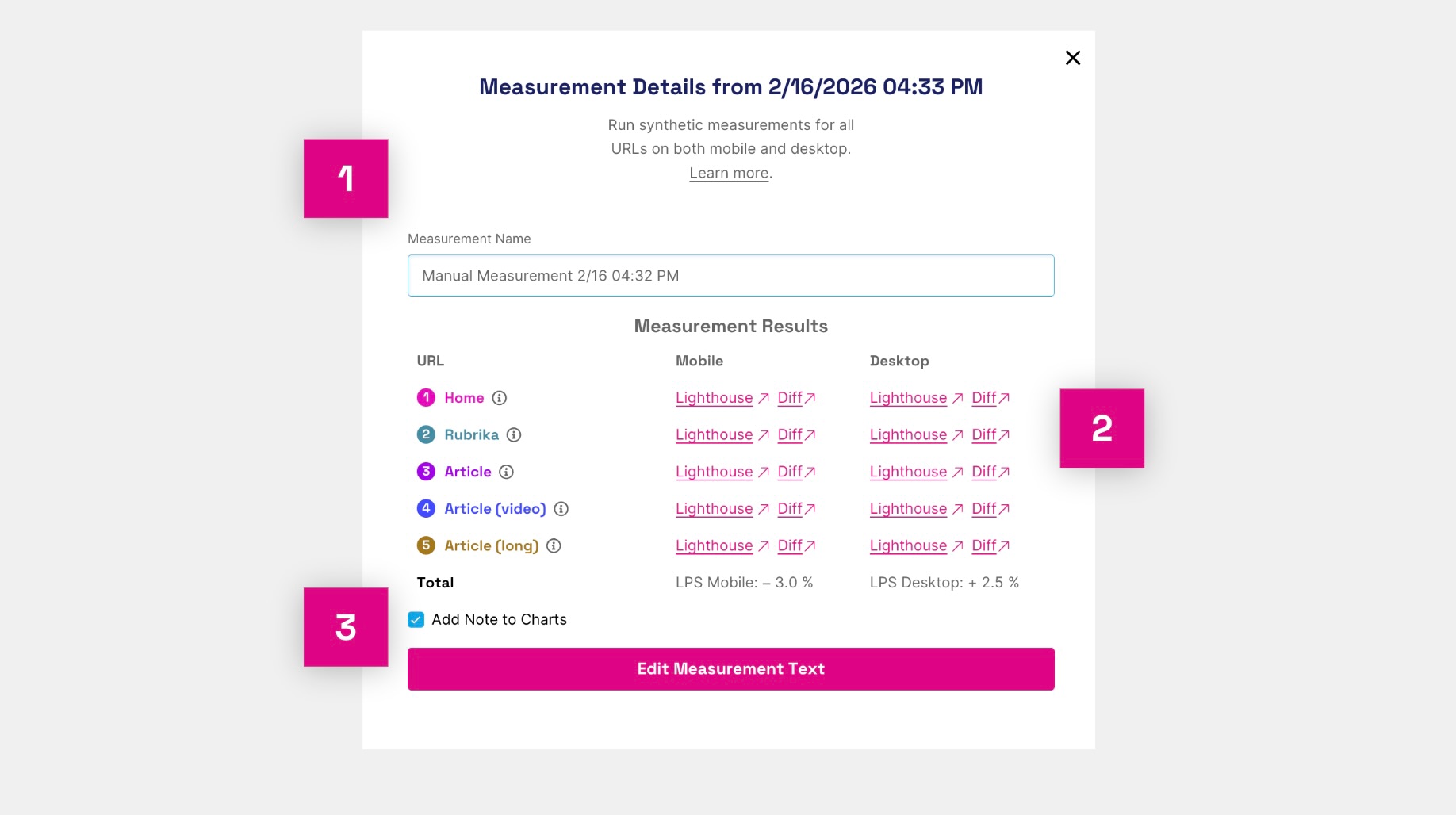 Measurement detail opened from the history page.
What can you view in the measurement detail? (See image above)
- The name of the measurement, which you choose as you wish.
- Specific Lighthouse tests and Lighthouse Diff.
- The option to add a note to the graph for this measurement.
This feature is in beta. If you're interested, contact us at info@pagespeed.cz.
More Measurement Times (Beta)
Typically, we measure only once, ideally at night. This is recommended to filter out daytime backend fluctuations.
However, in certain situations, having more regular measurement times can be beneficial. We now offer this option in beta.
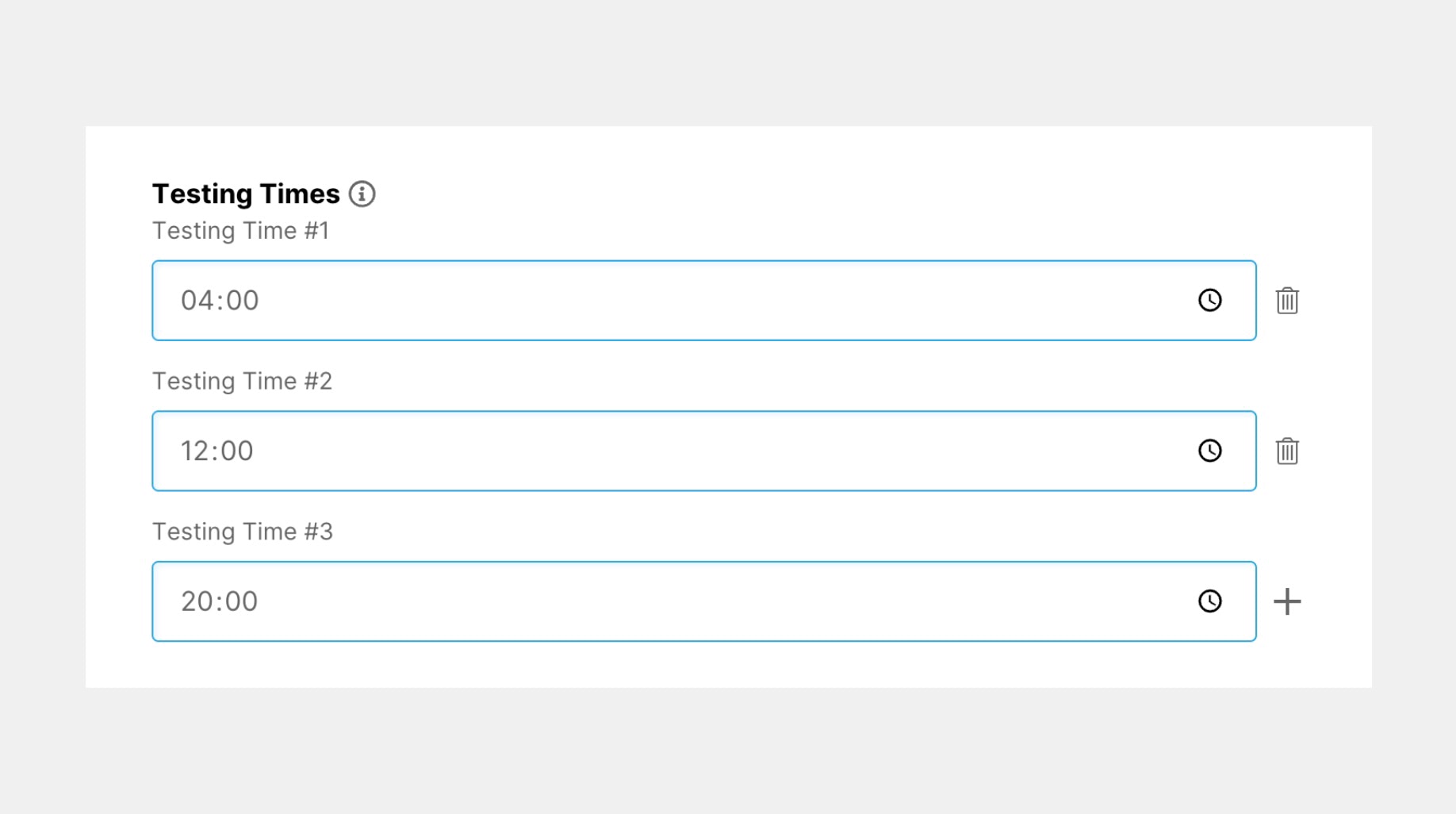 More measurement times in Settings.
You can now add multiple times in Test Settings. New test runs will appear in all reports, with a new seven-day view added to the graphs.
This feature is in beta. If you're interested, contact us at info@pagespeed.cz.
Faster Start (Redirector)
Until now, we relied on Google's infrastructure, specifically the PageSpeed Insights API, including finding the final URL for the tests.
The goal of this sizable project was to speed up the start time of all tests. We now have our own tool (in a delightful blend of Czech and English, we call it a "redirector"), which locates the final URL for the addresses you provide.
The result should be a manifold acceleration of free test start times, as well as PLUS tests. Try it yourself.
Updates on Our Public Website
Here you will find all the updates we deployed on the public website with release 4.10.
New Help and All Articles + English
Our guide on web speed has undergone a substantial revolution. This occurred on two levels:
- Technical (we moved on from the outdated Docusaurus and developed our own system)
- Content (all our texts are now available in English).
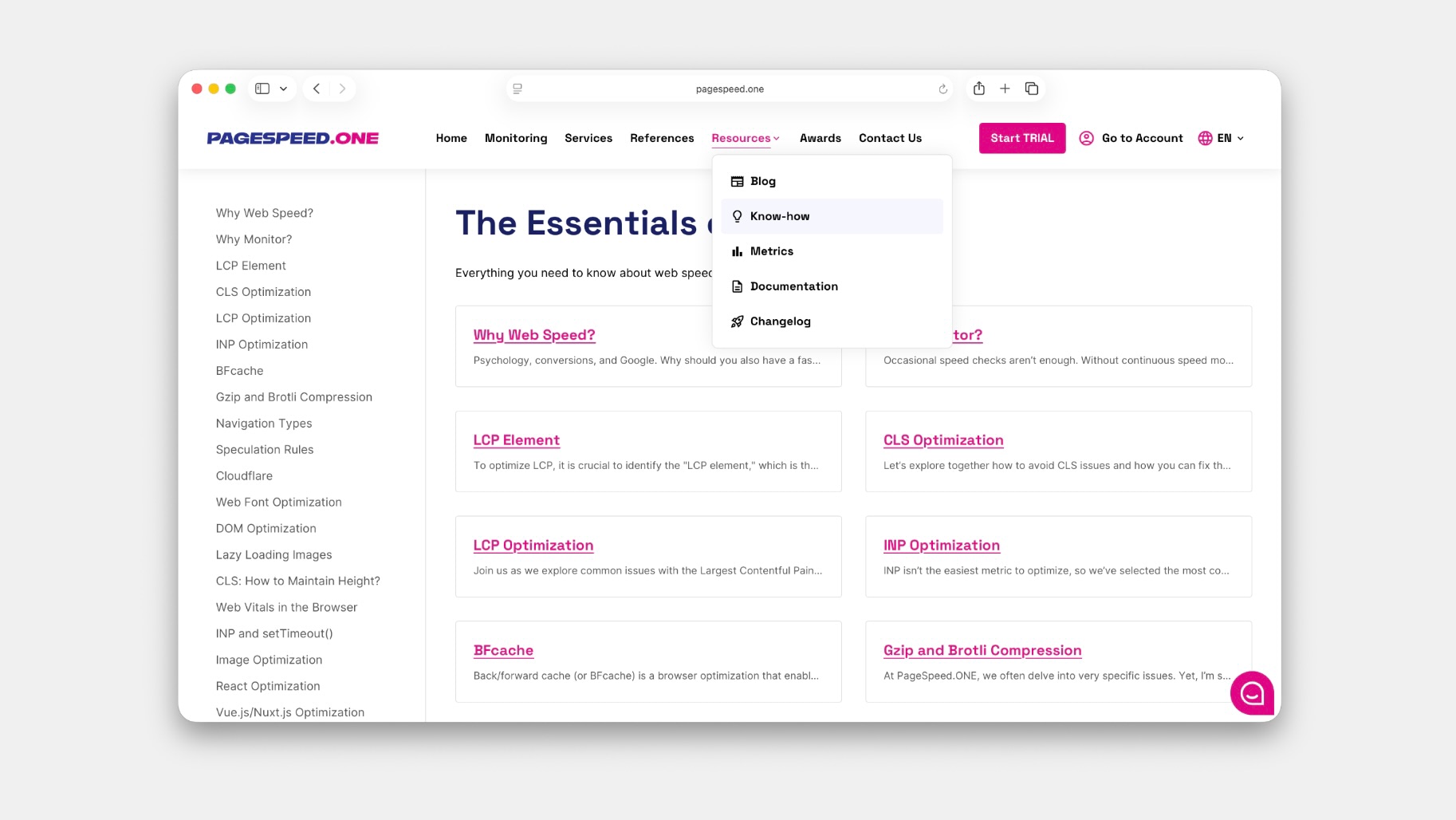 PageSpeed.ONE Help after the revolution.
All articles for the blog, knowledge, metrics, monitoring documentation, and this changelog are now housed in one place – under Resources in the navigation.
Translating texts into English and potentially other languages has become easier for us, and it will now be simpler to produce additional content.
This change also brings a revision of the navigation across the entire website, including the mobile version.
Transition to the PageSpeed.ONE Domain
As we previously hinted, our ambition and now daily reality is to accelerate not just Czech websites, but international ones too.
Following the rebranding to PageSpeed.ONE, we are now transitioning the domain to the new variant – https://pagespeed.one/
 Transition to the PageSpeed.ONE domain.
We no longer utilize the older domains pagespeed.cz and speedjar.com.
The redirection should cover all possible states, but you may need to adjust domains in your password managers.
And So On
Since the last release 4.9, we've accomplished:
- Clicking on an anchor next to a heading automatically copies the URL to the clipboard.
- We measure using the new Speed Score (SPS).
- We've shortened the time required to calculate the Watchdog limit, so you'll receive data faster.
- A secret tip: changing the range parameter in the test suite URL gives you a longer time frame.
- We've moved the database to a more powerful machine, speeding up the entire app.
- We've announced PageSpeed.ONE Awards and added comparisons with winners in the monitoring interface.
- In the Test Suite Settings, we provide better feedback for invalid URL entries.
- For PLUS test suites, we now automatically add website categories.
- Internally, we've transitioned to Tailwind for CSS.
At PageSpeed.ONE, we're thoroughly enjoying these updates and hope they help accelerate your websites too.
Found a bug? Have an idea? Feel free to write to us at info@pagespeed.cz.