Monitoring v4.6: Speed Scores, New Notes, and Dozens More Changes
 Martin Michálek12/12/20246 minutes reading
At PageSpeed.ONE, Christmas comes a tad early for our speed monitoring users. In the first week of December, we unwrapped a new version of our tool.
Expect a major overhaul of Notes, new speed scores, and an enhanced way of evaluating Watchdog reports – in total, roughly 80 changes to the monitoring application.
PageSpeed.ONE Score: Web Speed in a Single Number
Measuring speed is complex. It requires familiarity with numerous metrics and an understanding of different types of measurements. Frankly, it can be a bit of a maze, especially if you're managing multiple sites.
Enter PageSpeed.ONE Score (SPS), which encapsulates the essence of all Core Web Vitals metrics from users into a single number and a single colour.
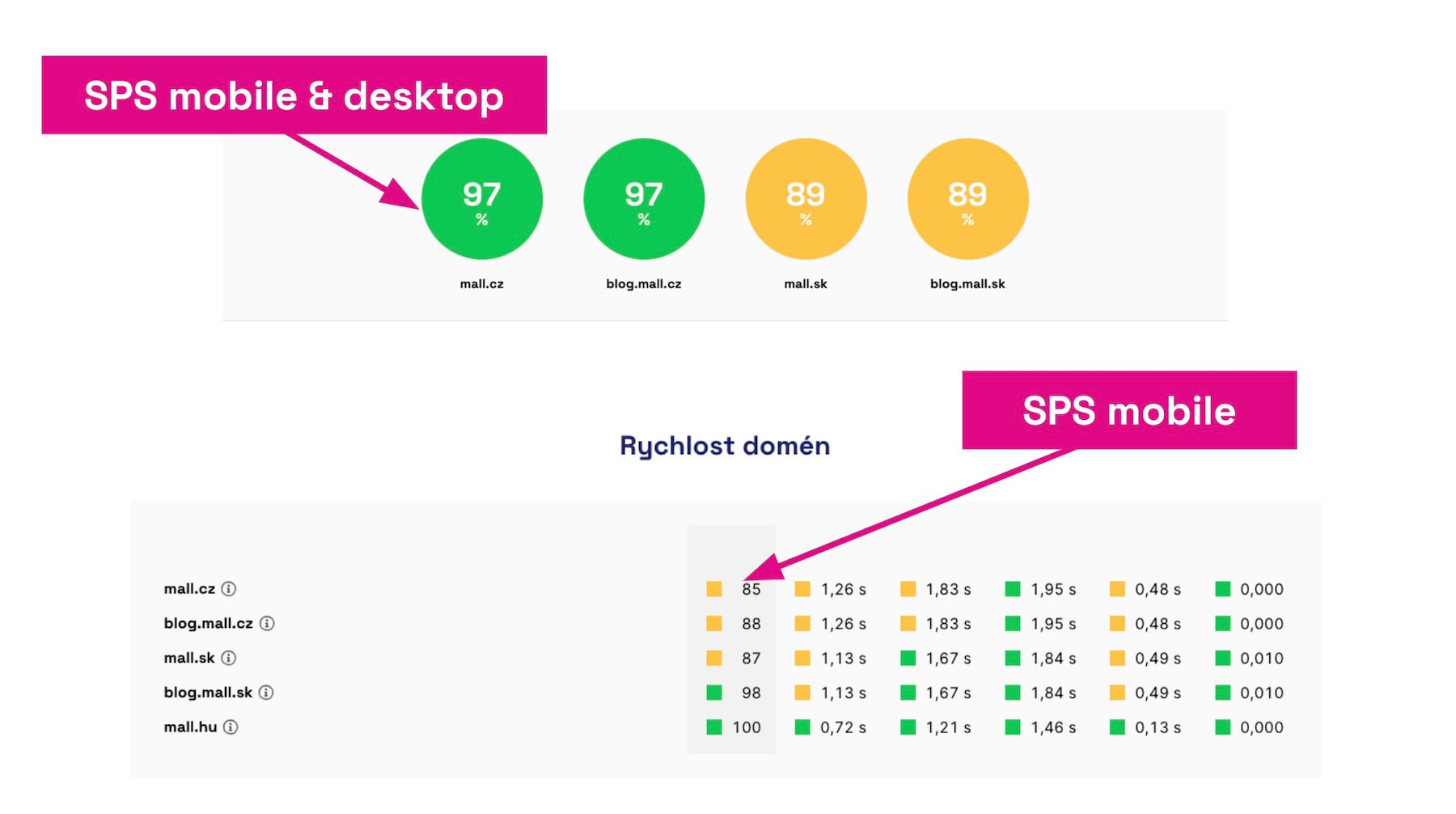 The Speed Score (SPS) is calculated for the entire domain, separately for mobile and desktop, and combined.
Why is the Speed Score (SPS) useful? It aims to simplify data from the Chrome UX Report, especially when monitoring multiple websites. Now, you should only need to glance at one number.
How is the score calculated? Each metric and device type carries its own weight. The metric's colour further indicates your overall rating from Google, which uses a three-level scale – green, orange, and red.
We continue to work on making speed monitoring reliably guide you to the most crucial information and help you easily understand your website's speed. The score is just the first step in a series of upcoming updates.
Measure your website's speed score: pagespeed.one.
Major Update to Notes
We consider Notes in graphs to be one of the most crucial tools for improving website speed. Therefore, in this version, we introduce significant changes to working with this tool.
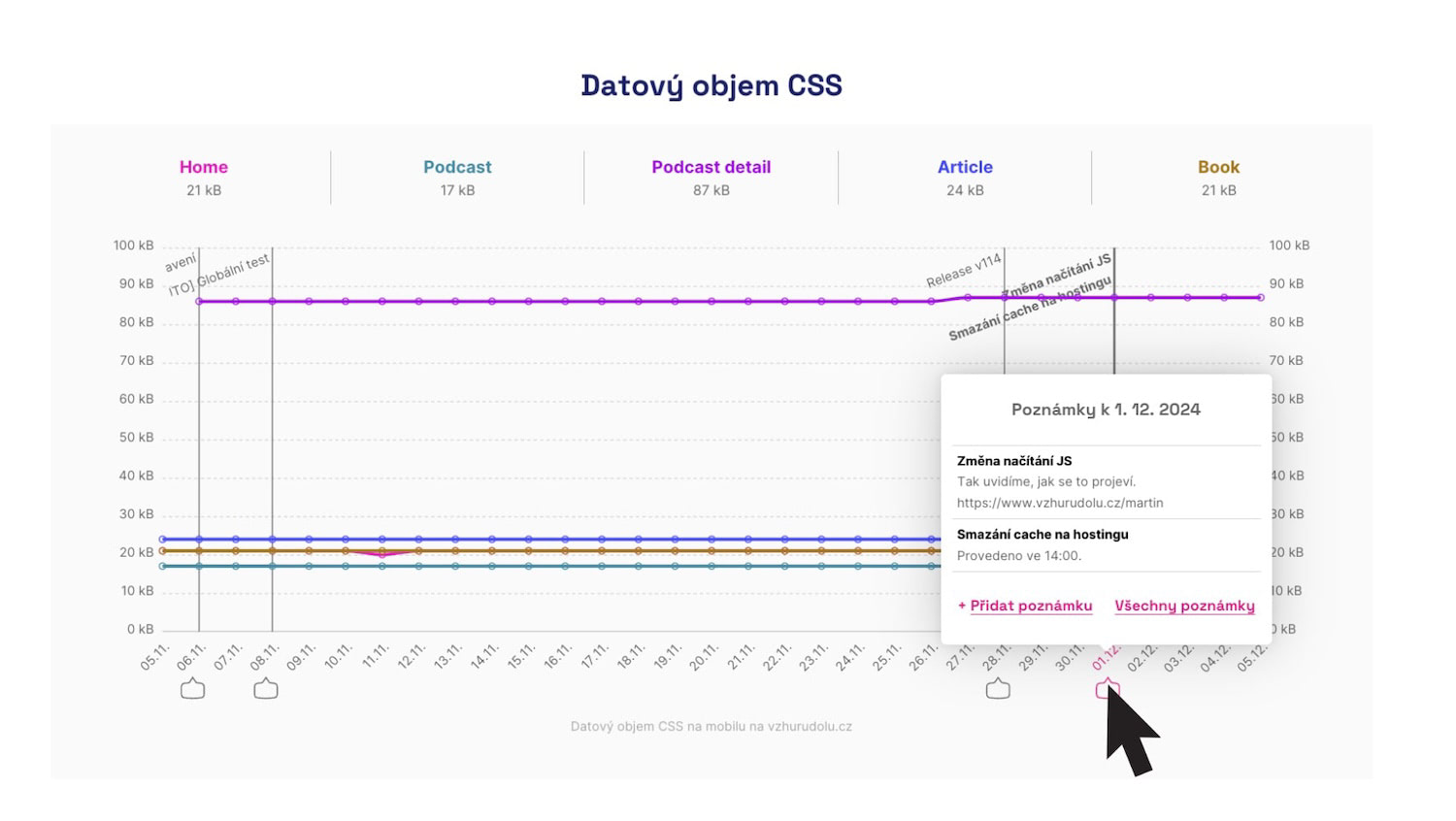 Entering notes about important website changes into graphs allows you to link speed changes with specific adjustments.
For version 4.6 of Monitoring PLUS, we've prepared several key changes in handling notes:
- You can now add or display multiple notes for one day in the graphs.
- We distinguish your notes from those automatically inserted, for example, when measurements change.
- Notes are now more visible, such as being in the main test navigation.
- You can now add more detailed text to a note.
We've also made improvements to notes that you'll notice yourself.
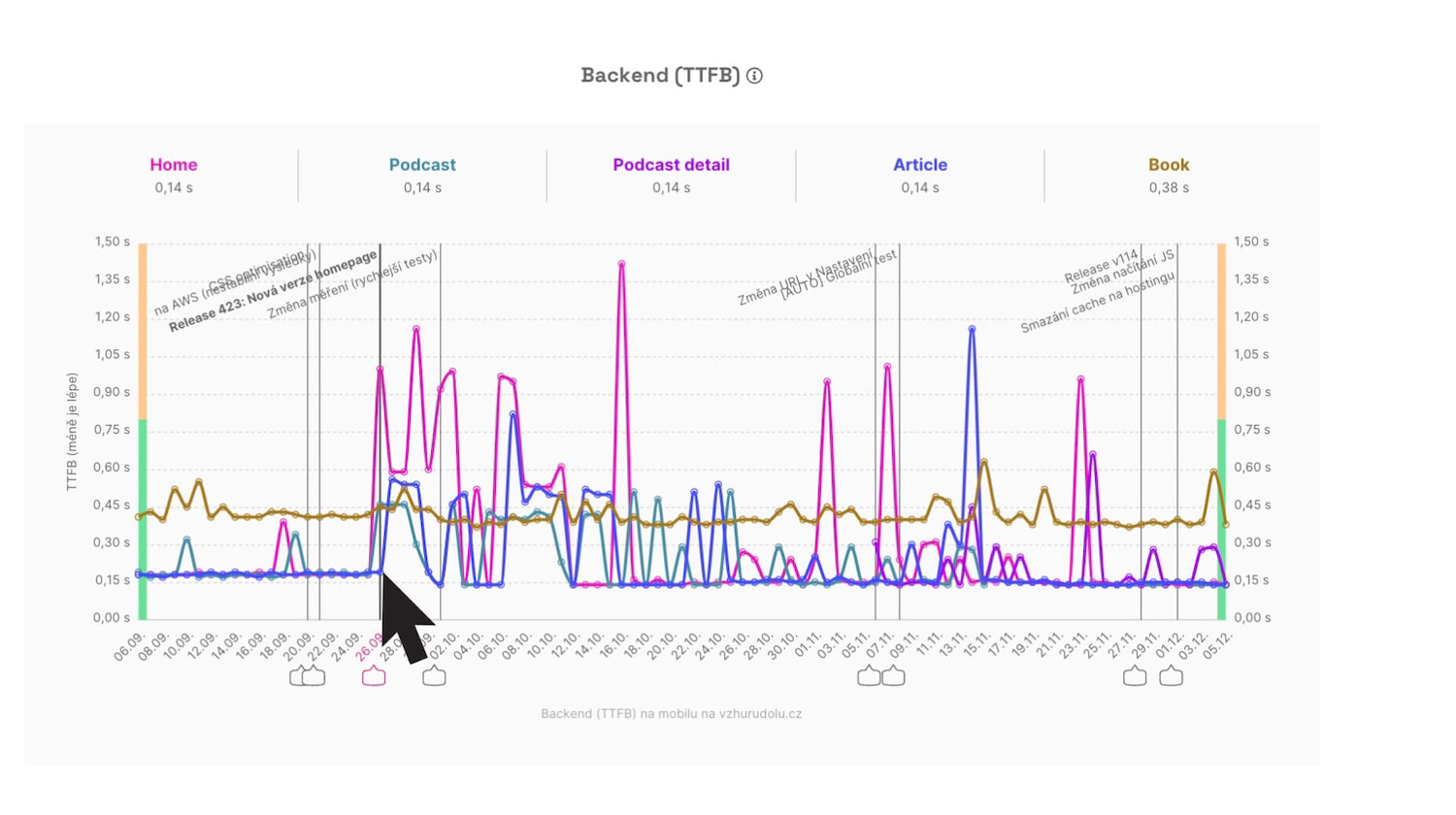 Notes on important changes are essential for retrospective problem evaluation or a reason to celebrate when something is fixed.
What happens to your existing notes? Don't worry, everything will remain as it is.
Users of Monitoring PLUS highly praise the notes. Eduard Beneš from PragueBest, for example, wrote to us:
“We appreciate the ability to check data on a daily basis and receive email notifications. It has proven useful to mark changes in the tool and monitor their impact.”
You can find more in the newly updated Notes Help Guide.
How to Evaluate Watchdog Notifications
We claim that our web speed monitoring is among the best on the market. Unlike the competition, we don't force you to manually set monitoring thresholds for metrics – we have a highly sensitive algorithm that varies for different metrics, significantly reducing the noise from signals from other speed monitoring tools.
However, evaluating Watchdog notifications does require having certain knowledge at hand (or in your head). Not every Watchdog report necessarily demands action.
Therefore, we provide guidance on how to evaluate signals from our monitoring. Our mission is to make web speed more comprehensible, even to the uninitiated, and this step is part of that mission.
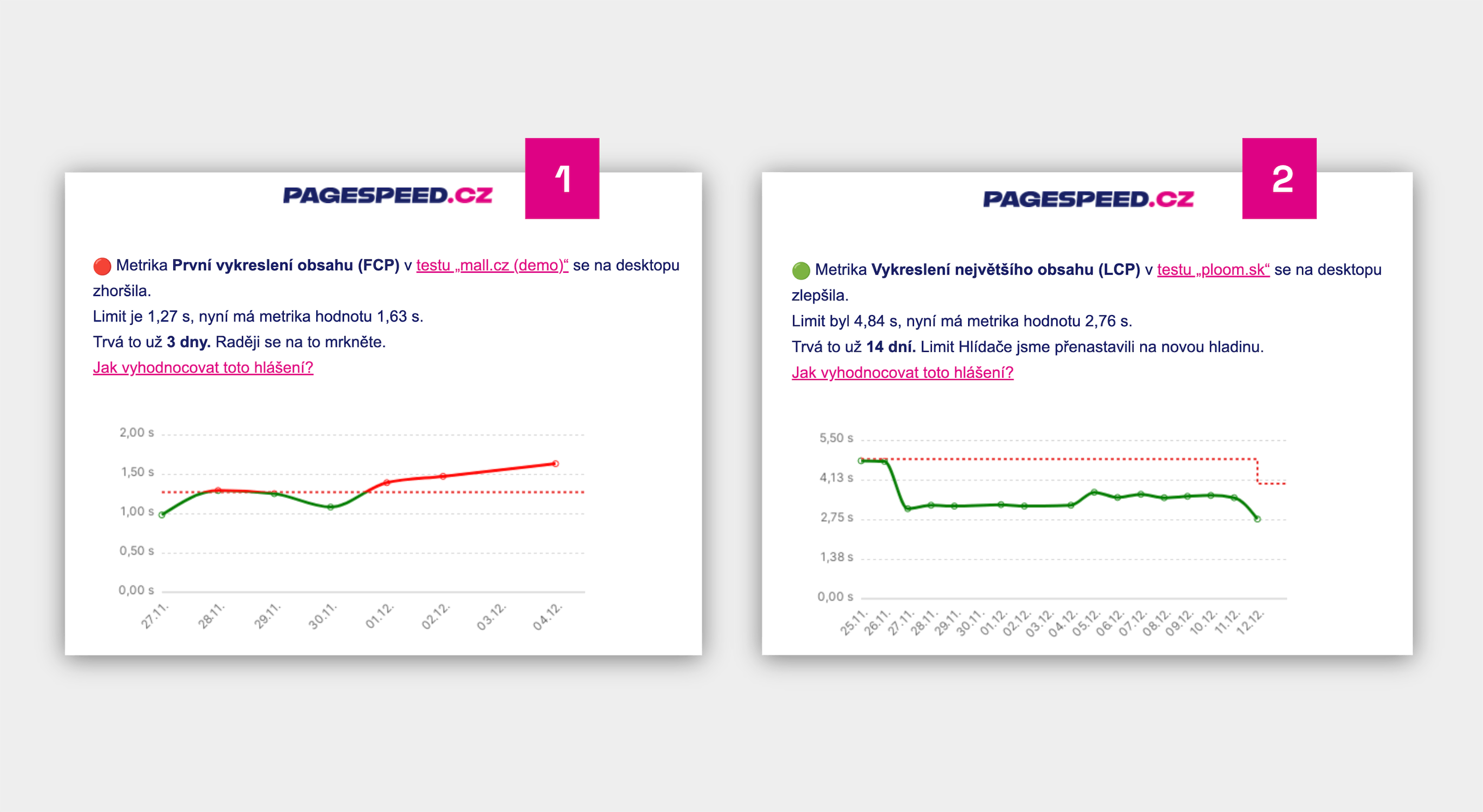 Each Watchdog report now also includes information on how to evaluate the notification.
The Watchdog is an essential part of speed monitoring. Check out the help page on evaluating Watchdog reports for individual metrics.
Update to Help Content
Our educational mission continues by sharing our know-how with the broader public through our help pages. Are you familiar with pagespeed.one?
What new content have we added to the Website Speed Help during the work on monitoring version 4.6?
- How can backend developers help with speed? (by Zuzana Fatrdla)
- What's the use of the Chrome UX Report? (Zuzana Fatrdla)
- How to optimize INP? (Zuzana Fatrdla)
- What does basic React optimization involve? (Michal Matuška)
- What does the setTimeOut() trick do for INP? (Michal Matuška)
- WebP Images: how do they help with speed? (Radek Šír)
- How to optimize LCP? (Radek Šír)
- How to optimize CLS? (Radek Šír)
- How to maintain element height without worsening CLS? (Radek Šír)
There have been numerous updates to the Help section. We strive to keep this section as fresh as possible.
Follow help updates and receive additional news on our social media (LinkedIn, Facebook, X) or in our newsletter.
Smaller Product Tasks
Also check out the minor adjustments that have positively impacted monitoring since the release of version 4.6:
- UI: Info when we don't have CrUX data for a domain is displayed outside the dashboard
- Watchdog no longer monitors Lighthouse score (LPS), only duplicates other metrics
- Onboarding when setting up a PLUS test: Unified countdown for graph display in Watchdog
- Onboarding when setting up a PLUS test: Improved content for PLUS informational emails
- Measurement error: Better documentation if we don't measure due to Network.getResponseBody
- Newsletter: Missing redirection and UTM parameters in the team name
- Onboarding when setting up a PLUS test: Now there's an option to book a demo
- Graphs: The graph name now changes when switching domains
- PLUS Settings: Add surcharges to UI and Help
- Technical Report: Whole numbers in the blocking JS count graph
- UI: Modals now show which specific URL belongs to the named page
- Graphs: Display days with missing data, just without data
- UI: Gradually cleaning up "tooltip hell"
- Post-measurement forms: Adding "https://" to make measurement easier to start
Internal and Long-Term Product Tasks
In addition to visible changes, we've also completed a significant amount of work on various internal technical or product tasks in this release, such as:
- Adjusting traffic measurement and custom reporting.
- Transitioning the technical part from Basecamp to GitHub Projects.
- Internal notifications about non-conducted tests.
- Preparing for the tool's translation into English.
- Database preparation for planned major changes and speedups.
- Restructuring Help for easier work and translation.
- Speeding up deployment of changes.
- Preparation for a one-off test.
In version 4.6, we also fixed about 20 bugs, some of which were reported by you (thank you!).
Have you found an error or have an idea for improving our Monitoring PLUS? Write to us at info@pagespeed.cz.