PageSpeed.ONE Speed Monitoring Version 4.4 Released: Navigation Types, New Test Setup, and a Heap of Help
 Martin Michálek7/2/20245 minutes reading
We are thrilled to announce the release of version 4.4 of our web speed monitoring.
We've been working hard (really hard) on help documentation. We've also focused on the automatic launch of PLUS monitoring. However, the main new feature will delight anyone who loves truly fast pages.
Quick loading is nice, but how about instantaneous loading? “Wait, is instant page loading even possible?” Allow me to elaborate.
Browsers have been able to leverage their own caching capabilities for some time to load the requested page immediately. Here are some possibilities:
- Back/forward cache (BFcache) – loading from cache when navigating history.
- Browser cache loading – no request to your server at all.
- Prerender – preloading a page while still on the previous page, e.g., using the Speculation Rules API.
For several weeks now, Google has been providing data on the distribution of individual Navigation Types as part of its Chrome UX Report. From version 4.4, we make them available in the Domain Report.
Here's how it looks:
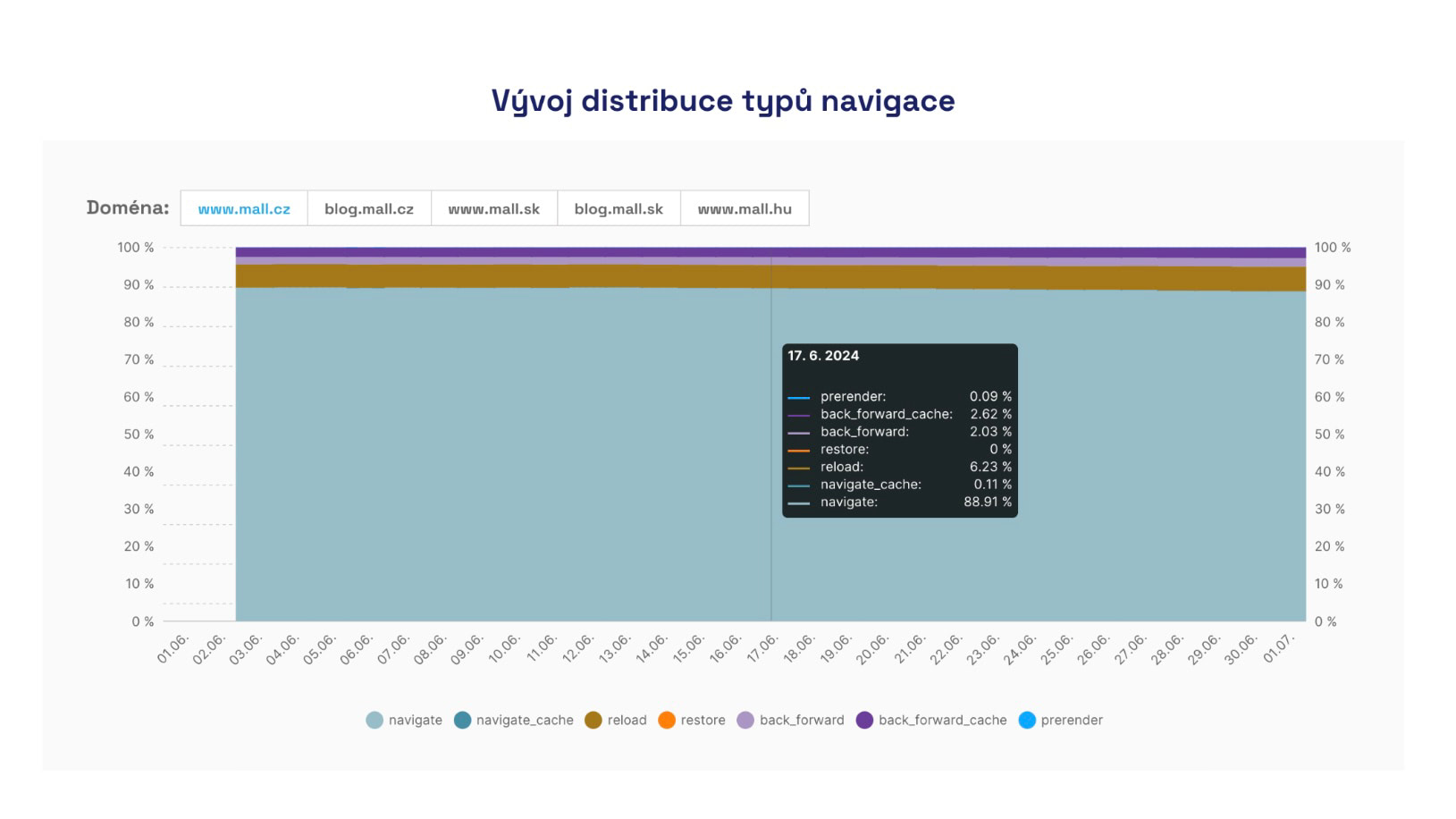 Development of various navigation types on Mall.cz. As you can see, fast navigation types occur in only a small percentage of page views.
We believe that this new report will encourage you to work on optimizing for instant page display. We will certainly write more about the topic of Navigation Types in our help section.
Automated Setup of New PLUS Monitoring with Ease
We have been working long-term to make setting up new monitoring as pleasant and seamless as possible, even though the first web speed testing takes some time.
We are pleased to announce that from version 4.4, you can set up PLUS monitoring almost as easily as free tests. Simply set up PLUS monitoring yourself now.
The price for PLUS tests is 5,148 CZK per year for one website. We now also offer a three-month money-back guarantee, so you can try out speed monitoring risk-free.
See our pricing for more details.
We have also prepared a loading screen that indicates the testing progress when setting up PLUS monitoring, as well as free tests:
User Data (CrUX) Always Takes Priority
Another change is the prioritization of Google user data (Chrome UX Report, CrUX) in the Page Report.
User data is usually available for our PLUS customers and is far more important for long-term monitoring than synthetic data.
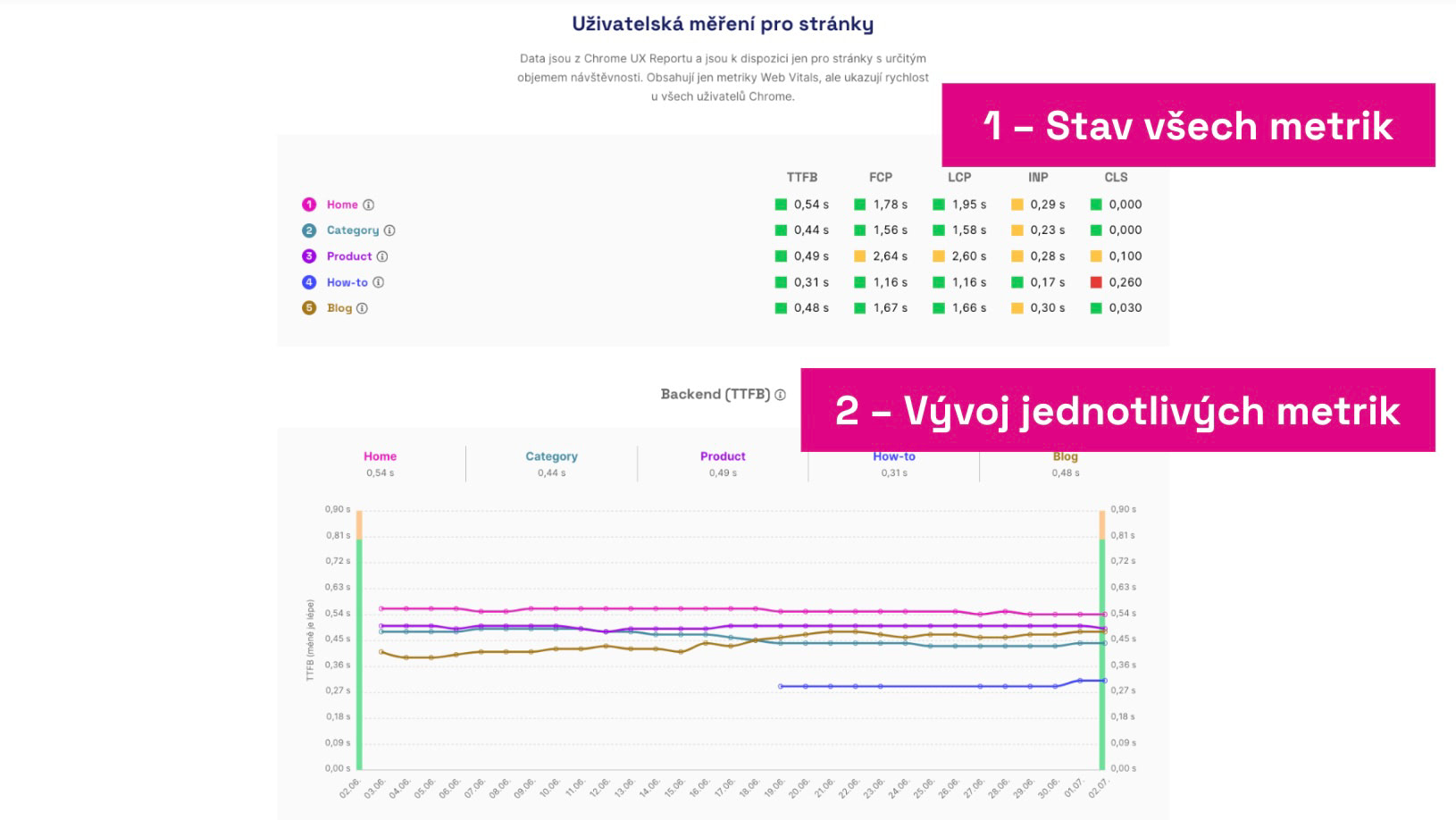 CrUX forward! You will now find this data at the top of the Page Report. Simply because they are important.
Free tests now do not include CrUX data for specific pages, as they are often used to test very small websites for which Google simply does not have data. We always recommend PLUS tests to the professionals.
Confused? Read about the difference between CrUX and synth data.
Changelog: All Changes in Version 4.4
Let's summarize what we deployed at the beginning of July on pagespeed.one.
Major Changes
- Navigation Types added to Domain Report.
- Automated setup of new PLUS test.
- Page Report: Change in the order of CrUX and synth data.
- Help: Basic Information for New Users.
- Help: Speed Watchdog.
- Help: Watchdog Alerts.
- Help: Technical Speed Data.
- Help: Test Run Details.
- Help: CrUX, synth, and RUM data.
- Help: TTFB Metric (server response).
- Our bot now comes from a single IP address, making it easier for you to filter out.
Minor Changes
- UI (User Interface): Aligned graph tooltip data into tables.
- UI: Info on various times in the test overview and in the run details.
- UI: Corrected premature URL truncation in tables.
- Graph UI: Better rendering of zero values.
- Email Invitation: Info for new users to sign in.
- Email Invitation: Onboarding info in texts.
- Bug: Fixed crash when filtering domains.
- Bug: Fixed an issue in the Opportunities report caused by Lighthouse 12.
- Bug: Fixed reactivation of inactive URLs that were part of a deleted test.
- Bug: Delay in note changes in graphs reflected in the bubble.
- Help: We moved almost all articles from the advisory blog to help.
Internal, Yet Important Adjustments
- We carried out a large deletion of older free test data. Tests not added to a team are now deleted after a month.
- We worked on the first demo of our next big product – custom advice.
- Addressed performance fluctuations in AWS, which occasionally affected some metrics.
- Switched to our own AWS and increased quotas for parallel test runs.
- Improved database query monitoring.
- Tidied up the code.
Thank you for your attention and for using our speed monitoring.
We welcome any feedback on the speed tester and, of course, bug reports. Contact us at info@pagespeed.cz or simply chat with us in the app.

Interested in these updates? Follow us on social media: X, LinkedIn, Facebook.