CLS Metric Optimization
Greetings to all fans of fast websites! In December 2023, I gave a talk at a Frontendists meetup about the CLS metric.
I mainly highlighted the common CLS issues found on our clients' websites and how we help eliminate them.
Let’s delve into how to avoid CLS issues and how to resolve them if they do arise.
Read on or simply watch the recording:
1. Aspect-ratio, Sizes, min-height
Every element on a page has a size. This can be an image, a video, an iframe, or any web component. When a page loads, the browser creates space for each element before displaying it. More details can be found in this article.
2. Font Size-Adjust
Use CSS descriptors like size-adjust and ascent-override to align the system font dimensions with the parameters of the web font you're using. Ensure the system font renders as closely as possible to your web font.
Preparing descriptors is straightforward. You can use this generator. Simply load your web font onto the page and use sliders to adjust the outlines so they proportionally match the system font.
For Google Fonts, specific settings are already prepared on this page. Here, you can also see how the final text will look.
 Here you see how the layout and positioning of individual paragraphs change after loading the web font.
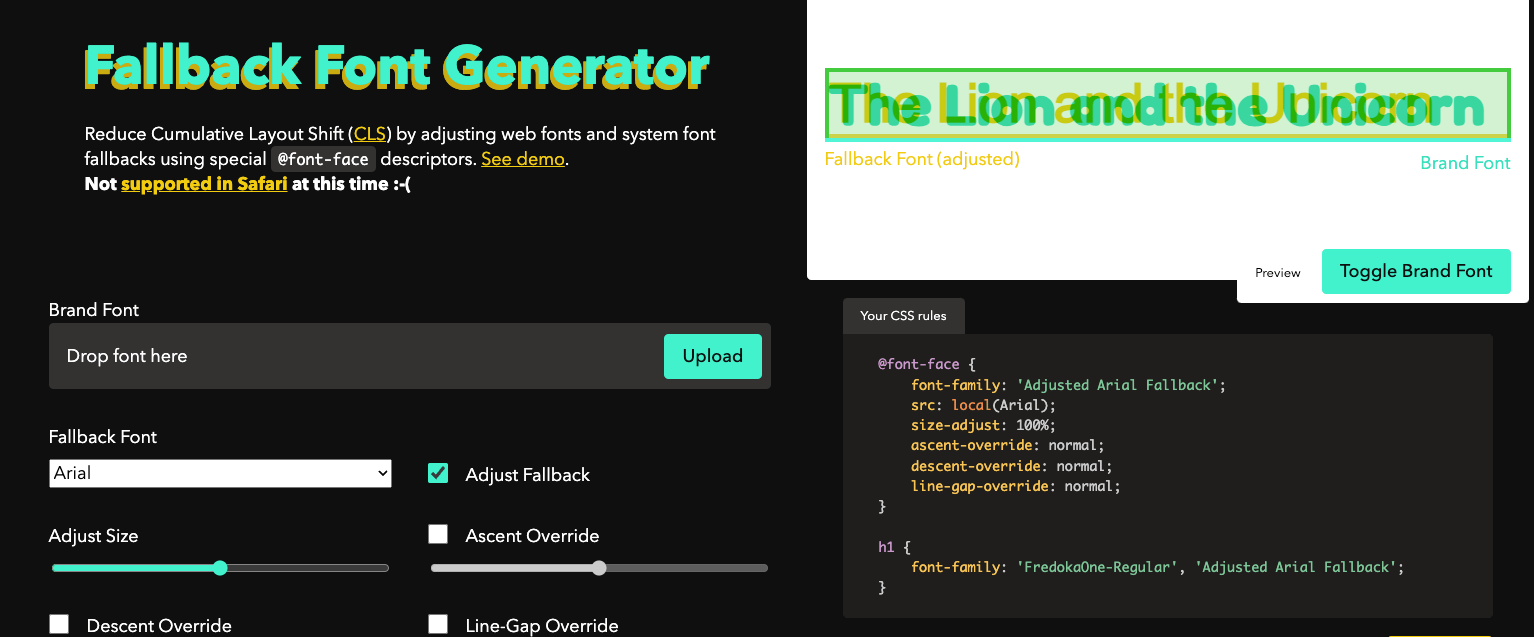 Sample tool for fine-tuning system font size screenspan.net/fallback.
3. Progressive Content Loading
When rendering a page, the browser scans the HTML content, gradually downloads individual source files, and then processes them. Websites often consist of smaller components like the header, main content, and footer. Sometimes the main content has a complex structure or contains a large amount of data.
If your website is built in a JavaScript framework (Vue.js, React, etc.), it might happen that the JavaScript responsible for rendering the main content takes longer to download than the JavaScript for rendering the website's header and footer.
If the footer is rendered first followed by the main content, it causes the footer to shift and an unwanted layout shift occurs.
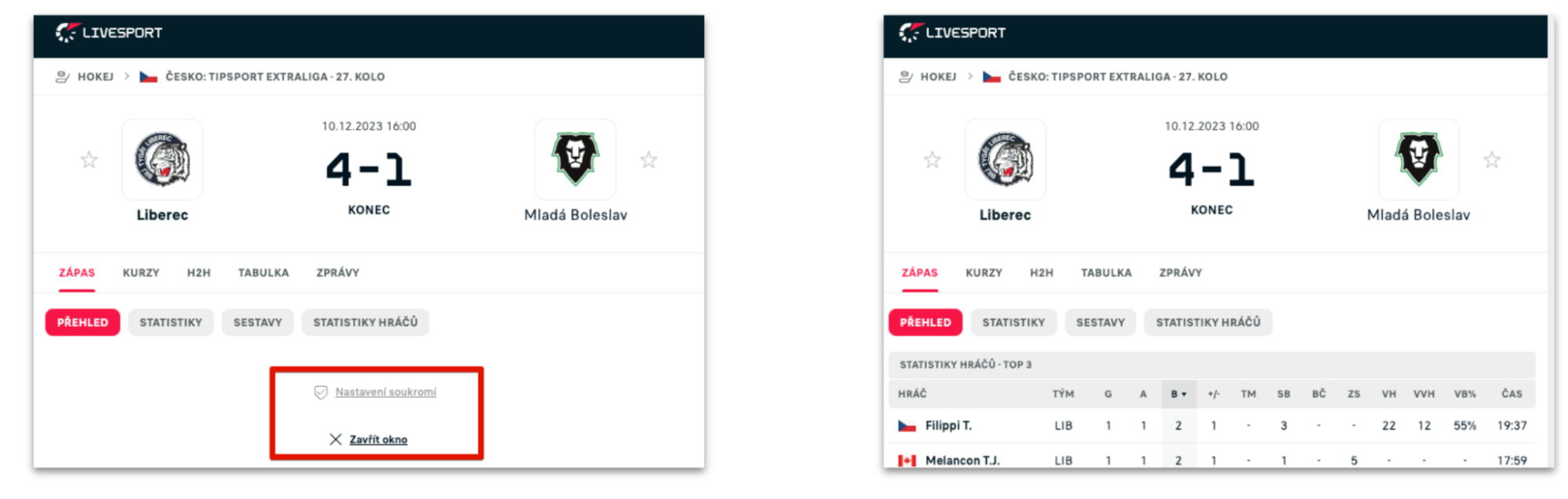 The main content was rendered late and pushed the footer down, causing a layout shift.
Solutions vary and depend on the type and usage of the application.
- This issue often affects Client-Side rendering applications. If possible, enable Server-Side rendering for as many elements on the website as possible.
- Another solution could be to load the footer only after the main content has loaded.
- If you don't have full control over the timing of JavaScript file processing, you can move the footer out of the viewport immediately when the page first renders. You can achieve this by setting the
<main>element's minimum height using the CSS propertymin-height: 100vh.
Tip: Our PageSpeed Monitoring can detect CLS metric issues and, using the Watchdog monitoring, notify you of changes in Teams, Slack, or via email.
4. Content (not only) in Modal Windows and AJAX
If you're using AJAX on your website to load data, ensure the data you display has a pre-prepared space on the page and does not shift content beneath it.
This applies to displaying product availability, product descriptions, technical data, prices, or other tables. Other elements that might cause issues include various ads and ad boxes, where you often don't know the future height of the content.
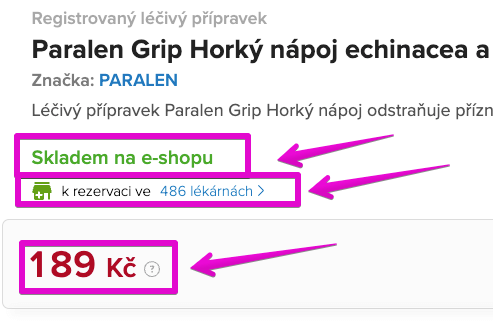
Information loaded later than the page's first rendering again shifts content and increases CLS.
The solution is to prepare appropriate placeholders in the locations where real content will be rendered later. If you don't know the future height of an element (e.g., an ad), prepare at least a placeholder with a minimum height to partially mitigate the impact on the CLS metric.
Mini Case Study: CLS Optimization on Datart's Homepage
Datart.cz, in collaboration with PageSpeed.ONE, managed to significantly improve unwanted layout shifts on their homepage. The issue was a carousel loaded via the external Bloomreach service, which loaded after the page's initial rendering, shifting the content beneath it.
The solution was relatively simple but not easy to implement on the existing setup. We reserved space for the carousel before it loaded. Thanks to this adjustment, the CLS value on the homepage dropped from 0.6 to 0.06, representing a tenfold improvement.
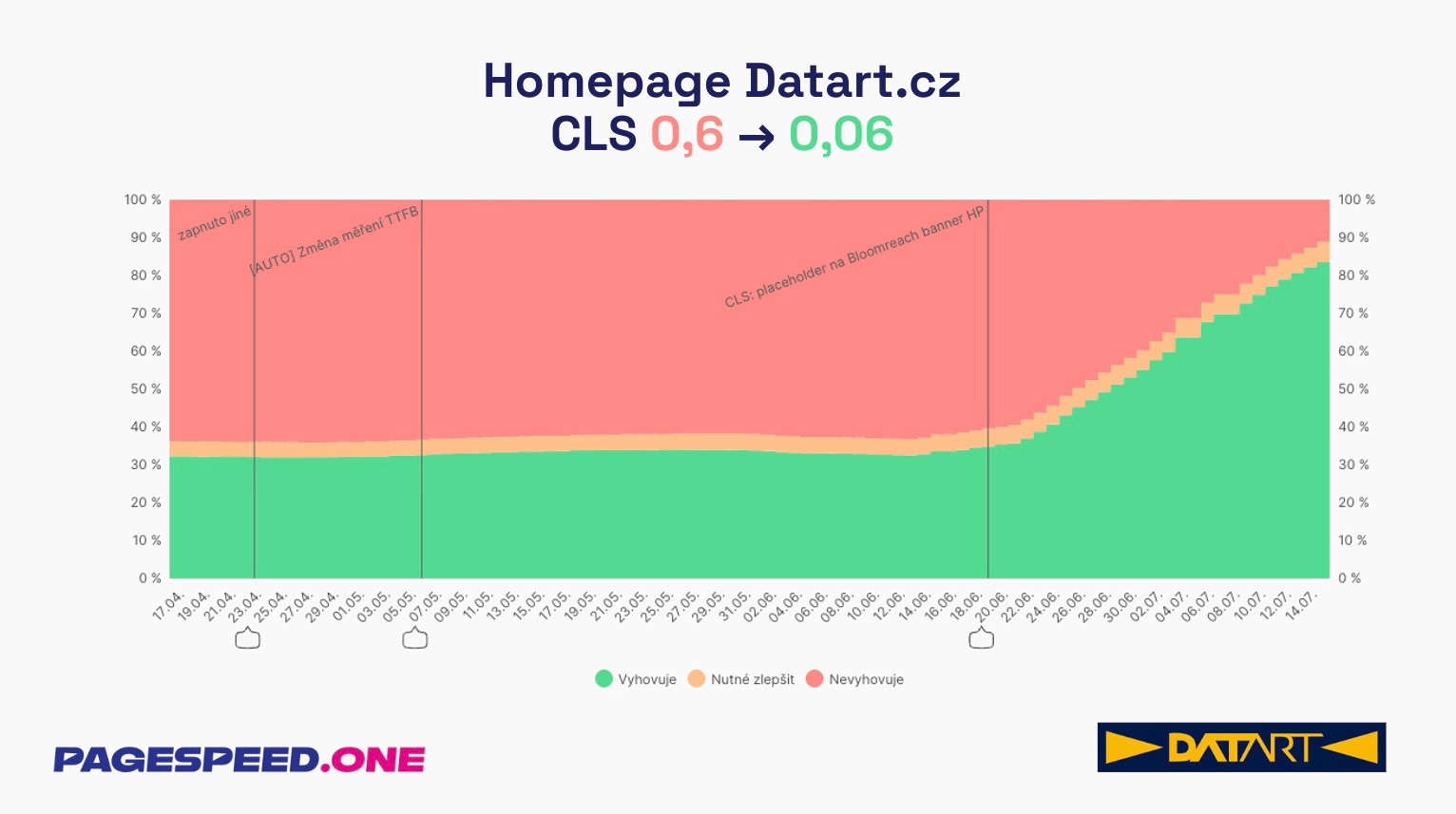 The graph shows the development of the CLS metric on Datart's homepage. The proportion of non-compliant measurements (red area) dropped from approximately two-thirds of page views to a minimum, while the proportion of compliant measurements (green area) increased to over 80%.
Tip: It's always better to use a placeholder that's smaller than the content than none at all.
5. CLS After User Interaction: Click, Hover, or Touch
We sometimes encounter developers who mistakenly believe that the CLS metric is only measured during the first rendering in the first viewport. That's a mistake. The CLS metric is calculated throughout the entire time spent on the page.
If you click a button that opens a box and shifts content beneath it, this can again worsen the CLS metric.
If you change content on the page after some user interaction (click, touch, hover), the entire action from the click to the complete rendering of the content needs to be completed within 500 ms.
You can imagine, for example, AJAX pagination on a product category listing.
- The user reaches the end of the page.
- Clicks the "Load more products" button.
- A database query is called in the background to load products.
- A new piece of HTML code is inserted into the page.
If these 4 steps take longer than 500 ms in total, it can lead to an unwanted layout shift, pushing the footer down, for example.
Sometimes it's not easy to load data quickly enough, especially on slower mobile connections. The cause can be the database server's response time, an unoptimized database query, a third-party server's response time, and so on.
If you can't process the request quickly enough, you need to prepare at least an empty space (placeholder) for the incoming data immediately after clicking the button. This will immediately move the footer out of the viewport after user interaction, and the new data will display once it arrives from the server.
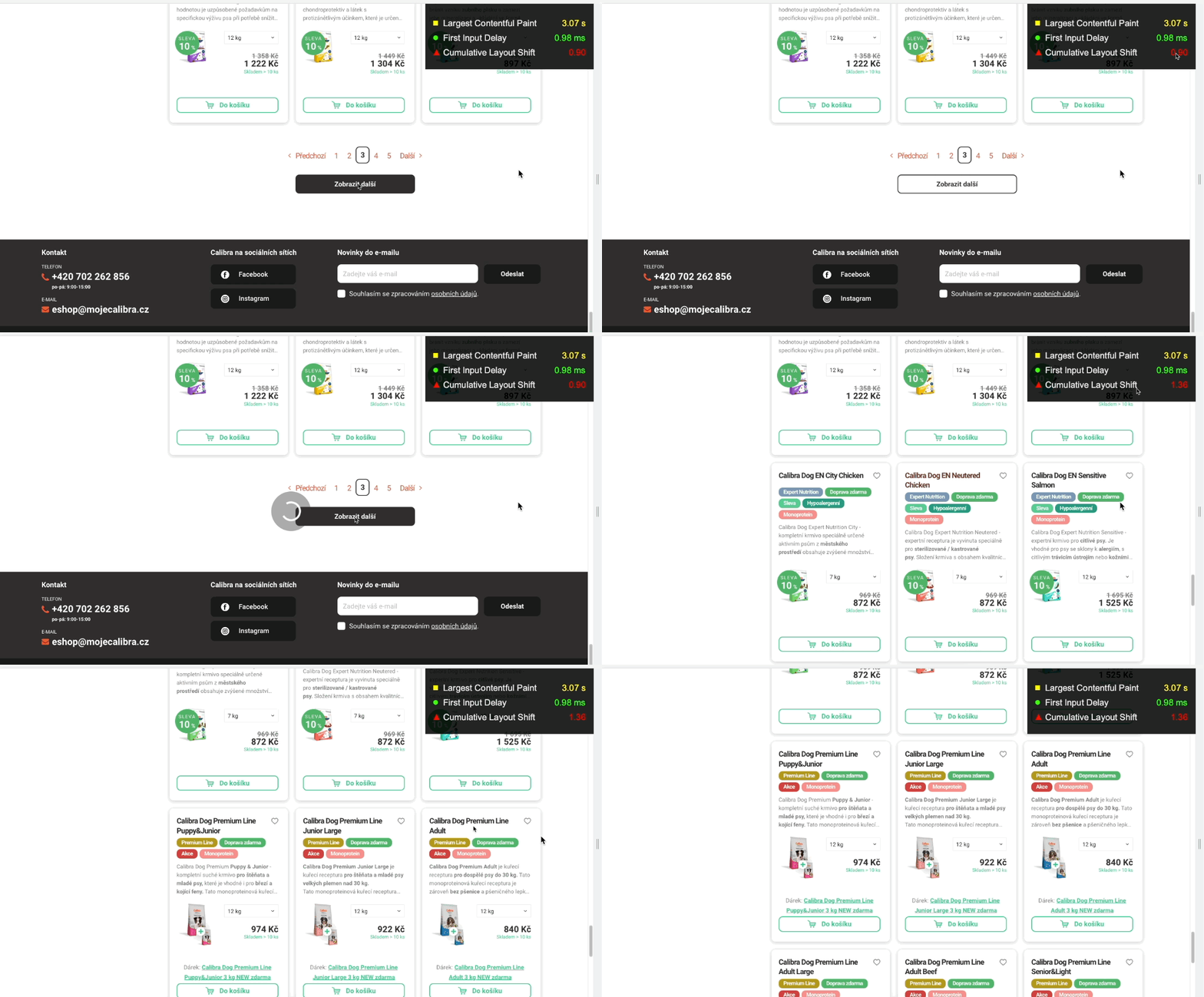 Slow database response causes a layout shift and worsens the CLS metric after user interaction.
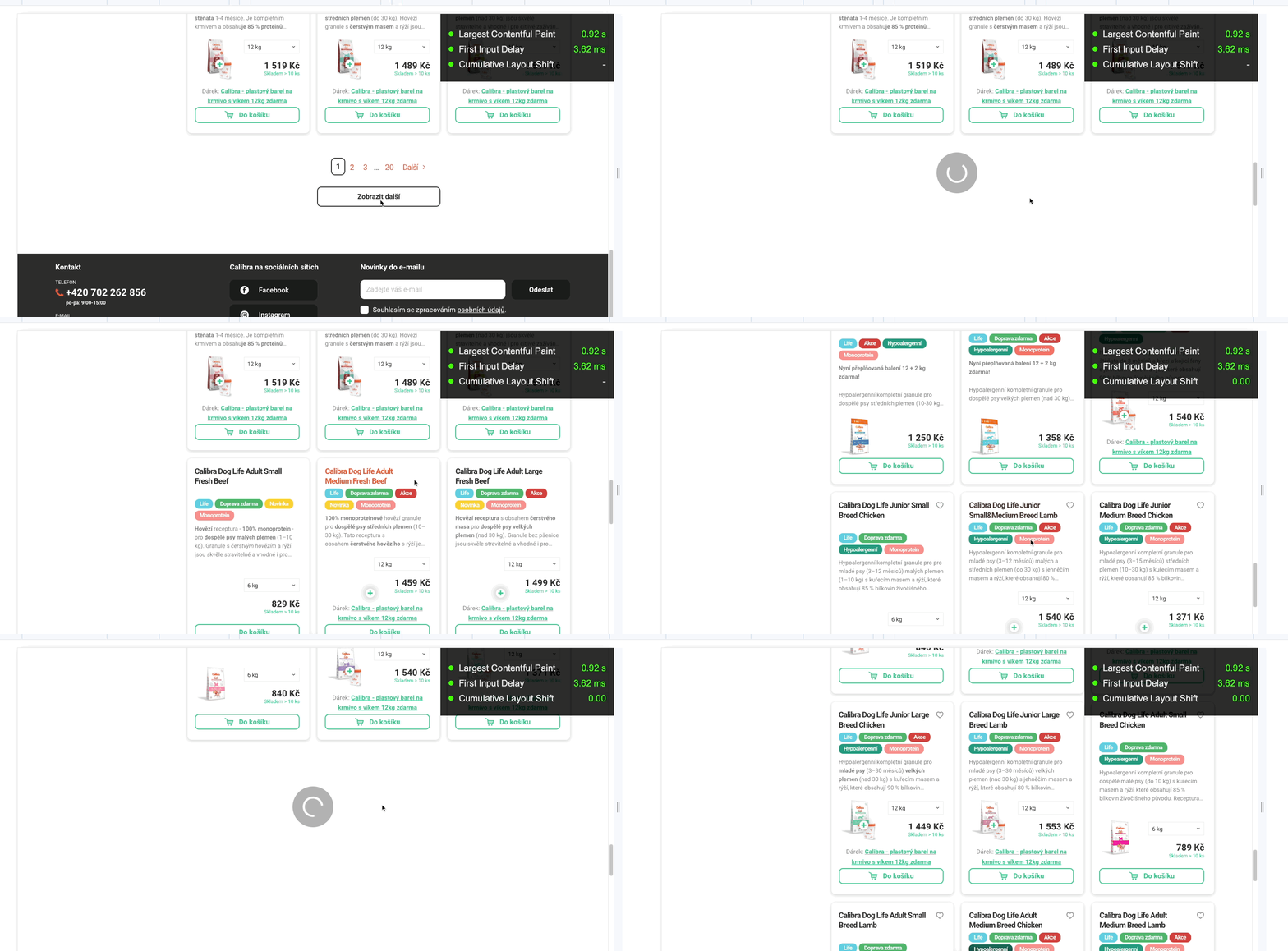 Adding a placeholder immediately after clicking a button prevents a layout shift.
6. Animations Only via CSS Transform
Prepare animations of backgrounds, displaying and moving boxes, bouncing elements, resizing, etc., using CSS transform. This avoids worsening the CLS metric.
If it's an element in the layout, such as in the menu or on the side of the page, poor CLS can affect the entire domain's evaluation.
- The CSS transform property allows you to animate elements without causing layout shifts.
- To move elements, avoid changing the
top, right, bottom, orleftproperties and usetransform()instead. - Instead of changing height and width properties, use
transform().
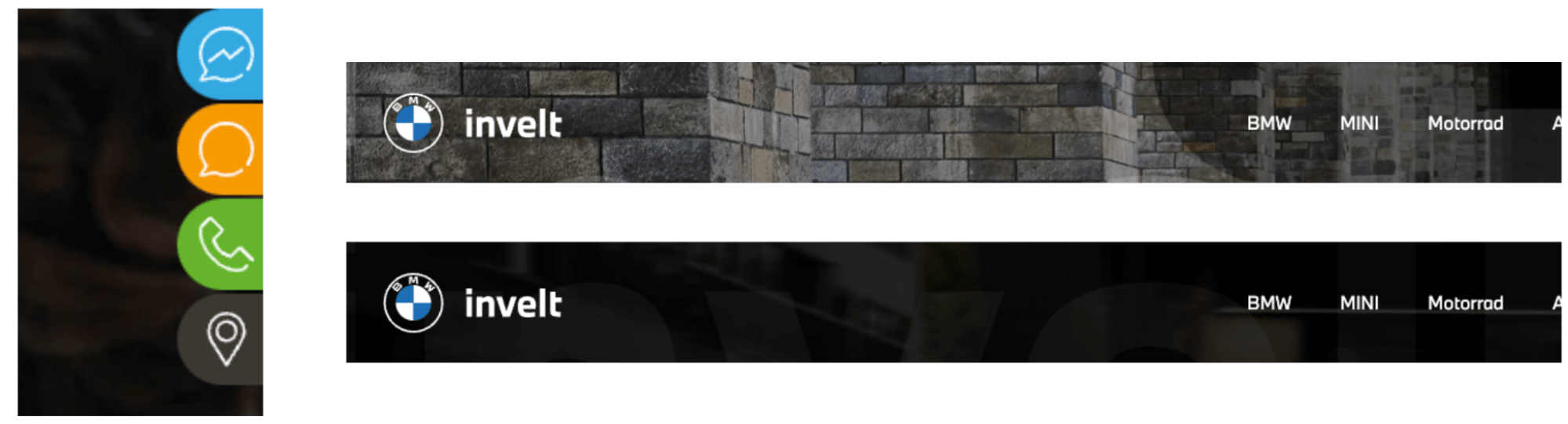 Poorly designed buttons moving from right to left or animations of a dark background overlay in the header can significantly worsen the CLS metric.
Final Tip
If during testing your website, the CLS metric shows a value of 1.00 or more, it means the entire page area shifts.
Try a hack and set the <html> tag with the rule overflow-y:scroll with a height of 100%.
Sometimes such a high CLS value can be caused by the scrollbar appearing during page rendering. This will display the scrollbar always.
html {
	height: 100%;
	overflow-y: scroll;
}
We cover the topic of Core Web Vitals metrics optimization in full breadth, read our other texts: