Cloudflare: Your Secret Weapon for a Faster and More Stable Web (Article with Checklist)
Imagine if your website could be faster, more secure, and more stable practically overnight. And better yet, imagine it’s all thanks to a tireless assistant who never sleeps and never takes a vacation.
Cloudflare is precisely that tool. And the best part? The basic version is free.
Want to deploy Cloudflare on your website? Check out our Cloudflare setup service.
What is Cloudflare? The Smart Assistant Between Your Website and Visitors
Cloudflare acts as an intermediary between your website and its visitors. Unlike a typical CDN (Content Delivery Network), it’s more than just a system for distributing images and files.
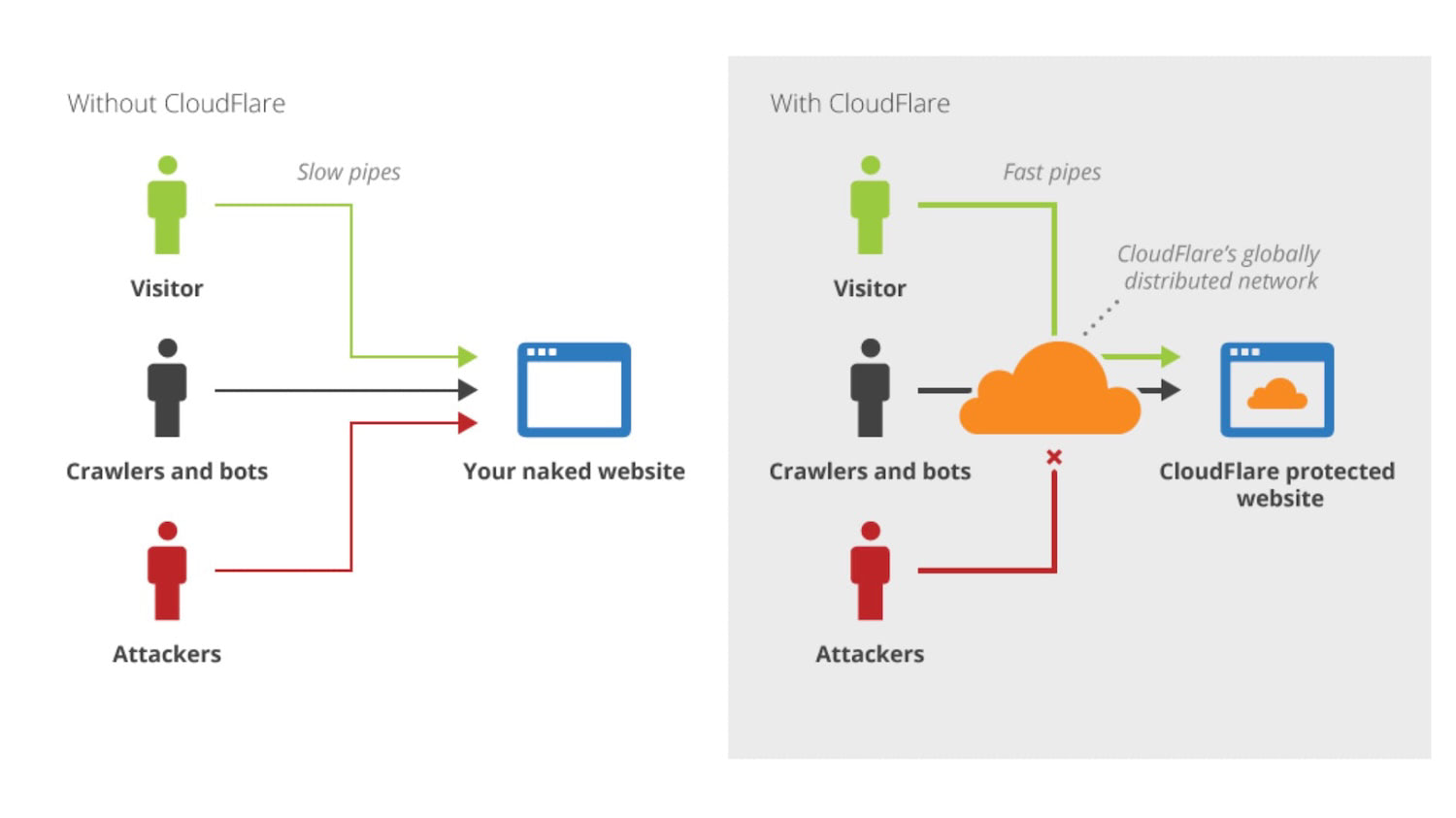 Cloudflare is the intermediary between your website, visitors, bots... and also attackers.
In practice, it works quite simply. Visitors, unbeknownst to them, first connect to Cloudflare servers, which then facilitate communication with your actual server, making several optimizations along the way.
This allows Cloudflare to optimize data transfer, protect your site, and ensure stability even during high traffic periods.
Cloudflare is essentially an intelligent filter and accelerator for your website, all in one.
Why We Recommend Cloudflare for Every Website
Based on PageSpeed.ONE’s experience with dozens of clients, we recommend implementing Cloudflare for nearly all websites. It’s one of the easiest optimizations you can make.
The reasons are straightforward:
- Improved website speed, especially for distant visitors.
- Protection against DDoS attacks (massive server overload with requests) and other threats.
- Higher website availability even during hosting outages.
- Reduced server load, which can save on hosting costs.
From our measurements, we know that websites using Cloudflare achieve better results in Core Web Vitals (Google's speed metrics).
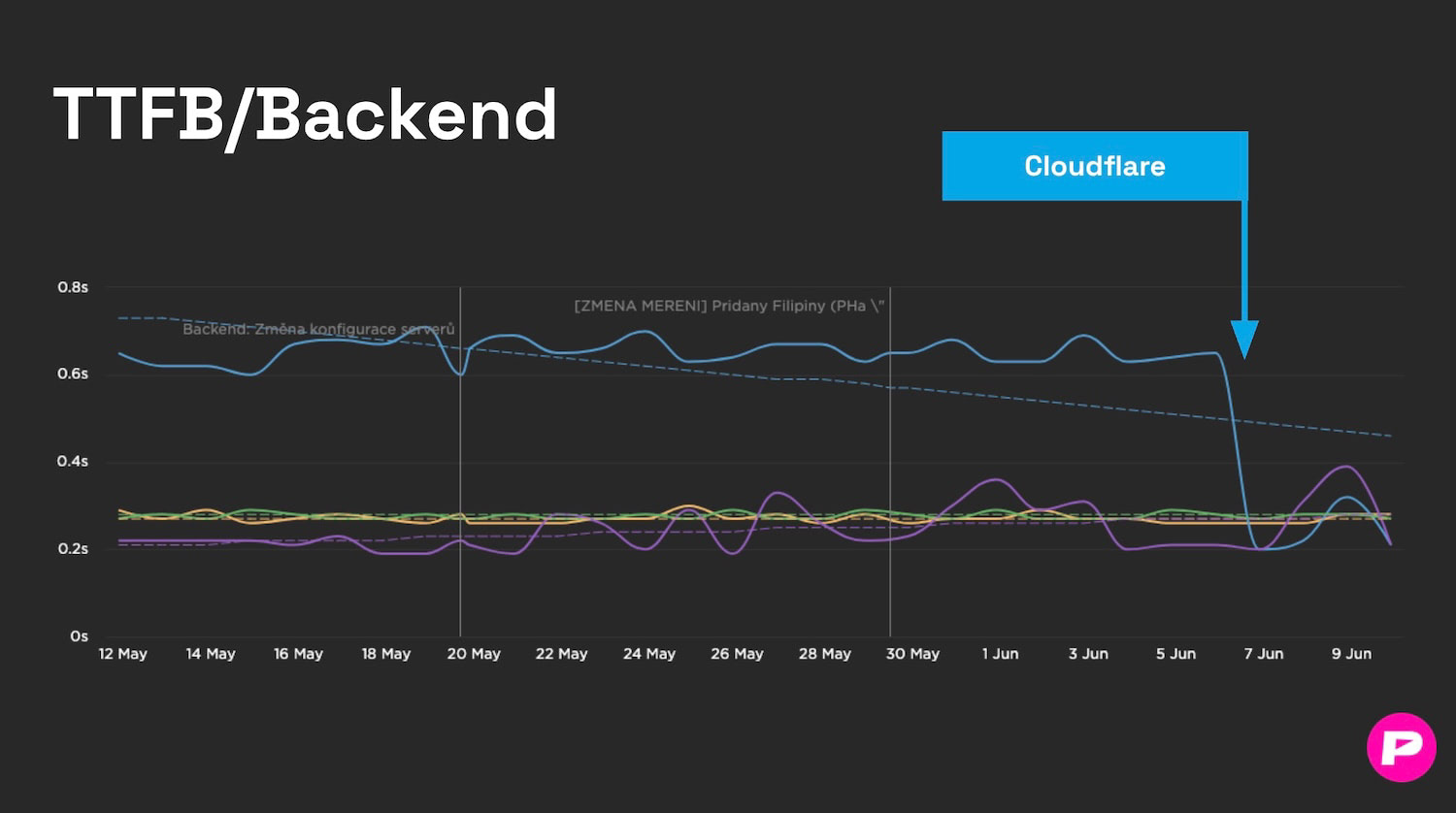 After PageSpeed.ONE deployed Cloudflare, a client's server response (TTFB) improved more than threefold.
How Cloudflare Helps with Speed
Cloudflare has servers all over the world, so your content is always nearby. This service offers several features to significantly speed things up:
-
Global network of servers means your website's content is closer to users. Instead of loading from your server's location, files load for Germans from Germany and for Americans from the USA. It's 21st-century logistics instead of carrier pigeons.
-
Automatic image optimization ensures the right compression and format for every device. Mobile devices receive smaller images than desktops. This is managed by Polish. (More on image optimization.)
-
Efficient caching means static content like CSS, JavaScript, and images are stored on Cloudflare's fast servers.
-
Caching dynamic content allows speeding up even dynamic pages generated for each visitor. You can set product pages to cache for 2 hours, articles for a week, but never the cart or customer account.
-
With Brotli compression, Cloudflare uses level 4, which provides an optimal balance between file size and compression speed. (More on Brotli and Gzip.)
-
HTTP/3 support activates the newest and fastest version of the HTTP protocol automatically.
-
Activating Early Hints according to Cloudflare data improves First Contentful Paint (FCP – initial content rendering) by over 20% and Largest Contentful Paint (LCP – main content rendering) by nearly 16%.
TIP: A faster website brings more conversions and better positions in Google, as well as many other benefits.
Security and Cloudflare: Your Website Under Protection
Cloudflare protects your website 24 hours a day without requiring manual oversight from you. It provides robust security features:
-
Protection against DDoS attacks automatically blocks malicious traffic before it reaches your server.
-
Web Application Firewall (WAF – firewall for web applications) protects against common threats like SQL injection (inserting malicious code into a database) or XSS attacks (cross-site scripting). WAF operates like a seasoned doorman at a luxury hotel—throwing out the troublemakers and letting the decent guests in.
-
Blocking bots – Bot Management identifies and blocks malicious bots that could steal content or slow down the website, including AI bots.
-
SSL/TLS encryption ensures secure HTTPS connections for all visitors automatically.
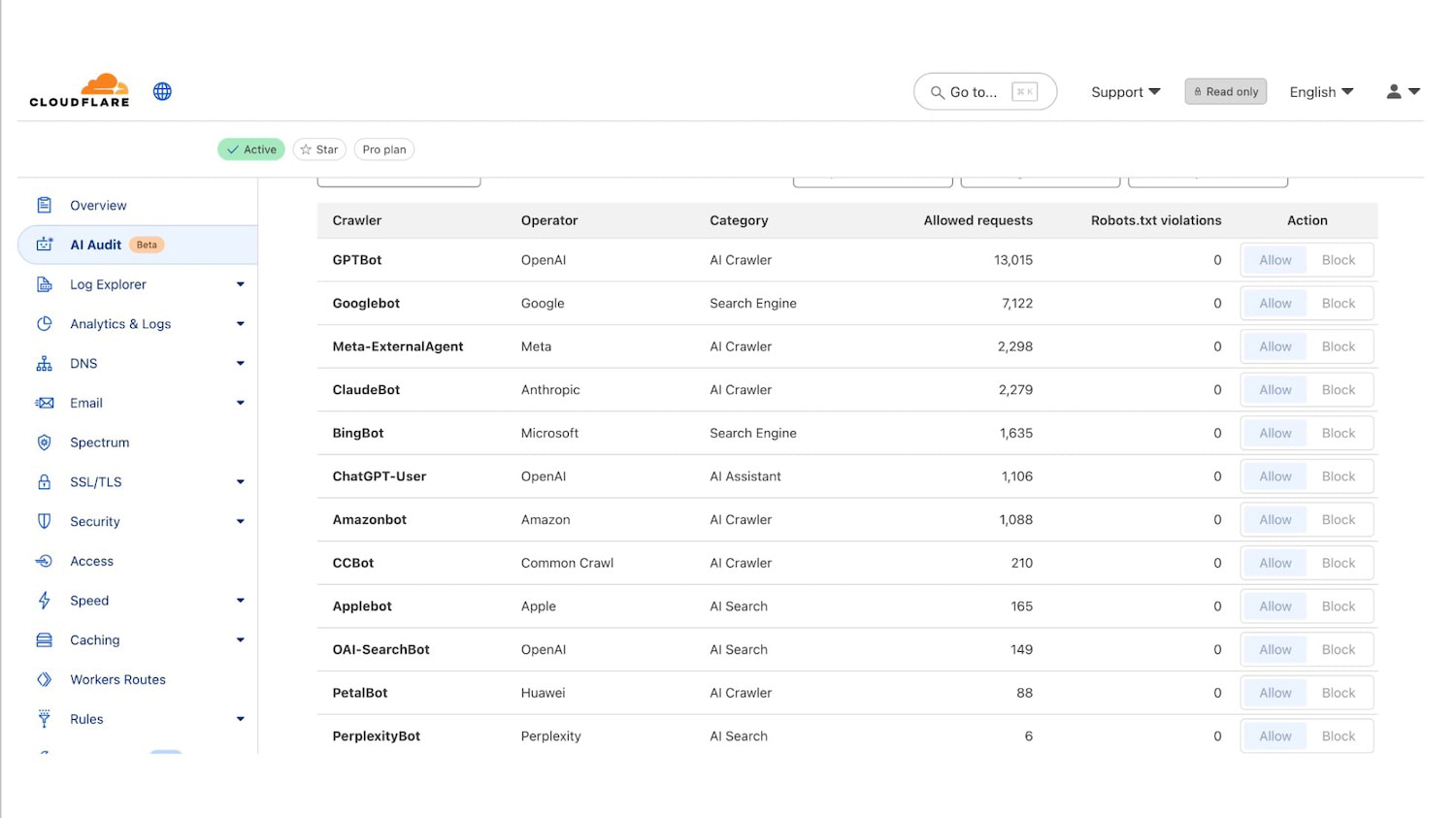 Access statistics of AI bots from the Cloudflare dashboard show how much interest AI chatbots have in your content.
How Cloudflare Helps with Stability: A Website That Never Goes Down
Even if your hosting fails, the website can continue to operate. Cloudflare helps keep the site functional under challenging conditions:
-
Always Online™ displays a cached version of your site even when your server is unavailable.
-
Load Balancing distributes traffic across multiple servers to ensure stability.
-
Argo Smart Routing intelligently directs traffic through the fastest routes across the internet.
-
Stale-While-Revalidate displays an older version immediately while fetching a new one in the background. Visitors get a lightning-fast site from the cache, even if it technically expired.
It’s like having a backup generator that kicks in automatically during a power outage—your site just keeps running, even when your hosting has a meltdown.
In practice from PageSpeed.ONE: for e-commerce sites, we’ve observed that Cloudflare can mitigate the impacts of peak loads. For instance, during Black Friday or marketing campaigns, the site won’t crash.
A stable website means satisfied customers and no lost orders. For that, you need a service like Cloudflare and ideally also monitoring for availability and site speed.
What Does Cloudflare Cost?
You can start for free and only pay when needed.
Cloudflare offers several pricing plans:
- Free Plan – basic features for free, suitable for personal sites and blogs.
- Pro Plan ($20/month) – more advanced features for small to medium websites. We at PageSpeed.ONE recommend this as a baseline if your sites are your livelihood.
- Business Plan ($200/month) – comprehensive solutions for high-traffic corporate websites.
- Enterprise Plan – customized solutions for large projects with a dedicated account manager.
From our experience, the free version often isn’t enough for e-commerce due to the limited number of Page Rules (rules for different parts of the site), but there are more reasons to opt for the Pro Plan. Check out the feature and pricing comparison.
How to Get Started with Cloudflare? Quick Deployment Guide and Basic Setup Checklist
Deploying Cloudflare can be done in 30 minutes, even if you’re not a techie. However, more detailed setups require knowledge and experience. The basic deployment is relatively straightforward:
- Sign up at Cloudflare.com.
- Add your domain and let Cloudflare scan your DNS records.
- Change the nameservers with your domain registrar to Cloudflare’s nameservers.
- Set the security level and caching according to your needs.
Deployment is simple, but proper setup is key to success. The basic setup is as follows:
- Verify that all DNS records are imported correctly.
- Set SSL/TLS to “Full”.
- Enable “Always Use HTTPS” and 0-RTT.
- Activate HTTP/3.
- Keep Brotli enabled. Turn on Early Hints (HTTP 103).
- Cache Rule – DYNAMICS/ADMIN → Bypass cache (non-GET/HEAD, /wp-admin, login, previews). Cache Rule – STATIC FILES (e.g.,
.css, .js, .jpg, .woff2) → Eligible for cache, Edge Cache TTL: 1 year (ideal for fingerprinted files). - Optionally: Cache Rule – PUBLIC HTML (e.g.,
/blog/) - Enable Tiered Cache (Smart).
- WAF – Bot Fight Mode as needed; enable Browser Integrity Check.
- Optionally (Pro+): Polish/WebP and Image Resizing for image optimization.
- Test the site on main pages (including login/checkout), check CF-Cache-Status and Security → Events.
- Measure site speed with PageSpeed.ONE and set up regular monitoring PLUS to see changes.
Tip: Changes propagate gradually (up to 48 hours), so don’t panic if you don’t see dramatic improvements immediately.
The Cloudflare dashboard shows you basic traffic data with important recommendations.
How Can PageSpeed.ONE Help You with Cloudflare?
Over the years with Cloudflare, we’ve gathered a wealth of valuable insights. Based on work with dozens of websites, we can confirm it’s one of the most effective “quick win” optimizations.
Here are some of our key findings:
-
For international websites, we’ve seen up to double the speed improvement in foreign locations. For one of our clients with content sites: loading in Australia sped up from 2.5s to 1.4s.
-
For larger WordPress sites, Cloudflare is almost a necessity, and many plugins can work directly with Cloudflare. (More on WordPress speed optimization.)
-
Beware of e-commerce sites and other sites with dynamic or personalized content—caching must be carefully configured to prevent outdated prices or logging in as the wrong user.
We use Cloudflare on our own sites and regularly recommend it as part of our speed audits and other services.
Of course, we can help you deploy and properly configure Cloudflare. On the site speed monitoring, you’ll soon see that it pays off.